
1. Úvod
This manual provides essential instructions for the safe and efficient operation, setup, and maintenance of your Ohaus ES50R ES Industrial Bench Scale. The Ohaus ES50R is designed for industrial weighing applications, offering a capacity of 50 kg (110 lb) with a readability of 20 g (0.05 lb). Please read this manual thoroughly before using the scale to ensure proper functionality and to prevent damage.
2. Bezpečnostné informácie
Vždy dodržiavajte nasledujúce bezpečnostné opatrenia:
- Nepreťažujte váhu nad jej maximálnu nosnosť 50 kg (110 lb).
- Ensure the scale is placed on a stable, level surface to achieve accurate readings.
- Operate the scale only with the specified 120 V power supply.
- Nevystavujte váhu extrémnym teplotám, vlhkosti alebo priamemu slnečnému žiareniu.
- Váhu neponárajte do vody ani iných tekutín.
- Udržujte váhu čistú a bez prachu a nečistôt.
- Opravy alebo údržbu nad rámec bežného čistenia by mal vykonávať iba kvalifikovaný personál.
3. Obsah balenia
Po vybalení skontrolujte, či sú všetky komponenty prítomné:
- Ohaus ES50R ES Industrial Bench Scale unit
- Power Adapter (for 120 V operation)
- Používateľská príručka (tento dokument)
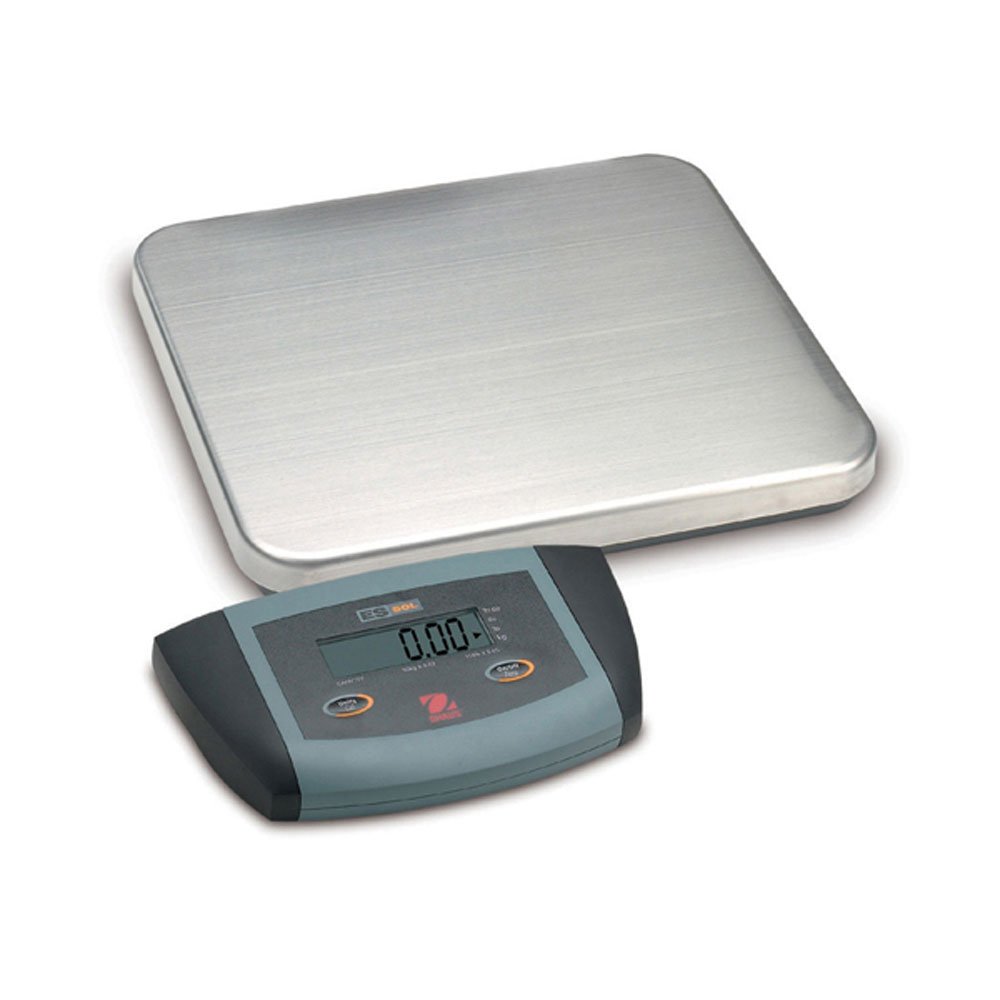
Obrázok 1: Ohaus ES50R ES Industrial Bench Scale. This image shows the complete bench scale unit, including the weighing platform and the display unit.
4. Nastavenie
- Rozbalenie: Opatrne vyberte všetky komponenty z obalu. Obal si uschovajte pre prípad neskoršej prepravy alebo skladovania.
- umiestnenie: Place the scale on a firm, level, and stable surface, free from vibrations, drafts, and rapid temperature changes. Ensure adequate space around the scale for safe operation.
- Napájanie: Connect the power adapter to the scale's power input port. Plug the adapter into a standard 120 V AC power outlet.
- Počiatočné zapnutie: Stlačte tlačidlo ON/OFF button to power on the scale. The display will perform a self-test and then show "0.00" or "0.0".
- vyrovnávanie: If your scale includes adjustable feet, rotate them until the bubble in the spirit level (if present) is centered.
5. Návod na obsluhu
5.1 Základné váženie
- Ensure the scale is powered on and the display shows "0.00" or "0.0".
- Place the item to be weighed gently in the center of the weighing platform.
- Wait for the display to stabilize. The stable weight reading will be shown on the large LCD display.
- Remove the item from the platform. The display should return to zero.
5.2 Funkcia Tara
The tare function allows you to subtract the weight of a container, so only the net weight of the contents is displayed.
- Na vážiacu plošinu umiestnite prázdnu nádobu.
- Stlačte tlačidlo TARA button. The display will reset to "0.00" or "0.0", indicating the container's weight has been tared.
- Add the material to be weighed into the container. The display will show the net weight of the material.
- To clear the tare, remove the container from the platform and press the TARA znova tlačidlo.
5.3 Špeciálne funkcie
- Automatické vypnutie: The scale is equipped with an auto shut-off feature to conserve power. If no activity is detected for a set period, the scale will automatically turn off.
- Veľký displej: The LCD display provides clear and easy-to-read weight indications.
- Manuálne vypnutie: Ak chcete váhu manuálne vypnúť, stlačte a podržte tlačidlo ON/OFF kým sa displej nevypne.
6. Údržba
6.1 Čistenie
To maintain accuracy and prolong the life of your scale:
- Disconnect the scale from the power supply before cleaning.
- Utrite povrchy váhy čistiacim prostriedkomamp handričkou a jemným čistiacim prostriedkom.
- Nepoužívajte abrazívne čistiace prostriedky, rozpúšťadlá ani agresívne chemikálie.
- Ensure no liquid enters the scale's internal components.
- Dry the scale thoroughly after cleaning.
6.2 Kalibrácia
Regular calibration ensures the accuracy of your scale. Refer to the full technical manual or contact Ohaus customer support for detailed calibration procedures. Calibration typically requires certified weights.
7. Riešenie problémov
| Problém | Možná príčina | Riešenie |
|---|---|---|
| Váha sa nezapne. | No power supply; faulty power adapter. | Check power connection and outlet. Ensure power adapter is functioning correctly. |
| Nepresné údaje. | Scale not level; unstable surface; overload; calibration required. | Ensure scale is level and on a stable surface. Do not exceed capacity. Perform calibration if necessary. |
| Display shows "Err" or error code. | Overload; internal malfunction. | Remove weight from platform. If error persists, power cycle the scale. If still present, contact customer support. |
| Auto shut-off too soon/not at all. | Auto shut-off settings. | Refer to the full technical manual for adjusting auto shut-off settings, if available. |
8. Špecifikácie
| Funkcia | Detail |
|---|---|
| Model | ES50R |
| Značka | Ohaus |
| Kapacita | 50 kg / 110 lb |
| Čitateľnosť | 20 g / 0.05 lb |
| Typ zobrazenia | LCD (Large Display) |
| Špeciálne funkcie | Auto Shut Off, Manual Shutdown |
| Form Factor | Lavičková váha |
| Napájanie | 120 V AC (via adapter) |
| Rozmery produktu | 15 x 13 x 5.5 palca |
| Hmotnosť položky | 9.64 libry |
| Výrobca | COLE-PARMER |
9. Záruka
The Ohaus ES50R ES Industrial Bench Scale comes with a 1-ročná záruka from the date of purchase. This warranty covers defects in materials and workmanship under normal use. It does not cover damage resulting from misuse, accident, unauthorized modification, or operation outside the specified environmental and electrical limits. For warranty claims, please retain your proof of purchase and contact Ohaus customer support.
10. Zákaznícka podpora
For technical assistance, service, or to inquire about replacement parts, please contact Ohaus customer support. Visit the official Ohaus webstránku, kde nájdete najaktuálnejšie kontaktné informácie a ďalšie zdroje.
Poznámka: Always provide your product model number (ES50R) and serial number (if applicable) when contacting support.