
1. Úvod
Ďakujem za nákupasing the Karcher KA 350 Compact Stereo System. This versatile audio system combines modern design with a wide range of playback options, including a 3-disc CD changer, dual cassette deck, turntable, USB port, SD card reader, and an integrated radio. This manual provides essential information for safe operation, setup, and maintenance of your device. Please read it thoroughly before use and retain it for future reference.
2. Dôležité bezpečnostné pokyny
- Zdroj napájania: Zabezpečte napájanie objtage zodpovedá štítku s výkonom na jednotke.
- Vetranie: Neblokujte žiadne vetracie otvory. Okolo jednotky nechajte dostatočný priestor pre správne prúdenie vzduchu.
- Voda a vlhkosť: Nevystavujte zariadenie dažďu, vlhkosti, kvapkajúcej ani striekajúcej vode. Na zariadenie neklaďte predmety naplnené tekutinami, ako napríklad vázy.
- Teplo: Uchovávajte jednotku mimo dosahu zdrojov tepla, ako sú radiátory, ohrievače, sporáky alebo iné zariadenia (vrátane amplifikátory), ktoré produkujú teplo.
- Čistenie: Pred čistením odpojte zariadenie zo zásuvky. Používajte iba mäkkú, suchú handričku.
- servis: Nepokúšajte sa opravovať tento výrobok sami. Všetky opravy zverte kvalifikovanému servisnému personálu.
- deti: Uchovávajte zariadenie a jeho príslušenstvo mimo dosahu detí.
- Laserová bezpečnosť: This product uses a laser. Use of controls or adjustments or performance of procedures other than those specified herein may result in hazardous radiation exposure.
3. Obsah balenia
Prosím, skontrolujte, či sú všetky položky prítomné a v dobrom stave:
- Karcher KA 350 Compact Stereo System (Main Unit)
- Diaľkové ovládanie
- Návod na použitie
- Stereo reproduktory (2 jednotky)
- Napájací kábel
- FM Antenna (wire type)
4. Produkt skončilview
4.1 Ovládacie prvky na prednom paneli
The front panel provides access to all primary functions and controls for the KA 350 system.

Obrázok 4.1: Ovládacie prvky na prednom paneli
- Tlačidlo ZAP./POHOTOVOSTNÝ REŽIM: Zapína alebo vypína jednotku.
- Tlačidlo FUNKCIE: Selects between CD, Tuner (Radio), Phono (Turntable), Tape (Cassette), and USB/SD modes.
- Gombík VOLUME: Upravuje hlavnú úroveň hlasitosti.
- Ovládanie CD: Play/Pause, Stop, Skip/Search (Forward/Backward), Open/Close CD tray.
- Ovládacie prvky kazetového prehrávača: Play, Record, Fast Forward, Rewind, Stop/Eject for Deck 1 and Deck 2.
- USB/SD Controls: Play/Pause, Stop, Skip/Search (Forward/Backward).
- Ovládanie tuneru: Band selection (AM/FM), Tuning Up/Down, Memory presets.
- Displej: Shows current mode, track information, radio frequency, and time.
4.2 Pripojenia zadného panela
The rear panel houses all necessary input and output connections for the system.
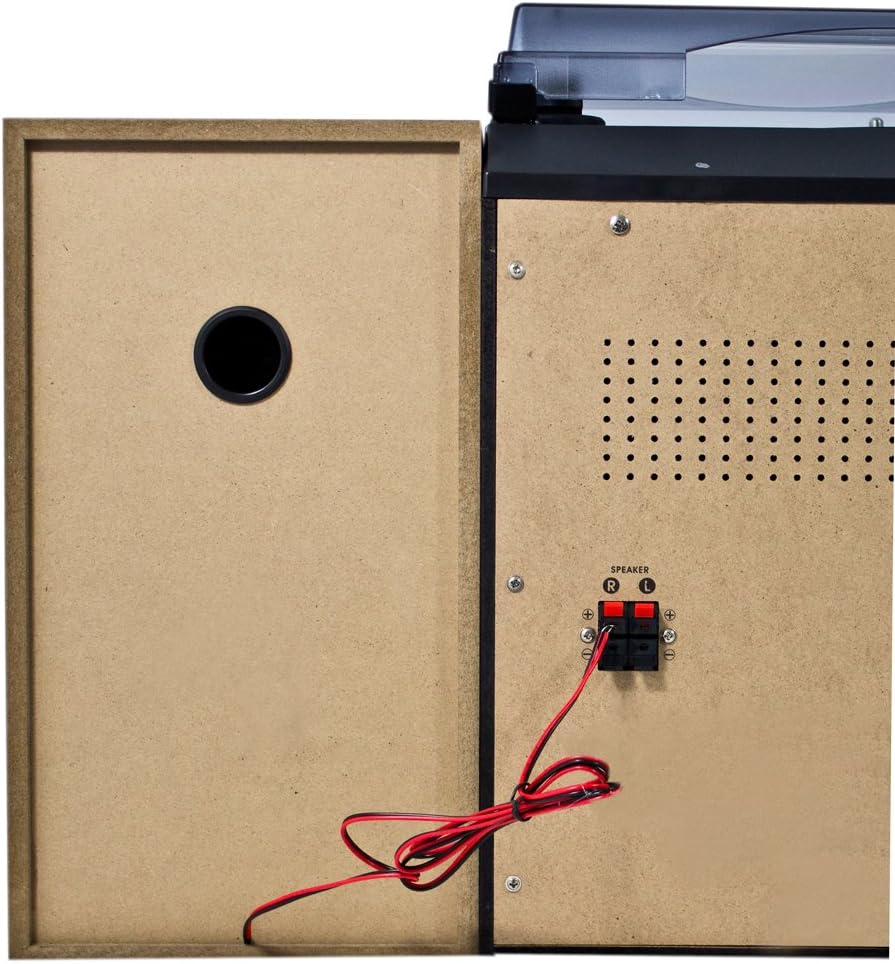
Obrázok 4.2: Pripojenia na zadnom paneli
- Speaker Terminals (R/L): Connect the included stereo speakers. Ensure correct polarity (+ to + and - to -).
- Vstup striedavého prúdu: Sem pripojte napájací kábel.
- Konektor FM antény: Connect the supplied FM wire antenna for radio reception.
4.3 Hlavné komponenty

Figure 4.3: Karcher KA 350 Main Components
- Gramofón: Located on top, for playing vinyl records.
- 3-Disc CD Changer: Front-loading tray for multiple CDs.
- Dual Cassette Deck: Dva priestory na kazety na prehrávanie a nahrávanie.
- USB port: Na pripojenie USB flash diskov.
- Slot na SD kartu: Na vkladanie pamäťových kariet SD.
- Stereo reproduktory: Two external speakers for audio output.
5. Nastavenie
5.1 Vybalenie a umiestnenie
- Opatrne vyberte všetky komponenty z obalu.
- Hlavnú jednotku umiestnite na stabilný, rovný povrch.
- Reproduktory umiestnite na obe strany hlavnej jednotky a uistite sa, že sú v rovnakej vzdialenosti, aby ste dosiahli optimálny stereo zvuk.
- Zabezpečte dostatočné vetranie okolo jednotky.
5.2 Pripojenie reproduktorov
Connect the supplied speakers to the speaker terminals on the rear of the main unit.

Figure 5.1: Speaker Unit
- Identify the speaker wires. Each wire typically has two strands, one marked for positive (+) and one for negative (-).
- Connect the positive (+) terminal of the left speaker to the 'L+' terminal on the main unit's rear panel.
- Connect the negative (-) terminal of the left speaker to the 'L-' terminal on the main unit's rear panel.
- Repeat the process for the right speaker, connecting it to the 'R+' and 'R-' terminals.
- Ensure all connections are secure to prevent sound distortion or damage.
5.3 Pripojenie FM antény
For optimal radio reception, connect the supplied FM wire antenna.
- Insert the FM antenna plug into the FM antenna jack on the rear panel.
- Extend the wire antenna fully and position it for the best possible reception. You may need to experiment with its placement.
5.4 Pripojenie napájania
- Plug the AC power cable into the AC power input on the rear of the main unit.
- Zapojte druhý koniec napájacieho kábla do štandardnej zásuvky v stene.
6. Návod na obsluhu
6.1 Zapnutie/vypnutie
Stlačte tlačidlo V POHOTOVOSTNOM REŽIME tlačidlo na prednom paneli alebo diaľkovom ovládači na zapnutie alebo vypnutie zariadenia.
6.2 Výber režimu
Stlačte tlačidlo FUNKCIA button repeatedly to cycle through the available modes: CD, Tuner (Radio), Phono (Turntable), Tape (Cassette), and USB/SD.
6.3 Obsluha CD prehrávača

Figure 6.1: CD Changer Tray
- Stlačte tlačidlo FUNKCIA tlačidlo pre výber režimu CD.
- Stlačte tlačidlo OPEN/CLOSE tlačidlo na otvorenie zásuvky na CD.
- Place up to three CDs onto the disc trays, label side up.
- Stlačte tlačidlo OPEN/CLOSE znovu zatvorte zásobník.
- Stlačte tlačidlo PLAY/PAUSE tlačidlo na spustenie prehrávania.
- Použite PRESKOČIŤ / VYHĽADÁVAŤ buttons to navigate between tracks or fast forward/rewind.
6.4 Obsluha kazetového prehrávača/rekordéra
- Stlačte tlačidlo FUNKCIA tlačidlo pre výber režimu TAPE.
- Stlačte tlačidlo STOP/EJECT button on either Deck 1 or Deck 2 to open the cassette compartment.
- Vložte kazetu a zatvorte priehradku.
- Stlačte tlačidlo HRAŤ tlačidlo na spustenie prehrávania.
- To record, insert a blank tape into Deck 2 (for recording from Deck 1 or other sources) or Deck 1 (for recording from external sources if applicable). Press the RECORD (záznam). tlačidlo.
6.5 Obsluha gramofónu
- Stlačte tlačidlo FUNKCIA tlačidlo pre výber režimu PHONO.
- Otvorte kryt proti prachu.
- Položte vinylovú platňu na tanier.
- Pomocou prepínača rýchlosti vyberte príslušnú rýchlosť (33, 45 alebo 78 ot./min.).
- Carefully lift the tone arm and place the stylus onto the desired groove of the record.
- Na konci platne manuálne vráťte rameno prenosky do jeho dorazovej polohy.
6.6 Prehrávanie z USB/SD karty
- Stlačte tlačidlo FUNKCIA button to select USB/SD mode.
- Vložte USB kľúč do USB portu alebo SD kartu do slotu pre SD kartu.
- Jednotka automaticky rozpozná a začne prehrávať kompatibilný zvukový súbor. files (MP3, WMA, AAC).
- Použite PLAY/PAUSE a PRESKOČIŤ / VYHĽADÁVAŤ tlačidlá na ovládanie prehrávania.
6.7 Prevádzka rádia
- Stlačte tlačidlo FUNKCIA button to select TUNER mode.
- Stlačte tlačidlo BAND button to select between FM and AM bands.
- Použite TUNING tlačidlá na manuálne naladenie stanice alebo stlačenie a podržanie pre automatické vyhľadávanie.
- Ak chcete uložiť stanicu, stlačte tlačidlo PAMÄŤ potom použite tlačidlo PRESKOČIŤ / VYHĽADÁVAŤ tlačidlami vyberte číslo predvoľby a stlačte PAMÄŤ znova na potvrdenie.
6.8 Diaľkové ovládanie
The included remote control allows convenient operation of all functions from a distance. Ensure batteries are correctly inserted.
7. Údržba
7.1 Čistenie jednotky
- Pred čistením jednotku vždy odpojte od elektrickej zásuvky.
- Na utieranie vonkajších povrchov použite mäkkú, suchú handričku.
- Nepoužívajte abrazívne čistiace prostriedky, vosky ani rozpúšťadlá, pretože by mohli poškodiť povrchovú úpravu.
7.2 Starostlivosť o hrot gramofónu
- Handle the stylus with extreme care. Only touch the tone arm, not the stylus itself.
- Pero pravidelne čistite mäkkou kefkou, pričom kefujte zozadu dopredu.
- Replace the stylus when it shows signs of wear (e.g., distorted sound, skipping).
7.3 Starostlivosť o kazetový magnetofón
- Pravidelne čistite hlavy magnetofónu, navijak a prítlačný valček vatovým tampónom, ktorý jemne osušte.ampzakončené izopropylalkoholom.
- Demagnetize the tape heads periodically to maintain sound quality.
8. Riešenie problémov
| Problém | Možná príčina | Riešenie |
|---|---|---|
| Žiadna sila | Napájací kábel nie je pripojený; Zásuvka nie je aktívna | Skontrolujte pripojenie napájacieho kábla; skúste inú zásuvku |
| Žiadny zvuk | Volume too low; Speakers not connected correctly; Incorrect function mode selected | Increase volume; Check speaker connections and polarity; Select correct function mode |
| CD preskakuje alebo sa neprehráva | CD is dirty or scratched; CD inserted incorrectly | Clean or replace CD; Insert CD label side up |
| Slabý príjem rádia | Anténa nie je pripojená alebo je zle umiestnená; Slabý signál | Connect and adjust FM antenna; Try repositioning the unit |
| Nesprávna rýchlosť otočného taniera | Nesprávna zvolená rýchlosť | Adjust the speed selector switch (33/45/78 RPM) |
| Problémy s prehrávaním z USB/SD | Nekompatibilné file formát; USB/SD karta nie je správne vložená; Poškodené files | Zaistite files are MP3, WMA, or AAC; Reinsert USB/SD card; Try a different USB/SD card |
9. Špecifikácie
| Funkcia | Špecifikácia |
|---|---|
| Značka | Karcher |
| Číslo modelu | KA 350 |
| Technológia pripojenia | FM/MW Tuner, USB, SD |
| Farba | Čierna |
| Typ reproduktora | Stereo (2 speakers included) |
| Rozmery položky (D x Š x V) | 70.5 x 41 x 37.3 cm |
| Zdroj napájania | Káblové elektrické |
| Kompatibilné zariadenia | Smartfón, tablet, MP3 prehrávač, osobný počítač |
| Hmotnosť položky | 10.8 kg |
| Výstupný výkon (RMS) | 2 x 5 W (Total 50 W) |
| Supported Media Standards | MP3, CD, Cassette, USB, SD |
| Podporované audio formáty | CD-DA, MP3, WMA, AAC |
| Podpora Bluetooth | Nie |
| Počet rečníkov | 2 |
| Režim zvukového výstupu | Stereo |
| Konfigurácia priestorového zvuku | 2.0 |
| Zahrnuté komponenty | Compact system, Remote control, Instruction manual |
10. Záruka a podpora
For warranty information and technical support, please refer to the warranty card included with your product or visit the official Karcher webstránky. Uschovajte si doklad o kúpe pre prípadné reklamácie.
Výrobca: Karcher


