
1. Úvod
This instruction manual provides essential information for the safe and efficient use of your THOMSON CE-26 Cassette/SD/USB Audio System. Please read this manual thoroughly before operating the device and retain it for future reference. The CE-26 allows you to play audio from cassettes, USB drives, and SD/MMC cards, as well as record audio directly from cassettes or external sources to MP3 format on USB or SD/MMC media.
2. Produkt skončilview
Familiarize yourself with the components and controls of your CE-26 audio system.

Obrázok 2.1: Predný panel View. This image displays the front of the THOMSON CE-26 unit, showing the cassette deck, control buttons, display screen, USB port, SD/MMC card slot, and volume knob.
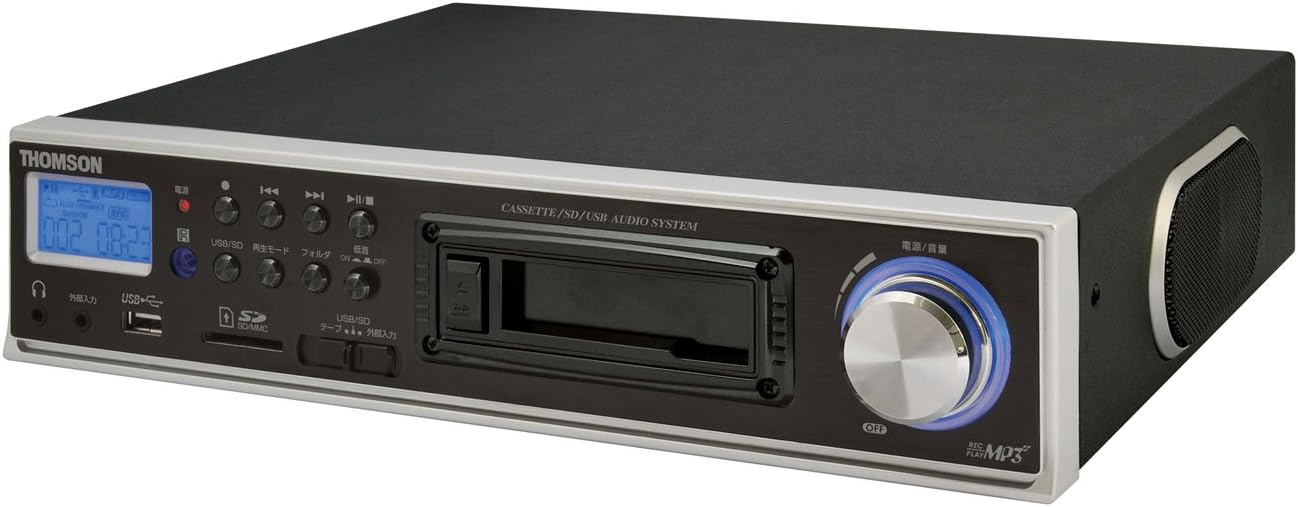
Obrázok 2.2: Uhlové View. This image shows the THOMSON CE-26 from an angled perspective, highlighting the integrated side speaker and the overall compact design.

Obrázok 2.3: Diaľkové ovládanie. This image displays the included remote control for the THOMSON CE-26, featuring buttons for search, display, record, playback mode, program, folder navigation, and USB/SD selection.

Obrázok 2.4: Prvek nadview Diagram. This diagram illustrates the key functionalities of the THOMSON CE-26, including direct recording from cassette to USB/SD, MP3/WMA playback, USB/SD memory copying, AUX input, built-in speaker, and remote control.
Ovládacie prvky na prednom paneli:
- Tlačidlo napájania: Zapína alebo vypína jednotku.
- Displej: Shows track information, mode, and time.
- Kazetový nosič: For inserting and playing audio cassettes.
- USB port: Connect USB flash drives for playback or recording.
- Slot pre SD/MMC kartu: Insert SD or MMC cards for playback or recording.
- Ovládanie prehrávania: Prehrať, Pozastaviť, Zastaviť, Rýchlo dopredu, Pretočiť dozadu, Preskočiť skladbu.
- Tlačidlo nahrávania: Spustí nahrávanie.
- Tlačidlo režimu: Switches between Cassette, USB, SD, and AUX input modes.
- Ovládač hlasitosti: Upravuje výstupnú úroveň zvuku.
- Jack pre slúchadlá: Na súkromné počúvanie.
- Vstup AUX: Pripojte externé zvukové zariadenia.
3. Nastavenie
- Napájanie: Pripojte napájací kábel striedavého prúdu k napájaciemu vstupu zariadenia a potom do štandardnej elektrickej zásuvky.
- Počiatočné zapnutie: Press the Power button to turn on the unit. The display will illuminate.
- Vkladanie médií:
- zásobník: Open the cassette door and insert an audio cassette with the open edge facing upwards. Close the door securely.
- USB disk: Insert a USB flash drive into the USB port. Ensure it is formatted to FAT32.
- SD/MMC karta: Insert an SD or MMC card into the card slot until it clicks into place. Ensure it is formatted to FAT32.
- External Audio Device (Optional): To use the AUX input, connect an external audio source (e.g., smartphone, CD player) to the AUX IN jack using a 3.5mm audio cable.
4. Návod na obsluhu
4.1. Cassette Playback
- Vložte kazetu.
- Press the "Mode" button until "Cassette" mode is selected (or the cassette deck automatically starts playing).
- Stlačte tlačidlo Prehrať (►) na jednotke alebo diaľkovom ovládači.
- Nastavte hlasitosť pomocou ovládača hlasitosti.
- Use Fast Forward (►►) or Rewind (◄◄) tlačidlá na navigáciu po páske.
- Press Stop (■) to end playback.
4.2. Prehrávanie z USB/SD karty
- Insert a USB drive or SD/MMC card containing MP3 or WMA audio files.
- Press the "Mode" button to select "USB" or "SD" mode. The unit will automatically scan and begin playing the first track.
- Použite tlačidlo Prehrať/Pozastaviť (►/∥), Stop (■), Next Track (►►|), and Previous Track (|◄◄) buttons to control playback.
- The "Folder" buttons on the remote can be used to navigate between folders on the USB/SD media.
4.3. Recording Audio to MP3 (Cassette to USB/SD)
This feature allows you to convert your cassette tapes into digital MP3 files.
- Insert a blank or desired USB drive/SD card into the respective slot.
- Vložte kazetu, z ktorej chcete nahrávať.
- Press the "Mode" button to select "Cassette" mode.
- Start playing the cassette tape.
- Press the "Record" button on the unit or remote. The recording indicator will light up, and the unit will begin converting the cassette audio to MP3 format on the selected USB/SD media.
- To stop recording, press the "Stop" button. The recorded MP3 file will be saved on your USB drive or SD card.
- Poznámka: There might be a slight delay between pressing record and the actual start of recording. It is recommended to start recording slightly before the desired audio begins to avoid cutting off the start of a track.
4.4. Recording Audio to MP3 (AUX Input to USB/SD)
Record audio from an external device connected via the AUX input.
- Connect your external audio device to the AUX IN jack.
- Insert a blank or desired USB drive/SD card.
- Stlačením tlačidla „Režim“ vyberte režim „AUX“.
- Spustite prehrávanie na externom zvukovom zariadení.
- Press the "Record" button on the unit or remote. The recording indicator will light up, and the unit will begin converting the AUX audio to MP3 format on the selected USB/SD media.
- To stop recording, press the "Stop" button.
4.5. Kopírovanie Files Between USB and SD/MMC
The CE-26 allows direct copying of MP3/WMA files between a USB drive and an SD/MMC card.
- Ensure both a USB drive and an SD/MMC card are inserted into their respective slots.
- Select either "USB" or "SD" mode using the "Mode" button, depending on which source you want to copy od.
- Prejdite na file or folder you wish to copy.
- Press and hold the "Copy" button (often labeled "USB/SD Copy" or similar) on the unit or remote. Follow any on-screen prompts to confirm the copy operation.
- The display will indicate when the copying process is complete.
5. Údržba
- Čistenie: Na čistenie exteriéru jednotky používajte mäkkú, suchú handričku. Nepoužívajte tekuté čistiace prostriedky ani abrazívne materiály.
- Starostlivosť o kazetový magnetofón: Periodically clean the cassette head and pinch rollers with a specialized cassette head cleaner to ensure optimal audio quality and prevent tape damage.
- Ukladací priestor: Ak zariadenie dlhší čas nepoužívate, odpojte napájací kábel a uskladnite ho na chladnom a suchom mieste mimo dosahu priameho slnečného žiarenia a extrémnych teplôt.
6. Riešenie problémov
| Problém | Možná príčina | Riešenie |
|---|---|---|
| Žiadna sila | Napájací kábel nie je pripojený; Zásuvka nie je aktívna. | Uistite sa, že je napájací kábel bezpečne pripojený. Skontrolujte, či je elektrická zásuvka funkčná. |
| Žiadny zvuk počas prehrávania | Príliš nízka hlasitosť; Vybraný nesprávny režim; Pripojené slúchadlá. | Increase volume. Select the correct input mode (Cassette, USB, SD, AUX). Disconnect headphones if using speakers. |
| Cassette tape not playing or recording correctly | Tape tangled or damaged; Cassette heads dirty; Incorrect tape direction. | Check tape condition. Clean cassette heads and pinch rollers. Ensure tape is inserted correctly. |
| Recording stops prematurely or has gaps | USB drive/SD card full; Media format issue; Intermittent power. | Ensure sufficient storage space. Use FAT32 formatted media. Check power connection stability. |
| Poor audio quality from USB/SD | Skorumpovaný files; Low bitrate MP3/WMA files. | Try different audio files. Zaistite files nie sú poškodené. |
| Diaľkové ovládanie nefunguje | Batteries depleted; Obstruction between remote and unit; Incorrect angle. | Replace remote control batteries. Ensure clear line of sight to the unit's IR receiver. |
7. Špecifikácie
| Funkcia | Detail |
|---|---|
| Značka | THOMSON |
| Číslo modelu | CE-26 |
| Podporované médiá | Cassette Tape, USB Memory, SD/MMC Card |
| Podporované audio formáty | MP3, WMA (playback); MP3 (recording) |
| Funkcia nahrávania | Direct digital recording from Cassette to MP3, AUX to MP3 |
| Konektivita | USB Port, SD/MMC Card Slot, AUX Input (3.5mm), Headphone Output (3.5mm) |
| Vstavaný reproduktor | áno |
| Diaľkové ovládanie | Zahrnuté |
| Rozmery (približne) | 35.4 x 33.2 x 12 cm |
| Hmotnosť (približne) | 3.02 kg |
8. Záruka a podpora
For warranty information and technical support, please refer to the warranty card included with your product or contact THOMSON customer service directly. Keep your purchase receipt as proof of purchase.
For further assistance, please visit the official THOMSON webalebo kontaktujte ich autorizované servisné strediská.