
1. Úvod
Thank you for choosing the SHARP KC850U Air Purifier and Humidifier. This appliance is designed to improve indoor air quality and maintain optimal humidity levels in medium-sized rooms. It combines a multi-stage filtration system with Plasmacluster Ion Technology to effectively reduce airborne particles, odors, and maintain a comfortable environment.
Please read this manual thoroughly before operating the unit to ensure safe and efficient use. Keep this manual for future reference.
2. Bezpečnostné informácie
To reduce the risk of electric shock, fire, or injury, always follow basic safety precautions when using electrical appliances:
- Neprevádzkujte jednotku s poškodeným káblom alebo zástrčkou.
- Neumiestňujte jednotku do blízkosti zdrojov tepla alebo na priame slnečné svetlo.
- Uistite sa, že je jednotka umiestnená na stabilnom, rovnom povrchu.
- Neblokujte vstupy alebo výstupy vzduchu.
- Pred čistením alebo akoukoľvek údržbou odpojte jednotku zo siete.
- Neponárajte prístroj do vody alebo iných tekutín.
- Uchovávajte mimo dosahu detí a domácich zvierat.
- Use only genuine SHARP replacement parts and filters.
3. Produkt skončilview
The SHARP KC850U integrates air purification and humidification functions into a single unit. Key components include the air intake, air outlet, control panel, dust and humidity sensors, and water tank.

Obrázok 3.1: Predné view of the SHARP KC850U Air Purifier and Humidifier, showing the control panel and display.
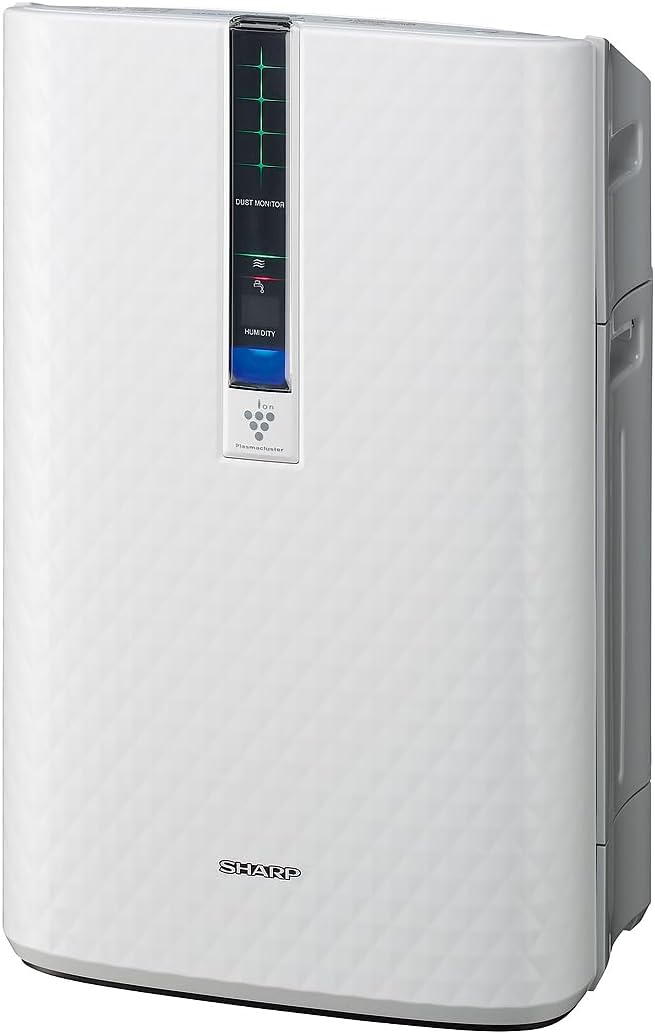
Obrázok 3.2: Side view of the SHARP KC850U, illustrating its compact design.
Ovládací panel a displej
The unit features an intuitive control panel and a display that provides real-time information on air quality and humidity levels.

Obrázok 3.3: Hore view of the control panel, showing buttons for power, fan speed, modes, and light control.
- Tlačidlo napájania: Zapína alebo vypína jednotku.
- Tlačidlo rýchlosti ventilátora: Cycles through Max, Med, and Low fan speeds.
- Tlačidlo režimu: Selects operating modes including Auto, Pollen, and Quick Clean.
- Tlačidlo svetiel: Adjusts the brightness of the display lights (Bright, Dim, Off).
- Dust Monitor: Visual indicator of air impurity levels (e.g., green for clean, red for high impurity).
- Displej vlhkosti: Shows the current relative humidity percentage.
4. Nastavenie
4.1 Rozbalenie
- Opatrne vyberte jednotku z obalu.
- Odstráňte všetky ochranné materiály a plastové vrecká.
- Ensure all filters are properly installed before first use. Refer to the Maintenance section for filter installation details.
4.2 Umiestnenie
For optimal performance, place the air purifier in a location where air can circulate freely. Avoid placing it directly against a wall or furniture that might obstruct air intake or output.
- Recommended for use in bedrooms, living rooms, studies, or exercise rooms.
- Ensure at least 12 inches (30 cm) of clear space around the unit.
- Place on a firm, level surface.
4.3 Naplnenie nádrže na vodu (na zvlhčovanie)
If you intend to use the humidification function, fill the water tank:
- Vyberte nádržku na vodu z boku jednotky.
- Open the tank cap and fill with clean tap water.
- Securely close the cap and reinsert the water tank into the unit.
5. Návod na obsluhu
5.1 Zapnutie/vypnutie
Stlačte tlačidlo Sila tlačidlo na zapnutie alebo vypnutie jednotky.
5.2 Výber rýchlosti ventilátora
Stlačte tlačidlo Rýchlosť ventilátora button repeatedly to cycle through the available fan speeds:
- Max: Highest air purification and humidification.
- Stredná: Moderate operation.
- Nízka: Quiet operation, suitable for sleeping (as quiet as 23 dBA).
5.3 Výber režimu
Stlačte tlačidlo Režim button repeatedly to select an operating mode:
- Automatický režim: The unit automatically adjusts fan speed and humidification based on sensor readings for air quality and humidity.
- Peľový režim: Optimalizované na odstraňovanie peľu.
- Režim rýchleho čistenia: Releases high-density Plasmacluster ions for rapid air purification.
5.4 Technológia Plasmacluster Ion
The Plasmacluster Ion Technology actively disperses positive and negative ions into the air to help reduce microscopic pollutants. This function operates automatically with the unit. A slight clicking sound may be audible during operation, which is normal.
5.5 Ovládanie osvetlenia displeja
Stlačte tlačidlo Svetlá button to adjust the brightness of the display indicators:
- Jasný: Full illumination.
- Tlmené: Reduced illumination.
- Vypnuté: Display lights are off, suitable for dark rooms.

Obrázok 5.1: Display showing 'Lo' for low humidity and green dust monitor indicators.

Obrázok 5.2: Display showing 'Hi' for high humidity and red dust monitor indicators, indicating higher impurity levels.
6. Údržba
Regular maintenance ensures optimal performance and extends the lifespan of your SHARP KC850U. Always unplug the unit before cleaning or replacing filters.
6.1 Filter System Overview
The KC850U utilizes a triple filtration system:
- Umývateľný predfilter: Traps large airborne particles like dust and pet dander.
- Activated Carbon Deodorizing Filter: Helps reduce common household odors.
- Skutočný HEPA filter: Zachytáva 99.97 % častíc s veľkosťou 0.3 mikrónu a väčších.
- Zvlhčovací filter: Used for the humidification function.

Obrázok 6.1: Diagram showing the air purification process through the humidifying filter, True HEPA filter, carbon filter, and pre-filter.
6.2 Čistenie a výmena filtra
- Predfilter: Clean regularly by vacuuming or washing with water. Allow to dry completely before reinstallation.
- Activated Carbon Deodorizing Filter: May be washed. Refer to the filter's specific instructions for cleaning frequency and method. Replace as needed, typically every 2-5 years depending on usage and environment.
- Skutočný HEPA filter: This filter is not washable. Replace typically every 2-5 years, depending on usage and environment. The unit will indicate when replacement is due.
- Zvlhčovací filter: Clean regularly to prevent mineral buildup. Replace as needed, typically every 2-5 years depending on water quality and usage.
Actual filter life may vary significantly based on air quality, usage frequency, and environmental conditions.
6.3 Všeobecné čistenie
- Vonkajšiu časť jednotky utrite mäkkou, damp plátno.
- Clean the dust and humidity sensors periodically to ensure accurate readings.
- Clean the water tank and humidifying tray regularly to prevent mold or bacteria growth.
7. Riešenie problémov
If you encounter issues with your SHARP KC850U, refer to the following common problems and solutions:
| Problém | Možná príčina | Riešenie |
|---|---|---|
| Jednotka sa nezapne. | Power cord not properly plugged in; no power at outlet. | Check power connection; test outlet with another device. |
| Air purification/humidification is ineffective. | Filters are dirty or clogged; water tank is empty (for humidification). | Clean or replace filters as per Maintenance section; refill water tank. |
| Unusual noise (e.g., clicking). | Normal operation of Plasmacluster Ion generator; foreign object in fan. | A slight clicking is normal. If noise is excessive, unplug and check for obstructions. |
| Odor persists or unit emits strange smell. | Carbon filter saturated; new unit odor; mold in water tank. | Replace carbon filter; new unit odor will dissipate; clean water tank and humidifying filter. |
| Úroveň vlhkosti sa nezvyšujeasing. | Water tank empty; humidifying filter dirty or damaged. | Refill water tank; clean or replace humidifying filter. |
Ak problém pretrváva aj po vyskúšaní týchto riešení, kontaktujte zákaznícku podporu spoločnosti SHARP.
8. Špecifikácie
| Funkcia | Špecifikácia |
|---|---|
| Číslo modelu | KC850U |
| Značka | Ostrý |
| Farba | Biela |
| Rozmery produktu (D x Š x V) | 10.5 cm x 14.87 cm x 23.11 cm |
| Hmotnosť položky | 20.5 libry |
| Odporúčaná podlahová plocha | 254 Square Feet (4.8 air changes/hour) |
| Úroveň hluku | 23 dBA (Quiet Sleep setting) to 36 dB (typical) |
| Veľkosť zadržania častíc | 0.3 Micrometer (HEPA filter) |
| Typ ovládača | Ovládanie tlačidlom |
| Wattage | 50 wattov |
| CADR (Smoke / Dust / Pollen) | 164 / 164 / 174 |
| Certifikácie | Hodnotené ENERGY STAR, testované AHAM Verifide, certifikované CARB |

Obrázok 8.1: Dimensions of the SHARP KC850U unit.

Obrázok 8.2: Room coverage diagram, showing 254 sq. ft. for 4.8 air changes per hour.
9. Záruka a podpora
9.1 Informácie o záruke
The SHARP KC850U Air Purifier and Humidifier comes with a 1-ročná obmedzená záruka. Please retain your proof of purchase for warranty claims. For detailed terms and conditions, refer to the warranty card included with your product or visit the official SHARP webstránky.
9.2 Zákaznícka podpora
For technical assistance, troubleshooting beyond this manual, or to inquire about replacement parts and filters, please contact SHARP customer support. Contact information can typically be found on the SHARP official webna stránke alebo na obale produktu.


