
1. Úvod
This manual provides essential instructions for the safe and efficient operation of your Sharp CD-DH950P 240W Mini-Component System. This system features a 5-disc CD changer, a cassette deck, an iPod/iPhone docking station, a USB host for digital audio playback, and an AM/FM tuner. Please read this manual thoroughly before using the system and retain it for future reference.
2. Bezpečnostné informácie
- Zdroj napájania: Zariadenie pripájajte iba do sieťovej zásuvky s uvedenou hlasitosťou.tage.
- Vetranie: Zabezpečte dostatočné vetranie. Neblokujte vetracie otvory.
- Voda a vlhkosť: Nevystavujte jednotku dažďu, vlhkosti ani kvapkajúcim/striekajúcim tekutinám.
- Teplo: Uchovávajte jednotku mimo dosahu zdrojov tepla, ako sú radiátory, ohrievače, sporáky alebo iné zariadenia, ktoré produkujú teplo.
- Čistenie: Pred čistením odpojte zariadenie zo zásuvky. Použite mäkkú, suchú handričku.
- servis: Nepokúšajte sa opravovať tento výrobok sami. Všetky opravy zverte kvalifikovanému servisnému personálu.
3. Obsah balenia
Skontrolujte, či váš balík obsahuje nasledujúce položky:
- Main Unit (CD-DH950P)
- Ľavý reproduktor
- Pravý reproduktor
- Diaľkové ovládanie s batériami
- AM slučková anténa
- Drôtová anténa FM
- Napájací kábel
4. Nastavenie
4.1 Pripojenie reproduktorov
Connect the speaker wires from the main unit to the corresponding terminals on the back of each speaker. Ensure correct polarity (red to red, black to black) for optimal sound quality. The left speaker connects to the left speaker output, and the right speaker to the right speaker output.
4.2 Pripojenie antén
- Anténa FM: Pripojte dodanú drôtovú FM anténu ku konektoru FM antény na zadnej strane hlavnej jednotky. Pre lepší príjem kábel predĺžte.
- AM anténa: Connect the supplied AM loop antenna to the AM antenna terminals on the rear of the main unit. Position the antenna for best reception.
4.3 Pripojenie napájania
Plug the power cord into the AC IN jack on the rear of the main unit, then plug the other end into a standard AC wall outlet.
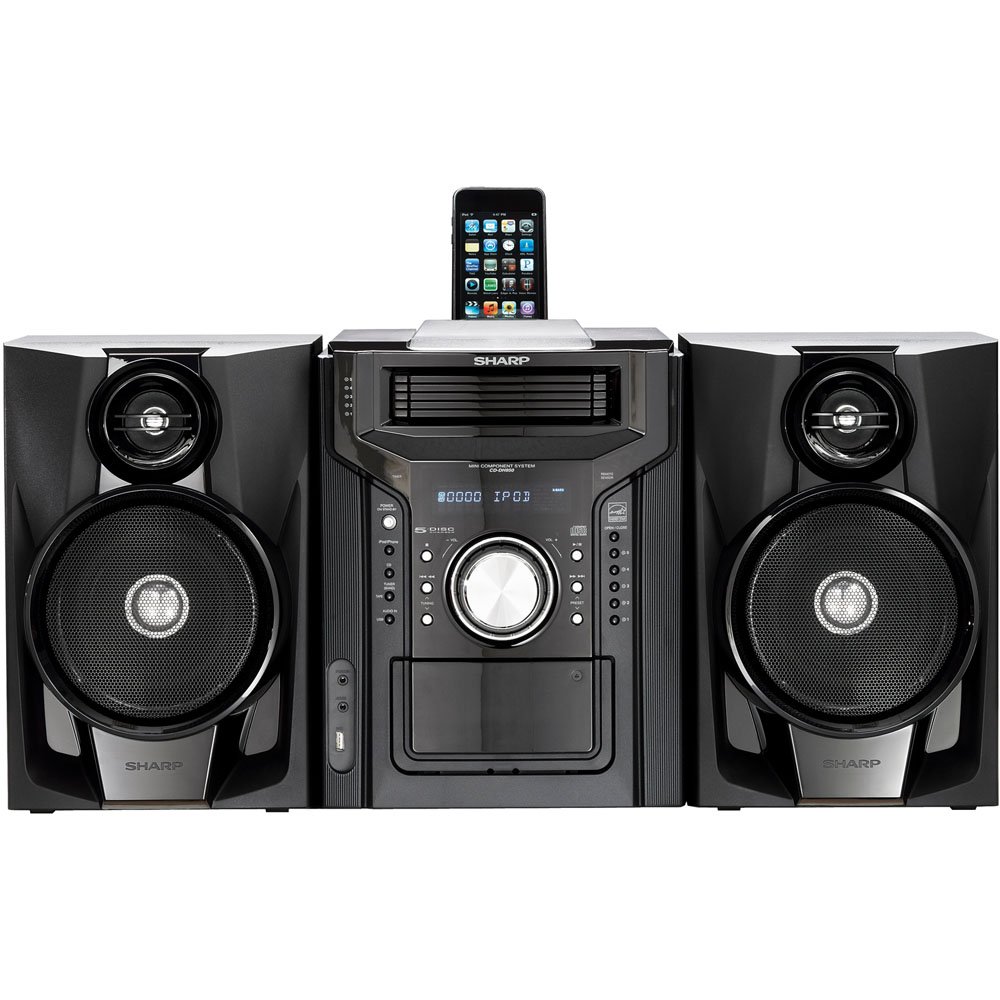
Obrázok 4.3.1: Celkovo view of the Sharp CD-DH950P Mini-Component System, showing the main unit flanked by two speakers, with an iPhone docked on top of the main unit.
5. Návod na obsluhu
5.1 Zapnutie/vypnutie a ovládanie hlasitosti
- Stlačte tlačidlo POWER tlačidlo na prednom paneli alebo diaľkovom ovládači na zapnutie alebo vypnutie zariadenia.
- Otočte VOLUME gombík na prednom paneli alebo použite VOL +/- tlačidlá na diaľkovom ovládači nastavte úroveň zvuku.
5.2 Prehrávanie CD
This system features a 5-disc CD changer.
- Stlačte tlačidlo OPEN/CLOSE tlačidlo na otvorenie zásuvky na CD.
- Place up to five CDs on the disc trays, label side up.
- Stlačte tlačidlo OPEN/CLOSE znova na zatvorenie zásobníka.
- Stlačte tlačidlo CD tlačidlo pre výber funkcie CD.
- Stlačte tlačidlo PLAY/PAUSE tlačidlo na spustenie prehrávania.
- Použite PRESKOČIŤ buttons to navigate between tracks or discs.
5.3 Obsluha kazetového magnetofónu
- Stlačte tlačidlo TAPE OPEN/CLOSE button to open the cassette deck.
- Vložte kazetu.
- Stlačte tlačidlo TAPE tlačidlo pre výber funkcie kazety.
- Stlačte tlačidlo HRAŤ spustite prehrávanie.
- To record, ensure the source is selected (e.g., CD, Tuner) and press the RECORD (záznam). button on the cassette deck.
5.4 iPod/iPhone Docking
The system includes a top-mounted docking slot for compatible iPod and iPhone devices (30-pin connector).
- Carefully place your iPod or iPhone into the docking slot.
- The system will automatically switch to iPod/iPhone mode or you may need to press the iPod / iPhone tlačidlo.
- Use the system's controls or your device's controls to play music. The device will also charge while docked.
5.5 USB Host Playback
Connect a USB storage device containing MP3 or WMA audio files to the USB port on the front panel.
- Vložte USB zariadenie do USB portu.
- Stlačte tlačidlo USB button to select the USB function.
- Na navigáciu a prehrávanie použite ovládacie prvky prehrávania files.
5.6 AM/FM tuner
- Stlačte tlačidlo TUNER tlačidlo pre výber rádia AM alebo FM.
- Použite TUNING +/- tlačidlá na manuálne naladenie stanice.
- To auto-scan, press and hold the TUNING +/- tlačidlá.
- To store a preset, tune to the desired station, then press PAMÄŤ nasledované prednastaveným číslom.
5.7 Audio vstup
Connect an external audio device (e.g., MP3 player, smartphone) to the AUDIO IN jack on the front panel using a 3.5mm stereo cable.
- Connect your device to the AUDIO IN jack.
- Stlačte tlačidlo AUDIO IN tlačidlo pre výber tohto zdroja.
- Ovládajte prehrávanie z pripojeného zariadenia.
6. Údržba
6.1 Čistenie jednotky
Wipe the exterior of the unit with a soft, dry cloth. Do not use abrasive cleaners, waxes, or solvents. Ensure the unit is unplugged before cleaning.
6.2 Starostlivosť o CD a kazety
- Handle CDs by their edges to avoid fingerprints and scratches. Clean discs with a soft, lint-free cloth from the center outwards.
- Store cassette tapes away from strong magnetic fields and direct sunlight.
7. Riešenie problémov
| Problém | Možná príčina | Riešenie |
|---|---|---|
| Žiadna sila | Napájací kábel nie je pripojený; Zásuvka je chybná | Uistite sa, že je napájací kábel bezpečne zapojený; skúste inú zásuvku. |
| Žiadny zvuk | Volume too low; Speakers not connected; Incorrect source selected | Increase volume; Check speaker connections; Select correct input source |
| CD sa neprehráva | Disc inserted incorrectly; Disc is dirty or scratched | Insert disc correctly (label side up); Clean or replace disc |
| Slabý príjem rádia | Antenna not positioned correctly; Weak signal | Adjust position of AM/FM antennas; Try auto-tuning or manual fine-tuning |
| iPod/iPhone not charging/playing | Device not properly docked; Device not compatible (e.g., newer connector) | Re-dock the device; Note that this system uses a 30-pin connector, newer devices may require an adapter (not included) |
8. Špecifikácie
- Značka: Ostrý
- Model: CD-DH950P
- Celkový výstupný výkon: 240 Watts RMS (85W/ch FTC)
- Konfigurácia reproduktorov: 2.1 kanál
- Podporované audio formáty: CD, MP3, WMA
- Pomer signál-šum: 100 dB
- Kompatibilné zariadenia: MP3 Player, Smartphone (via 30-pin dock or USB/Audio In)
- Rozmery (D x Š x V): 27.6 x 13.6 x 13.5 palca
- Hmotnosť položky: 24.4 libier
- UPC: 074000369863, 074000369290
9. Informácie o záruke
This product is covered by a 1-year limited warranty from the date of purchase. Please refer to the warranty card included with your product for full terms and conditions, or contact Sharp customer service for details.
10. Podpora
For further assistance, technical support, or service inquiries, please contact Sharp customer service. Contact information can typically be found on the Sharp official webna stránke alebo v dokumentácii dodanej s vaším produktom.