
1. Úvod
Ďakujem za nákupasing the Caliber RMD 068-2 Car Radio USB/SD Player. This manual provides detailed instructions for the installation, operation, and maintenance of your new car radio. Please read this manual thoroughly before using the product to ensure proper functionality and safety. Keep this manual for future reference.
2. Bezpečnostné informácie
- Inštalácia: Ensure the unit is installed by a qualified technician to prevent damage to the vehicle's electrical system. Incorrect wiring can cause fire or electrical shock.
- Napájanie: Zariadenie pripájajte iba k 12V jednosmernej autobatérii so záporným uzemnením.
- Poistky: Always replace fuses with new ones of the specified rating. Using an incorrect fuse can cause damage to the unit or vehicle.
- Úroveň hlasitosti: Do not operate the unit at excessively high volume levels, as this may impair your ability to hear external traffic sounds and could be dangerous.
- Čistenie: Na čistenie používajte mäkkú suchú handričku. Nepoužívajte abrazívne čistiace prostriedky ani rozpúšťadlá.
- vlhkosť: Nevystavujte jednotku vlhkosti alebo vode.
3. Obsah balenia
Prosím, skontrolujte, či sú prítomné všetky položky:
- Caliber RMD 068-2 Car Radio Unit
- Odnímateľný predný panel
- ISO káblový zväzok
- Montážny rám
- Demontážne kľúče (2 ks)
- Používateľská príručka (tento dokument)
4. Produkt skončilview
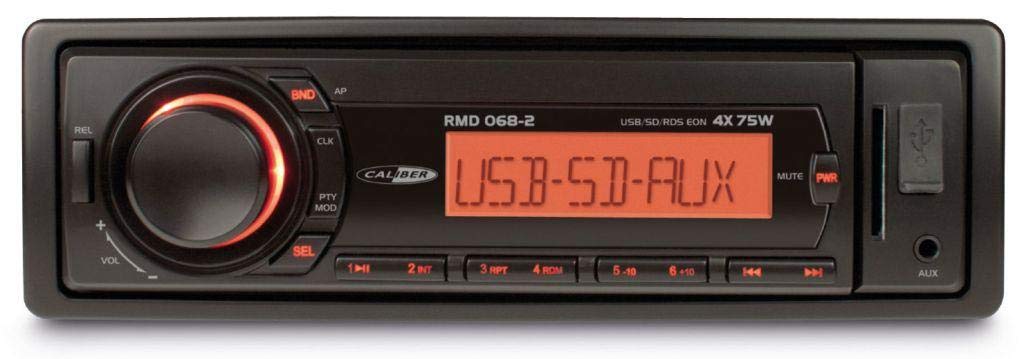
Obrázok 1: Predná strana view of the Caliber RMD 068-2 Car Radio. This image shows the main unit with its detachable front panel, including the display, control buttons, USB port, and SD card slot.
4.1 Ovládacie prvky na prednom paneli
- POWER/MODE Button: Press to turn on/off. Short press to switch between Radio, USB, SD, AUX modes.
- Gombík VOLUME: Rotate to adjust volume. Press to access audio settings (Bass, Treble, Balance, Fader).
- DISPLAY: Shows current time, radio frequency, track information, etc.
- USB port: Pripojte USB kľúče na prehrávanie médií.
- Slot na SD kartu: Vložte SD karty pre prehrávanie médií.
- AUX Input (3.5mm Jack): Pripojte externé zvukové zariadenia.
- BAND/AMS Button: In radio mode, press to select radio band (FM1, FM2, FM3). Long press for Automatic Memory Store.
- Tlačidlá PREDVOĽBY (1-6): Store and recall radio stations. In USB/SD mode, use for direct track selection.
- Tlačidlo PLAY/PAUSE: Play or pause media playback.
- FORWARD/BACKWARD Buttons: Skip tracks or tune radio frequency.
- Tlačidlo VYSUNUŤ: Release the detachable front panel.
4.2 Zadné pripojenia
The rear of the unit features standard ISO connectors for power and speakers, along with an antenna input.
- ISO Power Connector: For connecting to the vehicle's power supply (constant 12V, ignition 12V, ground).
- ISO Speaker Connector: For connecting to the vehicle's speakers (Front Left, Front Right, Rear Left, Rear Right).
- Vstup pre anténu: Na pripojenie antény autorádia vo vozidle.
5. Nastavenie
5.1 Inštalácia
- Odpojte batériu: Before starting, disconnect the negative terminal of your car battery to prevent short circuits.
- Odstránenie starej jednotky: Opatrne vyberte existujúce autorádio z palubnej dosky.
- Inštalácia montážneho rámu: Insert the supplied mounting frame into the dashboard opening and bend the tabs to secure it.
- Pripojiť vedenie: Refer to the wiring diagram in section 5.2. Connect the ISO wiring harness to the car's wiring and then to the Caliber RMD 068-2 unit. Connect the antenna cable.
- Slide Unit In: Carefully slide the Caliber RMD 068-2 unit into the mounting frame until it clicks into place.
- Znovu pripojte batériu: Znovu pripojte záporný pól autobatérie.
- Pripojte predný panel: Attach the detachable front panel to the main unit.
5.2 Schéma zapojenia
The Caliber RMD 068-2 uses standard ISO connectors. Ensure correct connections as shown below. If your vehicle does not have ISO connectors, an adapter may be required.
| PIN č. | Wire Color (Typical) | Funkcia |
|---|---|---|
| 4 | Žltá | Konštantné 12V (batéria) |
| 7 | Červená | Spínané 12V (zapaľovanie) |
| 8 | Čierna | Ground |
| 5 | Modrá | Antenna Remote Out |
| PIN č. | Wire Color (Typical) | Funkcia |
|---|---|---|
| 1 | Fialová | Vpravo vzadu (+) |
| 2 | Fialová/Čierna | Vpravo vzadu (-) |
| 3 | Zelená | Vľavo vzadu (+) |
| 4 | Zelená/Čierna | Vľavo vzadu (-) |
| 5 | Šedá | Vpravo vpredu (+) |
| 6 | Sivá/Čierna | Vpredu vpravo (-) |
| 7 | Biela | Vľavo vpredu (+) |
| 8 | Biela/Čierna | Vpredu vľavo (-) |
Note: Wire colors may vary depending on vehicle manufacturer. Always consult your vehicle's wiring diagram.
6. Návod na obsluhu
6.1 Základné funkcie
- Zapnutie/vypnutie: Stlačte tlačidlo VÝKON / REŽIM tlačidlo na zapnutie alebo vypnutie jednotky.
- Ovládanie hlasitosti: Otočte VOLUME otočením gombíka v smere hodinových ručičiek zvýšite hlasitosť, proti smeru hodinových ručičiek znížite.
- Výber režimu: Krátko stlačte VÝKON / REŽIM button to cycle through available modes: Radio (FM), USB, SD, AUX.
- Nastavenia zvuku: Stlačte tlačidlo VOLUME knob to enter audio settings. Rotate the knob to select settings like BASS, TREBLE, BALANCE, FADER. Press the knob again to confirm or move to the next setting.
6.2 Prevádzka rádia
- Výber kapely: V režime Rádio stlačte tlačidlo PÁSMO/AMS button to switch between FM1, FM2, and FM3 bands.
- Ručné ladenie: Krátko stlačte VPRED/SPÄŤ tlačidlá na jemné doladenie frekvencie.
- Automatické vyhľadávanie: Dlho stlačte VPRED/SPÄŤ tlačidlá pre automatické vyhľadanie ďalšej stanice so silným signálom.
- Uložiť predvoľby: Tune to your desired station. Long press one of the PRESET (1-6) buttons until you hear a beep. The station is now stored.
- Vyvolanie predvolieb: Krátko stlačte jeden z PRESET (1-6) buttons to recall a stored station.
- Automatické ukladanie do pamäte (AMS): Dlho stlačte PÁSMO/AMS button to automatically scan and store the strongest stations into the current band's presets.
6.3 Prehrávanie z USB/SD karty
- Vložiť médium: Insert a USB flash drive into the USB port or an SD card into the SD card slot. The unit will automatically switch to USB/SD mode and begin playback.
- Prehrať/pozastaviť: Stlačte tlačidlo PLAY/PAUSE tlačidlo na pozastavenie alebo obnovenie prehrávania.
- Preskočiť stopu: Krátko stlačte VPRED/SPÄŤ tlačidlá na preskočenie na nasledujúcu alebo predchádzajúcu skladbu.
- Rýchle pretáčanie dopredu/dozadu: Dlho stlačte VPRED/SPÄŤ tlačidlá na rýchle pretáčanie dopredu alebo dozadu v rámci skladby.
- Navigácia v priečinkoch: Použite PREDVOĽBA 5 a PREDVOĽBA 6 buttons to navigate between folders on your USB/SD media.
6.4 AUX vstup
- Pripojiť zariadenie: Connect your external audio device (e.g., smartphone, MP3 player) to the 3.5mm AUX input jack on the front panel using an audio cable.
- Vyberte režim AUX: Stlačte tlačidlo VÝKON / REŽIM button repeatedly until "AUX" is displayed.
- Ovládanie prehrávania: Control playback (play, pause, skip) directly from your connected external device. The car radio will control the volume.
7. Údržba
- Čistenie jednotky: Use a soft, dry cloth to wipe the front panel and display. Do not use harsh chemicals, cleaning sprays, or abrasive cloths, as these can damage the surface.
- Detachable Front Panel: When detaching the front panel, handle it carefully. Store it in a protective case (if supplied) to prevent scratches or damage.
- Porty USB/SD: Keep the USB port and SD card slot free from dust and debris.
8. Riešenie problémov
| Problém | Možná príčina | Riešenie |
|---|---|---|
| Žiadna sila | Prepálená poistka; Nesprávne zapojenie; Uvoľnené pripojenie | Check and replace fuse; Verify wiring connections (Yellow to constant 12V, Red to ignition 12V, Black to ground); Ensure front panel is securely attached. |
| Žiadny zvuk | Volume too low; Mute activated; Incorrect speaker wiring; Damaged speakers | Increase volume; Check if mute is active; Verify speaker connections; Test with known good speakers. |
| Slabý príjem rádia | Anténa nie je pripojená; Poškodená anténa; Oblasť so slabým signálom | Ensure antenna is securely connected; Check antenna for damage; Try tuning to a stronger station or move to a different location. |
| USB/SD karta sa neprehráva | Nepodporované file format; Corrupted media; Incorrectly inserted media; Max capacity exceeded | Zaistite files are MP3/WMA format; Try a different USB/SD card; Reinsert media correctly; Check media capacity (max 32GB recommended). |
| Front panel cannot be detached | Eject button not fully pressed; Mechanism jammed | Press the EJECT button firmly; Do not force the panel. |
If the problem persists after trying these solutions, please contact your dealer or a qualified service center.
9. Špecifikácie
- Model: Caliber RMD 068-2
- Výstupný výkon: 4 x 75 Watts Max
- Napájanie: 12V DC (10.8V-15.6V), Negative Ground
- poistka: 10A
- Podporované audio formáty: MP3, WMA (via USB/SD)
- USB/SD Compatibility: Až 32 GB (formát FAT32)
- FM tuner: RDS, 18 Presets
- Vstup AUX: 3.5 mm stereo jack
- Detachable Front Panel: áno
- Hmotnosť: Približne 0.95 kg (2.09 libier)
10. Záruka a podpora
This Caliber product is covered by a warranty in accordance with applicable European laws. For detailed warranty terms and conditions, please refer to the warranty card included with your product or visit the official Caliber website. For technical support, troubleshooting assistance, or service inquiries, please contact your authorized Caliber dealer or the customer service department in your region. Please have your product model number (RMD 068-2) and proof of purchase ready when contacting support.
Note: Specifications and design are subject to change without notice for improvement.