
Showtec 8717748269171
Používateľská príručka Spectral CYC-4000
Brand: Showtec | Model: 8717748269171
1. Produkt skončilview
Kľúčové vlastnosti
- Extremely powerful
- Dual lens system for optimal wash effect
- Sliding brackets for easy mounting
- PowerCon input and output
- Can be controlled in 1 or 3 sections
Popis produktu
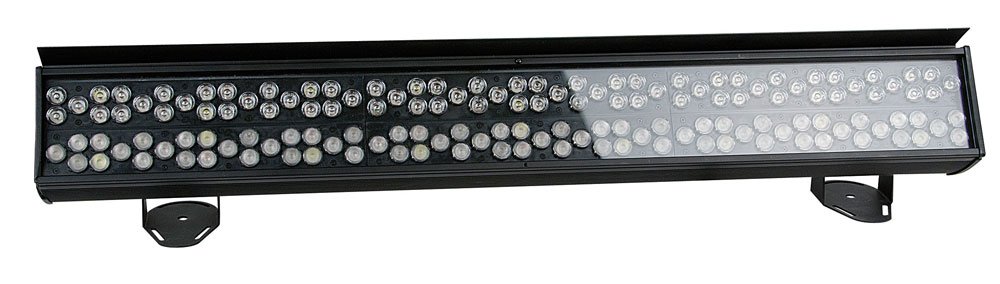
The Spectral CYC-4000 is a powerful lighting tool for all large-scale cyclorama applications. Specially designed with its dual 15° and 30° optical design, it creates an impressive light throw while maintaining smooth and uniform color mixing. This extremely bright cyclorama light combines the RGB color palette with white and orange pastels, offering a rich array of colors to paint with. A custom-built slide-in-glare flag ensures professional lighting considerations are fully adhered to, whether washing curtains and drapes for walls and landscapes.
2. Bezpečnostné informácie
Please read all safety instructions carefully before operating the device. Failure to do so may result in injury or damage to the product.
- Zaistite, aby bolo zariadenie správne uzemnené.
- Nevystavujte zariadenie dažďu ani vlhkosti.
- Vyhnite sa priamemu vystaveniu očí zdroju svetla.
- Zabezpečte dostatočné vetranie okolo jednotky.
- Pred čistením alebo opravou odpojte napájanie.
3. Nastavenie
Follow these steps to set up your Spectral CYC-4000:
- Rozbaľte jednotku a skontrolujte, či nedošlo k poškodeniu počas prepravy.
- Attach the sliding brackets securely to a suitable mounting surface (truss, wall, or floor).
- Ensure the mounting location can support the weight of the fixture.
- Connect the PowerCon input cable to a compatible power source.
- If daisy-chaining multiple units, connect the PowerCon output to the next unit's input.
- Connect DMX control cables if using external control.
4. Návod na obsluhu
Operating the Spectral CYC-4000 is straightforward:
- Power on the unit. The display (if present) will illuminate.
- Use the onboard controls or DMX controller to select the desired operating mode (e.g., DMX mode, auto program, static color).
- Adjust color mixing, intensity, and other parameters as needed for your application.
- Utilize the dual 15° and 30° optics to achieve the desired light throw and coverage for cyclorama or wall washing.
- Position the custom-built slide-in-glare flag to control light spill and achieve precise illumination.
5. Údržba
Regular maintenance ensures optimal performance and longevity:
- Clean the lenses and exterior casing periodically with a soft, dry cloth.
- Nepoužívajte abrazívne čistiace prostriedky ani rozpúšťadlá.
- Pred každým použitím skontrolujte všetky káble a pripojenia, či nie sú opotrebované alebo poškodené.
- Uistite sa, že vetracie otvory sú zbavené prachu a nečistôt.
- For internal servicing, contact qualified personnel.
6. Riešenie problémov
Bežné problémy a ich riešenia nájdete v tabuľke nižšie:
| Problém | Možná príčina | Riešenie |
|---|---|---|
| Žiadna sila | Napájací kábel je odpojený; zo zásuvky nie je prúd | Check power connections; test outlet |
| Žiadne DMX ovládanie | Incorrect DMX address; faulty DMX cable; DMX terminator missing | Verify DMX address; replace cable; add terminator to last unit |
| Svetlo bliká | Unstable power supply; DMX signal interference | Ensure stable power; check DMX connections and shielding |
7. Špecifikácie
Detailed specifications for the Spectral CYC-4000:
| Špecifikácia | Hodnota |
|---|---|
| Značka | Showtec |
| Farba | biela |
| Dostupnosť náhradných dielov | Informácie o náhradných dieloch nie sú k dispozícii |
| Aktualizácie softvéru zaručené do | Informácie nie sú k dispozícii |
| Číslo modelu položky | 8717748269171 |
| ASIN | B005CAMHUO |
| Dátum prvého vydania na Amazon.fr | 20. októbra 2011 |
8. Záruka a podpora
This product comes with a standard manufacturer's warranty. For specific warranty terms and conditions, please refer to the documentation included with your purchase or visit the official Showtec webstránky.
For technical support, troubleshooting assistance beyond this manual, or spare parts inquiries, please contact Showtec customer service. Contact information can typically be found on the manufacturer's webna stránke alebo na obale produktu.
Uschovajte si doklad o kúpe pre uplatnenie záruky.
Ask a question about this manual
Ask about setup, troubleshooting, compatibility, parts, safety, or missing instructions. Manuals+ will review the question and use this page’s manual context to help answer it.