
Úvod
The Arctic-Pro Tower Fan with Remote Control is designed to provide wide-range air distribution for your home or office. Standing 42 inches high, its modern design and minimal footprint ensure it fits seamlessly into most environments without occupying excessive space. Engineered for efficient airflow with reduced noise, this fan features 80-degree oscillation to circulate air effectively. It includes a convenient remote control and a digital screen for easy operation.

Figure 1: Arctic-Pro Digital Screen Oscillating Tower Fan with visible airflow and remote control.
Bezpečnostné pokyny
- Pred čistením, údržbou alebo premiestňovaním vždy odpojte ventilátor od elektrickej zásuvky.
- Neprevádzkujte ventilátor s poškodeným káblom alebo zástrčkou. Ak je kábel alebo zástrčka poškodená, kontaktujte zákaznícku podporu.
- Keep fingers, hair, and loose clothing away from the fan blades and openings during operation.
- Neponárajte ventilátor do vody alebo iných tekutín.
- Uistite sa, že ventilátor je umiestnený na stabilnom a rovnom povrchu, aby sa zabránilo prevráteniu.
- Nepoužívajte ventilátor vo vlhku alebo damp miestach, ako sú kúpeľne alebo práčovne.
- Tento spotrebič nie je určený na to, aby ho používali osoby (vrátane detí) so zníženými fyzickými, zmyslovými alebo duševnými schopnosťami alebo s nedostatkom skúseností a znalostí, pokiaľ nie sú pod dozorom alebo nie sú poučené o používaní spotrebiča osobou zodpovednou za ich bezpečnosť.
Obsah balenia
Please ensure all parts are present before assembly. Open both ends of the box to locate all components.
- Vežová ventilátorová jednotka
- Pedestal (for 42-inch configuration)
- Base (2 halves)
- Diaľkové ovládanie
- Skrutky pre montáž základne
- Napájací kábel
Nastavenie a montáž
Montáž zvyčajne trvá 6 – 9 minút.
- Opatrne vybaľte všetky komponenty z krabice.
- Assemble the two halves of the base by aligning them and pressing firmly until they snap together.
- Choose your desired height configuration:
- 42-Inch Configuration: Attach the pedestal to the assembled base, then secure the tower fan unit onto the pedestal.
- 32-Inch Configuration: Attach the tower fan unit directly to the assembled base.
- Secure the fan unit to the base/pedestal using the provided screws.
- Zapojte napájací kábel do štandardnej elektrickej zásuvky.

Figure 2: The Arctic-Pro Tower Fan can be configured at two different heights.
Návod na obsluhu
The Arctic-Pro Tower Fan can be operated using the control panel on the unit or the included remote control.
Control Panel & Remote Functions
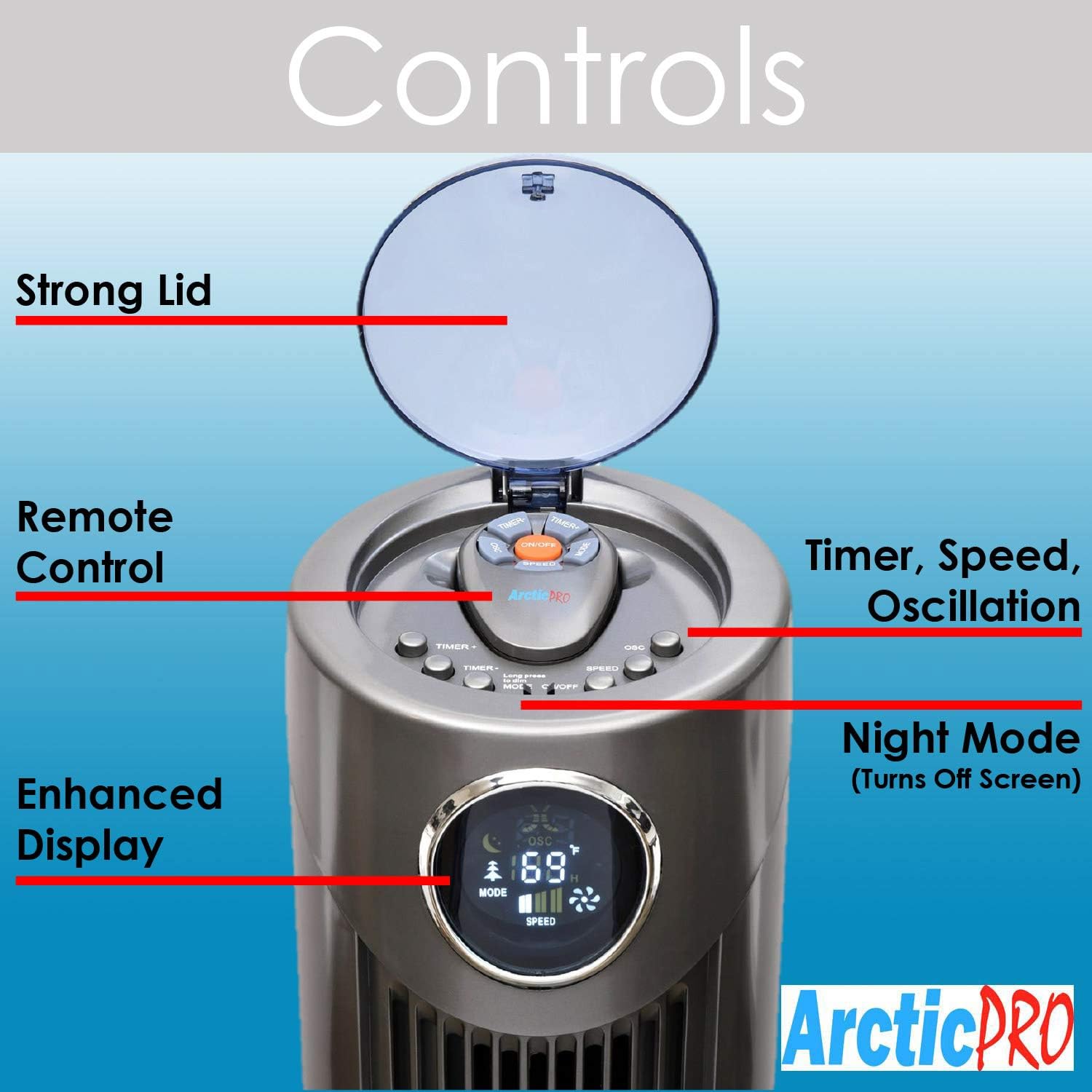
Obrázok 3: Detailný view of the fan's control panel.
- Zapnutie/vypnutie: Press the power button on the control panel or remote to turn the fan on or off.
- Nastavenia rýchlosti: The fan features 3 speed settings. Press the Speed button to cycle through Low, Medium, and High.
- Režimy: The fan offers Sleep, Nature Wind, and Normal Wind modes. Press the Mode button to switch between these settings.
- Oscilácia: Press the Oscillation button to activate or deactivate the 80-degree oscillation feature, circulating air throughout the room.
- Nočný režim: To turn off the digital screen for sensitive sleepers, hold down the Mode button for 5 seconds. To illuminate the screen again, press the Mode button once.
- Funkcia časovača: Activate the timer function to automatically shut off the fan after a set period, up to 12 hours. Press the Timer button to cycle through available time increments.
Diaľkové ovládanie
The convenient remote control allows you to operate all fan functions from a distance. It can be stored on top of the fan for easy access.

Figure 4: The fan's remote control and integrated handle.
Údržba
Pravidelné čistenie zaisťuje optimálny výkon a dlhú životnosť vášho ventilátora.
- Čistenie exteriéru: Wipe down the exterior surfaces of the fan with a soft, damp plátno. Nepoužívajte abrazívne čistiace prostriedky ani rozpúšťadlá.
- Čistenie interiéru: For deeper cleaning, there is a screw on the back that holds the back plate. Remove the screw, take off the back plate, and gently clean the internal components with a soft brush or vacuum cleaner attachment to remove dust buildup. Ensure the fan is completely dry before reassembling and operating.
- Pred akýmkoľvek čistením alebo údržbou ventilátor vždy odpojte.
Riešenie problémov
- Ventilátor sa nezapína:
- Uistite sa, že napájací kábel je bezpečne zapojený do funkčnej elektrickej zásuvky.
- Skontrolujte, či je zásuvka pod napätím, zapojením iného zariadenia.
- Verify that the power button on the unit or remote has been pressed.
- Slabé prúdenie vzduchu:
- Zvýšte nastavenie rýchlosti ventilátora.
- Clean the fan's air intake and exhaust vents to remove any dust or obstructions.
- Nezvyčajný hluk:
- Ensure the fan is placed on a stable, flat surface.
- Check for any foreign objects that may have fallen into the fan's vents.
- Perform interior cleaning to remove dust buildup that might cause rattling.
- Nefunguje diaľkové ovládanie:
- Replace the batteries (requires 2 AAA batteries).
- Uistite sa, že medzi diaľkovým ovládačom a senzorom ventilátora nie sú žiadne prekážky.
Špecifikácie
| Funkcia | Detail |
|---|---|
| Značka | Arctic-Pro |
| Názov modelu | 2103 |
| Farba | Šedá |
| Rozmery produktu | 12"H x 12"Š x 42"V |
| Hmotnosť položky | 9.85 libier |
| Zdroj napájania | Káblové elektrické |
| Počet úrovní výkonu | 3 |
| kmitanie | 80 stupňov |
| Špeciálne funkcie | Adjustable Height, Lightweight, Oscillating, Remote Controlled, Timer |
| Zahrnuté komponenty | Diaľkové ovládanie |
| Vyžadujú sa batérie | 2 batérie AAA (do diaľkového ovládača) |

Figure 5: Dimensions of the Arctic-Pro Tower Fan.
Záruka a podpora
This Arctic-Pro fan comes with a Limited Warranty of 120 Days from the date of purchase.
For any questions or support needs, please contact the manufacturer at: popshopcs@gmail.com
Ďalšie zdroje
Product Review Video
Video 1: Úprimná odpoveďview of the Arctic-Pro Digital Screen Oscillating Fan, provided by a seller. This video demonstrates various features and user experience.