
Úvod
This manual provides comprehensive instructions for the setup, operation, and maintenance of your VTech CS6829-2 2-Handset Cordless Phone with Answering System. This system is designed for home use, offering features such as caller ID, a digital answering machine, backlit keypad, and a full duplex speakerphone for enhanced communication.
Čo je v krabici
Overte si, či sú všetky položky súčasťou balenia:
- Základná jednotka
- 2 bezdrôtových telefónov
- Nabíjačka
- 2 adaptéry
- 2 sady batérií
- Kábel telefónnej linky
- Držiak na upevnenie na stenu
- Sprievodca rýchlym spustením
Nastavenie
Follow these steps to set up your VTech CS6829-2 phone system:
- Pripojenie základnej jednotky:
Plug one end of the telephone line cord into the TEL LINE jack on the back of the base unit. Plug the other end into a telephone wall jack. Plug the small end of the power adapter into the POWER jack on the back of the base unit. Plug the large end of the power adapter into a wall outlet not controlled by a wall switch.
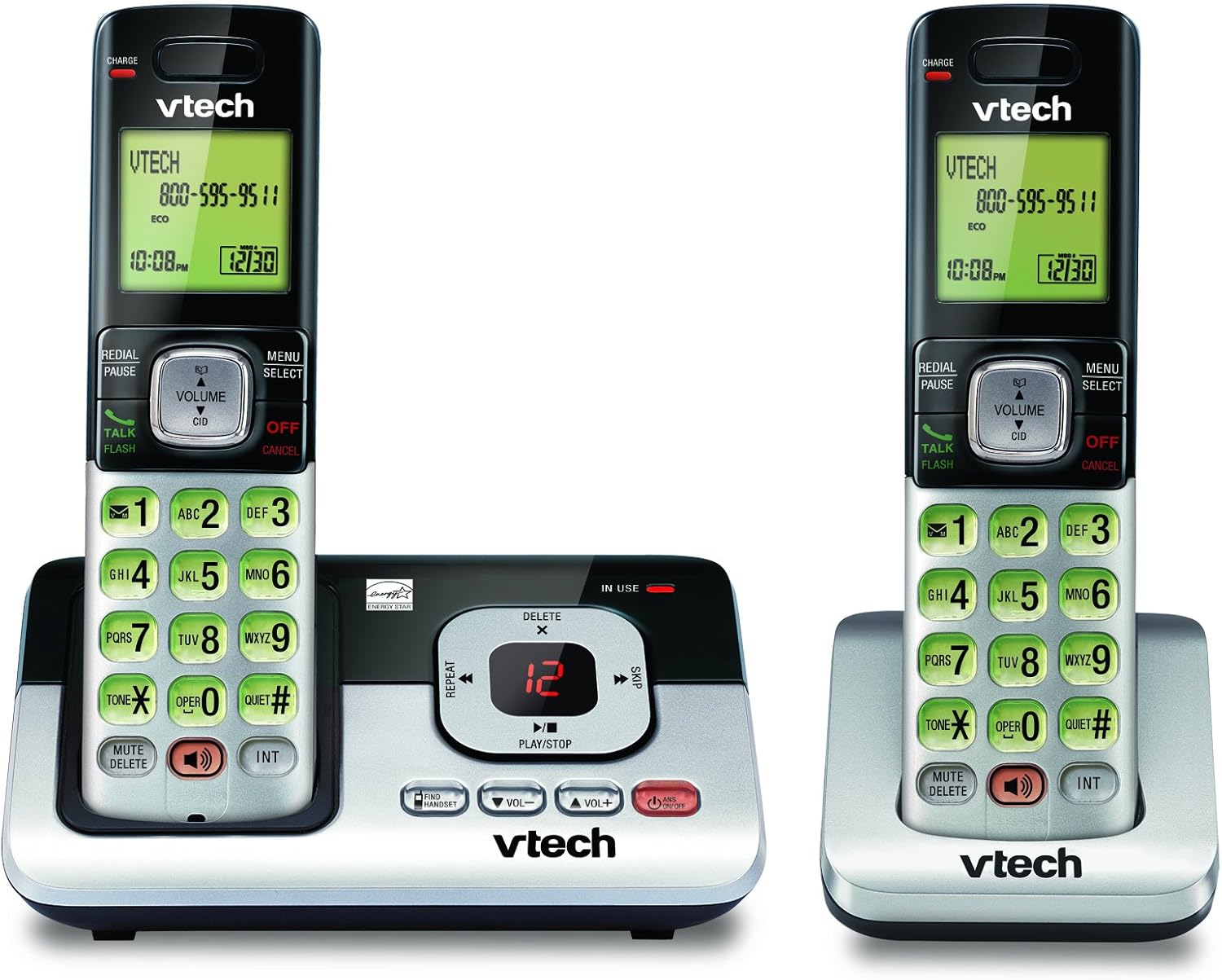
Image: The VTech CS6829-2 base unit with one handset docked, and a second handset with its charging cradle. This illustrates the main components of the phone system.
- Vložte batérie do telefónu:
Open the battery compartment cover on the back of each handset. Connect the battery pack connector securely into the jack inside the compartment. Place the battery pack with the label facing up and tuck the wires inside the compartment. Close the battery compartment cover.
- Nabíjanie slúchadiel:
Place each handset in the base unit or charger with the display facing up. The CHARGE light on the handset will illuminate, indicating proper charging. Allow the handsets to charge for at least 16 hours before initial use for optimal battery performance.

Obrázok: Uhlové view of the VTech CS6829-2 base unit with one handset docked, and the second handset in its separate charging cradle. This shows how the handsets are placed for charging.
- Nastaviť dátum a čas:
After the handsets are charged, follow the on-screen prompts or refer to the quick start guide to set the date and time. This is important for accurate caller ID and answering system timestamps.
Návod na obsluhu
Uskutočňovanie a prijímanie hovorov
- Ak chcete uskutočniť hovor: Stlačte tlačidlo HOVORTE / BLESK or any dialing key to get a dial tone, then dial the phone number.
- Ak chcete prijať hovor: Keď telefón zazvoní, stlačte HOVORTE / BLESK alebo ľubovoľné tlačidlo vytáčania.
- Ak chcete ukončiť hovor: Stlačte tlačidlo VYPNÚŤ/ZRUŠIŤ or place the handset back in the base unit/charger.
Digitálny záznamník
- Prehrávanie správ: Na základnej jednotke stlačte PLAY/STOP. On a handset, press MENU/SELECT, scroll to "Answering System", then select "Play Messages".
- Nahrávanie odchádzajúceho oznámenia: On the base unit or handset, navigate to the answering system menu and select "Record OGM" (Outgoing Message).
- Odstránenie správ: While a message is playing, press VYMAZAŤ na základňovej jednotke alebo slúchadle.
Funkcia hlasitého odposluchu
- To Use Speakerphone: Počas hovoru stlačte REPRODUKTOR button on the handset. Press it again to switch back to the handset earpiece.
Kľúčové vlastnosti
- Digital Answering System with LED Indicator and Volume Control: This system records up to 14 minutes of messages, announcements, and memos. An LED indicator notifies you of new messages. Volume control keys on the base allow easy adjustment of message playback volume.
- Caller ID / Call Waiting — Stores up to 50 Calls: Displays the name, number, time, and date of incoming calls, helping you identify callers before answering.
- Plne duplexný reproduktor: The handset features a full duplex speakerphone, enabling natural two-way conversations where both parties can speak and be heard simultaneously.
- Podsvietená klávesnica a displej: The entire keypad and LCD screen on the handset illuminate, ensuring clear visibility and easy dialing even in low-light conditions.
- Technológia úspory energie v režime ECO: This technology optimizes power consumption for extended battery performance and energy efficiency.
- Tichý režim: Allows you to silence the ringer on both the handset and base unit immediately or for a set period, providing peace and quiet when needed.
Údržba
- Čistenie: Telefón a základňovú jednotku čistite mäkkou handričkouamp handričkou. Nepoužívajte čistiace spreje ani tekuté čistiace prostriedky.
- Starostlivosť o batérie: Replace batteries when they no longer hold a charge. Use only the specified battery type. Dispose of old batteries responsibly according to local regulations.
- Podmienky prostredia: Neumiestňujte telefón na priame slnečné svetlo, do blízkosti zdrojov tepla alebo do oblastí s nadmernou vlhkosťou.
Riešenie problémov
Ak máte problémy s telefónom, vyskúšajte nasledujúce riešenia:
| Problém | Riešenie |
|---|---|
| Žiadny oznamovací tón. | Ensure the telephone line cord is securely plugged into both the base unit and the wall jack. Check that the power adapter is plugged into a working electrical outlet. |
| Telefón sa nenabíja. | Ensure the handset is properly seated in the base unit or charger. Clean the charging contacts on both the handset and base/charger with a dry cloth. Verify the power adapter is connected. |
| Slabá kvalita zvuku / šum. | Move the handset closer to the base unit. Avoid placing the phone near other electronic devices (e.g., microwaves, computers) that may cause interference. Check the telephone line cord for damage. |
| Odkazovač nezaznamenáva správy. | Uistite sa, že odkazovač je zapnutý. Skontrolujte, či nie je pamäť plná; v prípade potreby vymažte staré správy. |
Špecifikácie
| Funkcia | Detail |
|---|---|
| Číslo modelu | CS6829-2 |
| Rozmery produktu | 5.77 x 3.41 x 6.77 palca |
| Hmotnosť položky | 1.41 libry |
| Batérie | Vyžaduje sa 2 špecifická batéria pre produkt (súčasť balenia) |
| Typ systému odpovedania | digitálny |
| Pamäť ID volajúceho | Až 50 hovorov |
| Čas nahrávania odkazovača | Až 14 minút |
| Farba | Čierna/strieborná |
| Typ telefónu | Bezdrôtový |
Záruka a podpora
Informácie o záruke a technickú podporu nájdete v záručnej karte, ktorá je súčasťou balenia produktu, alebo navštívte oficiálne webové stránky spoločnosti VTech. webstránky. Uschovajte si doklad o kúpe ako doklad o kúpe pre prípad reklamácie.
Môžete tiež navštíviť Obchod VTech na Amazone pre ďalšie informácie o produkte a zdroje podpory.