
1. Produkt skončilview
The Radwin RW-7102-2000 IDU-E is an Indoor Unit (IDU) designed for telecommunication applications, specifically featuring 2 TDM ports. This unit also includes 2 Ethernet interfaces and external alarm interfaces, providing comprehensive connectivity and monitoring capabilities. It operates with a wide range DC power feed, from -20VDC to -60VDC. Please note that the AC/DC power adaptor (RW-9921-0032) must be ordered separately.
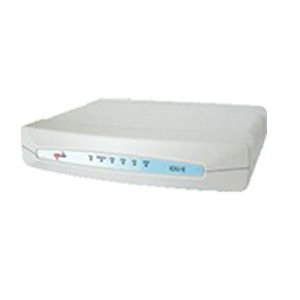
This image displays the Radwin RW-7102-2000 IDU-E, an indoor unit for telecommunications. It is a compact, rectangular device, predominantly white, featuring a series of indicator lights on its front panel. These lights, colored blue and red, provide visual status feedback for the unit's operation. The device is designed for integration into network infrastructure, facilitating data and voice transmission.
Kľúčové vlastnosti:
- 2 TDM ports (RW-9312204050) for traditional telecommunication services.
- 2 Ethernet interfaces for modern IP-based network connectivity.
- External alarm interfaces for system monitoring and fault detection.
- Wide range DC power input: -20VDC to -60VDC.
2. Nastavenie a inštalácia
This section provides general guidelines for setting up your Radwin RW-7102-2000 IDU-E. For detailed installation procedures, refer to the comprehensive installation guide provided with your unit or available on the manufacturer's webstránky.
2.1 Vybalenie a kontrola
- Carefully unpack the IDU-E unit from its packaging.
- Inspect the unit for any signs of physical damage that may have occurred during transit. If damage is found, contact your supplier immediately.
- Overte, či sú prítomné všetky komponenty uvedené v dodacom liste.
Požiadavky na napájanie 2.2
- The IDU-E requires a DC power input ranging from -20VDC to -60VDC.
- An AC/DC power adaptor (model RW-9921-0032) is required for operation but is sold separately. Ensure you have the correct adaptor before proceeding.
- Connect the power adaptor to the designated power input port on the IDU-E.
2.3 Connecting Interfaces
- TDM Ports: Connect your TDM lines to the 2 TDM ports using appropriate cabling.
- Ethernetové rozhrania: Connect your Ethernet cables to the 2 Ethernet ports for network integration.
- External Alarm Interfaces: If utilizing, connect external alarm systems to the dedicated alarm interfaces for remote monitoring.
3. Návod na obsluhu
Once the Radwin RW-7102-2000 IDU-E is properly installed and powered, it is ready for operation. The unit typically operates autonomously after initial configuration. Configuration details are usually managed via a network management system or direct console access, depending on your network setup.
3.1 Zapnutie
- Ensure all necessary cables (power, TDM, Ethernet, alarms) are securely connected.
- Apply power to the unit via the connected AC/DC adaptor.
- Observe the indicator lights on the front panel. Refer to the unit's specific documentation for the meaning of each light (e.g., power status, link status, activity).
3.2 Základné ovládanie
- The IDU-E facilitates the transmission of TDM and Ethernet traffic.
- Monitor the status indicators for normal operation. Green lights typically indicate active links and proper functioning.
- Any red or amber lights, or unexpected blinking patterns, may indicate a fault or an issue requiring attention.
4. Údržba
The Radwin RW-7102-2000 IDU-E is designed for reliable operation with minimal maintenance. However, periodic checks can help ensure optimal performance and longevity.
4.1 Všeobecná starostlivosť
- Keep the unit in a clean, dry, and well-ventilated environment.
- Zabezpečte správne prúdenie vzduchu okolo jednotky, aby ste predišli prehriatiu.
- Nevystavujte jednotku extrémnym teplotám, vlhkosti alebo priamemu slnečnému žiareniu.
4.2 Čistenie
- Dust the exterior of the unit periodically with a soft, dry cloth.
- Nepoužívajte tekuté čistiace prostriedky ani aerosólové spreje priamo na jednotku.
4.3 aktualizácií firmvéru
Periodically check the Radwin support website for available firmware updates. Firmware updates can provide performance enhancements, new features, and security improvements. Follow the manufacturer's instructions carefully when performing firmware updates.
5. Riešenie problémov
This section provides basic troubleshooting steps for common issues. For more complex problems, consult the detailed technical documentation or contact Radwin support.
5.1 Bez napájania
- Skontrolujte pripojenie napájania: Ensure the AC/DC power adaptor is securely connected to both the IDU-E and a working power outlet.
- Overte zdroj napájania: Confirm that the power outlet is active.
- Inspect Adaptor: Ensure the correct Radwin AC/DC power adaptor (RW-9921-0032) is being used and that it is not damaged.
5.2 No Link on Ethernet/TDM Ports
- Skontrolujte káble: Ensure all Ethernet and TDM cables are properly connected and not damaged.
- Verify Peer Device: Confirm that the connected device (e.g., switch, router, TDM equipment) is powered on and functioning correctly.
- Kontrolky: Observe the link/activity indicator lights on the IDU-E and the connected device.
5.3 Systémové alarmy
- If external alarms are triggered or internal alarm indicators are active, consult the detailed product documentation for specific alarm codes and their meanings.
- Address the root cause of the alarm as indicated by the system.
6. Špecifikácie
| Funkcia | Detail |
|---|---|
| Značka | Radwin |
| Model | RW-7102-2000 (IDU-E) |
| Výrobca | Radwin |
| TDM Ports | 2 (RW-9312204050) |
| Ethernetové rozhrania | 2 |
| Alarm Interfaces | External alarms interfaces included |
| DC Power Feed | -20VDC to -60VDC (wide range) |
| AC/DC adaptér | RW-9921-0032 (ordered separately) |
| Rozmery balenia | 43.18 x 27.94 x 5.08 cm |
| Číslo dielu položky | Radwin2TDM |
| ASIN | B00KC2TNHW |
| Dátum prvej dostupnosti | 13. augusta 2018 |
7. Informácie o záruke
This Radwin RW-7102-2000 IDU-E unit comes with a Záruka 3 mesiacov from the date of purchase. This warranty covers manufacturing defects and malfunctions under normal use conditions. For specific terms, conditions, and claim procedures, please refer to the official warranty documentation provided with your product or contact Radwin customer support.
Uschovajte si doklad o kúpe pre uplatnenie záruky.
8. Podpora
For technical assistance, product inquiries, or to report issues, please contact Radwin customer support. You can typically find support contact information, including phone numbers, email addresses, and online support portals, on the official Radwin webstránky.
Výrobca: Radwin
Webmiesto: www.radwin.com
When contacting support, please have your product model (RW-7102-2000) and serial number ready to expedite assistance.