
1. Produkt skončilview
The DeltaTrak 13307 Jumbo Display Thermohygrometer is designed for monitoring temperature and relative humidity in various environments such as hospitals, pharmacies, blood banks, greenhouses, laboratories, and clean rooms. This device features a large LCD display for easy readability, switchable °F/°C units, and memory for minimum and maximum readings. It includes an external thermistor probe for outdoor or remote temperature monitoring and a freeze alarm setting.
- °C/°F selectable temperature display.
- Indoor and outdoor temperature sensors, plus an indoor humidity sensor.
- Jumbo display for clear temperature and humidity readings.
- Min/Max memory function to recall highest and lowest recorded values.
- Freeze Alert feature for external temperature monitoring.
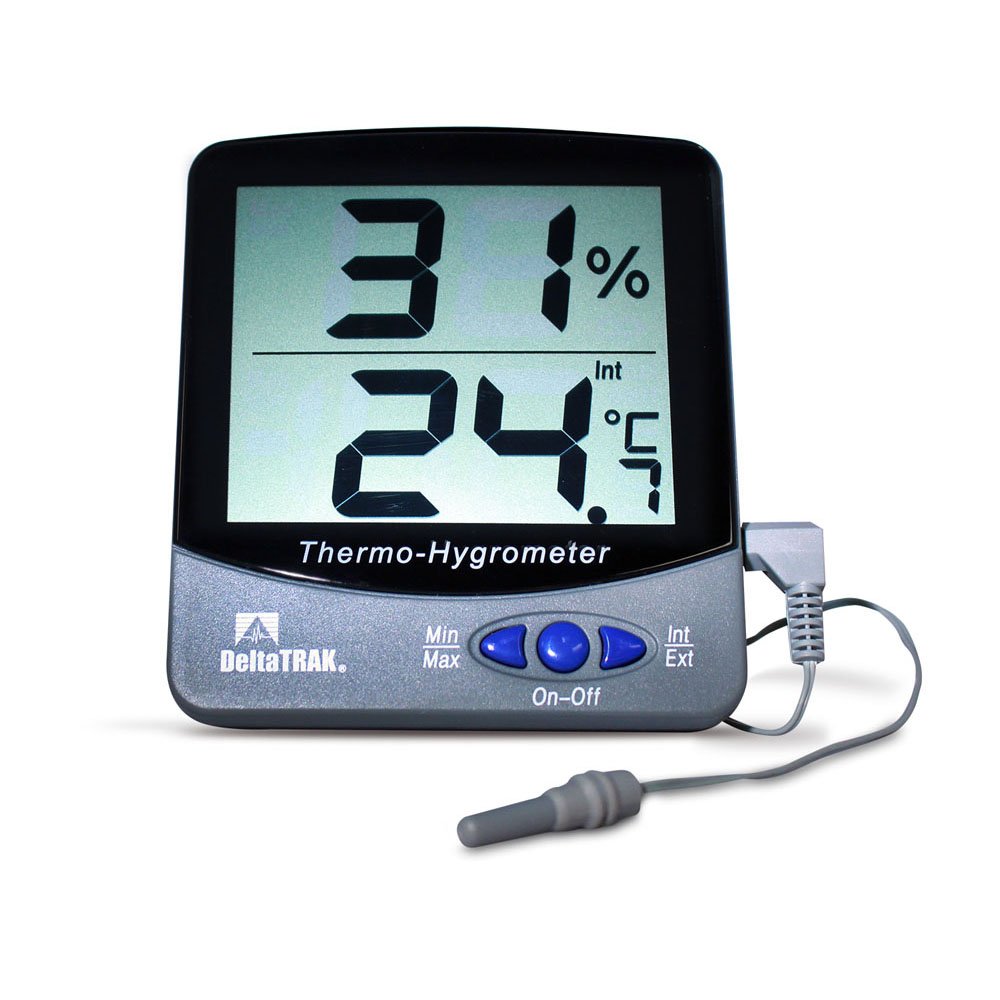
Obrázok 1: DeltaTrak 13307 Jumbo Display Thermohygrometer with external probe.
2. Nastavenie a inštalácia
2.1 Inštalácia batérie
- Nájdite priehradku na batérie na zadnej strane jednotky.
- Otvorte kryt priehradky na batérie.
- Vložte dve (2) batérie typu AAA a dbajte na správnu polaritu (+/-).
- Close the battery compartment cover securely. The unit should power on automatically.
2.2 Umiestnenie snímača
- Hlavná jednotka: Place the main thermohygrometer unit in the desired indoor location. Ensure it is not exposed to direct sunlight, drafts, or extreme temperature fluctuations, which could affect indoor temperature and humidity readings.
- Externá sonda: The external temperature probe has a 3-meter (9.8 feet) cable. Position the probe in the area where outdoor or remote temperature monitoring is required. The probe itself is IP67 water-resistant, making it suitable for outdoor use or in damp environments. Ensure the cable is routed safely and not pinched.
3. Návod na obsluhu
3.1 Zapnutie/vypnutie
The unit typically powers on automatically upon battery installation. There is no dedicated power button. To turn off, remove the batteries.
3.2 °C/°F Selection
Locate the °C/°F button, usually on the back or side of the unit. Press this button to toggle between Celsius and Fahrenheit temperature display units.
3.3 Min/Max Memory Function
The thermohygrometer automatically records the minimum and maximum temperature and humidity readings since the last reset. To view tieto hodnoty:
- Stlačte tlačidlo MIN / MAX raz stlačte tlačidlo pre zobrazenie maximálnych zaznamenaných hodnôt.
- Stlačte tlačidlo MIN / MAX druhýkrát sa zobrazia minimálne zaznamenané hodnoty.
- Stlačte tlačidlo MIN / MAX tretíkrát sa vrátite k aktuálnym údajom.
- Ak chcete vymazať pamäť min./max. hodnôt, stlačte a podržte tlačidlo MIN / MAX button for approximately 3 seconds while the Min/Max values are displayed. The display will flash, indicating the memory has been cleared.
3.4 Freeze Alert Setting
The unit features a freeze alert that sounds when the external temperature reaches 0°C (32°F).
- Refer to the specific button on your unit (often labeled ALERT or FREEZE) to activate or deactivate this feature.
- When activated, an alarm icon may appear on the display.
- The alarm will sound when the external probe detects a temperature of 0°C (32°F) or below.
4. Údržba
4.1 Čistenie
Wipe the unit's casing s mäkkým, damp handričkou. Nepoužívajte abrazívne čistiace prostriedky ani rozpúšťadlá, pretože by mohli poškodiť displej aleboasing. Ensure no liquid enters the unit's openings.
4.2 Výmena batérie
When the display becomes dim or the unit stops functioning, it is time to replace the batteries. Follow the battery installation steps in Section 2.1. Always replace both AAA batteries simultaneously with new ones.
4.3 Starostlivosť o senzor
The external probe is water-resistant (IP67), but the main unit is not. Avoid submerging the main unit in water. Keep the sensors free from dust and debris for accurate readings.
5. Riešenie problémov
- Žiadny displej alebo slabý displej:
- Skontrolujte polaritu batérie.
- Vymeňte batérie za nové AAA batérie.
- Nepresné hodnoty:
- Ensure the unit and external probe are not exposed to direct sunlight, heat sources, or strong drafts.
- Verify the external probe is securely connected to the main unit.
- Allow the unit to stabilize for at least 30 minutes after placement or battery change.
- If readings consistently deviate significantly from a known accurate reference, the unit may require calibration or service. Note that the external probe only measures temperature, not humidity.
- External Probe Not Working:
- Ensure the probe's connector is fully inserted into the jack on the main unit.
- Inspect the probe cable for any visible damage.
6. Špecifikácie
| Funkcia | Špecifikácia |
|---|---|
| Číslo modelu | 13307 |
| Rozsah vnútorných teplôt | 0 °C až 50 °C (32 °F až 122 °F) |
| External Probe Temperature Range | -50 °C až 70 °C (-58 °F až 158 °F) |
| Rozsah vnútornej vlhkosti | 20 % až 90 % relatívnej vlhkosti |
| Presnosť teploty | ±1°C (±1.8°F) from -40°C to 70°C |
| Presnosť vlhkosti | ±5% from 35% to 85% RH at 25°C |
| Rozlíšenie | 0.1°C / 0.1°F, 1% RH |
| Miera aktualizácie zobrazenia | 10 sekundy |
| External Probe Cable Length | 3 9.8 metrov (XNUMX XNUMX stôp) |
| External Probe Dimensions | 30 mm (L) x 5 mm (Dia.) |
| Display Window Size | 79 mm (W) x 66 mm (H) / 3.11 in. (W) x 2.79 in. (H) |
| Character Height (Display) | 27 mm (1.06 palca) |
| Rozmery produktu | 98 mm (W) x 110 mm (H) x 21 mm (D) / 3.85 in. (W) x 4.33 in. (H) x 0.82 in. (D) |
| Hmotnosť | 68 g (2.4 oz) |
| CasinMateriál | Polykarbonát a ABS |
| Typ snímača teploty | termistor |
| Typ snímača vlhkosti | Electronic Polymer Film Capacitance |
| Typ batérie | 2 x AAA |
| Odolnosť voči vode | IP67 (iba sonda) |
| Certifikácie | CE Marked, NIST Traceable |
7. Záruka a podpora
For warranty information, technical support, or service inquiries, please contact DeltaTrak customer service directly. Refer to the product packaging or the official DeltaTrak webnajaktuálnejšie kontaktné údaje a záručné podmienky nájdete na stránke.
Výrobca: DeltaTrak