
1. Produkt skončilview
The Plugable USB-C Multi-Card Reader (USBC-FLASH3) is a high-performance, driverless card reader designed to enhance your USB 3.1 Type-C (USB-C) device with fast data transfer capabilities. It supports a wide range of memory card formats, making it a versatile accessory for various computing needs.

Figure 1: Plugable USB-C Multi-Card Reader (USBC-FLASH3)
Kľúčové vlastnosti:
- Ohromne rýchly výkon: Supports USB 3.1 Type-C (USB-C) for high-speed data transfer.
- Široká kompatibilita: Compatible with Late 2016 / 2017 / 2018 MacBook Pro, 12" Retina MacBook, Chromebook Pixel, and most USB-C and Thunderbolt 3 host PCs.
- Podpora viacerých kariet: Easily access Secure Digital (SD), MultiMediaCard (MMC), and Memory Stick (MS) formats, including Micro SD.
- Prevádzka bez vodiča: Functions out of the box with Mac, Linux, and Windows Desktop or Laptop systems without requiring additional driver installation.
- Optimálny výkon karty: Offers UHS-I mode support for SD, SDHC, and SDXC cards up to 104 MB/sec and accommodates SDXC / MSXC Cards up to 2 TB in size.
2. Pokyny na nastavenie
The Plugable USB-C Multi-Card Reader is designed for simple plug-and-play functionality. Follow these steps to begin using your device:
- Pripojenie k hostiteľskému zariadeniu: Plug the USB-C connector of the card reader into an available USB-C or Thunderbolt 3 port on your computer.
- Vložte pamäťovú kartu: Carefully insert your desired memory card (SD, Micro SD, MMC, or MS) into the corresponding slot on the card reader. Ensure the card is inserted correctly and fully seated.

Figure 2: Inserting an SD Card into the Reader
Poznámky ku kompatibilite:
- Compatible with Windows (11, 10, 8.1/8), Mac OS X (10.10 Yosemite and newer), and Linux (3.x Kernel and newer versions).
- For Mac users, some ports may require extra force for full insertion.
- Mobile platforms, especially most Android devices with USB-C ports, generally DO NOT SUPPORT adding mass storage devices without rooting/jailbreaking. Verify with your device manufacturer before attempting to use the card reader with mobile devices.
3. Návod na obsluhu
Once connected and a memory card is inserted, your computer should automatically recognize the card reader as an external storage device. You can then access the contents of the memory card as you would with any other drive.
Podporované typy kariet:
- Secure Digital (SD)
- MultiMediaCard (MMC)
- Memory Stick (MS)
- Micro SD
Prenos dát:
The card reader supports high-speed data transfer, leveraging USB 3.1 Type-C capabilities. Transfer speeds for UHS-I mode SD, SDHC, and SDXC cards can reach up to 104 MB/sec.
Bezpečné odstránenie:
Always safely eject the memory card from your operating system before physically removing it from the card reader or disconnecting the card reader from your computer. This prevents data corruption.
4. Údržba
To ensure the longevity and optimal performance of your Plugable USB-C Multi-Card Reader, follow these simple maintenance guidelines:
- Čistenie: Use a soft, dry, lint-free cloth to clean the exterior of the device. Avoid using liquid cleaners or solvents.
- Ukladací priestor: Čítačku kariet skladujte na chladnom a suchom mieste mimo dosahu priameho slnečného žiarenia a extrémnych teplôt.
- Manipulácia: Zabráňte pádu zariadenia alebo jeho vystavovaniu silným nárazom. Pamäťové karty nevkladajte do slotov násilím.
5. Riešenie problémov
If you encounter issues with your Plugable USB-C Multi-Card Reader, please refer to the following common solutions:
- Zariadenie nebolo rozpoznané:
- Ensure the USB-C connector is fully inserted into your computer's port. Mac ports may sometimes require extra force.
- Try connecting the card reader to a different USB-C or Thunderbolt 3 port on your computer.
- Reštartujte počítač a skúste to znova.
- Uistite sa, že váš operačný systém je aktuálny.
- Pamäťová karta nebola zistená:
- Verify the memory card is inserted correctly and completely into the appropriate slot.
- Test with a different memory card to rule out a card issue.
- Note that the physical write-protect switch on SD cards is not supported by this reader. Ensure your card is not write-protected if you intend to write data.
- Pomalé prenosové rýchlosti:
- Ensure your computer's USB-C port supports USB 3.1 (or Thunderbolt 3) for optimal speeds. Connecting to a USB 2.0 port will result in slower speeds.
- The performance of the memory card itself can affect transfer speeds. Use high-speed cards for best results.
- Kompatibilita mobilných zariadení: As noted in the setup section, most Android devices with USB-C ports do not natively support external mass storage without modifications. If you are experiencing issues on a mobile device, this is likely the cause.
If these steps do not resolve your issue, please contact Plugable Support for further assistance.
6. Špecifikácie

Figure 3: Product Packaging with Specifications
| Funkcia | Detail |
|---|---|
| Značka | Pripojiteľné |
| Číslo modelu | USBC-FLASH3 |
| Technológia pripojenia | USB typu C (USB 3.1) |
| Podporované typy médií | SD, SDHC, SDXC, Micro SD, MMC, MS, MSXC |
| Maximálna kapacita karty | Up to 2 TB (SDXC / MSXC) |
| Operačné systémy | Windows, macOS, Linux |
| Hmotnosť položky | 1.6 uncí |
| Rozmery produktu (DxŠxV) | 7.28 x 4.53 x 0.79 palca |
| Farba | Flash Silver (Product appears green in images) |
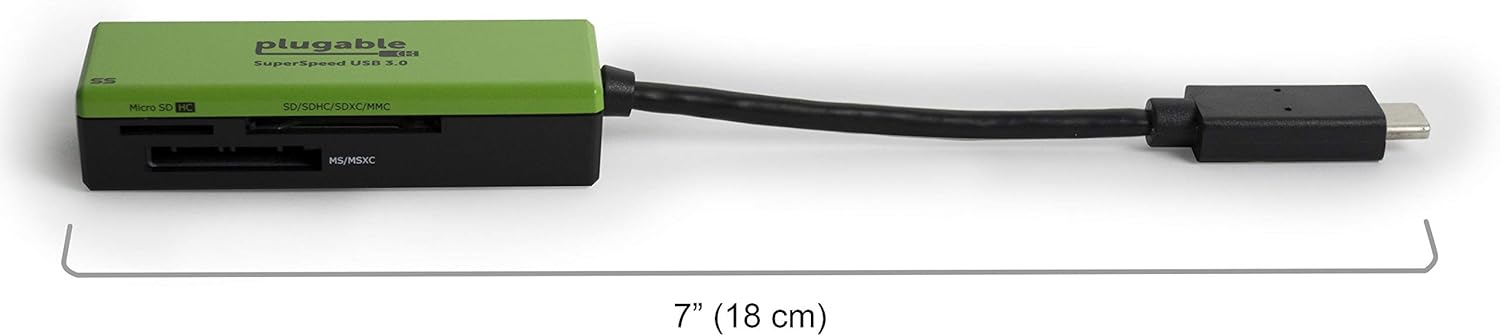
Obrázok 4: Rozmery produktu
7. Informácie o záruke
Plugable products typically come with a limited warranty. For detailed information regarding the warranty period, coverage, and terms for your USBC-FLASH3 Multi-Card Reader, please refer to the official Plugable webalebo kontaktujte ich zákaznícku podporu.
8. Podpora
For technical assistance, troubleshooting, or any questions regarding your Plugable USB-C Multi-Card Reader, please contact Plugable Support:
- E-mailová podpora: support@plugable.com
- Stránka produktu: Visit the official product page for the USBC-FLASH3 on the Plugable website for FAQs, drivers, and additional resources. You can often find this by searching for "Plugable USBC-FLASH3" online.
No relevant instructional videos from the seller were available for direct embedding in this manual.