
Solight TE09
Solight TE09 Weather Station User Manual
Model: TE09
Úvod
Thank you for choosing the Solight TE09 Weather Station. This manual provides essential information for the proper setup, operation, and maintenance of your device. Please read it thoroughly before use and retain it for future reference.
Bezpečnostné informácie
- Nevystavujte zariadenie extrémnym teplotám, priamemu slnečnému žiareniu alebo vysokej vlhkosti.
- Zabráňte pádu zariadenia alebo jeho vystaveniu silným nárazom.
- Nepokúšajte sa zariadenie rozoberať ani upravovať. Zruší sa tým platnosť záruky.
- Batérie uchovávajte mimo dosahu detí. Pri požití okamžite vyhľadajte lekársku pomoc.
- Použité batérie zlikvidujte v súlade s miestnymi predpismi.
- Zariadenie čistite mäkkou, suchou handričkou. Nepoužívajte abrazívne čistiace prostriedky ani rozpúšťadlá.
Obsah balenia
Po vybalení skontrolujte obsah balenia. Ak niektoré položky chýbajú alebo sú poškodené, kontaktujte svojho predajcu.
- Solight TE09 Weather Station Unit
- Používateľská príručka (tento dokument)
Koniec produktuview
The Solight TE09 Weather Station is designed to provide accurate indoor temperature and humidity readings. Its compact design makes it suitable for various indoor environments.
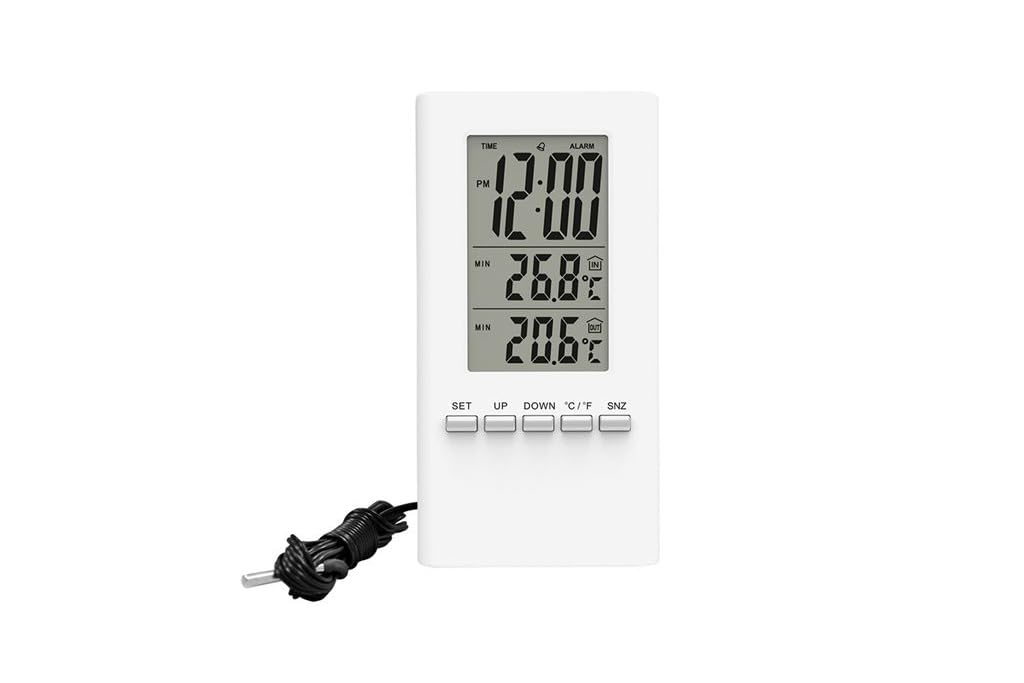
Obrázok 1: Predné view of the Solight TE09 Weather Station, displaying its screen and compact white casing.
Kľúčové komponenty:
- LCD displej: Shows temperature, humidity, and other relevant information.
- Ovládacie tlačidlá: For setting time, units, and other functions.
- Priestor na batériu: Nachádza sa na zadnej strane jednotky.
Nastavenie
1. Inštalácia batérie
- Locate the battery compartment cover on the back of the Solight TE09 Weather Station.
- Posuňte alebo odpnite kryt, aby ste ho otvorili.
- Insert 1.5V AAA alkaline batteries (not included) according to the polarity indicators (+ and -) inside the compartment.
- Bezpečne zatvorte kryt priestoru pre batérie.
Poznámka: Ensure batteries are inserted correctly. Incorrect insertion may damage the device.
2. Initial Power-On and Placement
- Once batteries are installed, the device will power on automatically and display initial readings.
- Place the weather station in a suitable indoor location, away from direct sunlight, heat sources, and drafts, which could affect temperature and humidity accuracy.
- Allow the device a few minutes to stabilize and display accurate readings after initial setup.
Návod na obsluhu
1. Displaying Temperature and Humidity
The main display continuously shows the current indoor temperature and humidity. No specific action is required to view tieto čítania.
2. Changing Temperature Units (Celsius/Fahrenheit)
Prepínanie medzi stupňami Celzia (°C) a Fahrenheita (°F):
- Locate the "°C/°F" button, usually on the back or side of the unit.
- Press the button once to toggle between the two temperature units. The display will update accordingly.
3. Setting Time and Date (if applicable)
Poznámka: The Solight TE09 is primarily a temperature and humidity monitor. If your model includes time/date functionality, follow these general steps:
- Press and hold the "SET" or "MODE" button for a few seconds until the time display starts flashing.
- Use the "UP" or "DOWN" buttons to adjust the hour, then press "SET" or "MODE" to confirm and move to minutes.
- Repeat for minutes, then for date (year, month, day) if available.
- Press "SET" or "MODE" again to exit the setting mode.
Údržba
1. Čistenie zariadenia
- Wipe the exterior of the weather station with a soft, dry, or slightly damp plátno.
- Do not use abrasive cleaners, alcohol, or corrosive chemicals, as these can damage the surface and internal components.
- Dbajte na to, aby sa do zariadenia nedostala žiadna tekutina.
2. Výmena batérie
- When the display becomes dim or the device stops functioning, it's time to replace the batteries.
- Follow the "Battery Installation" steps in the Setup section to replace the old batteries with new 1.5V AAA alkaline batteries.
- Dispose of old batteries responsibly according to local environmental regulations.
3. Skladovanie
Ak sa zariadenie nebude dlhší čas používať, vyberte z neho batérie, aby ste predišli ich vytečeniu, a uskladnite ho na chladnom a suchom mieste.
Riešenie problémov
| Problém | Možná príčina | Riešenie |
|---|---|---|
| Žiadny alebo slabý displej. | Batérie sú vybité alebo nesprávne vložené. | Vymeňte batérie za nové 1.5 V alkalické batérie typu AAA a dbajte na správnu polaritu. |
| Nepresné údaje o teplote/vlhkosti. | Zariadenie umiestnené v blízkosti zdrojov tepla, priameho slnečného žiarenia alebo prievanu. | Relocate the weather station to a stable indoor environment away from interfering factors. Allow time for readings to stabilize. |
| Tlačidlá nereagujú. | Dočasná chyba softvéru alebo slabá batéria. | Remove and reinsert batteries to reset the device. If the issue persists, replace batteries. |
Špecifikácie
- Model: Solight TE09
- Farba: Biela
- Materiál: Plastové
- Zdroj napájania: Battery (AAA alkaline, 1.5V)
- Vrátane batérií: Nie
- GTIN: 08592718012212
- Výrobca: Solight
- Prvý dostupný dátum: 7. októbra 2018
Záruka a podpora
Informácie o záruke a technickej podpore nájdete v dokumentácii dodanej v mieste nákupu alebo sa obráťte na svojho predajcu. Uschovajte si doklad o kúpe ako doklad o kúpe.
Ask a question about this manual
Ask about setup, troubleshooting, compatibility, parts, safety, or missing instructions. Manuals+ will review the question and use this page’s manual context to help answer it.