
Úvod
Ďakujem za nákupasing the SENTRY HPXBT150 Bluetooth Flat Cord Earbuds. This manual provides detailed instructions on how to set up, operate, and maintain your new wireless earbuds. Please read this manual thoroughly before use to ensure optimal performance and longevity of your device.
Obsah balenia
- SENTRY HPXBT150 Bluetooth Flat Cord Earbuds
- Ochranné puzdro
- Nabíjací kábel USB (Micro-USB)
- Removable Ear Hooks
- Používateľská príručka
Koniec produktuview
The SENTRY HPXBT150 earbuds feature Bluetooth wireless technology, allowing for a cord-free listening experience. They include an in-line microphone for hands-free calls and media control buttons for easy operation. Removable ear hooks provide a secure fit, especially during physical activity.
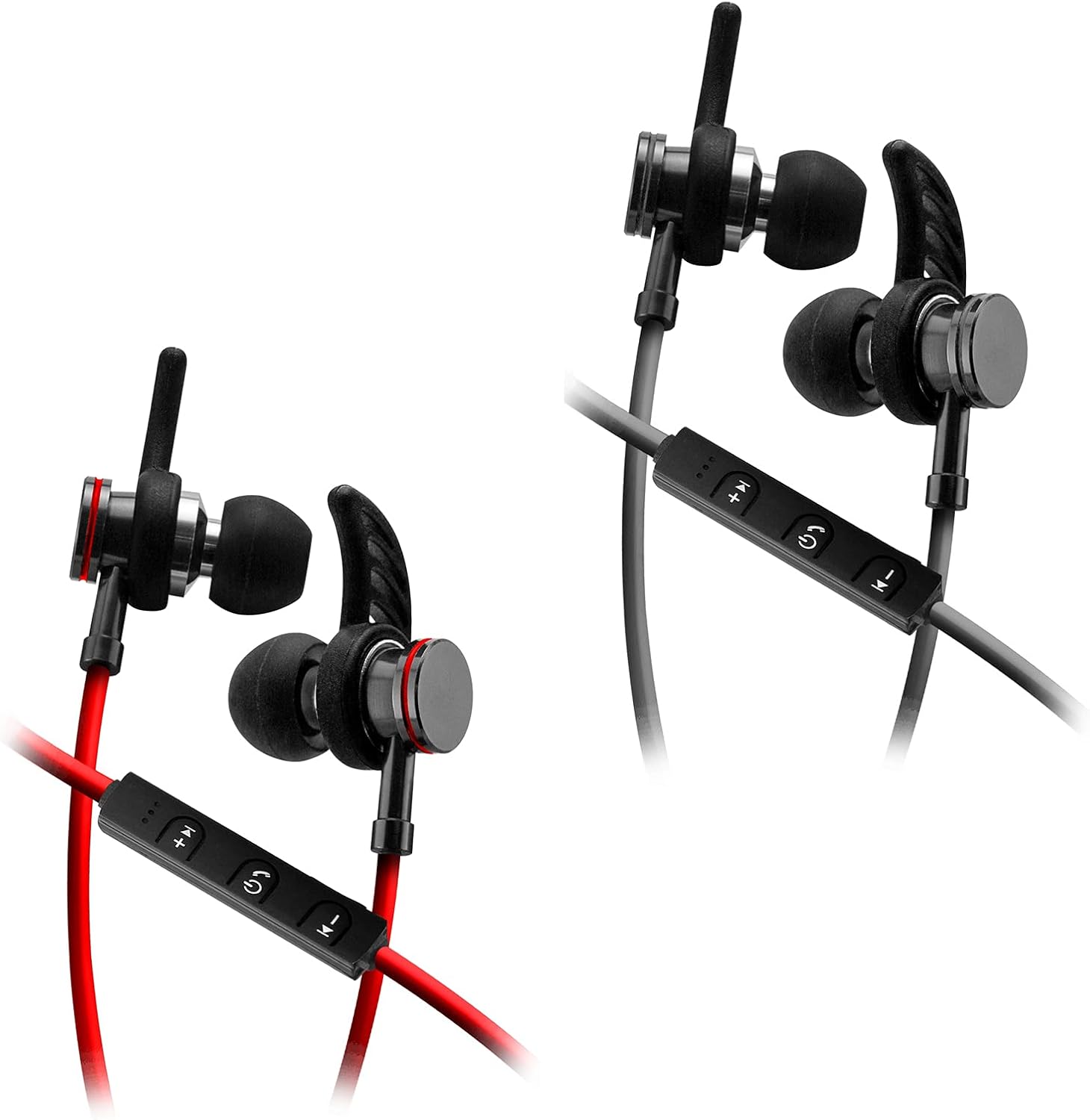
Image: SENTRY HPXBT150 Bluetooth Earbuds showing the in-line control panel and ear hooks. The control panel features volume up/next track, power/multifunction, and volume down/previous track buttons.
Nastavenie
1. Nabíjanie slúchadiel
- Locate the Micro-USB charging port on the in-line control unit.
- Connect the provided USB charging cable to the earbuds' charging port.
- Zapojte druhý koniec USB kábla do kompatibilného USB zdroja napájania (napr. USB port počítača, USB adaptér do steny).
- The LED indicator light will illuminate during charging. It will change color or turn off once charging is complete. A full charge typically takes approximately 1-2 hours.
2. Párovanie pomocou Bluetooth
- Pred prvým párovaním sa uistite, že slúchadlá sú úplne nabité.
- Press and hold the multi-function button (usually the center button on the in-line control) for approximately 5-7 seconds until the LED indicator light flashes red and blue alternately. This indicates the earbuds are in pairing mode.
- Na zariadení s podporou Bluetooth (smartfón, tablet, počítač) prejdite do ponuky nastavení Bluetooth.
- Zapnite Bluetooth a vyhľadajte dostupné zariadenia.
- Select "HPXBT150" or a similar name from the list of found devices.
- Once successfully paired, the LED indicator on the earbuds will typically flash blue slowly or turn off, and you will hear an audible confirmation.
- Ak sa zobrazí výzva na zadanie hesla, zadajte „0000“.
Návod na obsluhu
Zapnutie/vypnutie
- Zapnutie: Press and hold the multi-function button for approximately 3 seconds until the LED indicator flashes blue and you hear a power-on tone.
- Vypnúť: Press and hold the multi-function button for approximately 3-5 seconds until the LED indicator flashes red and you hear a power-off tone.
Prehrávanie hudby
- Prehrať/pozastaviť: Stlačte raz multifunkčné tlačidlo.
- Zvýšiť hlasitosť: Stlačte tlačidlo „+“.
- Znížiť hlasitosť: Stlačte tlačidlo „-“.
- Ďalšia skladba: Stlačte a podržte tlačidlo „+“.
- Predchádzajúca skladba: Stlačte a podržte tlačidlo „-“.
Správa hovorov
- Prijať/Ukončiť hovor: Stlačte raz multifunkčné tlačidlo.
- Odmietnuť hovor: Stlačte a podržte multifunkčné tlačidlo približne 2 sekundy.
- Znova vytočiť posledné číslo: Dvakrát stlačte multifunkčné tlačidlo.
Údržba
- Čistenie: Use a soft, dry cloth to clean the earbuds. Do not use harsh chemicals or abrasive materials.
- Ukladací priestor: Keď slúchadlá nepoužívate, uložte ich do priloženého ochranného puzdra, aby ste predišli ich poškodeniu.
- Starostlivosť o batérie: Aby ste zachovali výdrž batérie, vyhýbajte sa častému úplnému vybíjaniu slúchadiel. Pravidelne ich nabíjajte, aj keď ich dlhší čas nepoužívate.
- Vyhnite sa vlhkosti: Keep the earbuds away from water and excessive moisture.
Riešenie problémov
| Problém | Možné riešenie |
|---|---|
| Slúchadlá sa nezapínajú. | Ensure the earbuds are fully charged. Connect to a power source and allow time to charge. |
| Nedá sa spárovať so zariadením. | Ensure earbuds are in pairing mode (flashing red/blue). Turn off and on Bluetooth on your device. Move earbuds closer to your device. Forget previous pairings on your device and try again. |
| Žiadny zvuk alebo nízka hlasitosť. | Check volume levels on both the earbuds and your connected device. Ensure earbuds are properly paired. Try re-pairing the earbuds. |
| Prerušované pripojenie. | Ensure there are no obstructions between the earbuds and your device. Move closer to your device. Avoid environments with strong Wi-Fi or other wireless interference. |
Špecifikácie
- Model: HPXBT150
- Technológia pripojenia: Bezdrôtové (Bluetooth)
- Jednotka pohonu: 10 mm
- Impedancia: 32+/-3 Ohms
- Citlivosť: 103dB +/- 3dB
- Frekvenčná odozva: 20 Hz – 20 kHz
- Kompatibilné zariadenia: Phones, Tablets, MP3 Players, Computers, Gaming Consoles
- Typ ovládania: Ovládanie médií
- Špeciálne vlastnosti: Microphone Included, USB Connectivity, Removable Ear Hooks
- Hmotnosť položky: 2.08 uncí
Bezpečnostné informácie
- Do not expose the earbuds to extreme temperatures, direct sunlight, or fire.
- Nerozoberajte ani neupravujte slúchadlá. Môže to viesť k zrušeniu záruky a poškodeniu.
- Vyhnite sa dlhodobému počúvaniu pri vysokej hlasitosti, aby ste predišli poškodeniu sluchu.
- Uchovávajte mimo dosahu detí a domácich zvierat.
- Produkt zlikvidujte zodpovedne v súlade s miestnymi predpismi.
Záruka a podpora
For warranty information and technical support, please refer to the documentation included with your purchase or contact SENTRY customer service directly. Keep your proof of purchase for warranty claims.