
Jeden pre všetkých WM2251
Používateľská príručka držiaka na televízor One For All Full Motion WM2251
Model: WM2251 | Značka: One For All
Úvod
This manual provides comprehensive instructions for the installation, operation, and maintenance of your One For All Full Motion TV Bracket, model WM2251. This bracket is designed to securely mount televisions ranging from 13 to 40 inches, offering flexible viewing angles with its swivel and tilt capabilities.

Image: The One For All Full Motion TV Bracket, model WM2251, showcasing its robust design and articulating arm.
Bezpečnostné informácie
Please read all safety warnings and instructions carefully before installation and use. Failure to do so may result in property damage, serious injury, or death.
- Ensure the mounting surface can safely support the combined weight of the bracket and the television.
- Use appropriate tools and follow all drilling and mounting instructions precisely.
- Do not exceed the maximum weight capacity of 30kgs (66 lbs).
- Verify VESA compatibility (75x75, 100x100, 200x100, 200x200) with your TV before installation.
- Počas inštalácie držte deti a domáce zvieratá mimo dosahu.
- Ak si nie ste istí niektorou časťou inštalácie, poraďte sa s kvalifikovaným odborníkom.
Obsah balenia
Pred začatím inštalácie skontrolujte, či sú všetky komponenty prítomné.
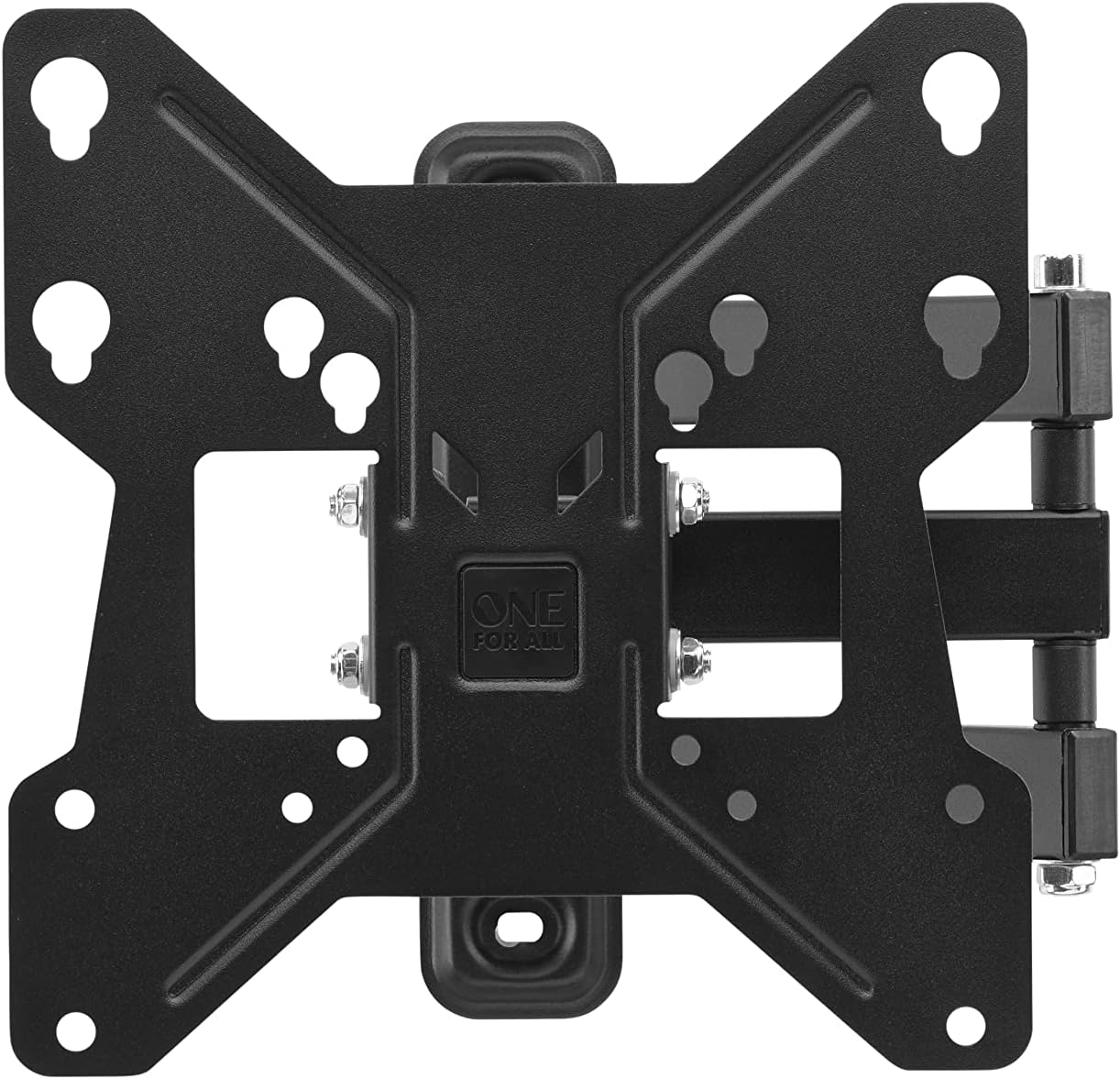
Obrázok: Zhora nadol view of the One For All TV Bracket, showing the main mounting plate and articulating arm.
- TV Wall Mount Bracket Assembly
- Mounting Hardware (screws, concrete anchors, spacers)
- Návod na použitie
Nastavenie a inštalácia
Kontrolný zoznam pred inštaláciou
- Confirm your TV's screen size is between 13 and 40 inches.
- Check your TV's VESA mounting pattern: 75x75, 100x100, 200x100, or 200x200.
- Ensure your TV's weight does not exceed 30kgs.
- Identify the type of wall (wood stud, concrete, brick) and use appropriate anchors.
Kroky inštalácie
- Attach Bracket to TV: Secure the TV-side bracket components to the back of your television using the provided screws that match your TV's VESA pattern. Ensure a snug fit.
- Označte polohu steny: Determine the desired height for your TV. Hold the wall plate against the wall and mark the drilling points. Use a spirit level to ensure it is perfectly horizontal.
- Vŕtacie otvory: Drill pilot holes at the marked locations. For wood studs, drill directly. For concrete or brick, insert the provided concrete anchors.
- Montážna doska na stenu: Secure the wall plate to the wall using the appropriate screws. Ensure it is firmly attached and stable.
- Zavesiť televízor: Carefully lift the TV with the attached bracket and hook it onto the wall plate. Ensure it is securely seated.
- Upevnenie televízora: Tighten any safety screws or locking mechanisms to prevent accidental dislodging of the TV from the mount.

Obrázok: Bývalý/áample of the TV bracket installed on a wall, demonstrating its discreet presence above a living space.
For additional assistance, you can download the One For All Toolbox app (available for iOS and Android), which includes tools like a spirit level and flashlight to aid installation.
Operating the TV Bracket
The One For All Full Motion TV Bracket allows for flexible adjustment of your television's viewing uhol.
- Swivel (180°): Gently push or pull the TV to rotate it horizontally up to 180 degrees (90 degrees left or right from center). This is ideal for viewz rôznych častí miestnosti.
- Tilt (15°): Adjust the vertical angle of the TV up to 15 degrees (up or down). This feature helps reduce glare and optimize viewing from various heights.
- Správa káblov: Utilize the integrated cable management system to route and conceal cables for a tidy appearance.
Údržba
To ensure the longevity and proper function of your TV bracket:
- Periodically check all screws and bolts to ensure they remain tight.
- Clean the bracket with a soft, dry cloth. Avoid abrasive cleaners or solvents.
- Do not hang objects from the bracket or apply excessive force when adjusting the TV.
Riešenie problémov
| Problém | Možná príčina | Riešenie |
|---|---|---|
| Televízor nie je vodorovne | Wall plate not level during installation | Re-adjust wall plate using a spirit level. |
| Držiak sa zdá byť uvoľnený | Screws are not tightened sufficiently or wall anchors are inadequate | Re-tighten all mounting screws. Ensure correct wall anchors were used for your wall type. |
| TV does not fit mount | Incorrect VESA size or TV size/weight | Verify your TV's VESA pattern and ensure it is within the 13-40 inch screen size and 30kg weight limit. |
Špecifikácie
- Model: WM2251
- Kompatibilita veľkosti obrazovky: 13-40 palcov
- Maximálna nosnosť: 30 kg (66 libier)
- Kompatibilita VESA: 75x75, 100x100, 200x100, 200x200
- Uhol otočenia: Až 180°
- Uhol sklonu: Až 15°
- Farba: Čierna
- Materiál: Plastové
- Rozmery produktu: 9.45 x 1.93 x 9.8 palca
Záruka a podpora
Informácie o záruke a technickej podpore nájdete na oficiálnych webových stránkach One For All. webalebo kontaktujte ich zákaznícky servis. Uschovajte si doklad o kúpe ako dôkaz o kúpe.
You can also visit the One For All Store on Amazon for more products and information: Jeden obchod pre všetkých.
Ask a question about this manual
Ask about setup, troubleshooting, compatibility, parts, safety, or missing instructions. Manuals+ will review the question and use this page’s manual context to help answer it.