
1. Produkt skončilview
The DEPSTECH WF010-3.5M Wireless Endoscope is a versatile inspection camera designed for use with Android 5.0+ and iOS 9+ smartphones and tablets. Featuring a 2.0 Megapixels HD camera and a bendable semi-rigid cable, it allows for visual inspection in hard-to-reach areas. The IP67 waterproof probe and adjustable LED lights ensure clear imaging in various environments.

Image 1: The DEPSTECH WF010-3.5M Wireless Endoscope, a flexible inspection camera with a built-in light.
2. Obsah balenia
Uistite sa, že balenie obsahuje všetky nasledujúce komponenty:
- DEPSTECH Wireless Endoscope (WF010-3.5M)
- USB nabíjací kábel
- Háčikový nástavec
- Magnetická príloha
- Side View Zrkadlový nástavec
- Resetovať PIN
- Používateľská príručka

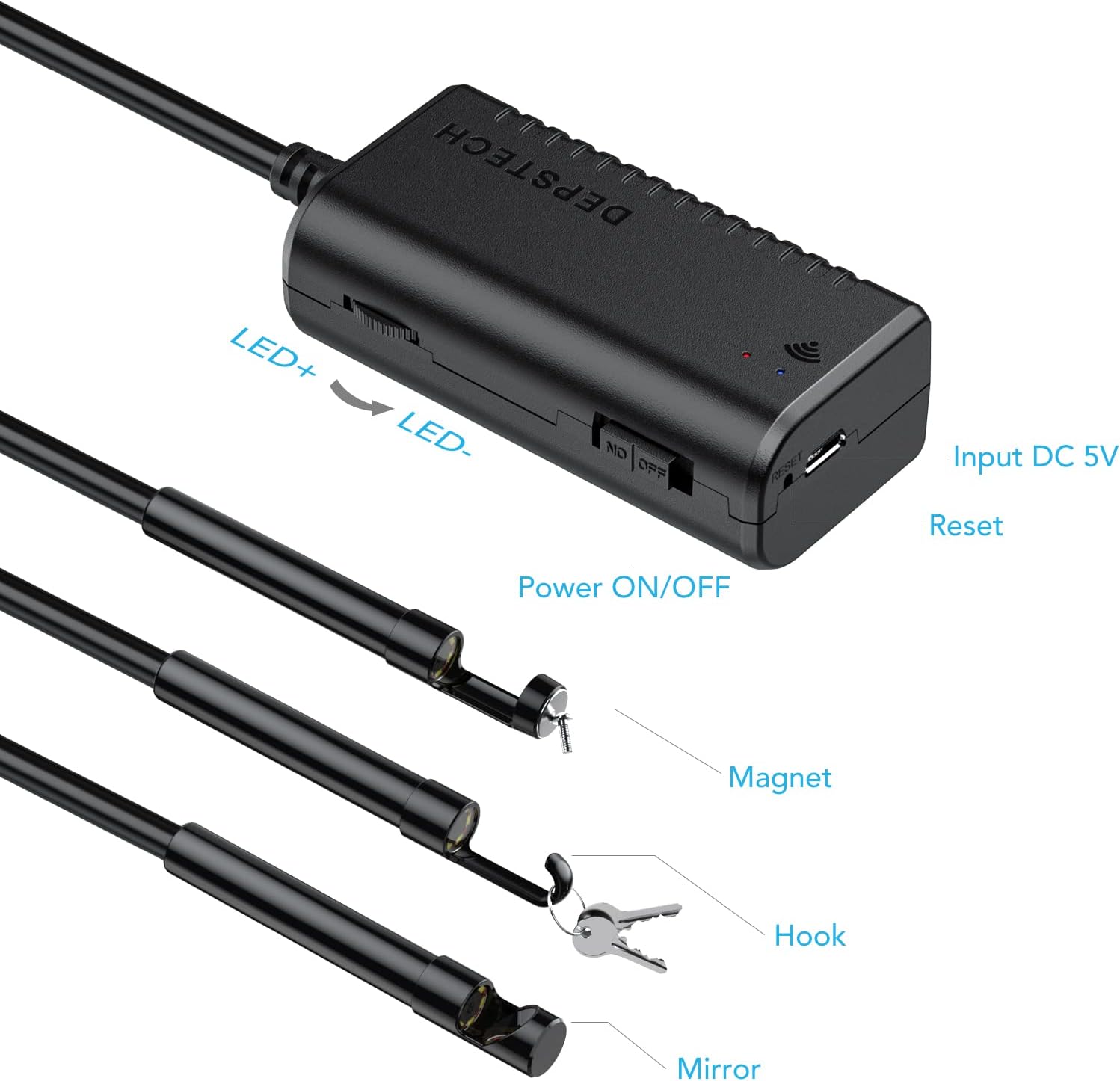
Image 2: The endoscope control box with LED adjustment, power switch, and charging port, along with the included hook, magnet, and mirror attachments.
3. Inštalačná príručka
- Nabite zariadenie: Before first use, fully charge the endoscope using the provided USB charging cable. The charging indicator light will change when fully charged.
- Stiahnite si aplikáciu: Hľadať and install the compatible application on your smartphone or tablet.
- If the WiFi name generated by the endoscope starts with "Jetion", use the "DEPSTECH" app (available for iOS/Android).
- If the WiFi name starts with "DEPSTECH", use the "DEPSTECH-view" app (available for iOS/Android).
- Zapnutie: Turn on the wireless endoscope. It will generate a Wi-Fi signal.
- Pripojte sa k sieti Wi-Fi: Go to your phone's WLAN settings, find the endoscope's WiFi network (e.g., "Jetion_XXXX" or "DEPSTECH_XXXX"), and connect to it. The default password is usually 12345678. If prompted that the network has no internet, confirm to proceed.
- Spustiť aplikáciu: Open the installed DEPSTECH app. The real-time image from the endoscope camera should now be displayed.
4. Návod na obsluhu
4.1 Nastavenie jasu LED diódy
The endoscope features 6 adjustable LED lights around the camera lens. Use the LED+ and LED- buttons on the control box to increase or decrease the brightness as needed for optimal visibility in dark environments.
4.2 Zachytávanie obrázkov a videí
Within the DEPSTECH app, you will find options to capture still images (JPG format) and record videos (MP4 format). Refer to the app's interface for specific button layouts for these functions.
4.3 Pripevnenie príslušenstva
The included hook, magnet, and side view mirror attachments can be screwed onto the tip of the camera probe to assist with various inspection tasks, such as retrieving small objects or viewpod uhlom 90 stupňov.

Image 3: The IP67 waterproof probe of the endoscope, suitable for damp alebo vlhké prostredie.
Obrázok 4: Príkladamples of how the endoscope can be used for inspections in various household and automotive settings.
5. Údržba
- Čistenie: After use, especially in wet or dirty environments, gently wipe the camera probe with a soft, damp cloth. Ensure the lens is clean for clear images.
- Ukladací priestor: Endoskop a jeho príslušenstvo skladujte na suchom a chladnom mieste, mimo dosahu priameho slnečného žiarenia a extrémnych teplôt.
- Starostlivosť o batérie: To prolong battery life, avoid fully discharging the device frequently. Recharge it regularly, even if not in use for extended periods.
6. Riešenie problémov
| Problém | Možné riešenie |
|---|---|
| No image displayed in the app. | Ensure the endoscope is powered on and your device is connected to its WiFi network. Verify the correct app is installed and launched. |
| Nízka kvalita obrazu / rozmazaný obraz. | Clean the camera lens. Adjust the LED brightness. Ensure the object is within the optimal macro focus range (3cm-8cm). Try adjusting the resolution settings within the app. |
| App language is incorrect (e.g., Chinese). | Navigate to the app's settings (often represented by a gear icon) and select your preferred language (e.g., English). |
| WiFi connection drops frequently. | Disable automatic WiFi connections on your phone to prevent it from switching to other networks. Ensure you are within range of the endoscope's WiFi signal. |
| Zariadenie sa nenabíja. | Check the USB cable and power adapter. Ensure they are properly connected and functional. |
7. Špecifikácie
- Číslo modelu: WF010-3.5M
- Rozlíšenie fotoaparátu: 2.0 Megapixels (adjustable: 640x480, 1280x720, 1600x1200, 1920x1080)
- Dĺžka kábla: 11.5 stôp / 3.5 miliónov
- Priemer sondy: 8.4 mm
- Vodotesné hodnotenie: IP67
- LED svetlá: 6 nastaviteľných LED diód
- Macro Focus Range: 3cm-8cm (1.18-3.15 inches)
- Pripojenie: Bezdrôtové WiFi pripojenie
- Kompatibilita: Android 5.0+ / iOS 9+
- Batéria: 1 lítium-polymérová batéria (súčasťou balenia)
- Hmotnosť položky: 9 uncí
- Rozmery produktu: 5.12 x 4.92 x 1.77 palca

Image 5: Illustration of the optimal observation distance for clear imaging with the endoscope.
8. Záruka a podpora
For warranty information, technical support, or further assistance, please visit the official DEPSTECH store or contact their customer service directly. You can find more information at the DEPSTECH Store on Amazon.