
Úvod
This manual provides essential information for the safe and efficient use of your SANSUI SCM39-B11 39V High-Vision LCD TV. Please read these instructions thoroughly before operating the television and retain them for future reference. This television features a reliable Japanese design, incorporating a main board developed by Toshiba Visual Solutions Corporation, with evaluation and production management handled by a specialized team in Echizen City, Fukui Prefecture.
The SCM39-B11 model is a 2017 release, designed for terrestrial digital broadcasting, and supports external HDD recording via USB connection.
Bezpečnostné informácie
Pri používaní tohto televízora vždy dodržiavajte základné bezpečnostné opatrenia, aby ste znížili riziko požiaru, úrazu elektrickým prúdom a zranenia.
- Nevystavujte televízor dažďu ani vlhkosti.
- Neblokujte vetracie otvory. Zabezpečte dostatočný priestor okolo televízora pre správne prúdenie vzduchu.
- Neumiestňujte televízor na nestabilný vozík, stojan, statív, konzolu alebo stôl.
- Počas búrok s bleskami alebo ak televízor dlhší čas nepoužívate, odpojte ho zo siete.
- Všetok servis prenechajte kvalifikovanému servisnému personálu.
Obsah balenia
Overte, či sú v balení všetky položky:
- SANSUI SCM39-B11 39V LCD TV
- Diaľkové ovládanie
- Batérie (pre diaľkové ovládanie)
- MiniB-CAS Card
- B-CAS Card Cover (with screws)
- Stojan (so skrutkami)
- Návod na použitie (tento dokument)
- Záručný list
Sprievodca nastavením
1. Inštalácia stojana
Carefully place the television screen-down on a soft, flat surface. Attach the included stand to the bottom of the television using the provided screws. Ensure the stand is securely fastened before placing the television upright.

Obrázok: Predná strana view of the SANSUI SCM39-B11 TV with its stand, showing the display and the two silver-colored feet.
2. Prepojovacie káble
Refer to the back panel of the television for connection ports.

Obrázok: Zadná strana view of the SANSUI SCM39-B11 TV, displaying the back panel with various input ports including HDMI, USB, and antenna connections.
- Pripojenie antény: Connect your terrestrial digital antenna cable to the ANTENNA IN port.
- HDMI zariadenia: Connect DVD players, Blu-ray players, game consoles, or other HDMI-compatible devices to the HDMI 1 or HDMI 2 ports. This model has 2 HDMI ports.
- Externý pevný disk s rozhraním USB: For recording, connect a compatible external USB Hard Disk Drive (HDD) to the USB port.
- Výkon: Connect the power cord to the AC inlet on the television and then to a wall outlet.
3. Úvodné nastavenie
After connecting all cables and powering on the TV, the initial setup wizard will guide you through the process. This typically includes:
- Výber jazyka.
- Výber regiónu.
- Automatic channel scan for terrestrial digital broadcasts. Ensure your antenna is properly connected for this step.
Návod na obsluhu
Základné operácie
- Zapnutie/vypnutie: Stlačte tlačidlo POWER tlačidlo na diaľkovom ovládači.
- Výber kanála: Použite CH +/- buttons or the number buttons on the remote.
- Úprava hlasitosti: Použite VOL +/- tlačidlá.
- Vstupný zdroj: Stlačte tlačidlo VSTUP button to cycle through connected devices (TV, HDMI 1, HDMI 2, etc.).
Recording with External HDD
This TV supports recording terrestrial digital broadcasts to an external USB HDD. Ensure your HDD is connected to the USB port.
- Plánovanie nahrávok: Use the Electronic Program Guide (EPG) to select programs for recording. The EPG supports a 1-week display.
- Automatic Chapter Marking: The TV can detect commercials during recording and automatically set chapter marks, allowing for easier navigation during playback.
Funkcie prehrávania
When playing back recorded content from an external HDD, the following functions are available:
- Opakované prehrávanie: Replay a section or the entire program.
- Prehrávanie naháňačky: Watch a program from the beginning while it is still being recorded.
- 1.5x Speed Playback: Watch recorded content at an accelerated speed.
Vylepšenia obrazu a zvuku
- Blue Light Guard: Activate this function via the remote control to reduce blue light emission by up to approximately 50%, which may help reduce eye strain.
- Picture Enhancer: This feature automatically adjusts the super-resolution processing level according to the input content, ensuring optimal image display at all times.
- Japanese Paper Speakers: The integrated speakers utilize Japanese paper for clear sound reproduction across high to low frequencies.
Ďalšie funkcie
- Screen Freeze Function: Pause the live broadcast or current display.
- HDMI Connected Device Linkage: Control compatible HDMI-connected devices using the TV remote.
- Bi-directional Data Communication: Supports two-way data communication.
Údržba
Čistenie televízora
- Obrazovka: Obrazovku jemne utrite mäkkou, suchou handričkou, ktorá nepúšťa vlákna. V prípade odolných škvŕn ju jemne utriteampen the cloth with water or a specialized screen cleaner (ensure it is safe for LCD screens) and wipe carefully. Do not spray liquid directly onto the screen.
- Telo: Wipe the television body with a soft, dry cloth. Avoid using abrasive cleaners, waxes, or solvents as they can damage the finish.
Starostlivosť o diaľkové ovládanie
- Replace batteries when the remote control's response becomes slow or inconsistent.
- Nekombinujte staré a nové batérie ani rôzne typy batérií.
- Keep the remote control away from moisture and direct sunlight.
Riešenie problémov
Ak sa vyskytnú problémy s televízorom, pred kontaktovaním podpory si prečítajte nasledujúce bežné problémy a riešenia.
| Problém | Možná príčina/Riešenie |
|---|---|
| Žiadna sila | Ensure the power cord is securely plugged into both the TV and the wall outlet. Check if the outlet is functioning. |
| Žiadny obraz / Žiadny signál | Verify antenna connection. Check the input source selection (e.g., HDMI 1, HDMI 2, TV). Perform a channel scan if necessary. |
| Žiadny zvuk | Check volume level and mute status. Ensure external audio devices are properly connected if used. |
| Diaľkové ovládanie nefunguje | Skontrolujte a vymeňte batérie. Uistite sa, že medzi diaľkovým ovládačom a infračerveným senzorom televízora nie sú žiadne prekážky. |
| External HDD recording issues | Ensure the USB HDD is properly connected and formatted for the TV. Some HDDs may have compatibility issues. Try a different USB port or HDD if available. |
| HDMI device not recognized | Ensure the HDMI cable is securely connected. Try a different HDMI port or cable. Power cycle both the TV and the HDMI device. |
Špecifikácie produktu

Image: A table detailing the specifications of the SANSUI SCM39-B11 TV, including screen size, resolution, tuner type, recording capabilities, connectivity, and power consumption.
| Funkcia | Špecifikácia |
|---|---|
| Názov modelu | SCM39-B11 |
| Veľkosť obrazovky | 39V-type (39 inches) |
| Technológia displeja | LCD |
| Rozlíšenie | High-Vision (HD 1366 x 768) |
| Tunery | Terrestrial Digital x1, BS Digital: None, CS Digital: None |
| External HDD Recording | Supported via USB |
| Porty HDMI | 2 systémy |
| USB porty | Systém 1 |
| Kompatibilné s držiakom na stenu | Rozmer VESA 200 x 200 mm |
| Hmotnosť produktu | 6.1 kg |
| Rozmery (Š x V x H) | Approx. 88.8 cm x 57.5 cm x 21.0 cm (with stand) |
| Spotreba energie | 61 W |
| Rok vydania | 2017 |

Obrázok: Predná strana view of the SANSUI SCM39-B11 TV with overlaid measurements for width (88.8cm), height (57.5cm), and weight (6.1kg).

Obrázok: Bočný view of the SANSUI SCM39-B11 TV, illustrating the depth of the television body (9.9cm) and the total depth including the stand (21cm).
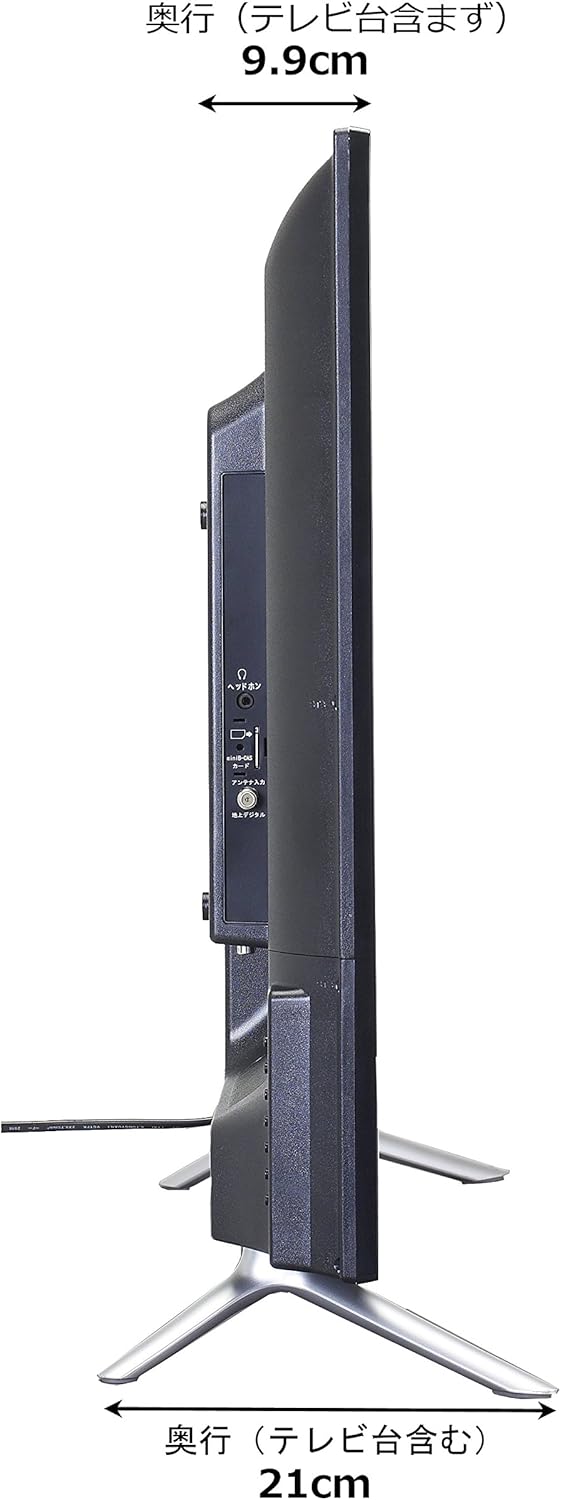
Image: Diagram showing the SANSUI SCM39-B11 TV on a stand next to a human figure (approx. 160cm tall) for visual scale, with TV dimensions indicated.
Záruka a podpora
Your SANSUI SCM39-B11 television comes with a warranty. Please refer to the included warranty card for details regarding coverage period and terms. Keep your purchase receipt as proof of purchase.
For technical support, service, or inquiries not covered in this manual, please contact SANSUI customer service. Contact information can typically be found on the warranty card or the official SANSUI webstránky.