
1. Úvod
The Sengled Smart Light Bulbs A19 are Zigbee-compatible LED bulbs designed for integration into smart home systems. These bulbs provide soft white (2700K) illumination, are dimmable, and offer control via voice commands or a mobile application when connected to a compatible Zigbee hub. This manual provides instructions for installation, setup, operation, and troubleshooting.

Image 1.1: Sengled Smart Light Bulbs A19 (4-Pack)
2. Bezpečnostné informácie
- Elektrická bezpečnosť: Always ensure power is turned off at the switch before installing or removing bulbs.
- Len na použitie v interiéri: These bulbs are designed for indoor use in dry locations. Do not expose to water or excessive humidity.
- Prevádzková teplota: Neinštalujte do uzavretých svietidiel, ktoré obmedzujú prúdenie vzduchu, pretože to môže skrátiť životnosť žiarovky.
- Kompatibilita stmievača: These bulbs are dimmable via the smart home system. Do not use with standard incandescent dimmers.
- Likvidácia: Elektronický odpad zlikvidujte zodpovedne v súlade s miestnymi predpismi.
3. Obsah balenia
Balíček obsahuje:
- 4 x Sengled Smart LED Light Bulbs (A19, Soft White 2700K)
4. Špecifikácie
| Funkcia | Detail |
|---|---|
| Číslo modelu | E21-N13A |
| Typ žiarovky | LED |
| Veľkosť tvaru žiarovky | A19 |
| Základňa žiarovky | E26 |
| Wattage | 9 wattov |
| Žiarovkový ekvivalent | 60 wattov |
| Jas | 800 XNUMX lúmenov |
| Teplota farby | 2700 Kelvinov (jemná biela) |
| Voltage | 120 voltov (100 – 120 V, 60 Hz) |
| Metóda kontroly | Hlas, Aplikácia |
| Konektivita | Zigbee protokol (vyžaduje sa rozbočovač) |
| Priemerný život | 25,000 hodín |
| Vnútorné / vonkajšie použitie | Vnútorný |
| Rozmery | 2.4"Š x 4.5"V |
5. Pokyny na nastavenie
These Sengled Smart Light Bulbs require a compatible Zigbee hub for full functionality. Compatible hubs include Sengled Smart Hub, Amazon Echo devices with a built-in Zigbee hub (e.g., Echo 4th Gen, Echo Plus, Echo Show 10, Echo Studio), SmartThings Hub, Wink Hub, or Hubitat Hub.
5.1. Počiatočné kroky nastavenia
- Nainštalujte žiarovku: Screw the Sengled Smart Light Bulb into a standard E26 light socket. Ensure the power to the fixture is turned off before installation.
- Zapnutie: Zapnite napájanie svietidla. Žiarovka by sa mala rozsvietiť.
- Stiahnite si aplikáciu: Download the Sengled Home App from the Apple App Store or Google Play Store. Alternatively, use the app for your chosen compatible hub (e.g., Amazon Alexa App, SmartThings App).
- Registrácia/Prihlásenie: Otvorte aplikáciu a zaregistrujte si účet alebo sa prihláste, ak ho už máte.
- Pridať zariadenie: Follow the in-app instructions to add a new device. This typically involves scanning a QR code on the bulb or packaging, or initiating a device search within the app.
- Pripojenie k Hubu: The bulb will connect to your Zigbee hub. This process usually completes within one minute.
5.2. Hub-Specific Setup Options
The following images illustrate common setup configurations:

Image 5.1: Setup with Sengled Smart Hub

Image 5.2: Setup with Samsung SmartThings Hub

Image 5.3: Setup with Amazon Echo (Built-in Hub)
6. Prevádzka
Once successfully paired with your smart hub, the Sengled Smart Light Bulbs offer various control options.
6.1. Ovládanie hlasom
Control your lights hands-free using voice commands with compatible assistants like Amazon Alexa or Google Home Assistant.

Image 6.1: Voice control example with Alexa
6.2. Dimming and Remote Control
Adjust the brightness from 1% to 100% and control your lights from anywhere using the Sengled Home App or your smart home platform's app.
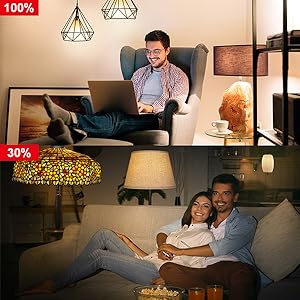
Image 6.2: Dimming functionality from 100% to 30%

Image 6.3: Remote control from any location
6.3. Scheduling and Routines
Set schedules for your lights to turn on/off or adjust brightness at specific times, such as dusk or sunrise. Create routines for automated lighting scenarios.
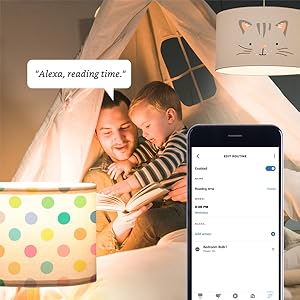
Image 6.4: Setting up a reading time routine
6.4. Skupinová kontrola
Add multiple smart bulbs (up to 64) to your smart hub system and control them individually or as a group within the app.
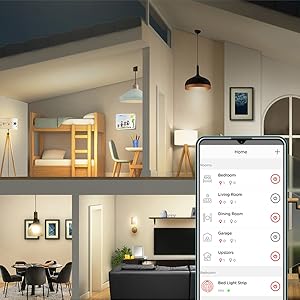
Image 6.5: Managing lights by room for group control
7. Údržba
- Čistenie: Pred čistením sa uistite, že žiarovka je vypnutá a vychladnutá. Utrite mäkkou, suchou handričkou. Nepoužívajte tekuté čistiace prostriedky.
- Ukladací priestor: Ak skladujete žiarovky, uchovávajte ich na chladnom a suchom mieste mimo dosahu priameho slnečného žiarenia a extrémnych teplôt.
- Žiadne diely opraviteľné používateľom: Do not attempt to disassemble or repair the bulb. This will void the warranty.
8. Riešenie problémov
8.1. Bulb Not Responding/Connecting
- Skontrolujte napájanie: Ensure the light fixture switch is in the ON position and the bulb is receiving power.
- Pripojenie rozbočovača: Verify that your Zigbee hub is powered on and connected to your network.
- Blízkosť: Ensure the bulb is within range of your Zigbee hub or another Zigbee device acting as a repeater.
- Opätovné spárovanie: If the bulb loses connection, try removing it from your app and re-pairing it according to the setup instructions. Power cycling the bulb (turning it off and on 5 times) can sometimes reset it for re-pairing.
- Aktualizácia aplikácie: Ensure your Sengled Home App or smart home platform app is updated to the latest version.
8.2. Problémy s hlasovým ovládaním
- Assistant Link: Confirm that your Sengled account (or smart hub) is correctly linked to your voice assistant (Alexa, Google Home).
- Zistenie zariadenia: Ask your voice assistant to "Discover devices" to ensure all bulbs are recognized.
- Command Clarity: Speak commands clearly and ensure the device name used in the command matches the name in your app.
8.3. Unstable Connection
- Zigbee sieť: A strong Zigbee mesh network is crucial. Adding more Zigbee devices (like smart plugs or other bulbs) can strengthen the network.
- rušenie: Keep your Zigbee hub away from Wi-Fi routers, microwaves, or other devices that might cause wireless interference.
9. Informácie o záruke
Sengled Smart Light Bulbs are covered by a 3-ročná obmedzená záruka from the date of purchase. This warranty covers defects in materials and workmanship under normal use. For warranty claims or detailed terms, please refer to the official Sengled webalebo kontaktujte zákaznícku podporu.
10. Zákaznícka podpora
For further assistance, technical support, or to report issues, please visit the official Sengled support website or contact their customer service department. Contact information can typically be found on the Sengled website or within the Sengled Home App.