
Úvod
This manual provides detailed instructions for the installation, configuration, and operation of your Multilaser RE085 Dual Band Wireless Router. Please read this guide carefully to ensure proper setup and optimal performance of your device. The RE085 router offers dual-band connectivity (2.4GHz and 5GHz) with speeds up to 750 Mbps, featuring three external antennas and four LAN ports for reliable network access.
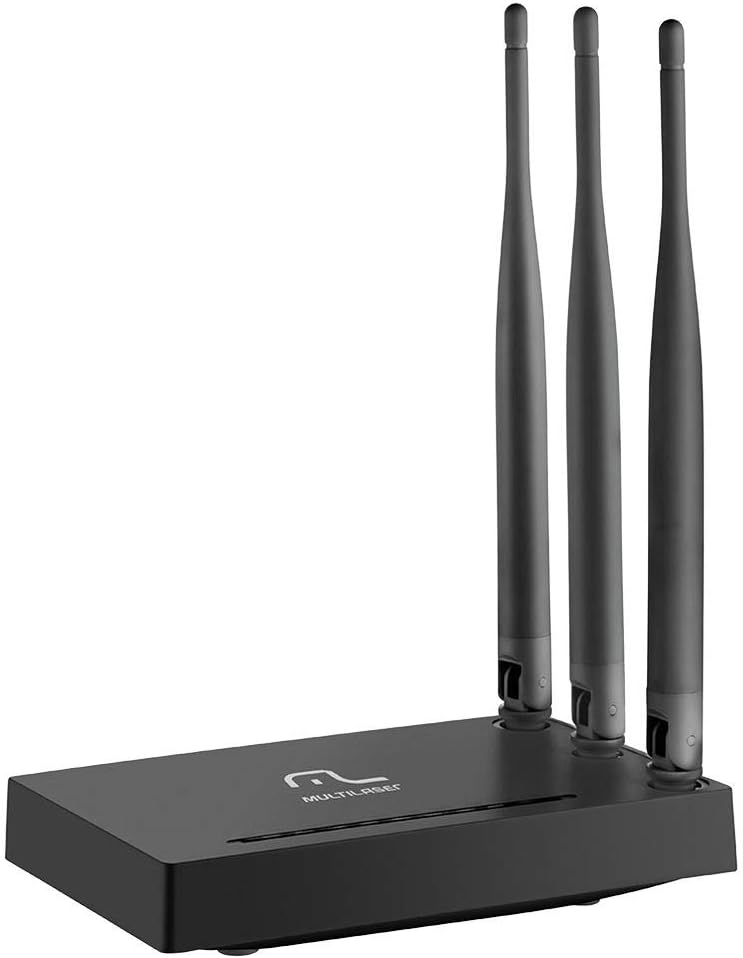
Obrázok: Predná strana view of the Multilaser RE085 router with its three external antennas in an upright position, showcasing jeho kompaktný dizajn.
Obsah balenia
Pred pokračovaním v inštalácii sa uistite, že balenie obsahuje nasledujúce položky:
- Multilaser RE085 Dual Band Wireless Router
- Napájací adaptér
- Ethernetový kábel
- Stručný návod na inštaláciu (tento dokument slúži ako komplexný sprievodca)
Nastavenie a inštalácia
Follow these steps to set up your Multilaser RE085 router:
1. Fyzické pripojenie
- Umiestnenie: Place the router in a central location in your home or office, away from obstructions and devices that may cause interference (e.g., cordless phones, microwaves).
- Pripojte antény: Ensure the three external antennas are securely attached and oriented for optimal signal coverage.
- Pripojiť k napájaniu: Plug the power adapter into the router's power port and then into a wall outlet. The power indicator LED on the router should light up.
- Pripojenie k modemu: Connect one end of the provided Ethernet cable to the WAN port (often colored differently, e.g., blue) on the Multilaser RE085 router. Connect the other end to the LAN port on your modem or existing internet source.
- Pripojenie zariadení (voliteľné): For wired connections, connect one end of an Ethernet cable to any of the four LAN ports (usually yellow) on the router and the other end to your computer or other network device.

Obrázok: Zadná strana view of the Multilaser RE085 router, highlighting the WAN port (typically blue) and four yellow LAN ports for wired connections.
2. Počiatočná konfigurácia (Web Rozhranie)
- Pripojte sa k smerovaču: Connect your computer to the router either via an Ethernet cable (to a LAN port) or wirelessly using the default Wi-Fi network name (SSID) printed on the router's label.
- Prístup Web Prehliadač: Otvorte a web prehliadač (napr. Chrome, Firefox, Edge) a do adresného riadka zadajte predvolenú IP adresu smerovača. Zvyčajne je to
192.168.0.1or192.168.1.1Presnú adresu nájdete na štítku na smerovači. - Prihlásenie: Enter the default username and password. Common defaults are
adminfor both username and password. If these do not work, check the router's label or the quick installation guide. - Spustite Sprievodcu nastavením: Upon successful login, you will likely be prompted to run a Quick Setup Wizard. Follow the on-screen instructions to configure your internet connection type (e.g., PPPoE, Dynamic IP, Static IP). Your Internet Service Provider (ISP) can provide this information if you are unsure.
- Konfigurácia nastavení bezdrôtového pripojenia:
- SSID (názov siete): Change the default Wi-Fi network names for both 2.4GHz and 5GHz bands to something unique and easily identifiable.
- Password (Security Key): Set a strong, secure password for each Wi-Fi network. Use a combination of uppercase and lowercase letters, numbers, and symbols.
- Typ zabezpečenia: WPA2-PSK (AES) is recommended for optimal security.
- Uložiť nastavenia: After configuring, save your settings. The router may restart to apply the changes.
Návod na obsluhu
Once your Multilaser RE085 router is set up, you can connect your devices and manage your network.
Pripojovacie zariadenia
- Bezdrôtové zariadenia: On your smartphone, tablet, laptop, or smart TV, search for available Wi-Fi networks. Select the SSID you configured (e.g., "MyHomeNetwork_2.4GHz" or "MyHomeNetwork_5GHz") and enter the password.
- Káblové zariadenia: Connect devices like desktop computers, gaming consoles, or smart TVs directly to the router's LAN ports using Ethernet cables for a stable and fast connection.
Dual Band Functionality
The RE085 supports both 2.4GHz and 5GHz wireless bands:
- Pásmo 2.4 GHz: Offers wider coverage and better penetration through walls, suitable for general internet use, browsing, and devices further away from the router.
- Pásmo 5 GHz: Provides faster speeds and lower latency, ideal for bandwidth-intensive activities like online gaming, 4K video streaming, and devices closer to the router.
You can connect different devices to the band that best suits their needs and location.
Sieť pre hostí
The router allows you to create up to 6 additional guest networks. This feature provides internet access to guests while isolating them from your main network, enhancing security. Access the router's web interface to configure guest networks.
Funkcia opakovača
The Multilaser RE085 can also function as a wireless repeater, extending the range of an existing Wi-Fi network. Refer to the advanced settings in the router's web interface for repeater mode configuration.
Údržba
Pravidelná údržba pomáha zabezpečiť dlhú životnosť a optimálny výkon vášho routera.
- Pravidelný reštart: Periodically restart your router (unplug from power for 10 seconds, then plug back in) to clear its memory and refresh network connections. This can resolve minor performance issues.
- Aktualizácie firmvéru: Check the Multilaser official website for firmware updates. Keeping your router's firmware up-to-date can improve performance, add new features, and enhance security. Follow the instructions provided by Multilaser carefully when performing updates.
- Fyzické čistenie: Keep the router free from dust. Use a soft, dry cloth to gently clean the exterior. Ensure ventilation holes are not blocked.
- Správa hesiel: Change your Wi-Fi and router login passwords periodically for enhanced security.
Riešenie problémov
If you encounter issues with your Multilaser RE085 router, try the following troubleshooting steps:
Žiadne internetové pripojenie
- Skontrolujte káble: Ensure all Ethernet cables (WAN, LAN) are securely connected to both the router and your modem/devices.
- Skontrolujte modem: Overte, či váš modem funguje správne a má aktívne internetové pripojenie. Skúste modem reštartovať.
- Kontrolky stavu smerovača: Check the LED indicators on the front of the router. The internet/WAN light should be solid or blinking, indicating an active connection.
- Reštartujte smerovač: Power cycle the router (unplug, wait 10 seconds, plug back in).
- Nastavenia poskytovateľa internetových služieb: Confirm your internet connection type and settings (PPPoE, Dynamic IP, Static IP) in the router's web rozhranie sa zhoduje s rozhraniami poskytovanými vaším poskytovateľom internetových služieb.
Weak or Unstable Wi-Fi Signal
- Umiestnenie smerovača: Presuňte smerovač na centrálnejšie miesto, ďalej od stien, veľkých kovových predmetov a iných elektronických zariadení, ktoré môžu spôsobovať rušenie.
- Orientácia antény: Adjust the antennas for better signal direction.
- Výber kapely: For devices closer to the router, try connecting to the 5GHz band for faster speeds. For devices further away, the 2.4GHz band might offer better range.
- rušenie: Identify and minimize sources of interference (e.g., microwaves, cordless phones, Bluetooth devices).
- Výber kanála: V smerovači web rozhranie, skúste zmeniť kanál Wi-Fi pre pásma 2.4 GHz aj 5 GHz na menej preťažený.
Forgotten Wi-Fi Password or Router Login Password
- Check Router Label: The default Wi-Fi password and router login credentials are often printed on a label on the bottom or back of the router.
- Obnoviť predvolené výrobné nastavenia: If you cannot access the router's web interface or have forgotten your Wi-Fi password and cannot retrieve it, you may need to perform a factory reset. Locate the small reset button (often recessed) on the router. With the router powered on, use a paperclip or pin to press and hold the reset button for about 10-15 seconds until the lights flash. The router will restart with its factory default settings, including default Wi-Fi names and passwords. You will then need to reconfigure it from scratch.
Špecifikácie
Key technical specifications for the Multilaser RE085 Dual Band Wireless Router:
| Funkcia | Špecifikácia |
|---|---|
| Značka | Multilaser |
| Číslo modelu | RE085 |
| Štandard bezdrôtovej komunikácie | 802.11ac |
| Trieda frekvenčného pásma | Dvojpásmové (2.4 GHz a 5 GHz) |
| Rýchlosť prenosu dát | Až 750 megabitov za sekundu |
| Počet portov | 4 (LAN) |
| Technológia pripojenia | Wi-Fi |
| Kompatibilné zariadenia | Herné konzoly, tablety, inteligentné televízory |
| Odporúčané použitie | Domov |
Záruka a podpora
For warranty information, technical support, or further assistance, please refer to the official Multilaser webalebo sa priamo obráťte na ich zákaznícky servis. Uschovajte si doklad o kúpe ako doklad o kúpe pre prípad reklamácie.
Multilaser Official Webmiesto: www.multilaser.com.br