
1. Úvod
This manual provides detailed instructions for the safe and efficient operation of your KNACRO IMAX B6AC 80W Balance Battery Charger/Discharger. This device is designed to charge and discharge various battery types, including LiIon, LiPo, LiFe, NiCd, NiMh, and Pb batteries. It features advanced functions such as balance charging to prevent overcharging and ensure battery longevity.
2. Bezpečnostné pokyny
Please read and understand all safety warnings and instructions before using the charger. Failure to do so may result in property damage, injury, or fire.
- Always supervise the charging process, especially when charging lithium batteries, to prevent overcharging which can lead to explosion.
- Počas prevádzky zabezpečte dostatočné vetranie okolo nabíjačky, aby ste predišli prehriatiu.
- Nepokúšajte sa nabíjať poškodené alebo nafúknuté batérie.
- Verify battery type, cell count, and charging current settings match your battery specifications before starting any process.
- Keep the charger away from moisture, heat sources, and flammable materials.
- Disconnect power immediately if any malfunction or unusual behavior is observed.
3. Obsah balenia
Carefully unpack the box and ensure all items listed below are present and in good condition.
- 1 x iMAX B6AC Battery Balance Charger
- 1 x Alligator Clip DC Input Cable
- 1 x XT60 Plug Output Cable
- 1 x Glow Charging Cable
- 1 x XT60 to JST Plug Charging Cable
- 1 x XT60 to JR Plug Charging Cable
- 1 x XT60 to Alligator Clip Charging Cable
- 1 x AC vstupný kábel
- 1 x anglický manuál
Obrázok 3.1: The IMAX B6AC charger shown with its complete set of included cables and accessories, including the AC power cord, various charging cables with different connectors (XT60, JST, JR, Alligator Clip), and the DC input cable.

Obrázok 3.2: Podrobný view of the assortment of charging cables provided with the charger, featuring different connectors such as XT60, JST, JR, and alligator clips, designed for compatibility with various battery types.
4. Produkt skončilview a funkcie
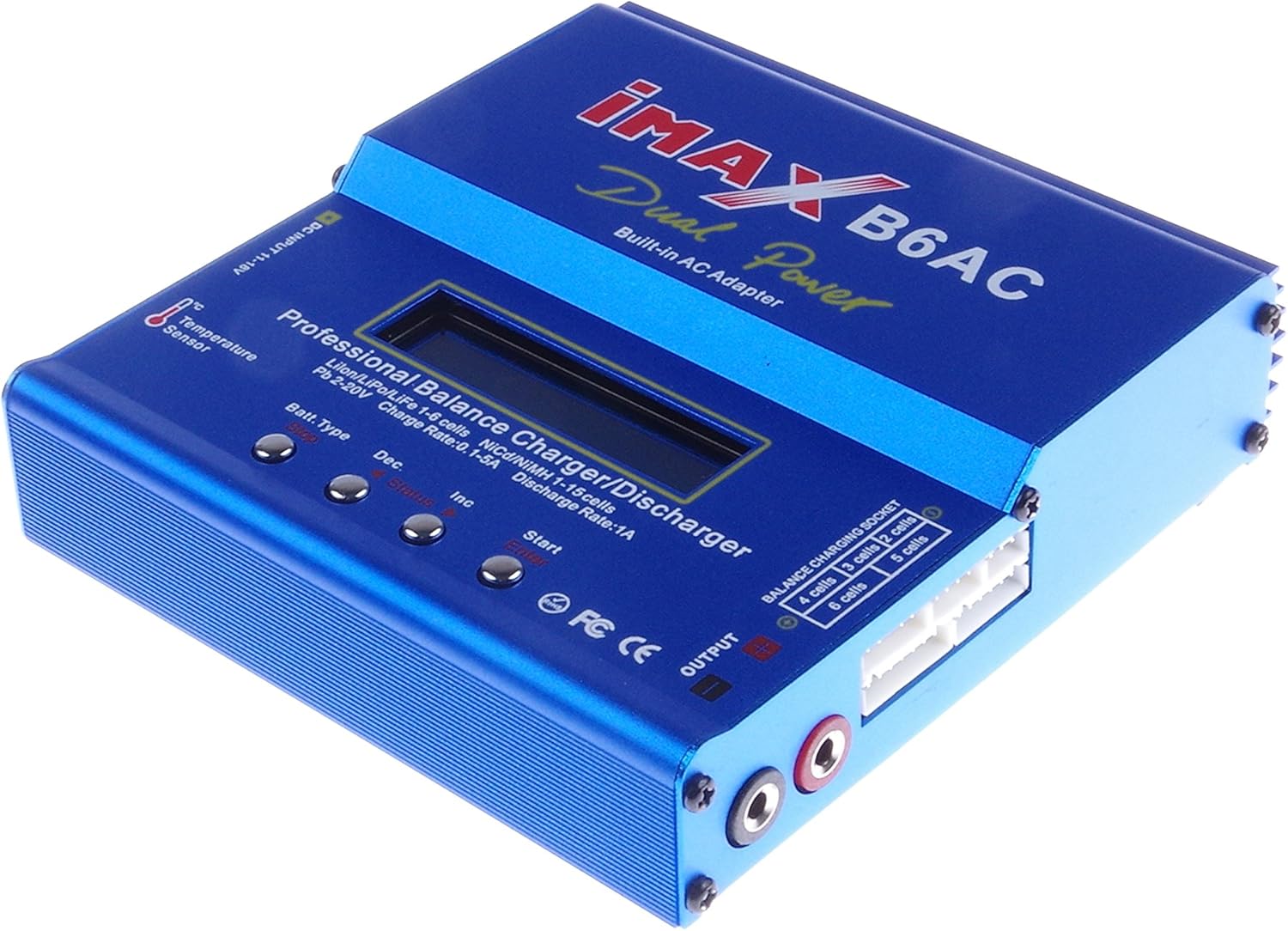
The KNACRO IMAX B6AC is a versatile professional balance charger/discharger with an integrated AC adapter, offering comprehensive battery management for hobbyists and professionals.

Obrázok 4.1: Jasný front view of the blue IMAX B6AC balance charger, highlighting its central LCD screen, control buttons, and various input/output ports. The 'Dual Power Built-in AC Adapter' text is visible.
Kľúčové vlastnosti:
- Automatická funkčnosť: Features an 'AUTO' function that sets feeding current during charging or discharging, preventing overcharging, especially for lithium batteries.
- Bezpečnostné mechanizmy: Automatically disconnects circuits and alarms upon detecting malfunctions, ensuring maximum safety. All settings are user-configurable.
- Integrated Balance Charger: Employs an individual-cell-voltage balancer, eliminating the need for an external balancer for balance charging. Monitors and balances each cell during discharge, terminating the process if any cell voltage je abnormálne.
- Versatile Lithium Battery Support: Adaptable to various lithium battery types including Li-ion, LiPo, and LiFe. Offers 'fast' charge for reduced duration and 'store' mode to optimize final voltage for long-term storage, protecting battery lifespan.
- Delta-Peak Sensitivity: Utilizes an automatic charge termination program based on Delta-peak voltage detection, ensuring charging stops when the battery's voltage exceeds a safe threshold.

Obrázok 4.2: This image displays both the front panel and the bottom of the IMAX B6AC charger, revealing the ventilation grilles on the bottom for heat dissipation and important warning labels regarding operation and safety.
5. Nastavenie
5.1 Pripojenie napájania
The IMAX B6AC charger can be powered by either AC (100-240V) or DC (11-18V) input.
- Napájanie striedavým prúdom: Connect the provided AC input cable to the charger's AC input port (located on the side) and then plug it into a wall outlet.
- DC napájanie: Connect the Alligator Clip DC Input Cable to a 11-18V DC power source (e.g., a car battery or a regulated DC power supply). Ensure correct polarity.

Obrázok 5.1: Strana view of the IMAX B6AC charger, clearly showing the AC input port for wall power and the DC input port for external 11-18V power sources. Ventilation grilles are also visible.
5.2 Connecting Batteries
Connect your battery to the charger's output ports. For lithium batteries, always use the balance port in conjunction with the main charging port for safety and optimal performance.
- Hlavný výstup: Use the appropriate charging cable (e.g., XT60, JST, JR, Alligator Clip) to connect your battery's main power lead to the charger's output banana sockets.
- Balance Port (for Lithium Batteries): For LiPo, LiFe, and LiIon batteries, connect the battery's balance lead to the corresponding balance port on the charger (2S-6S).

Obrázok 5.2: This image provides a close-up of the charger's output section, detailing the banana sockets for power output and the multi-pin balance charging socket, labeled for 2S to 6S battery configurations.
6. Návod na obsluhu
6.1 Navigácia v ponuke
The charger features an LCD screen and four control buttons for navigation and setting adjustments.

Obrázok 6.1: An annotated image of the IMAX B6AC charger's control panel, clearly labeling the functions of each button: 'Batt. Type/Stop' for selecting battery type and stopping programs, 'Dec' for decreasing values, 'Inc' for increasing values, and 'Start/Enter' for initiating processes and confirming selections.
- Batt. Type / Stop: Press to cycle through main menu options or to stop a running program.
- Dec (-): Decreases selected values or moves backward in menus.
- Inc (+): Increases selected values or moves forward in menus.
- Start / Enter: Initiates a program or confirms a selection. Press and hold to start a program.
6.2 Charging Lithium Batteries (LiPo/LiFe/LiIon)
Always connect both the main power lead and the balance lead for lithium batteries.
- From the main menu, use the Batt. Typ button to select the appropriate lithium battery type (e.g., LiPo BATTERY).
- Stlačte tlačidlo Štart/Enter to enter the program menu.
- Použite Inc/Dec to select the desired charging mode (e.g., BALANCE, FAST CHG, STORAGE, DISCHARGE).
- Stlačte tlačidlo Štart/Enter na potvrdenie režimu.
- Adjust the charging current and cell count using Inc/Dec. For balance charging, the charger will automatically detect the cell count.
- Stlačte a podržte Štart/Enter for 3 seconds to begin the process. The charger will perform a battery check. Confirm by pressing Štart/Enter znova.
Zostatok poplatku:
Recommended for regular charging to ensure all cells are equally charged, maximizing battery life and safety.
Rýchle nabíjanie:
Charges the battery quickly to approximately 90% capacity without balancing, suitable when time is limited.
Poplatok za skladovanie:
Nabíja alebo vybíja batériu na určitý objemtagÚroveň e je ideálna na dlhodobé skladovanie a chráni batériu.
Vybíjanie:
Vybíja batériu na užívateľom definovaný objemtage. Useful for preparing batteries for storage or cycling.
6.3 Charging NiMH/NiCD Batteries
- Z hlavnej ponuky vyberte NiMH BATTERY or NiCD BATTERY pomocou Batt. Typ tlačidlo.
- Stlačte tlačidlo Štart/Enter to enter the program menu.
- Vyberte CHARGE or VYPÚŠŤAŤ režim.
- Adjust the charging/discharging current and the Delta-Peak sensitivity (if applicable) using Inc/Dec.
- Stlačte a podržte Štart/Enter for 3 seconds to begin.
6.4 Charging Pb Batteries
- Z hlavnej ponuky vyberte PB BATTERY pomocou Batt. Typ tlačidlo.
- Stlačte tlačidlo Štart/Enter to enter the program menu.
- Vyberte CHARGE or VYPÚŠŤAŤ režim.
- Adjust the charging/discharging current and voltage pomocou Inc/Dec.
- Stlačte a podržte Štart/Enter for 3 seconds to begin.
6.5 Používateľské nastavenia
The charger allows customization of various parameters such as safety timer, capacity limit, temperature cut-off, and buzzer settings. Access these settings from the main menu by cycling through options with the Batt. Typ button until 'USER SET PROGRAM' appears.
7. Údržba
Proper maintenance ensures the longevity and reliable operation of your charger.
- Čistenie: Regularly wipe the charger with a soft, dry cloth. Do not use solvents or abrasive cleaners.
- Ukladací priestor: Nabíjačku skladujte na chladnom a suchom mieste mimo dosahu priameho slnečného žiarenia a extrémnych teplôt.
- Kontrola: Periodically check cables and connectors for any signs of wear, damage, or corrosion. Replace damaged components immediately.
- Uistite sa, že vetracie otvory sú zbavené prachu a nečistôt.
8. Riešenie problémov
If you encounter issues with your charger, refer to the common problems and solutions below.
- 'CONNECTION BREAK' Error: This indicates a poor connection between the charger and the battery. Check all cables and connectors for secure attachment and damage.
- 'CELL ERROR' or 'VOLTAGE ERROR': This typically occurs with lithium batteries when the cell count detected by the charger does not match the setting, or if a cell voltage is critically low/high. Verify your battery settings and inspect the battery for damage.
- Nabíjačka sa nezapína: Ensure the AC or DC input cable is securely connected and the power source is active. Check for any blown fuses in the power supply or charger (if accessible).
- Prehrievanie: If the charger becomes excessively hot, ensure it has adequate ventilation and is not covered. Reduce the charging current if possible.
- Charging Process Stops Prematurely: Check if safety timers, capacity limits, or temperature cut-offs are enabled in the user settings and adjust if necessary.
9. Špecifikácie
| Špecifikácia | Hodnota |
|---|---|
| Vstupné objtage Rozsah | AC 100-240V 50/60 Hz / DC 11.0-18.0 Volt |
| Výstupný objemtage Rozsah | DC 2~20V |
| Max. Nabíjací výkon | 80 W |
| Max. Vybíjací výkon | 10 W |
| Rozsah nabíjacieho prúdu | 0.1-6.0A |
| Rozsah vybíjacieho prúdu | 0.1-2.0A |
| Current Drain for Balancing Li-Po | 300mAh/článok |
| LiIon/LiPo/LiFe Cells | 1-6 buniek |
| NiCd/NiMH Cells | 1-15 buniek |
| Objem olovenej batérietage | 2 ~ 20 V |
| Veľkosť položky | 133 x 142 x 36 mm |
| Hmotnosť položky | 800 g (približne 1.76 libry) |
10. Podpora a záruka
V prípade technickej podpory alebo otázok týkajúcich sa záruky kontaktujte svojho predajcu alebo priamo výrobcu. Uschovajte si doklad o kúpe ako doklad o kúpe.
Manufacturer: KNACRO