
Waveshare 7inch HDMI LCD (H)
Waveshare 7-inch HDMI Capacitive Touch Screen LCD User Manual
Model: 7inch HDMI LCD (H)
Úvod
This manual provides detailed instructions for setting up, operating, and maintaining your Waveshare 7-inch HDMI Capacitive Touch Screen LCD. This display features a 1024x600 resolution IPS panel, capacitive touch functionality, and broad compatibility with various single-board computers and PCs.
Obsah balenia
Overte si, či sú vo vašom balení všetky nižšie uvedené položky:
- 7-inch HDMI LCD (H)
- HDMI kábel
- USB Type-A to Micro-B Cable (for touch and power)
- HDMI to Micro HDMI Adapter (for Raspberry Pi Zero series)
- Screws and standoffs for mounting

Image: Contents of the Waveshare 7-inch HDMI LCD package, including the display, HDMI cable, USB cable, HDMI adapter, and mounting hardware.
Vlastnosti produktu
- Veľkosť displeja: 7-inch IPS screen.
- Rozlíšenie: 1024x600 hardware resolution, software configurable up to 1920x1080.
- Typ dotyku: Capacitive, 5-point touch support.
- Viewuhol záberu: 170 ° široký viewing uhol.
- Rozhranie displeja: HDMI / VGA (VGA requires separate cable).
- Zvukový výstup: 3.5mm audio jack and 4PIN header for speaker connection.
- Ponuka OSD: Multi-language On-Screen Display menu for power management, brightness, and contrast adjustments.
- Kompatibilita: Supports Raspberry Pi OS, Ubuntu, Kali, Retropie (driver-free for Raspberry Pi); Windows 11/10/8.1/8/7 (5-point touch, driver-free); Jetson Nano (Ubuntu, single-point touch, driver-free); Game Consoles (Xbox360, PS4, Switch - display only).

Obrázok: Cezview of the 7-inch HDMI Touch Display's key specifications including size, resolution, display interface, panel type, viewing angle, touch type, touch points, touch port, OSD menu, and audio outputs.
Pokyny na nastavenie
1. Connecting to Raspberry Pi
- Connect the HDMI port of the Raspberry Pi to the HDMI port of the display using the provided HDMI cable.
- Connect the USB port of the Raspberry Pi to the Micro-B USB port labeled "Touch" on the display using the provided USB A to Micro-B cable. This provides power to the display and enables touch functionality.
- For Raspberry Pi Zero series, use the included HDMI to Micro HDMI adapter.
- Ensure the Raspberry Pi is powered by a suitable 5V/3A (or higher, depending on Pi model) power supply. The display can draw power from the USB connection, but an external power supply for the Pi is essential.
2. Pripojenie k počítaču (Windows)
- Connect the HDMI output of your PC to the HDMI input of the display.
- Connect a USB port on your PC to the Micro-B USB port labeled "Touch" on the display. This provides power and enables 5-point touch functionality.
- The display is driver-free for Windows 11/10/8.1/8/7.
3. Connecting to Jetson Nano
- Connect the HDMI output of the Jetson Nano to the HDMI input of the display.
- Connect a USB port on the Jetson Nano to the Micro-B USB port labeled "Touch" on the display. This provides power and enables single-point touch functionality.
- Ensure the Jetson Nano is powered by a suitable 5V/4A power supply.
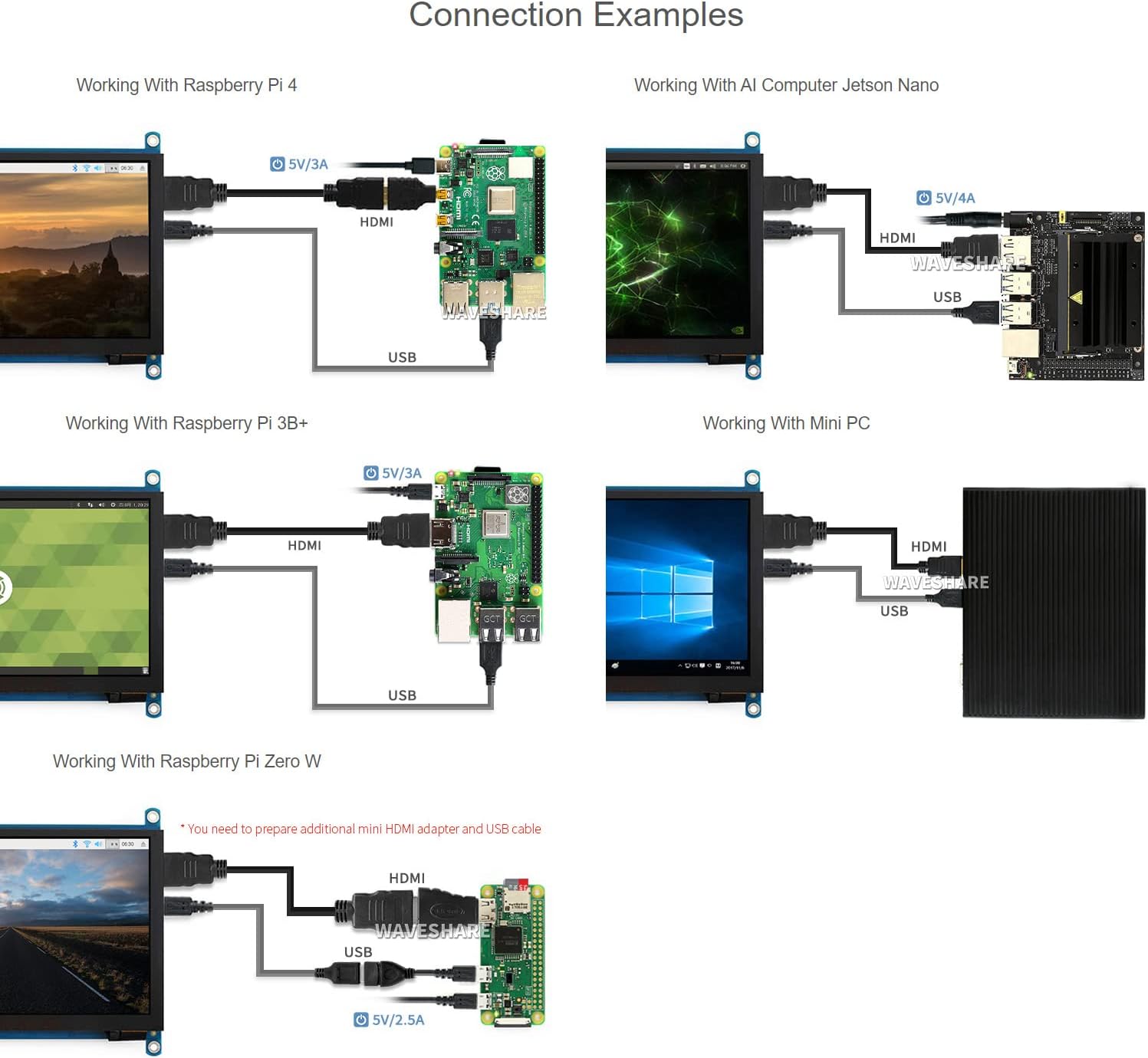
Image: Diagrams illustrating various connection examples for the 7-inch HDMI LCD with Raspberry Pi 4, Jetson Nano, Raspberry Pi 3B+, Raspberry Pi Zero W, and a Mini PC, showing HDMI and USB cable connections.
Návod na obsluhu
1. Zapnutie/vypnutie
The display powers on automatically when connected to a powered device via HDMI and USB. To power off, disconnect the power source from the connected device or the display's USB power input.
2. Navigácia v ponuke OSD
The display features an On-Screen Display (OSD) menu for various settings. Use the physical buttons on the side of the display to navigate and adjust settings such as brightness, contrast, and power management. Refer to the "Appearance and Dimensions" section for button identification.
3. Dotknite sa položky Ovládanie
The display supports capacitive touch input. When connected via USB to a compatible operating system (Raspberry Pi OS, Ubuntu, Kali, Windows), the touch functionality will be recognized automatically without additional drivers. The number of touch points supported depends on the operating system (e.g., 5-point touch on Windows, single-point on Jetson Nano Ubuntu).

Image: Demonstrates the capacitive touch control functionality on the 7-inch HDMI LCD, showing a hand interacting with a web browser interface. Also shows the display connected to a game console, indicating support for gaming display.
4. Audio výstup
Audio can be output through the 3.5mm audio jack or the 4PIN header for external speakers. Ensure your connected device is configured to output audio via HDMI.
Údržba
- Čistenie: Use a soft, lint-free cloth to gently wipe the screen surface. Do not use abrasive cleaners or solvents.
- Ukladací priestor: Store the display in a cool, dry environment away from direct sunlight and extreme temperatures.
- Manipulácia: Zabráňte nadmernému tlaku na obrazovku alebo pádu zariadenia.
Riešenie problémov
- Žiadny displej/čierna obrazovka:
- Uistite sa, že všetky káble HDMI a USB sú bezpečne pripojené.
- Verify the connected device (Raspberry Pi, PC) is powered on and outputting video.
- Check the power supply for the connected device; insufficient power can cause display issues.
- Try a different HDMI cable or port if available.
- Dotyková funkcia nefunguje:
- Ensure the USB cable for touch is connected from the display's "Touch" port to the host device.
- Verify the operating system on your host device supports touch input and is configured correctly.
- For Raspberry Pi, ensure the OS is up-to-date and configured for the display's resolution.
- A low USB voltage can cause touch failure; ensure adequate power supply.
- Blikanie displeja:
- This can be caused by low USB voltage. Ensure the host device has a stable and sufficient power supply (e.g., 5V/3A for Raspberry Pi).
- Skontrolujte, či nie sú uvoľnené káblové spojenia.
- Žiadny zvukový výstup:
- Ensure your host device is configured to output audio via HDMI.
- Check connections to the 3.5mm jack or 4PIN header.
Špecifikácie
| Veľkosť obrazovky | 7 palca |
| Rozlíšenie | 1024 x 600 (Hardware), up to 1920x1080 (Software) |
| Typ panelu | IPS |
| Viewing uhol | 170° |
| Dotknite sa položky Typ | Kapacitný |
| Dotknite sa položky Body | 5-point (Windows), Single-point (Jetson Nano), 5-point (Raspberry Pi OS) |
| Rozhranie displeja | HDMI, VGA (requires separate cable) |
| Zvukový výstup | 3.5mm Jack, 4PIN Header |
| Príkon | 5V DC (cez USB) |
| Rozmery produktu | 7.09 x 5.51 x 1.97 palca (približne 180 x 140 x 50 mm) |
| Hmotnosť položky | 0.352 unce (približne 10 gramov) |
Podpora zariadení a systému
- Raspberry Pi: Supports Raspberry Pi OS, Ubuntu, Kali, Retropie (driver-free). Supports all versions of Raspberry Pi.
- Jetson Nano: Supports Ubuntu (single-point touch, driver-free).
- PC: Supports Windows 11 / 10 / 8.1 / 8 / 7 (5-point touch, driver-free).
- Herné konzoly: Xbox360, PS4, Switch (display only).
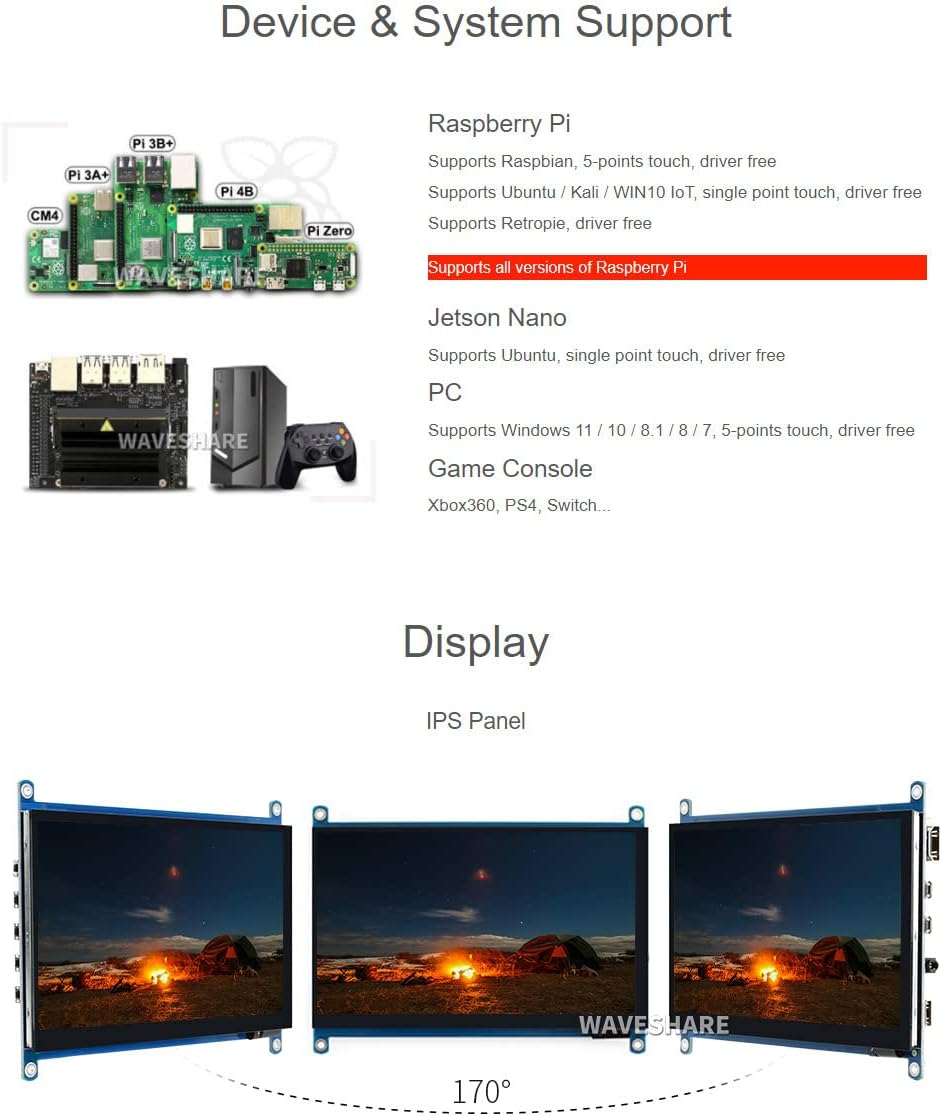
Image: Illustrates various compatible devices including Raspberry Pi models (Pi 3A+, Pi 3B+, Pi 4B, CM4, Pi Zero), Jetson Nano, and a generic PC setup, along with a list of supported operating systems and touch capabilities.
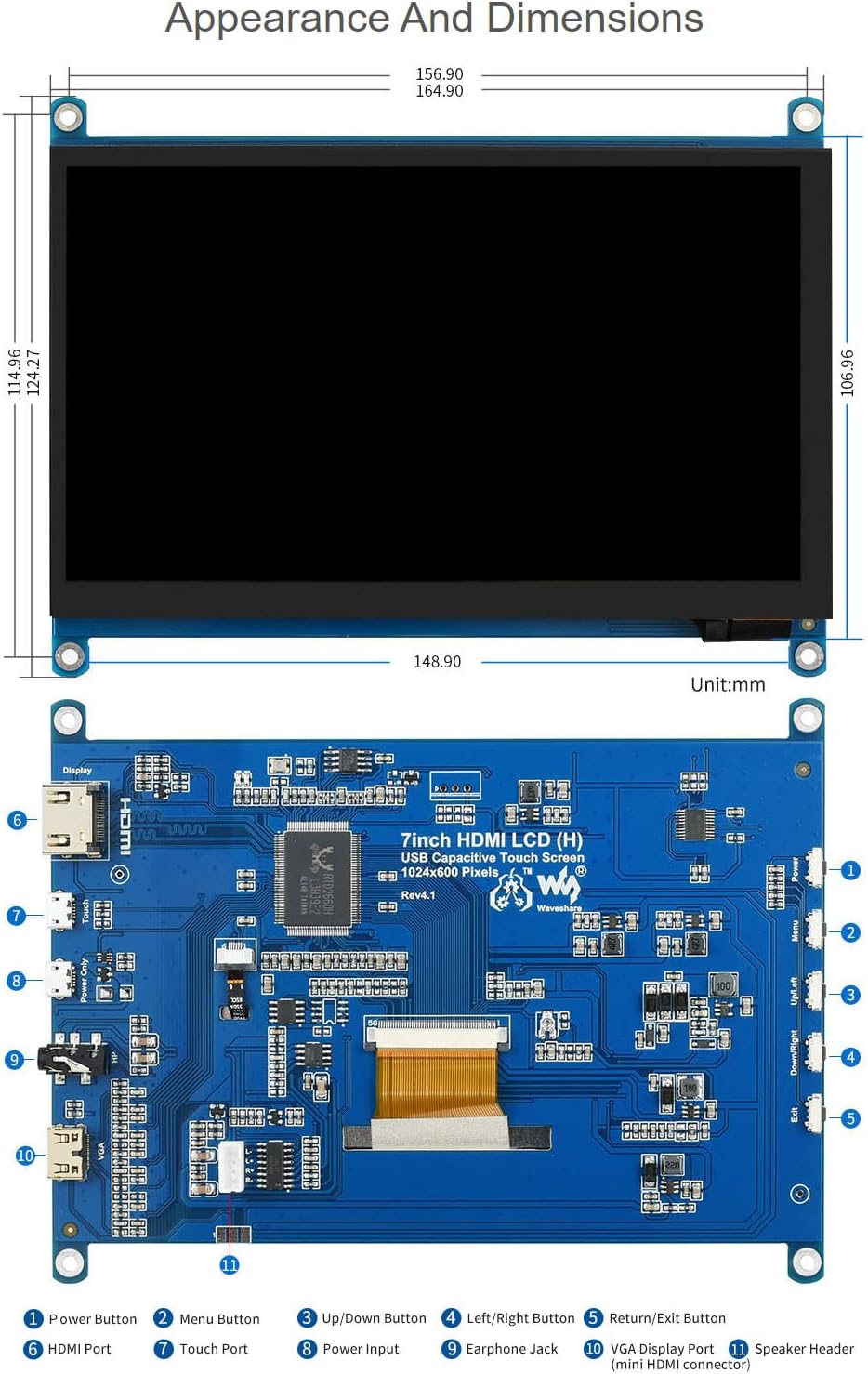
Image: Technical drawing showing the physical dimensions of the 7-inch HDMI LCD in millimeters, along with a detailed diagram identifying various ports and buttons on the display's circuit board, such as HDMI port, touch port, power input, earphone jack, VGA display port, and OSD menu buttons.
Záruka a podpora
Waveshare is committed to providing high-quality products and customer service.
- Bezplatná výmena: 30 days from purchase date.
- Bezplatná oprava: 365 days from purchase date.
- Technická služba: K dispozícii je doživotná technická podpora.
For technical assistance or warranty claims, please contact Waveshare customer support through their official channels.

Image: Details Waveshare's commitment to support and service, including rigorous testing, one-to-one technical service, 24-hour response, 30-day free replacement, 365-day free repair, and lifetime technical service.
Certifikácie
This product holds the following certifications:
- HDMI Certified: The display is an officially authorized HDMI adopter, ensuring higher-quality images and stable data transmission. For verification, visit hdmi.org.
- V súlade s RoHS: Complies with the Restriction of Hazardous Substances Directive.
- CE certifikované: Meets European Union safety, health, and environmental protection requirements.
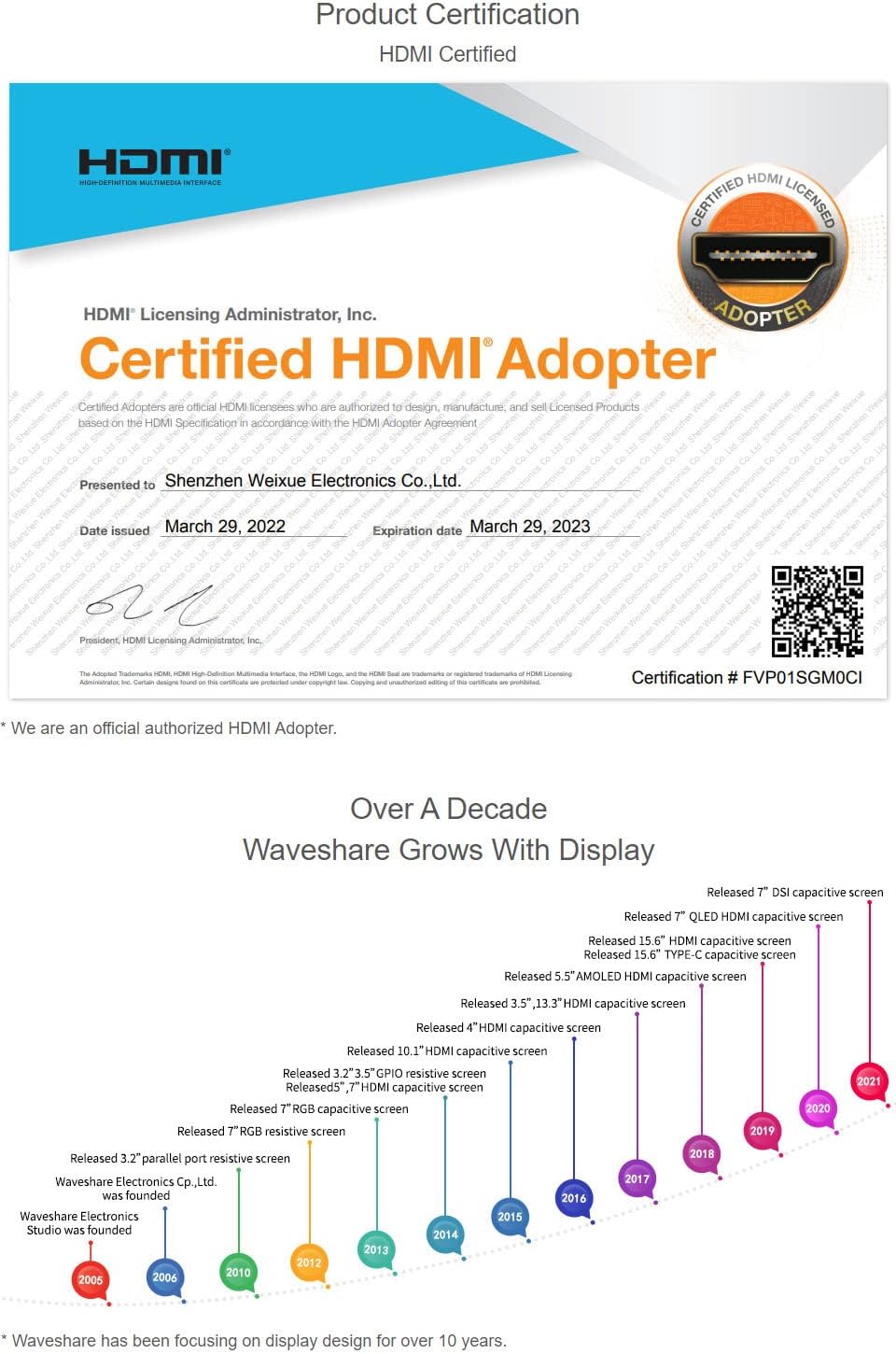
Image: A certificate indicating that Waveshare is an officially authorized HDMI adopter, ensuring compliance with HDMI standards for quality and reliability.

Image: Displays certificates for RoHS compliance and CE marking, indicating the product meets relevant environmental and safety standards.