
Easytry123 Easytry2094
Easytry123 Replacement Remote Control User Manual
For Samsung HW-J450/ZA, PS-WJ651, PS-WJ470/ZA, HW-J6502, HW-J650 Audio Soundbar Systems
1. Úvod
This manual provides instructions for the Easytry123 replacement remote control, designed for use with various Samsung audio soundbar systems. This remote control offers basic functionality for compatible models. Please note that as a replacement unit, it may not support all advanced functions of the original remote control.
Kompatibilné modely:
- Samsung HW-J450/ZA
- Samsung PS-WJ651
- Samsung PS-WJ651/ZA
- Samsung PS-WJ470/ZA
- Samsung HW-J6502
- Samsung HW-J650
2. Nastavenie
2.1 Inštalácia batérie
The remote control requires batteries for operation. Batteries are not included with the remote control and must be purchased separately. This remote typically uses standard Lithium batteries.
- Nájdite priehradku na batérie na zadnej strane diaľkového ovládača.
- Remove the battery compartment cover by sliding or gently prying it open.
- Insert the new batteries, ensuring the correct polarity (+ and -) as indicated inside the compartment.
- Nasaďte kryt priehradky na batérie späť, kým bezpečne nezacvakne na miesto.

Obrázok 1: Diaľkové ovládanie s otvoreným priestorom pre batérie.
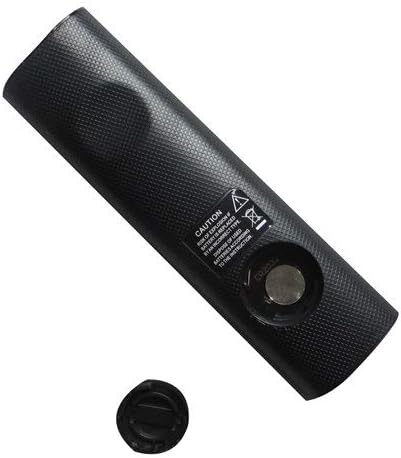
Figure 2: Remote control showing the battery cap detached.
2.2 Prvé použitie
This remote control utilizes infrared (IR) technology. No complex pairing or programming is typically required. Once batteries are installed, point the remote directly at your Samsung soundbar system and begin operation.
3. Návod na obsluhu
The remote control features 15 buttons for various functions. While specific button labels may vary, common functions include:
- Výkon: Zapne alebo vypne systém soundbaru.
- Zvýšenie/zníženie hlasitosti: Upravuje výstupnú úroveň zvuku.
- Stlmiť: Stíší zvukový výstup.
- Vstup/zdroj: Cykluje medzi dostupnými zdrojmi zvukového vstupu (napr. HDMI, optický, Bluetooth).
- Navigačné tlačidlá: Used for menu navigation (if supported by the soundbar and remote).
- Ovládanie prehrávania: Play, Pause, Skip (if controlling a connected media device).
For optimal performance, ensure a clear line of sight between the remote control and the soundbar's IR receiver. The maximum effective range is approximately 10 meters (33 feet).
4. Údržba
4.1 Výmena batérie
Replace batteries when the remote control's response becomes inconsistent or stops working. Always replace all batteries at the same time with new ones of the same type. Do not mix old and new batteries, or different types of batteries.
4.2 Čistenie
To clean the remote control, wipe it with a soft, dry cloth. Do not use liquid cleaners, abrasive pads, or chemical solvents, as these can damage the remote's surface or internal components.
4.3 Skladovanie
Diaľkový ovládač skladujte na chladnom a suchom mieste mimo dosahu priameho slnečného žiarenia a extrémnych teplôt. Ak diaľkový ovládač nebudete dlhší čas používať, odporúča sa vybrať batérie, aby ste predišli ich vytečeniu.
5. Riešenie problémov
- Diaľkové ovládanie nereaguje:
- Skontrolujte, či sú batérie vložené správne so správnou polaritou.
- Vymeňte batérie za nové.
- Ensure there is a clear line of sight between the remote and the soundbar's IR receiver. Remove any obstructions.
- Make sure you are within the effective operating range (approximately 10 meters).
- Niektoré funkcie nefungujú:
- As a replacement remote, it may not support all advanced or specific functions of the original equipment. This is normal for universal or replacement remotes.
- Verify that your soundbar model is listed as compatible in the Introduction section.
6. Špecifikácie
| Funkcia | Špecifikácia |
|---|---|
| Značka | Easytry123 |
| Názov modelu | Easytry2094 |
| Technológia pripojenia | Infračervený (IR) |
| Množstvo tlačidiel | 15 |
| Typ ovládača | Ovládanie tlačidlom |
| Maximálny rozsah | 10 metra |
| Typ batérie | Lithium (not included) |
| Farba | Čierna |
| Kompatibilné zariadenia | Samsung Audio Soundbar Systems (specific models listed) |
7. Záruka a podpora
For warranty information and customer support, please refer to the seller or retailer from whom you purchased this product. Specific warranty terms and support channels are typically provided at the point of sale.
Ask a question about this manual
Ask about setup, troubleshooting, compatibility, parts, safety, or missing instructions. Manuals+ will review the question and use this page’s manual context to help answer it.