
Úvod
The Forge Doosl DSER102 is a versatile device designed to enhance your audio experience. It functions as both a Bluetooth receiver, allowing you to stream audio wirelessly to non-Bluetooth devices, and an FM transmitter, enabling you to broadcast audio to your car radio. This manual provides detailed instructions for setup, operation, and maintenance to ensure optimal performance.
Bezpečnostné informácie
- Chráňte zariadenie pred vodou, vlhkosťou a extrémnymi teplotami.
- Nepokúšajte sa zariadenie rozoberať ani opravovať sami. Obráťte sa na kvalifikovaný servisný personál.
- Používajte iba dodaný nabíjací kábel alebo jeho certifikovaný ekvivalent.
- Vyhnite sa dlhodobému vystaveniu priamemu slnečnému žiareniu.
- Zariadenie a jeho batériu zlikvidujte zodpovedne v súlade s miestnymi predpismi.
Obsah balenia
Skontrolujte, prosím, balenie, či neobsahuje nasledujúce položky:
- Forge Doosl DSER102 Bluetooth Receiver & FM Transmitter
- Micro USB nabíjací kábel
- 3.5 mm audio kábel
- Používateľská príručka (tento dokument)
Koniec produktuview
Oboznámte sa s komponentmi zariadenia:
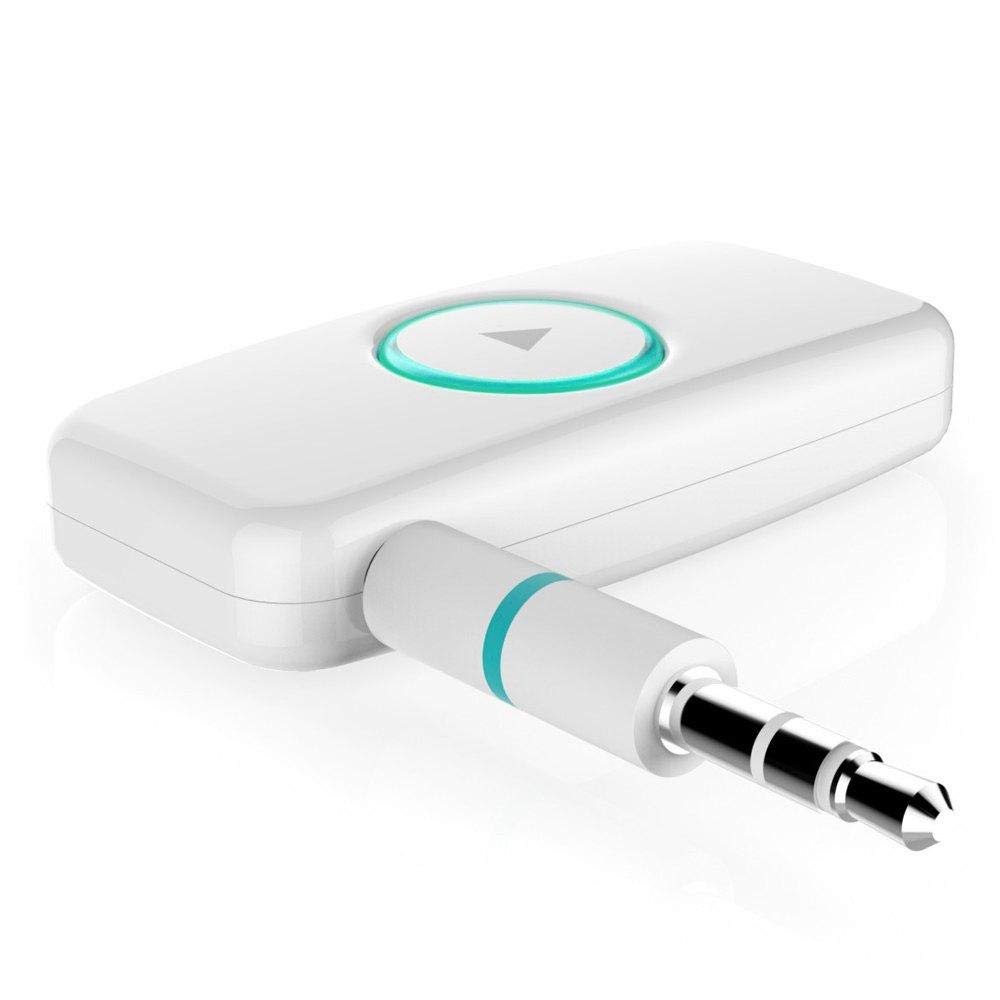
Obrázok 1: Predná strana view of the DSER102 device.
- Multifunkčné tlačidlo: Power on/off, Play/Pause, Answer/End Call, Mode Switch.
- LED indikátor: Shows power, charging, and connection status.
- 3.5mm Audio Output/Input Port: Connects to audio devices.
- Micro USB nabíjací port: Na nabíjanie internej batérie.
Nastavenie
1. Nabíjanie zariadenia
Before first use, fully charge the DSER102.
- Connect the Micro USB charging cable to the device's charging port.
- Druhý koniec kábla pripojte k napájaciemu adaptéru USB (nie je súčasťou balenia) alebo k portu USB počítača.
- The LED indicator will show red during charging and turn off when fully charged. A full charge takes approximately 2 hours and provides up to 16 hours of music playback.
2. Bluetooth Receiver Mode Setup
Use this mode to stream audio from your Bluetooth-enabled phone to a non-Bluetooth speaker or car stereo.
- Zapnutie: Press and hold the Multi-function Button for 3 seconds until the LED indicator flashes blue rapidly, indicating pairing mode.
- Pripojenie k zvukovému zariadeniu: Plug the DSER102 into the 3.5mm AUX input of your car stereo, home stereo, or speaker using the 3.5mm audio cable.
- Spárovanie s telefónom: On your mobile phone, enable Bluetooth and search for "DSER102" in the list of available devices. Select it to pair.
- Connection Confirmed: Once paired, the LED indicator will flash blue slowly. You can now play music from your phone through the connected audio device.
3. FM Transmitter Mode Setup
Use this mode to broadcast audio from the DSER102 to your car's FM radio.
- Zapnutie: Stlačte a podržte multifunkčné tlačidlo na 3 sekundy.
- Switch to FM Transmitter Mode: Double-press the Multi-function Button to switch modes. The LED indicator will change color or pattern (refer to device for specific indication).
- Naladenie FM rádia: On your car's FM radio, tune to an unused FM frequency (e.g., 87.5 MHz or 108.0 MHz).
- Set DSER102 Frequency: The DSER102 will transmit on a specific FM frequency. If adjustable, match the DSER102's frequency to your car radio's frequency. If not adjustable, find the frequency the DSER102 is broadcasting on and tune your car radio to it.
- Pripojenie zdroja zvuku: Connect your audio source (e.g., phone via Bluetooth) to the DSER102. The audio will now be transmitted to your car's FM radio.
Návod na obsluhu
Zapnutie/vypnutie
- Zapnutie: Stlačte a podržte multifunkčné tlačidlo približne 3 sekundy, kým sa nerozsvieti LED indikátor.
- Vypnúť: Stlačte a podržte multifunkčné tlačidlo približne 3 sekúnd, kým nezhasne LED indikátor.
Music Playback (Bluetooth Receiver Mode)
- Prehrať/pozastaviť: Krátko stlačte multifunkčné tlačidlo.
Call Management (Bluetooth Receiver Mode)
- Prijať/Ukončiť hovor: Krátko stlačte multifunkčné tlačidlo.
- Odmietnuť hovor: Stlačte a podržte multifunkčné tlačidlo na 2 sekundy.
- Znova vytočiť posledné číslo: Dvakrát stlačte multifunkčné tlačidlo.
Údržba
- Zariadenie čistite mäkkou, suchou handričkou. Nepoužívajte tekuté čistiace prostriedky ani aerosóly.
- Keď zariadenie nepoužívate, skladujte ho na chladnom a suchom mieste.
- Zabráňte pádu zariadenia alebo jeho vystaveniu silným nárazom.
Riešenie problémov
| Problém | Riešenie |
|---|---|
| Zariadenie sa nezapne. | Uistite sa, že zariadenie je úplne nabité. Pripojte ho k zdroju napájania pomocou kábla Micro USB. |
| Nedá sa spárovať so zariadením Bluetooth. | Make sure the DSER102 is in pairing mode (rapidly flashing blue LED). Ensure your phone's Bluetooth is enabled and within range. Try restarting both devices. |
| No audio in Bluetooth Receiver mode. | Check if the 3.5mm audio cable is securely connected to both the DSER102 and your audio system's AUX input. Ensure your audio system is set to the correct AUX input. Adjust volume on both devices. |
| Poor audio quality in FM Transmitter mode. | Find a clear, unused FM frequency on your car radio and match the DSER102's frequency to it. Avoid frequencies used by local radio stations. Reduce interference by moving the device away from other electronics. |
Špecifikácie
- Model: DSER102
- Verzia Bluetooth: V4.0
- Kapacita batérie: Li-batéria 250mAh
- Čas prehrávania hudby: Až 16 hodín
- Nabíjací port: Micro USB
- Zvukový výstup: 3.5 mm AUX
- Rozmery: 1.4 x 4.6 x 3.7 cm
- Hmotnosť: 200 g
- Kompatibilné zariadenia: Slúchadlá, smartfón, reproduktor
Záruka a podpora
For warranty information or technical support, please refer to the retailer where the product was purchased or visit the official Forge webstránky. Uschovajte si doklad o kúpe ako dôkaz o kúpe.