
1. Úvod
The Waveshare RS485 to Ethernet Converter (Model: RS485 TO ETH) is a device designed to facilitate communication between RS485 serial devices and an Ethernet network. It enables seamless data exchange, allowing RS485 devices to be integrated into modern IP-based systems. This manual provides essential information for the proper setup, operation, and maintenance of the converter.
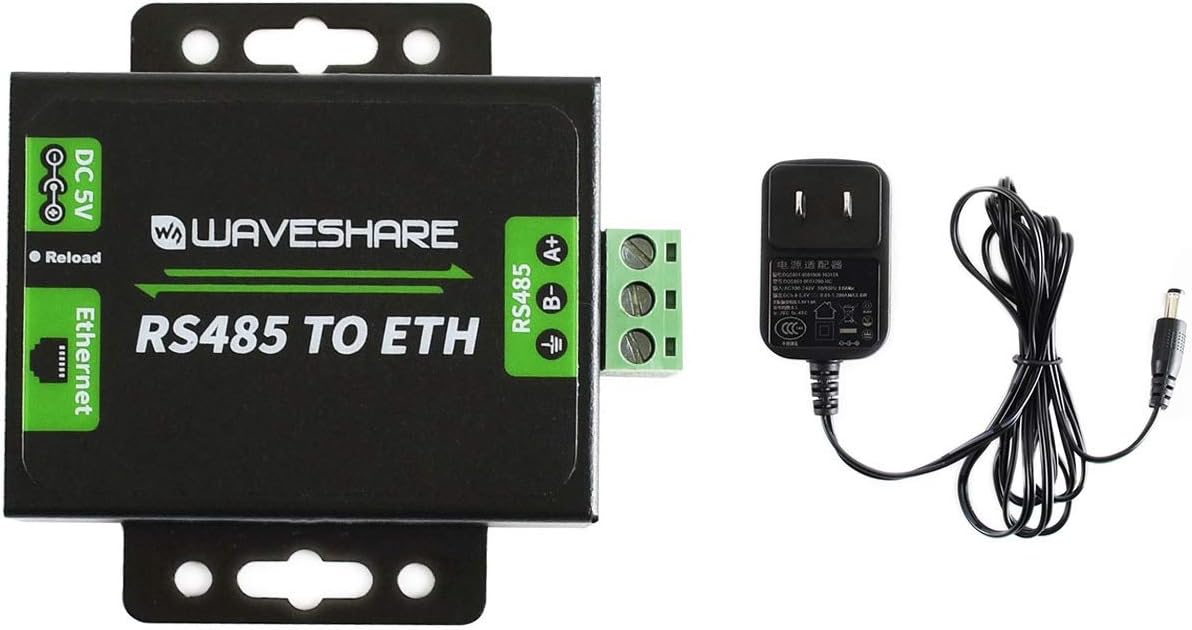
Figure 1: Waveshare RS485 to Ethernet Converter with included power adapter. This image displays the Waveshare RS485 to Ethernet Converter unit alongside its power adapter. The converter features a black casing with green labels indicating DC 5V power input, Ethernet port, and RS485 screw terminals (A+, B-, GND). The power adapter is a standard wall plug type.
2. Produkt skončilview a funkcie
The Waveshare RS485 to Ethernet Converter is built with a focus on performance and reliability. Key features include:
- M0 series 32-bit ARM processor for fast and efficient operation.
- 10/100M Auto-MDI/MDIX Ethernet interface, compatible with both cross-over and straight-through cables.
- Configurable RS485 baud rate from 600bps to 230.4Kbps, supporting None, Odd, Even, Mark, and Space parity options.
- Multiple working modes: TCP Server, TCP Client, UDP Server, UDP Client, and HTTPD Client (supports GET and POST).
- Flexible configuration options via webpage, AT commands, serial protocol, and network protocol.
- Support for customized heartbeat and registration packets for connection verification and device identification.
- Prispôsobiteľné webpage for module configuration.
- RFC2217-like protocol support for devices with changing serial settings.
- KeepAlive mechanism for detecting broken connections and automatic re-connection.
- Time-out reboot (no-data reboot) for long-term stable connections, with configurable reboot time.
- DNS domain name resolution and configurable DNS server.
- DHCP support for auto-obtained IP or static IP configuration.
- Firmware upgradable via the network.
- Hardware and software options for restoring to factory settings.
- Customizable MAC address.
3. Nastavenie
Follow these steps to set up your Waveshare RS485 to Ethernet Converter:
- Napájanie: Connect a DC 5V power supply to the DC 5V input jack on the converter. The recommended input voltage je 5.0-7.0V.
- Ethernetové pripojenie: Connect an Ethernet cable from the converter's RJ45 port to your network switch or router. The converter supports 10/100M Auto-MDI/MDIX.
- Pripojenie RS485: Connect your RS485 device to the green screw terminal block. Ensure correct polarity for A+ (positive), B- (negative), and GND (ground).
- Počiatočná konfigurácia: The device comes with default network settings. These are typically printed on a label on the bottom of the unit.

Figure 2: Bottom label of Waveshare RS485 to Ethernet Converter showing default network settings. The bottom of the converter unit displays a label with essential network configuration details: Model: RS485 TO ETH, Username: admin, Default IP: 192.168.0.7, Password: admin, MAC address, and Input power requirements (DC5-7V/500mA). The manufacturer's website, www.waveshare.net, is also listed.
For detailed setup instructions and advanced configurations, refer to the official Waveshare product wiki at www.waveshare.net.
4. Prevádzkové režimy
The converter supports various operating modes to suit different application requirements:
- TCP server: The converter listens for incoming TCP connections from clients.
- TCP klient: The converter initiates a TCP connection to a specified server.
- UDP Server: The converter listens for incoming UDP packets.
- UDP Client: The converter sends UDP packets to a specified destination.
- HTTPD Client: The converter can act as an HTTP client, supporting GET and POST requests.
5. Konfigurácia
The Waveshare RS485 to Ethernet Converter offers multiple methods for configuration:
- Webpage Configuration: Access the converter's built-in web interface using its IP address (default: 192.168.0.7) in a web browser. Use the default username 'admin' and password 'admin' for login.
- AT príkazy: Configure the device using AT commands sent via the serial port.
- Sériový protokol: Utilize a dedicated serial protocol for configuration.
- Sieťový protokol: Configuration can also be performed over the network using specific protocols.
Aktualizácia firmvéru: The device's firmware can be updated over the network, ensuring access to the latest features and improvements.
Obnovenie výrobných nastavení: The converter can be restored to its factory default settings via both software commands and a hardware reset button (Reload button).
6. Softvér
Waveshare provides supporting software to assist with the use and configuration of the converter:
- Module Configuration Software: A dedicated application for configuring the converter's parameters.
- TCP/UDP Testing Tool: Software for testing TCP and UDP communication.
- VCOM Virtual Serial Port Software: Allows the Ethernet port to be mapped as a virtual serial port on a computer.
Example code for various platforms (e.g., host computer socket, VB, C++, Delphi, Android, iOS) is also available from the manufacturer.
7. Špecifikácie

Figure 3: Technical specifications and dimension diagram for Waveshare RS485 to Ethernet Converter. A detailed diagram presenting the technical specifications for Ethernet, RS485, Power, and Environment, along with precise dimensions of the converter unit in millimeters. Key measurements like length, width, and height are indicated.
| Kategória | Parameter | Hodnota |
|---|---|---|
| Ethernet | Konektor | RJ45 |
| Rýchlosť komunikácie | 10/100 Mbps | |
| Ochrana rozhrania | 1.5KV electromagnetic isolation | |
| Protokoly | IP, TCP, UDP, ARP, ICMP, DHCP, DNS, HTTPD Client | |
| TX/RX Cache | 6Kbyte / 4Kbyte | |
| RS485 | Konektor | Screw terminal (A+, B-, GND) |
| Dátový bit | 5bit, 6bit, 7bit, 8bit | |
| Zastav bit | 1, 2 | |
| Kontrola parity | Žiadne, nepárne, párne, známky, medzera | |
| Prenosová rýchlosť | 600bps-230.4Kbps | |
| Ochrana rozhrania | 2KV ESD protection, RS485 pull up/down resistors: 2.2KΩ | |
| Sila | Napájanie | 5.0-7.0V (5V recommended) |
| Prevádzkový prúd | 150 mA (pri 5 V) | |
| Spotreba energie | <1 W | |
| Ochrana rozhrania | Reverse-proof, ESD protection, anti-surge | |
| Životné prostredie | Prevádzková teplota | -25 až 75 °C |
| Skladovacia teplota | -40 až 105 °C | |
| Rozmery | Unit (L x W x H) | 63.59mm x 41.13mm x 25.47mm (approximate, excluding mounting tabs) |
8. Riešenie problémov
If you encounter issues with your Waveshare RS485 to Ethernet Converter, consider the following:
- Žiadne sieťové pripojenie: Verify that the Ethernet cable is securely connected and that your network infrastructure (router/switch) is functioning correctly. Check the converter's network indicator lights.
- Nedá sa získať prístup Web Rozhranie: Ensure your computer's IP address is in the same subnet as the converter's default IP (192.168.0.7). If the IP has been changed, try to recall the new IP or perform a factory reset.
- Chyba komunikácie RS485: Double-check the RS485 wiring for correct A+ and B- polarity. Ensure the baud rate, data bits, stop bits, and parity settings on the converter match those of your RS485 device.
- Problémy s napájaním: Confirm that the power adapter is correctly connected and providing the specified DC 5V (5.0-7.0V) power.
- Protokol Modbus: Please note that this converter does nie natively support Modbus protocol. If your application requires Modbus, additional software or gateway solutions may be necessary.
- Všeobecná nestabilita: If the device experiences intermittent issues, consider performing a factory reset and reconfiguring it. Ensure the operating environment is within specified temperature ranges.
For more in-depth troubleshooting guides and technical support, visit the official Waveshare webstránky.
9. Údržba
To ensure the longevity and reliable operation of your converter:
- Udržujte zariadenie čisté a bez prachu. Na čistenie používajte mäkkú, suchú handričku.
- Operate the device within the specified environmental conditions (temperature and humidity).
- Nevystavujte zariadenie nadmernej vlhkosti alebo extrémnym teplotám.
- Zabezpečte správne vetranie okolo jednotky, aby ste predišli prehriatiu.
10. Záruka a podpora
For information regarding product warranty, technical support, and additional resources, please refer to the official Waveshare webmiesto:
The website provides comprehensive documentation, software downloads, and contact information for customer assistance.