
1. Úvod
This manual provides detailed instructions for the installation, operation, and maintenance of your ESX VN715-E39-DAB In-Car Navigation and Multimedia System. Please read this manual thoroughly before using the device to ensure proper functionality and to prevent damage. Keep this manual for future reference.
2. Produkt skončilview a funkcie
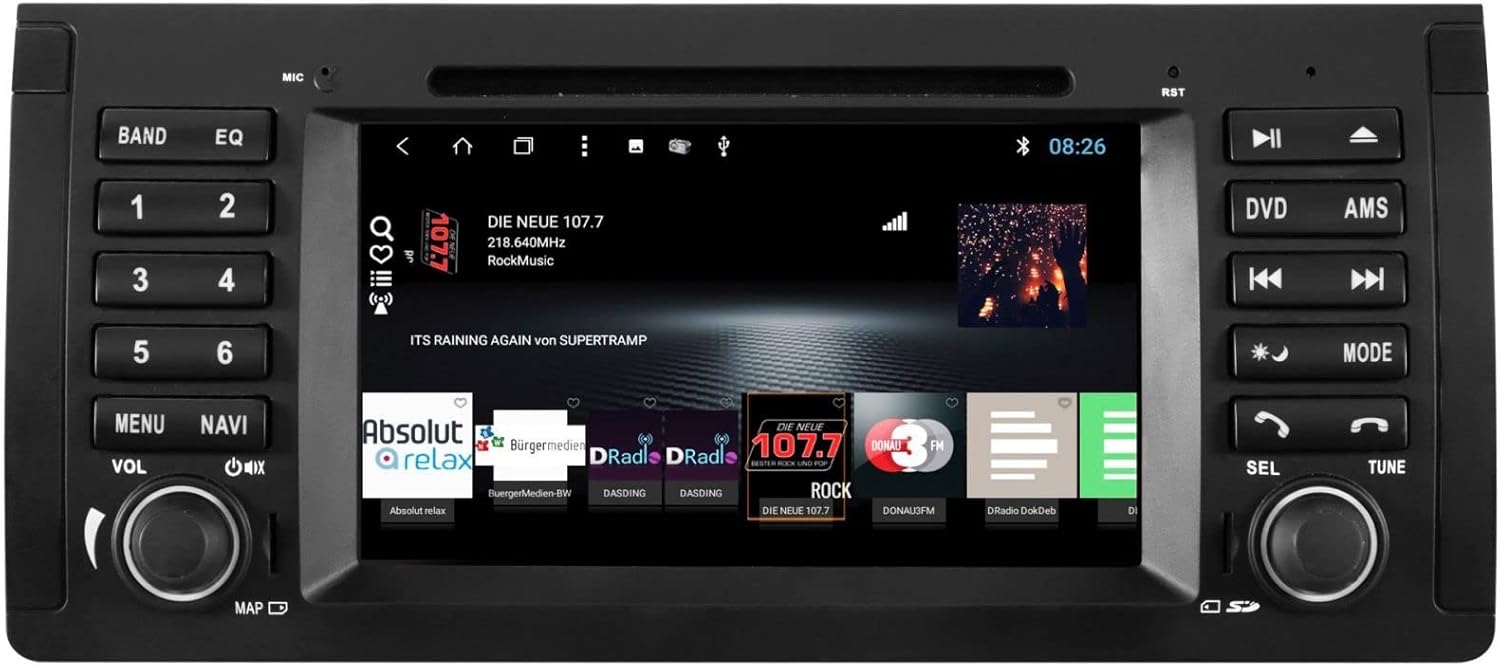
The ESX VN715-E39-DAB is an advanced in-car multimedia system designed to enhance your driving experience with navigation, entertainment, and connectivity features. It integrates seamlessly into compatible BMW vehicles.
Kľúčové vlastnosti:
- High-Resolution 8-inch Touchscreen: Provides clear visuals and intuitive control.
- Advanced Android i15 Operating System: Offers a familiar and customizable user interface.
- Google Maps Navigation: Supports both online and offline navigation for reliable route guidance.
- Mobile Internet Connectivity: Connects via Wi-Fi hotspot for online services.
- Digitálne rádio DAB+: Includes a DAB antenna for high-quality digital radio reception with station logos.
- AM/FM Radio with RDS: Standard analog radio reception with Radio Data System functionality.
- Multi-format DVD Player: Supports DVD, DVD-R/RW, DVD+R/RW, VCD, CD, CD Text, CD-R/RW, and MP3 formats.
- Bluetooth Hands-Free Kit: Enables safe phone calls and audio streaming with an internal microphone and optional external microphone connection.
- Integrácia smartfónu: Connect iPhone or Android smartphones via USB for various functions.
- Ovládanie hlasom: Utilize voice commands through a connected smartphone.
- Audio výstupy: Pre-amplifier outputs for front, rear, subwoofer, and center channels.
- Vstup fotoaparátu: One adjustable camera input for reverse cameras.
- Pomocné vstupy/výstupy: One AUX video input, two audio/video outputs, and one AUX audio input.
- USB porty: Two USB ports for media and connectivity.
- Slot na kartu Micro SD: Dedicated slot for navigation data and media files.
- Prispôsobenie: Personalize with customizable logos and wallpapers.
- Authenticity Certificate: Included with the product.
3. Nastavenie a inštalácia
Installation of the ESX VN715-E39-DAB system requires technical knowledge and should ideally be performed by a qualified professional. Incorrect installation can lead to damage to the device or vehicle electrical system.
Kompatibilita:
This unit is compatible with specific BMW models and connector types:
- BMW 5 Series E39 (1996-2001) with 17-pin system connector.
- BMW 5 Series E39 (2002-2003) with 40-pin system connector.
- BMW X5 E53 (2000-2001) with 17-pin system connector.
- BMW X5 E53 (2002-2007) with 40-pin system connector.
- BMW M5 (1996-2003) with 17/40-pin system connector.
Všeobecné kroky inštalácie (odporúča sa profesionálna inštalácia):
- Odpojte batériu: Always disconnect the vehicle's battery before starting any electrical work.
- Odstrániť existujúcu jednotku: Carefully remove the factory radio or navigation system from the dashboard.
- Pripojte káblový zväzok: Connect the appropriate wiring harness (17-pin or 40-pin) to the vehicle's electrical system and the ESX unit. Ensure all connections are secure.
- Pripojte antény: Connect the GPS antenna, DAB antenna, and radio antenna to their respective ports on the unit. Position the antennas for optimal reception.
- Pripojte periférne zariadenia: Connect any optional accessories such as a reverse camera, external microphone, USB devices, or auxiliary inputs/outputs.
- Namontujte jednotku: Securely mount the ESX unit into the dashboard opening.
- Znovu pripojte batériu: Znovu pripojte batériu vozidla a otestujte systém.

4. Návod na obsluhu
Familiarize yourself with the touchscreen interface and physical buttons for optimal use.
4.1 Základné ovládanie
- Zapnutie/vypnutie: Press and hold the power button (usually the VOL knob) to turn the unit on or off. A short press typically mutes or unmutes the audio.
- Ovládanie hlasitosti: Otočením ovládača VOL nastavte hlasitosť zvuku.
- Rozhranie dotykovej obrazovky: V ponukách a aplikáciách sa môžete pohybovať ťuknutím, potiahnutím a zovretím prstov na 8-palcovej dotykovej obrazovke.

4.2 Navigácia
Access the navigation application (e.g., Google Maps) from the home screen. Input your destination, and the system will provide turn-by-turn directions. Ensure GPS antenna is properly connected for accurate positioning.

4.3 Radio (DAB+/AM/FM)
- Vyberte režim: Tap the 'Radio' or 'DAB+' icon on the home screen or press the 'BAND' button.
- Skenovacie stanice: Use the 'AMS' (Auto Memory Store) button or on-screen controls to scan and save available stations.
- Naladiť: Manually tune using the 'TUNE' knob or on-screen frequency controls.
- predvoľby: Save your favorite stations to preset buttons (1-6) for quick access.

4.4 Pripojenie Bluetooth
- Párovanie: Go to the Bluetooth settings on the unit and your smartphone. Hľadať available devices and select 'ESX VN715-E39-DAB'. Enter the PIN if prompted (usually '0000' or '1234').
- Hands-free telefonovanie: Po spárovaní môžete uskutočňovať a prijímať hovory priamo prostredníctvom zariadenia.
- Streamovanie zvuku: Play music from your smartphone via Bluetooth A2DP.
4.5 Media Playback (DVD/USB/SD)
- DVD: Insert a DVD into the disc slot. The system will automatically switch to DVD mode or prompt you to select it.
- USB/SD: Insert a USB drive into a USB port or an SD card into the Micro SD slot. Access media files through the 'Media' or 'File Explorer' application.
5. Údržba
Regular maintenance ensures the longevity and optimal performance of your ESX VN715-E39-DAB system.
- Čistenie obrazovky: Dotykovú obrazovku jemne utrite mäkkou handričkou, ktorá nepúšťa vlákna. V prípade odolných škvŕn ju jemne utrite.amphandričku utrite vodou alebo čistiacim prostriedkom na obrazovky. Vyhnite sa agresívnym chemikáliám.
- Aktualizácie softvéru: Periodically check for software updates from the manufacturer's official website or through the unit's system settings (if available) to ensure you have the latest features and bug fixes.
- Disc Drive Care: Keep the DVD slot free of dust and debris. Avoid inserting damaged or non-standard discs.
6. Riešenie problémov
Ak sa s jednotkou vyskytnú problémy, pozrite si nasledujúce bežné kroky na riešenie problémov:
| Problém | Možná príčina | Riešenie |
|---|---|---|
| Žiadna sila | Uvoľnené pripojenie napájania, prepálená poistka, problém s batériou vozidla. | Check power cables and fuse. Ensure vehicle battery is charged. Consult a professional if issues persist. |
| Žiadny zvuk | Volume muted, speaker wires disconnected, incorrect audio source. | Check volume level and mute status. Verify speaker connections. Select the correct audio source. |
| Strata signálu GPS | GPS antenna improperly connected or obstructed, unit in an area with poor satellite reception. | Uistite sa, že anténa GPS je bezpečne pripojená a má jasný signál. view oblohy. Presuňte sa na otvorené priestranstvo. |
| Zlyhanie párovania Bluetooth | Bluetooth not enabled on device, incorrect PIN, device out of range. | Ensure Bluetooth is active on both devices. Re-enter PIN. Bring devices closer. Restart both devices. |
| Dotykový displej nereaguje | Zamrznutie systému, nečistoty na obrazovke. | Perform a soft reset (refer to device settings or power cycle). Clean the screen. |
Ak tieto kroky problém nevyriešia, kontaktujte zákaznícku podporu alebo kvalifikovaného servisného technika.
7. Špecifikácie
Detailed technical specifications for the ESX VN715-E39-DAB unit:
- Značka: rozšírenie ESX
- Model: VN715-E39-DAB
- Veľkosť obrazovky: 8 palca
- Typ zobrazenia: LCD
- Operačný systém: Android i15
- Technológia pripojenia: Bluetooth, USB, Wi-Fi (via hotspot)
- Typ média: DVD, DVD-R/RW, DVD+R/RW, VCD, CD, CD Text, CD-R/RW, MP3, USB, Micro SD
- Rádiový tuner: DAB+, AM/FM with RDS
- Navigácia: Google Maps (online/offline)
- Kompatibilita: BMW 5 Series E39 (1996-2003), BMW X5 E53 (2000-2007), BMW M5 (1996-2003)
- Pôvod: Čína
8. Záruka a podpora
For warranty information, please refer to the documentation provided with your purchase or contact your retailer. For technical support, please visit the official ESX website or contact their customer service department. Ensure you have your model number (VN715-E39-DAB) and proof of purchase available when seeking support.