
1. Úvod
This manual provides instructions for the FocalTop N2QAYB000953 replacement remote control. This remote is designed to function as a direct replacement for the original Panasonic Blu-ray Player remote control models N2QAYB000953, compatible with DMP-BDT360, DMP-BDT361, DMP-BDT460, and DMP-BDT460PS Blu-ray players.
No programming is required for this remote control. Simply insert batteries, and it is ready for use.
2. Nastavenie
2.1 Inštalácia batérie
- Nájdite priehradku na batérie na zadnej strane diaľkového ovládača.
- Posuňte kryt priehradky na batérie smerom nadol, aby ste ho otvorili.
- Insert two (2) AAA alkaline batteries (not included), ensuring the positive (+) and negative (-) terminals align correctly with the markings inside the compartment.
- Zasuňte kryt priehradky na batérie späť na miesto, kým bezpečne nezacvakne.

Obrázok 2.1: Priestor pre batérie s odstráneným krytom, znázorňujúci umiestnenie batérií.
Poznámka: Ensure batteries are inserted with correct polarity. Incorrect installation may prevent the remote from functioning.
3. Ovládanie diaľkového ovládača
The FocalTop N2QAYB000953 remote control is designed for intuitive operation of your compatible Panasonic Blu-ray Player. Point the remote directly at the Blu-ray player's infrared sensor for optimal performance.
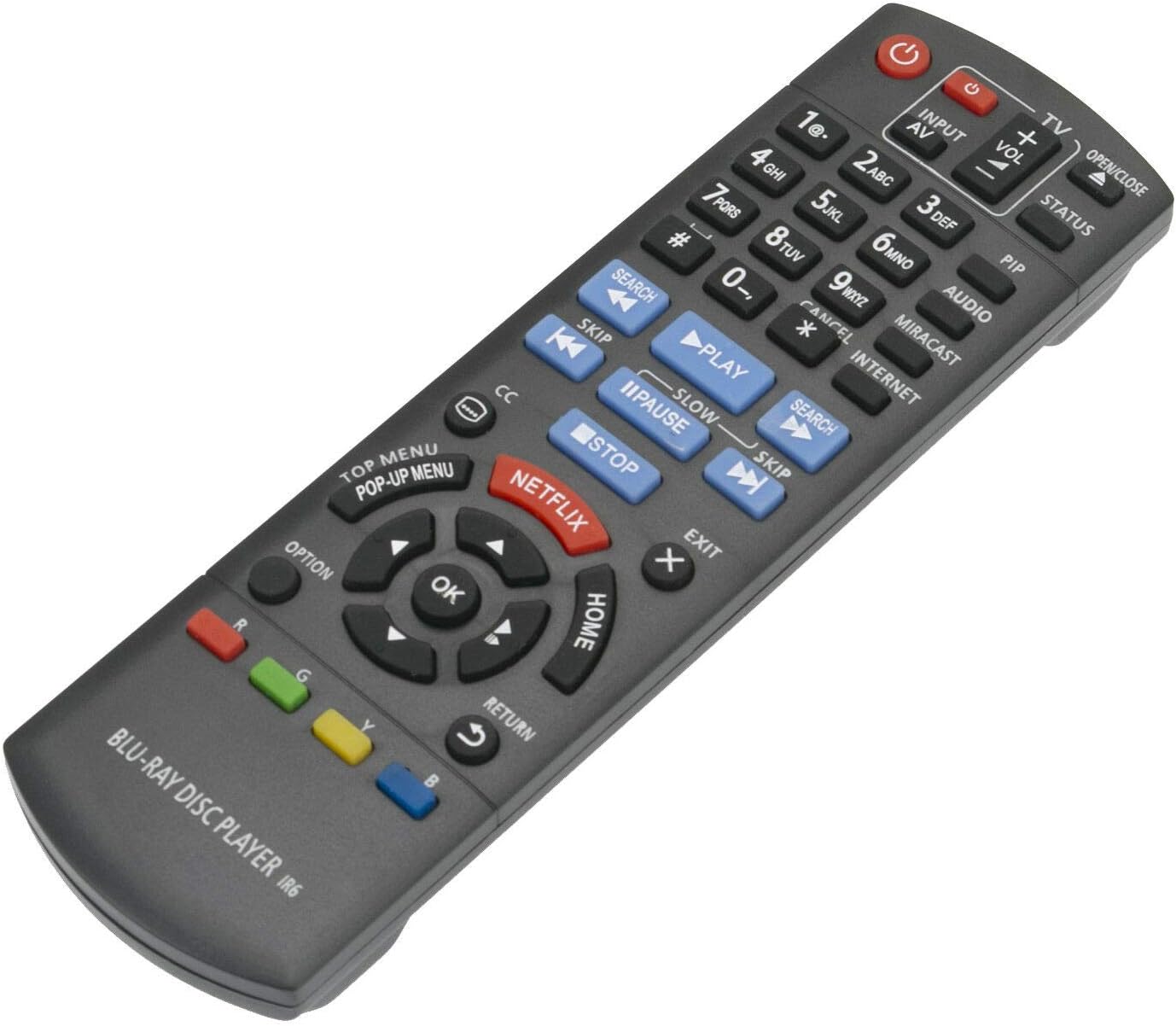
Obrázok 3.1: Predná strana view diaľkového ovládača s rozložením tlačidiel.
3.1 Funkcie tlačidiel
- Napájanie (⏻): Turns the Blu-ray player on or off.
- Vstup/AV: Selects the input source on your television.
- Hlasitosť (+/-): Adjusts the volume of the connected audio system (if supported by the Blu-ray player's HDMI-CEC or similar function).
- Číselné tlačidlá (0-9): Používa sa na priamy výber skladby alebo zadávanie číselných údajov.
- Hrať(▶), Pauza (⏸), Stop (■): Štandardné ovládacie prvky prehrávania médií.
- Preskočiť (⏭), Search (⏮): Navigate between tracks or fast-forward/rewind.
- Directional Pad (Up, Down, Left, Right) & OK: Slúži na navigáciu v menu a potvrdzovanie výberov.
- DOMOV: Returns to the main menu of the Blu-ray player.
- HLAVNÉ MENU/VYSKRYTÉ MENU: Accesses the disc's top menu or pop-up menu.
- NETFLIX: Tlačidlo priameho prístupu k aplikácii Netflix.
- SPÄŤ: Návrat na predchádzajúcu obrazovku alebo ponuku.
- MOŽNOSŤ: Displays options relevant to the current screen or playback.
- Farebné tlačidlá (červené, zelené, žlté, modré): Používa sa pre špecifické funkcie v rámci menu alebo aplikácií, ako je uvedené na obrazovke.
4. Údržba
- Čistenie: Diaľkový ovládač utrite mäkkou, suchou handričkou. Nepoužívajte tekuté čistiace prostriedky ani abrazívne materiály.
- Výmena batérie: Replace batteries when the remote's response becomes sluggish or stops working. Always replace both batteries at the same time with new ones of the same type (AAA alkaline).
- Ukladací priestor: Ak diaľkový ovládač nebudete dlhší čas používať, vyberte z neho batérie, aby ste predišli ich vytečeniu a možnému poškodeniu.
- Prostredie: Nevystavujte diaľkový ovládač extrémnym teplotám, priamemu slnečnému žiareniu alebo vysokej vlhkosti.
5. Riešenie problémov
| Problém | Možná príčina | Riešenie |
|---|---|---|
| Diaľkové ovládanie nefunguje. |
|
|
| Niektoré tlačidlá nereagujú. |
|
|
| Diaľkové ovládanie funguje prerušovane. |
|
|
6. Špecifikácie
- Model: N2QAYB000953
- Značka: FocalTop
- Kompatibilita: Panasonic Blu-ray Player models DMP-BDT360, DMP-BDT361, DMP-BDT460, DMP-BDT460PS
- Technológia pripojenia: Infračervený (IR)
- Typ ovládača: Ovládanie tlačidlom
- Zdroj napájania: 2 x alkalické batérie AAA (nie sú súčasťou balenia)
- Špeciálna funkcia: Ergonomický dizajn
7. Záruka a podpora
This product is a replacement remote control. For specific warranty information or technical support, please refer to the documentation provided by the original seller or contact FocalTop directly. No explicit warranty information is provided within this manual.