
Úvod
This manual provides essential instructions for the proper use, setup, and maintenance of your BYTECH Lightning Cable (Model: CLMFCBLASST). This cable is designed for charging and data transfer with compatible Apple iOS devices, including iPhones, iPads, and iPods, as well as connecting to laptops and personal computers.
Koniec produktuview
The BYTECH Lightning Cable is a durable accessory for your Apple devices. It features a Lightning connector on one end and a USB-A connector on the other, facilitating both power delivery for charging and data exchange. The cable supports fast charging capabilities for compatible devices.
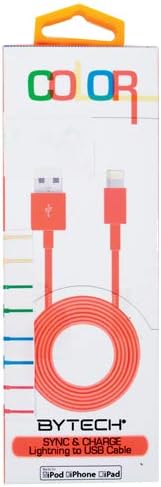
This image displays the retail packaging for the BYTECH Lightning to USB Cable. The packaging is white with 'COLOR' printed at the top in multi-colored letters. An orange Lightning to USB cable is visible through a clear window, coiled neatly. The bottom of the package indicates 'BYTECH SYNC & CHARGE Lightning to USB Cable' and compatibility with iPod, iPhone, and iPad.
Komponenty:
- Konektor Lightning: Connects to your Apple iOS device (iPhone, iPad, iPod).
- Konektor USB-A: Connects to a USB power adapter, computer USB port, or other USB charging source.
- Kábel: The flexible cord connecting the two connectors, designed for durability and efficient power/data transfer.
Nastavenie
To begin using your BYTECH Lightning Cable, follow these steps:
- Identifikujte konektory: Locate the Lightning connector (smaller, 8-pin) and the USB-A connector (larger, rectangular).
- Pripojenie k zdroju napájania alebo počítaču:
- For charging, insert the USB-A connector into a compatible USB wall adapter or car charger.
- For charging and data transfer, insert the USB-A connector into an available USB port on your laptop or personal computer.
- Connect to iOS Device: Insert the Lightning connector into the charging port of your iPhone, iPad, or iPod. Ensure it is fully seated.
- Overiť pripojenie: Your device should indicate that it is charging or connected to a computer.
Návod na obsluhu
Nabíjanie zariadenia:
Once connected as described in the "Setup" section, your iOS device will begin charging automatically. The cable supports fast charging when paired with a compatible power adapter and device.
Prenos dát:
When connected to a computer, the cable enables data transfer between your iOS device and the computer. This allows for syncing media, documents, and other files using iTunes or Finder (macOS Catalina and later).
- Connect your iOS device to your computer using the BYTECH Lightning Cable.
- Unlock your iOS device and respond to any "Trust This Computer?" prompts by tapping "Trust" and entering your passcode if required.
- Open iTunes (Windows/older macOS) or Finder (macOS Catalina and later) on your computer.
- Select your device within the application to manage and transfer data.
Údržba
Správna starostlivosť predlžuje životnosť vášho kábla:
- Ukladací priestor: Keď kábel nepoužívate, voľne ho zviňte. Vyhnite sa silnému zvinutiu alebo ostrým ohybom, najmä v blízkosti konektorov, pretože by to mohlo poškodiť vnútorné vodiče.
- Čistenie: Na jemné utretie kábla a konektorov použite mäkkú, suchú handričku. Nepoužívajte tekuté čistiace prostriedky ani abrazívne materiály.
- Manipulácia: Pri pripájaní alebo odpájaní kábla vždy uchopte za konektor. Neťahajte priamo za samotný kábel.
- Prostredie: Chráňte kábel pred extrémnymi teplotami, priamym slnečným žiarením a vlhkosťou.
Riešenie problémov
If you encounter issues with your BYTECH Lightning Cable, consider the following:
- Zariadenie sa nenabíja:
- Uistite sa, že sú oba konce kábla bezpečne pripojené.
- Try a different USB power adapter or computer USB port.
- Check the charging port on your iOS device for debris or lint.
- Test the cable with a different compatible iOS device, if available.
- Problémy s prenosom údajov:
- Ensure your iOS device is unlocked and you have tapped "Trust This Computer" when prompted.
- Restart both your iOS device and your computer.
- Update iTunes or Finder to the latest version.
- Vyskúšajte iný port USB na počítači.
- Poškodenie kábla: Inspect the cable for any visible signs of damage, such as fraying, cuts, or bent connectors. Discontinue use if damage is found.
Špecifikácie
| Atribút | Detail |
|---|---|
| Značka | Bytech |
| Číslo modelu | CLMFCBLASST |
| UPC | 805112016938 |
| Typ konektora | Lightning (Male) to USB-A (Male) |
| Typ kábla | Blesk |
| Kompatibilné zariadenia | iPhone, iPad, iPod, Laptop, Personal Computer |
| Špeciálna funkcia | Rýchle nabíjanie |
| Odporúčané použitia | Charging, data transfer for iOS devices |
| Počet kolíkov | 8 (Lightning) |
| Hmotnosť položky | 1.76 uncí |
| Rozmery produktu | 1 x 1 x 1 palca (balenie) |
Záruka a podpora
For warranty information or technical support regarding your BYTECH Lightning Cable, please refer to the official Bytech webalebo sa priamo obráťte na ich zákaznícky servis. Uschovajte si doklad o kúpe pre prípad reklamácie.
V prípade všeobecných otázok môžete navštíviť Bytech brand page on Amazon.