
1. Úvod
The Aerocool LUXPRO550 is a 550W power supply unit designed for desktop computers, offering reliable and efficient power delivery. This unit is 80 Plus 230V EU Bronze certified, ensuring over 88% efficiency. It features high-quality 105°C Japanese capacitors and a 14cm FDB fan for enhanced durability and optimized thermal performance. This manual provides essential information for the safe and correct installation, operation, and maintenance of your LUXPRO550 power supply.

Image 1.1: The Aerocool LUXPRO550 Power Supply Unit, highlighting its high efficiency and 80 Plus Bronze certification.
2. Bezpečnostné opatrenia
- Pred inštaláciou alebo demontážou napájacieho zdroja vždy odpojte napájací kábel zo zásuvky.
- Neotvárajte napájací zdroj casing. Vysoký objemtagVo vnútri sa nachádzajú predmety, ktoré môžu spôsobiť úraz elektrickým prúdom.
- Zabezpečte správne uzemnenie, aby ste predišli úrazu elektrickým prúdom.
- Nainštalujte napájací zdroj na dobre vetranom mieste, mimo dosahu zdrojov tepla a vlhkosti.
- Používajte iba káble dodané so zdrojom napájania.
- Tento produkt je určený len na použitie v počítačových systémoch. Nepoužívajte ho na žiadny iný účel.
3. Inštalačná príručka
The LUXPRO550 power supply supports all Intel ATX12V formats and features flat, black cables for optimized internal airflow and ease of installation.
3.1. Príprava na inštaláciu
- Turn off your computer and disconnect the power cord from the wall outlet.
- Otvorte skrinku počítača. Konkrétne pokyny nájdete v návode na obsluhu skrinky počítača.
- Ak vymieňate existujúci zdroj napájania, odpojte všetky káble od starého zdroja a vyberte ho zo skrinky.
3.2. Inštalácia napájacieho zdroja
- Carefully place the LUXPRO550 into the power supply bay of your computer case.
- Secure the power supply to the case using the provided screws.
- Connect the 20+4 pin ATX motherboard power connector to your motherboard.
- Connect the 4+4 pin CPU power connector to your motherboard.
- Connect SATA power connectors to your storage drives (HDDs, SSDs) and optical drives.
- Connect PCIe 6+2 pin connectors to your graphics card(s) if required.
- Connect any other peripheral connectors (e.g., Molex) as needed for case fans or other components.
- Ensure all connections are secure. Use cable ties to manage cables for better airflow.
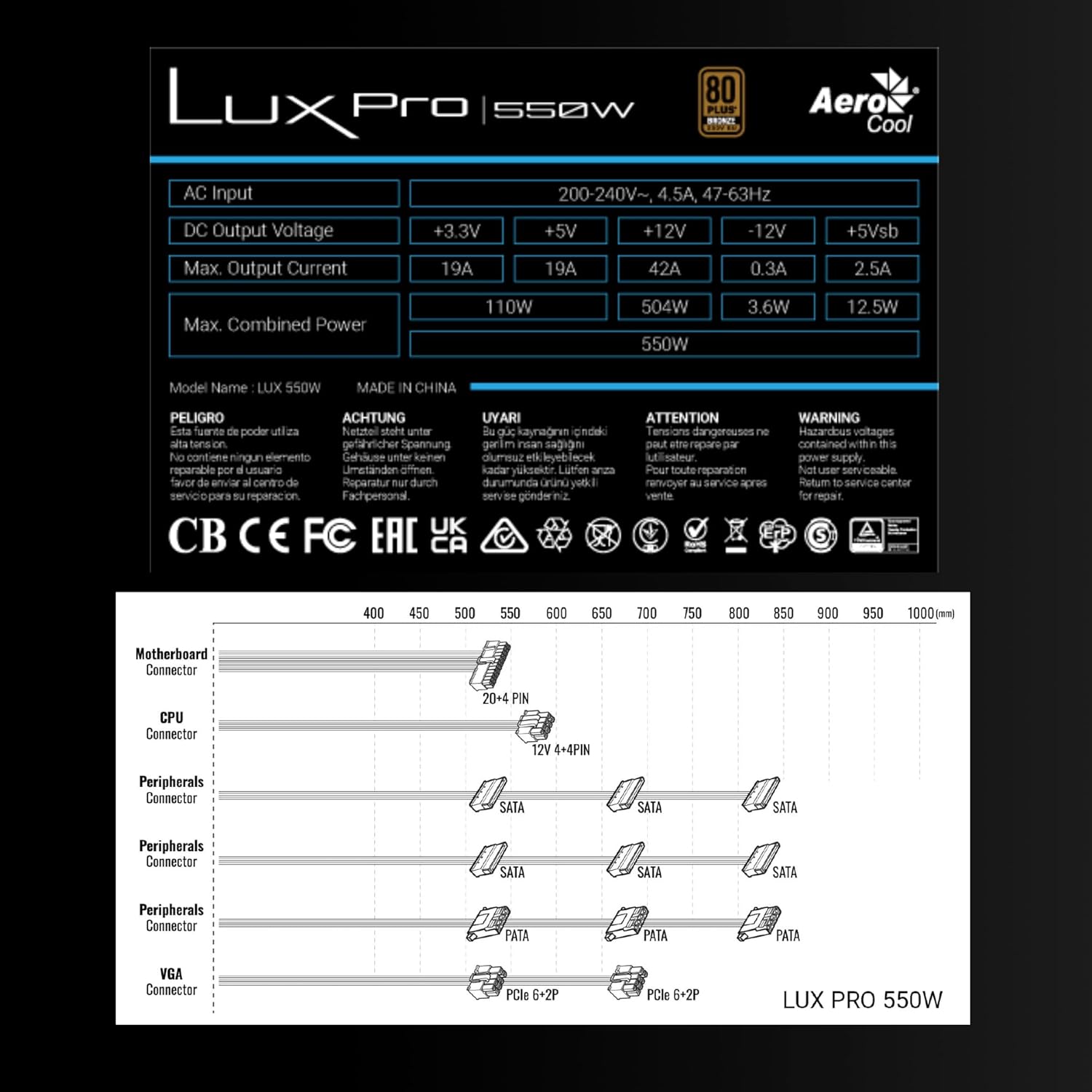
Image 3.1: Connector types and lengths for the LUXPRO550 power supply. This diagram illustrates the available connectors including Motherboard (20+4 PIN), CPU (12V 4+4 PIN), Peripherals (SATA, PATA), and VGA (PCIe 6+2 PIN).
3.3. Záverečné kroky
- Zatvorte počítačovú skrinku.
- Pripojte napájací kábel k zdroju napájania a potom do elektrickej zásuvky.
- Prepnite vypínač na zadnej strane zdroja PSU do polohy „ON“.
- Zapnite počítač.
4. Návod na obsluhu
The Aerocool LUXPRO550 is designed for continuous and stable operation once correctly installed. Its 80 Plus Bronze certification ensures high energy efficiency, reducing power consumption and heat generation.
4.1. Active PFC Technology
The integrated Active Power Factor Correction (APFC) technology ensures efficient and reliable power distribution, contributing to overall system stability and energy savings.
4.2. Prevádzka ventilátora
The 14cm FDB (Fluid Dynamic Bearing) fan features optimized thermal speed control. It operates silently, starting at less than 700 RPM, and only increases speed as the load approaches 40% at ambient temperatures of 25°C, ensuring quiet operation under typical loads.

Image 4.1: The 14cm FDB fan of the LUXPRO550, illustrating its optimized thermal speed control for efficient cooling.
5. Údržba
The LUXPRO550 is built with high-quality components, including 105°C Japanese capacitors, designed for maximum reliability and a long operational lifespan with minimal maintenance.

Image 5.1: High-quality 105°C Japanese capacitors, contributing to the power supply's reliability and extended lifespan.
5.1. Všeobecná starostlivosť
- Keep the power supply and computer case free from dust. Dust accumulation can hinder cooling and reduce efficiency.
- Use compressed air to gently clean the fan and ventilation grilles periodically. Ensure the computer is powered off and unplugged before cleaning.
- Do not obstruct the airflow around the power supply.
Vo vnútri sa nenachádzajú žiadne časti, ktoré by mohol používateľ opraviť. Nepokúšajte sa jednotku sami otvárať ani opravovať.
6. Riešenie problémov
If you encounter issues with your LUXPRO550 power supply, please follow these basic troubleshooting steps:
- Bez napájania:
- Uistite sa, že napájací kábel je bezpečne pripojený k zdroju napájania aj k elektrickej zásuvke.
- Skontrolujte, či je vypínač na zadnej strane zdroja PSU v polohe „ON“.
- Overte funkčnosť zásuvky zapojením iného zariadenia.
- Systém sa nespúšťa:
- Double-check all power connections to the motherboard, CPU, graphics card, and storage devices.
- Ensure all components are properly seated in their slots.
- If possible, test the power supply with another known working system or test another power supply with your system to isolate the issue.
- Nezvyčajné zvuky:
- A slight hum is normal. If you hear grinding or loud fan noises, ensure the fan is not obstructed by cables or dust.
- Ak hluk pretrváva, kontaktujte zákaznícku podporu.
If these steps do not resolve the issue, please contact Aerocool customer support or your retailer for further assistance. Do not attempt to repair the unit yourself.
7. Špecifikácie
| Funkcia | Špecifikácia |
|---|---|
| Názov modelu | LUXPRO550 |
| Značka | AeroCool |
| Wattage | 550 wattov |
| Certifikácia efektívnosti | 80 Plus Bronze 230V EU (over 88% efficiency) |
| Form Factor | ATX |
| Kondenzátory | Japanese 105°C |
| Typ ventilátora | 14cm FDB (Fluid Dynamic Bearing) with thermal speed control |
| PFC | Aktívny PFC |
| Rozmery (DxŠxV) | 16 x 15 x 8.5 cm |
| Hmotnosť | 1.4 kg |
| Kompatibilné zariadenia | PC |
7.1. Výstup DC Voltage Tabuľka
The following table details the DC output voltages and maximum currents for the LUXPRO550:
| DC výstup Voltage | +3.3 V | +5 V | +12 V | -12V | +5Vsb |
|---|---|---|---|---|---|
| Max. Výstupný prúd | 19A | 19A | 42A | 0.3A | 2.5A |
| Max. Kombinovaná sila | 110 W | 504 W | 3.6 W | 12.5 W | |
| Total Combined Power | 550 W | ||||
8. Záruka a podpora
8.1. Informácie o záruke
The Aerocool LUXPRO550 power supply comes with an extended 5-ročná záruka, reflecting its high reliability and the quality of its components, such as the 105°C Japanese capacitors.
Uschovajte si doklad o kúpe pre uplatnenie záruky.
8.2. Zákaznícka podpora
For technical assistance, warranty claims, or any questions regarding your Aerocool LUXPRO550 power supply, please contact Aerocool customer support through their official webstránku alebo vášho miestneho predajcu.
Do not attempt to open or repair the power supply unit, as this will void the warranty.