
1. Úvod
This manual provides detailed instructions for the installation, operation, and maintenance of your Axis Communications M3064-V Mini Dome Camera. This camera is designed for indoor surveillance, offering HDTV 720p video quality, dust resistance, and IK08 impact protection. Please read this manual thoroughly before using the product to ensure proper functionality and safety.
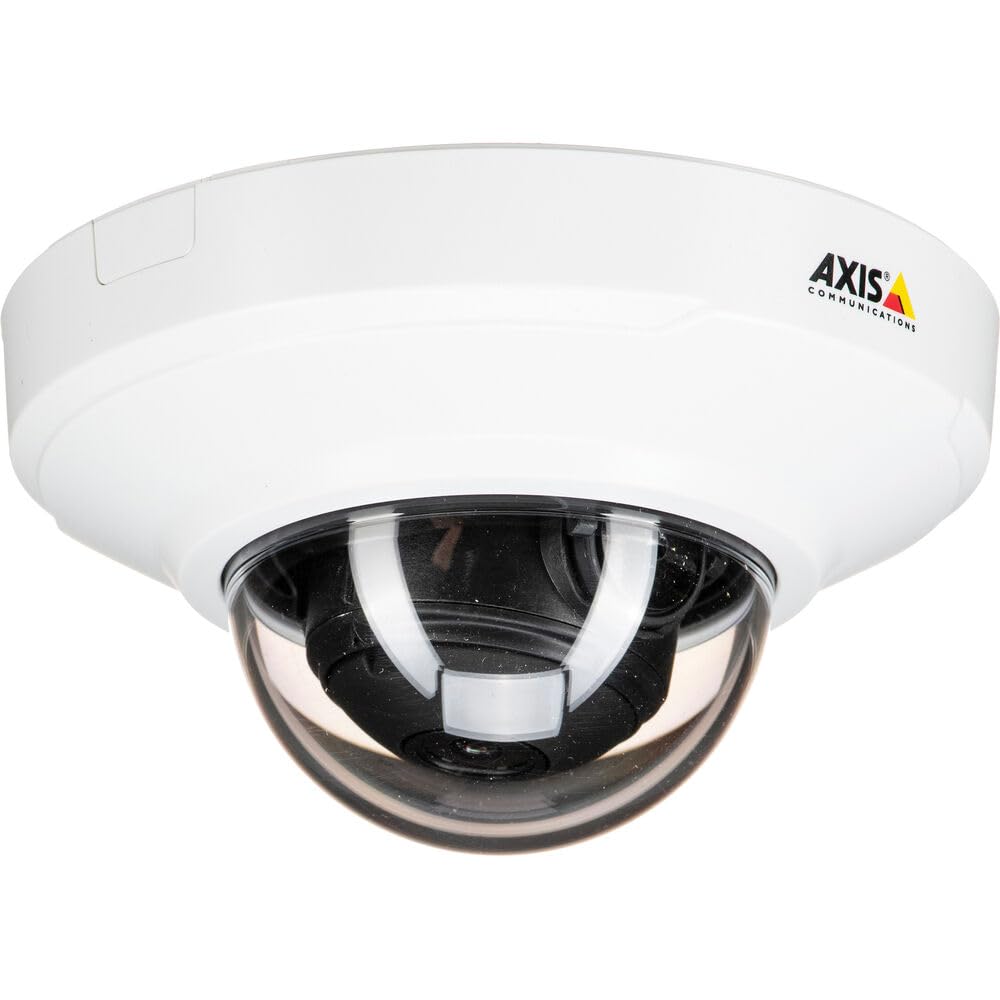
Obrázok 1: Predná strana view of the Axis M3064-V Mini Dome Camera. This image shows the compact dome design suitable for discreet indoor surveillance.
2. Bezpečnostné informácie
- Napájanie: Use only the specified power supply (AC/DC, 220 Volts, 1.6 Watts) to prevent damage or fire.
- Inštalácia: Installation should be performed by qualified personnel and comply with all local electrical codes. Ensure the mounting surface can support the camera's weight.
- Prostredie: This camera is designed for indoor use. While dust-resistant and IK08 rated, avoid exposing it to extreme temperatures, direct water spray, or corrosive substances.
- Čistenie: Pred čistením odpojte napájanie. Použite mäkkú, suchú handričku. Nepoužívajte tekuté ani aerosólové čistiace prostriedky.
- servis: Nepokúšajte sa opravovať tento výrobok sami. Všetky opravy zverte kvalifikovanému servisnému personálu.
3. Obsah balenia
Overte, či sú v balení všetky položky. Ak niektoré položky chýbajú alebo sú poškodené, kontaktujte svojho dodávateľa.
- Axis M3064-V Mini Dome Camera (1 unit)
- Inštalačná príručka
- Montážna konzola
- Montážne skrutky a hmoždinky
- Resistorx L-key
4. Nastavenie a inštalácia
4.1 Montáž fotoaparátu
The Axis M3064-V camera can be mounted on a ceiling or wall. Ensure the mounting surface is stable and can support the camera's weight.
- Pripravte povrch: Choose a suitable location. Use the mounting bracket as a template to mark drill holes.
- Vŕtacie otvory: Drill pilot holes for the mounting screws. Insert wall plugs if necessary.
- Pripevnite držiak: Pripevnite montážnu konzolu k povrchu pomocou dodaných skrutiek.
- Pripojovacie káble: Route the network cable (wired connectivity) through the bracket and connect it to the camera's Ethernet port.
- Pripojiť kameru: Secure the camera body to the mounting bracket. Ensure it clicks into place or is fastened according to the specific bracket design.

Figure 2: Illustrative diagram of the camera mounting process on a ceiling. This shows the steps from marking holes to securing the camera.
4.2 Zapnutie a sieťové pripojenie
- Káblové pripojenie: Connect an Ethernet cable from your network switch or router to the camera's Ethernet port. The camera supports Power over Ethernet (PoE), simplifying power delivery.
- Wi-Fi pripojenie: The camera supports Wi-Fi connectivity. After initial wired setup, you can configure wireless settings via the camera's web rozhranie.
- Napájanie: If not using PoE, connect a compatible AC/DC power adapter (220V, 1.6W) to the camera's power input.
- Počiatočný prístup: Once powered, the camera will obtain an IP address from your network (DHCP). Use an Axis IP Utility tool or your network router's client list to find the camera's IP address.
5. Návod na obsluhu
5.1 Accessing the Camera Interface
Otvorte a web browser (e.g., Chrome, Firefox) and enter the camera's IP address in the address bar. You will be prompted to create a new password for the root user upon first access. Follow the on-screen instructions.
5.2 Naživo View and Video Settings
- Naživo View: The main interface provides a live video feed. You can adjust the viewing angle remotely if the camera supports pan/tilt/zoom (PTZ) functions, though this model features a fixed dome with 3x optical zoom.
- Rozlíšenie: The camera supports HDTV 720p video capture resolution. You can configure streaming profiles for different quality and frame rate needs.
- Nočné videnie: The camera includes Night Color functionality, providing enhanced visibility in low-light conditions. This feature can be configured in the image settings.
- Optický zoom: Utilize the 3x optical zoom feature through the web interface to focus on specific areas within the 83-degree viewing uhol.
5.3 Nahrávanie a ukladanie
Kamera podporuje rôzne možnosti nahrávania:
- Úložisko na okraji siete: The camera has 128 GB of flash memory installed for local recording. Insert a compatible microSD card (not included) for additional storage.
- Sieťový videorekordér (NVR): Integrate the camera with an NVR or video management system (VMS) for centralized recording and management.
- Event-Based Recording: Configure motion detection or other event triggers to start recording, saving storage space.
6. Údržba
6.1 Čistenie fotoaparátu
Pravidelné čistenie pomáha udržiavať optimálnu kvalitu obrazu.
- Vypnúť: Always disconnect the camera from its power source before cleaning.
- Objektív: Gently wipe the lens cover with a soft, lint-free cloth. For stubborn dirt, slightly dampen the cloth with water or a mild lens cleaning solution. Avoid abrasive materials.
- Bývanie: Wipe the camera housing with a soft, dry cloth. Do not use strong detergents or solvents.
6.2 aktualizácií firmvéru
Pravidelne kontrolujte systém Axis Communications website for firmware updates. Keeping your camera's firmware up-to-date ensures optimal performance, security, and access to new features. Follow the instructions provided with the firmware update package.
7. Riešenie problémov
| Problém | Možná príčina | Riešenie |
|---|---|---|
| Kamera sa nezapína | No power supply; Faulty PoE switch/injector; Damaged cable. | Check power connection. Verify PoE functionality. Test with a different Ethernet cable or power adapter. |
| Žiadny kanál videa | Network connectivity issue; Incorrect IP address; Firewall blocking access; Camera not configured. | Verify network connection. Confirm camera's IP address. Check firewall settings. Ensure camera is properly configured via its web rozhranie. |
| Zlá kvalita obrazu | Znečistený objektív; Nesprávne zaostrenie; Slabé svetelné podmienky; Problémy so šírkou pásma siete. | Clean the lens. Adjust focus settings in the web interface. Ensure adequate lighting or verify Night Color settings. Check network bandwidth. |
| Nedá sa získať prístup web rozhranie | Incorrect IP address; Network issue; Browser compatibility. | Confirm IP address. Ping the camera's IP. Try a different web browser. Clear browser cache. |
8. Špecifikácie
| Funkcia | Detail |
|---|---|
| Názov modelu | M3064-V |
| Číslo modelu | 01716-001 |
| Značka | Axis Communications |
| Form Factor | Dome |
| Technológia pripojenia | Káblové pripojenie, Wi-Fi |
| Rozlíšenie snímania videa | 720p (HDTV) |
| Efektívne stále rozlíšenie | 64 MP (Note: This might refer to sensor resolution, actual video output is 720p) |
| Rozlíšenie fotografického snímača | 5 MP |
| Viewing uhol | 83 stupňov |
| Optický zoom | 3x |
| Nočné videnie | Nočná farba |
| Hodnotenie vodotesnosti | IP42 (Dust-resistant) |
| Ochrana proti nárazu | IK08 |
| Zdroj napájania | AC/DC, PoE |
| Voltage | 220 voltov |
| Wattage | 1.6 wattov |
| Veľkosť nainštalovanej pamäte Flash | 128 GB |
| Rozmery položky (DxŠxV) | 3.98 x 3.98 x 2.2 palca |
| Hmotnosť položky | 150 gramov |
| Farba | Čierna / Biela |
9. Záruka a podpora
9.1 Záruka na výrobok
Axis Communications products typically come with a limited manufacturer's warranty. Please refer to the warranty card included with your product or visit the official Axis Communications website for detailed warranty terms and conditions specific to the M3064-V model. Keep your proof of purchase for warranty claims.
9.2 Technická podpora
For technical assistance, troubleshooting beyond this manual, or service inquiries, please contact Axis Communications customer support. You can find contact information, FAQs, and additional resources on the official Axis Communications support website. When contacting support, please have your product model number (M3064-V or 01716-001) and serial number ready.
Online zdroje: www.axis.com/support