
1. Produkt skončilview
The Alecto WS-1560 is a wireless weather station designed to provide accurate indoor and outdoor environmental data. Featuring a clear color display and a remote outdoor sensor, it offers comprehensive weather information and additional useful functions for your home.
Kľúčové vlastnosti:
- Measures indoor and outdoor temperature and humidity.
- Long-range wireless outdoor sensor (up to 100 meters).
- 5.7-inch well-lit color display with animated weather forecast icons.
- Temperature and ice alarm functions.
- Budík s funkciou snooze.
- Memory function for latest and highest readings.
- Moon phase indicator, date, day, and time display.
- Battery-operated main unit and outdoor sensor with backup batteries.

Figure 1.1: Alecto WS-1560 Main Unit and Wireless Outdoor Sensor.
2. Obsah balenia
Ensure all components are present and in good condition upon unpacking:
- Hlavná jednotka Alecto WS-1560 (vnútorný displej)
- Bezdrôtový vonkajší snímač
- Používateľská príručka
- (Power adapter and batteries may be included depending on package)
Video 2.1: Illustrative video showing typical weather station components and basic setup. (Note: This video is for a related product and may not show the exact Alecto WS-1560 model.)
3. Nastavenie a inštalácia
3.1. Inštalácia batérie
Both the main unit and the outdoor sensor require batteries for operation. Ensure you use the correct type and polarity.
- Vonkajší senzor:
- Otvorte priehradku na batérie na zadnej strane bezdrôtového vonkajšieho senzora.
- Vložte 2 batérie typu AA (nie sú súčasťou balenia) podľa vyznačenej polarity (+/-).
- Bezpečne zatvorte priehradku na batérie.
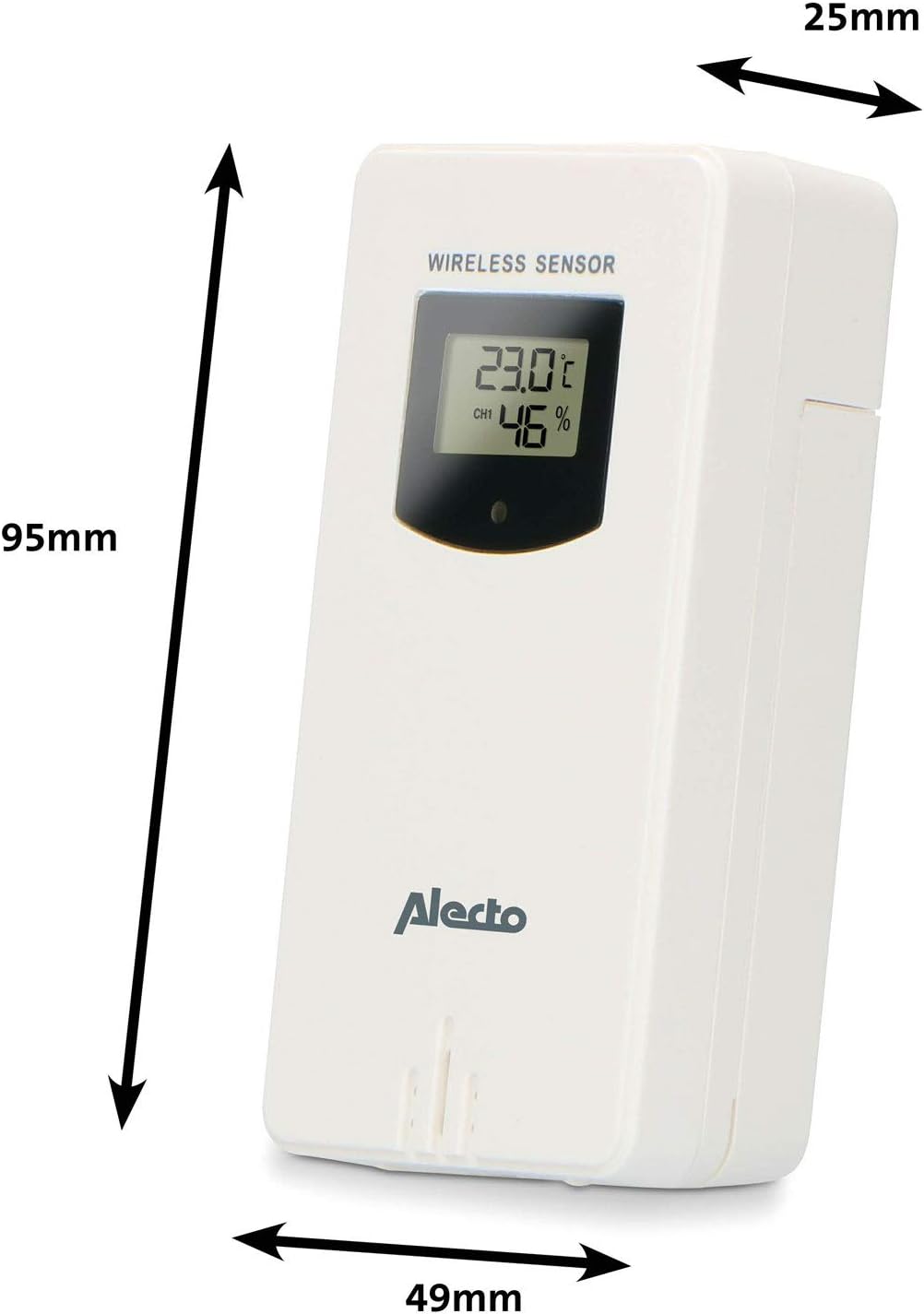
Figure 3.1: Wireless Outdoor Sensor dimensions and battery compartment location.
- Hlavná jednotka:
- Otvorte priehradku na batérie na zadnej strane hlavnej jednotky.
- Insert 2x AA batteries (not included) according to the polarity markings (+/-). These serve as backup batteries.
- Bezpečne zatvorte priehradku na batérie.
- Connect the main unit to a power outlet using the provided power adapter (if included).

Figure 3.2: Main Unit dimensions and power input.
3.2. Umiestnenie snímača
For accurate outdoor readings, proper placement of the wireless sensor is crucial:
- Place the sensor in a shaded area, away from direct sunlight, to prevent inaccurate temperature readings.
- Ensure good air circulation around the sensor.
- Mount the sensor vertically, approximately 1.5 to 2.5 meters (5 to 8 feet) above the ground.
- Avoid placing the sensor near heat sources (e.g., vents, windows) or moisture sources.
- The maximum transmission range is 100 meters (328 feet) in open air. Walls and other obstacles will reduce this range.

Obrázok 3.3: Prample of outdoor sensor placement on a wall.
3.3. Pairing the Sensor with the Main Unit
The main unit and sensor should automatically pair once both are powered on. If pairing does not occur:
- Ensure both units have fresh batteries and are within range.
- Press the "TX" button inside the outdoor sensor's battery compartment to manually send a signal.
- On the main unit, you may need to initiate a search for the outdoor sensor (refer to the "Operation" section for specific button functions).
4. Prevádzka
4.1. Rozloženie displeja
The 5.7-inch color display provides a clear overview of all measured data. Key areas include:
- Vonkajšia teplota a vlhkosť: Displays current outdoor conditions.
- Vnútorná teplota a vlhkosť: Displays current indoor conditions.
- Animated Weather Forecast: Icons predict upcoming weather (sunny, partly cloudy, cloudy, rainy, snowy).
- Čas a dátum: Aktuálny čas, deň a dátum.
- Barometrický tlak: Aktuálny atmosférický tlak.
- Fáza mesiaca: Grafické znázornenie aktuálnej fázy mesiaca.
- Temperature/Ice Alarm Indicators: Alerts for specific temperature thresholds or potential ice conditions.

Obrázok 4.1: Detailný view of the main unit's color display.
4.2. Funkcie tlačidiel
The main unit features several buttons for setting and adjusting functions. Common buttons include:
- SADA: Enters setup mode for time, date, and other settings.
- trasy: Switches between display modes or confirms settings.
- HORE/DOLE (alebo +/-): Adjusts values during setup or cycles through channels.
- ALARM: Nastaví alebo aktivuje funkciu budíka.
- MEM: Displays maximum/minimum temperature and humidity records. Long press to clear records.
- SNOOZE/SVETLO: Activates snooze during an alarm or adjusts backlight brightness.
Video 4.2: Illustrative video demonstrating various features and settings of a weather station. (Note: This video is for a related product and may not show the exact Alecto WS-1560 model.)
4.3. Nastavenie času a dátumu
- Stlačte a podržte tlačidlo „SET“, kým nezačne blikať zobrazenie času.
- Use the "UP" or "DOWN" buttons to adjust the hour, then press "SET" to confirm and move to minutes.
- Opakujte pre minúty, rok, mesiac a deň.
- Press "SET" again to exit the setting mode.
4.4. Nastavenia budíka
- Press the "ALARM" button once to view čas budenia.
- Press and hold the "ALARM" button until the alarm time starts flashing.
- Use the "UP" or "DOWN" buttons to set the desired alarm hour and minute.
- Stlačte tlačidlo „ALARM“ pre potvrdenie.
- To activate/deactivate the alarm, press the "ALARM" button briefly when the alarm time is displayed. An alarm icon will appear/disappear.
4.5. Záznamy o maximálnych/minimálnych hodnotách
The weather station automatically records the maximum and minimum temperature and humidity values over a 24-hour period.
- Press the "MEM" button briefly to view maximálne zaznamenané hodnoty.
- Znovu stlačte tlačidlo „MEM“ pre view minimálne zaznamenané hodnoty.
- Tretím stlačením tlačidla „MEM“ sa vrátite k aktuálnym údajom.
- To clear the records, press and hold the "MEM" button for a few seconds.
5. Údržba
- Čistenie: Displej a povrch jednotky utrite mäkkou handričkou.amp plátno. Nepoužívajte abrazívne čistiace prostriedky ani rozpúšťadlá.
- Výmena batérie: Keď sa na displeji zobrazí indikátor slabej batérie, vymeňte batérie v hlavnej jednotke aj vo vonkajšom senzore. Vždy vymeňte všetky batérie naraz za nové rovnakého typu.
- Starostlivosť o snímač: Periodically check the outdoor sensor for debris or obstructions that might affect its readings. Ensure it remains in a shaded, well-ventilated area.
6. Riešenie problémov
| Problém | Možná príčina | Riešenie |
|---|---|---|
| No outdoor temperature/humidity reading (or "---" displayed) |
|
|
| Nepresné údaje o teplote/vlhkosti |
|
|
| Displej je tmavý alebo prázdny |
|
|
7. Špecifikácie
| Číslo modelu | WS-1560 |
| Značka | Alecto |
| Zdroj napájania (hlavná jednotka) | Power Adapter (if included) + 2x AA batteries (backup) |
| Zdroj napájania (vonkajší senzor) | 2x AA batérie |
| Rozmery produktu (hlavná jednotka) | 5.1 x 16.5 x 12.3 cm |
| Hmotnosť produktu | 440 g |
| Dosah bezdrôtového senzora | Do 100 metrov (v otvorenom priestore) |
| Veľkosť displeja | 5.7 palca / 14.5 cm |
| Pôvod | Čína |
8. Záruka a podpora
For warranty information, technical support, or service inquiries, please refer to the warranty card included with your product or visit the official Alecto webstránky. Uschovajte si doklad o kúpe ako dôkaz o kúpe.
Alecto Webmiesto: www.alecto.nl (General Alecto webstránka, konkrétna stránka podpory sa môže líšiť)