
Úvod
Ďakujem za nákupasing the Neewer i4T EX 400W Monolight. This professional studio flash is designed for both indoor and outdoor photography, offering advanced features such as TTL, HSS, and a built-in 2.4G wireless trigger system. This manual provides detailed instructions for safe operation, setup, and maintenance to ensure optimal performance and longevity of your device.
Bezpečnostné informácie
- Nevystavujte zariadenie dažďu ani vlhkosti, aby ste predišli požiaru alebo úrazu elektrickým prúdom.
- Do not disassemble the unit. If repairs are needed, contact qualified service personnel.
- Uchovávajte mimo dosahu detí.
- Vyhnite sa priamemu vystaveniu očí blesku, pretože môže spôsobiť dočasné poškodenie zraku.
- Počas používania zabezpečte dostatočné vetranie, aby ste predišli prehriatiu.
- Používajte iba určený napájací adaptér a batériu.
- The flashtube and modeling LED can become hot during operation. Allow time for cooling before handling.
Koniec produktuview
Familiarize yourself with the components and controls of your Neewer i4T EX 400W Monolight and its wireless trigger.
Monolight Components

Obrázok: Podrobný view of the Neewer i4T EX 400W Monolight and its wireless trigger, highlighting various controls and ports. The monolight features an LCD display, power knob, sound and function button, channel button, modeling light switch, power switch, optical sensor, optical slave button, sync port (6.35mm), and a Tset button for recycling modes. The wireless trigger includes an LCD display, ID channel button, select group buttons (A, B, C), LED power setup button, signal indicator light, mode-setting button, LED light switch button, enter button, +/- button, 2.5mm PC sync port, 3.25mm PC sync port, test button, and power switch.
- LCD displej: Zobrazuje aktuálne nastavenia a stav.
- Gombík napájania: Upravuje výkon blesku.
- Sound and Function Button: Controls sound prompts and other functions.
- Tlačidlo kanála: Selects wireless communication channel.
- Modeling Light Switch: Turns the modeling light on/off.
- Vypínač: Turns the monolight on/off.
- Optický senzor: Detects other flashes for optical slave mode.
- Sync Port (6.35mm): Pre káblovú synchronizáciu.
- Tset Button: Triggers a test flash and switches recycle modes.
Flashtube and Modeling LED

Obrázok: Detailný záber view of the monolight's front, detailing the flashtube and modeling LED. The flashtube has an overheat protection temperature of 95°C. The modeling LED is 10W, 1000Lux/1M Lumen, with an overheat protection temperature of 80°C.
- Flashtube: Provides the main flash output. Features overheat protection at 95°C.
- Modeling LED: A 10W LED providing 1000 Lux at 1 meter. Features overheat protection at 80°C.
Nastavenie
1. Inštalácia batérie

Image: The Neewer i4T EX 400W Monolight with its high-capacity rechargeable lithium battery attached. The image highlights the DC Power Input and Locking Button for the battery. Key specifications shown are 4000mAh Battery Capacity, 0.2-1.3s Callback Time, and 4H Charging Time.
- Align the battery pack with the battery compartment on the monolight.
- Slide the battery into place until it clicks securely. Ensure the locking button engages.
- To remove, press the locking button and slide the battery out.
- Charge the battery using the provided charger. A full charge takes approximately 4 hours.
2. Mounting the Monolight
The monolight features a standard Bowens mount for light modifiers and umbrella holes for umbrellas.

Image: The Neewer i4T EX 400W Monolight with a Bowens mount softbox attached, demonstrating compatibility with various light modifiers.
Bowensov držiak: Attach compatible light modifiers (e.g., softboxes, beauty dishes) by aligning the modifier with the mount and twisting until it locks into place.

Image: The Neewer i4T EX 400W Monolight with an umbrella inserted into its dedicated umbrella hole, illustrating how to use umbrellas for light diffusion.
Umbrella Holes: Insert the shaft of a photographic umbrella into the designated hole on the monolight's bracket and secure it.
3. Attaching the Wireless Trigger
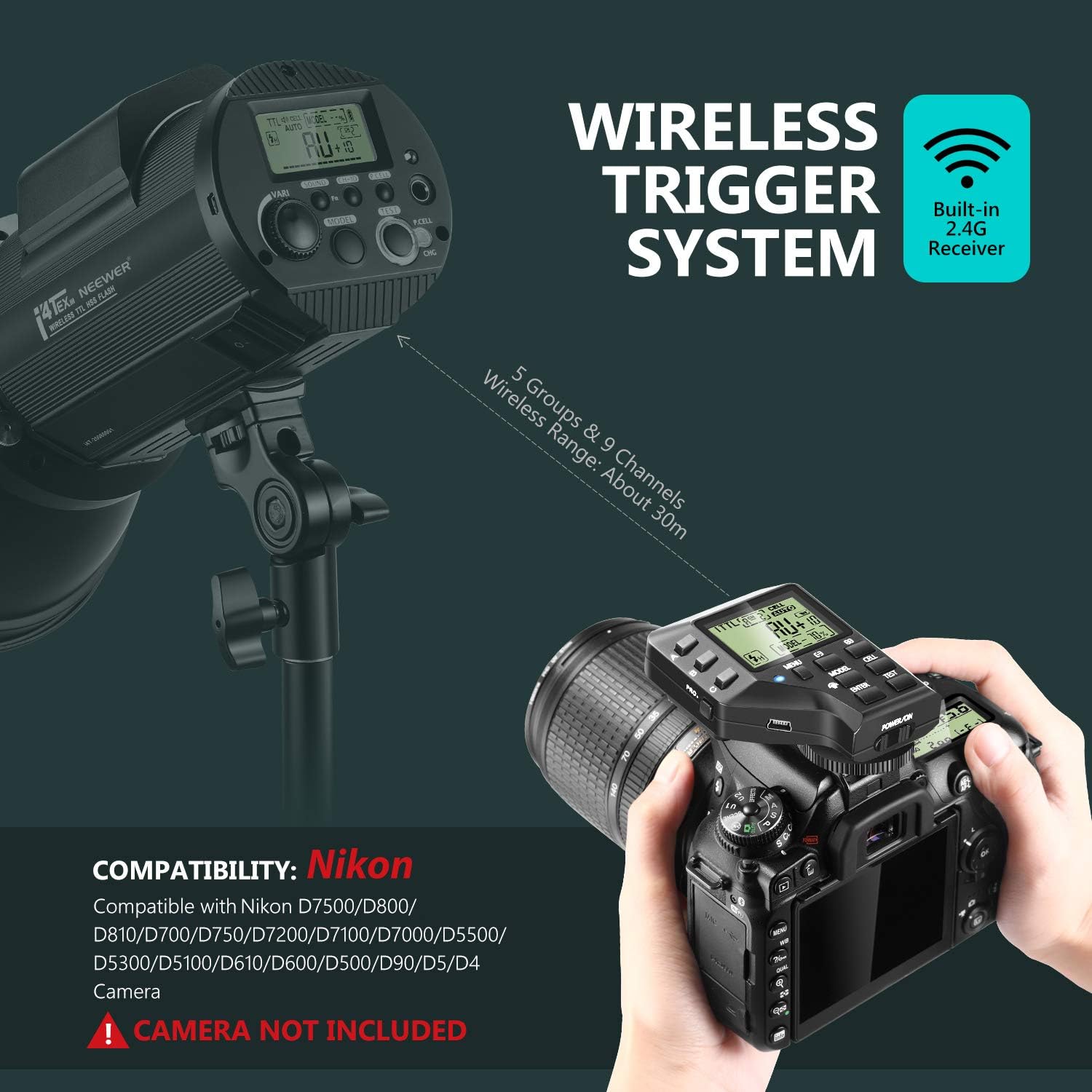
Image: The Neewer i4T EX 400W Monolight shown with a Nikon DSLR camera and the wireless trigger mounted on the camera's hot shoe. The image indicates a built-in 2.4G receiver, 5 groups, 9 channels, and a wireless range of approximately 30m. It also lists compatible Nikon camera models: D7500, D800, D810, D700, D750, D7200, D7100, D7000, D5500, D5300, D5100, D610, D600, D500, D90, D5, D4.
- Mount the wireless trigger onto your camera's hot shoe.
- Ensure both the monolight and the trigger are powered on.
- Set the same channel and group on both the monolight and the trigger for wireless communication. The system supports 5 groups and 9 channels with a range of approximately 30 meters.
Návod na obsluhu
1. Zapnutie/vypnutie
- Pre zapnutie prepnite vypínač do polohy „ON“.
- Ak chcete zariadenie vypnúť, prepnite vypínač do polohy „VYPNUTÉ“.
2. Nastavenie výkonu blesku
Rotate the Power Knob on the monolight or use the +/- buttons on the wireless trigger to adjust the flash output. The output range is typically 1/1 to 1/128 or similar, depending on the mode.
3. Prevádzkové režimy

Image: Demonstrates the capabilities of the Neewer i4T EX 400W Monolight. It highlights 1/8000s High Speed Sync with a recycle time of 0.2-1.3s and 400W power. Flash duration is T0.5: 1/420-16500 (Quick Mode) and T1: 1/225-1/13520 (Ordinary Mode). Examples of Stroboscopic Mode (CO-1 Fast flash, C1-5, C2-10, C3-15, C4-20, C5-25) and a comparison of TTL Mode (Without i4T EX Strobe Flash vs. With i4T EX Strobe Flash) are also shown.
- Režim TTL: (Through-The-Lens) Automatically adjusts flash output for correct exposure.
- Manuálny režim: Allows manual control over flash output.
- Multi (stroboskopický) režim: Fires a series of rapid flashes during a single exposure to capture multiple movements. Settings include flash frequency and number of flashes (e.g., CO-1 Fast flash, C1-5, C2-10, C3-15, C4-20, C5-25).
- Vysokorýchlostná synchronizácia (HSS): Enables flash synchronization at shutter speeds faster than the camera's native sync speed, up to 1/8000s.
4. Modelovacie svetlo
Press the Modeling Light Switch to turn the modeling light on or off. The modeling light helps visualize the lighting effect before taking a shot.
5. Wireless Trigger Operation
- Výber kanála/skupiny: Use the Channel Button and Select Group Buttons (A, B, C) on the trigger to match the settings on the monolight.
- Test Flash: Press the Test Button on the trigger to fire a test flash.
- Nastavenie režimu: Use the Mode-Setting Button to cycle through TTL, Manual, and Multi modes.
- Nastavenie výkonu: Use the +/- buttons to adjust flash power.
Údržba
- Čistenie: Use a soft, dry cloth to clean the exterior of the monolight and trigger. Do not use abrasive cleaners or solvents.
- Flashtube: Avoid touching the flashtube directly with bare hands, as oils can reduce its lifespan. If touched, clean with alcohol.
- Starostlivosť o batérie: Store the lithium battery in a cool, dry place. If not used for extended periods, charge it periodically to maintain battery health. Do not expose to extreme temperatures.
- Ukladací priestor: Store the device in a protective case when not in use to prevent dust and damage.
Riešenie problémov
| Problém | Možná príčina | Riešenie |
|---|---|---|
| Monolight sa nezapne. | Batéria je vybitá alebo nie je správne vložená. | Charge the battery or ensure it is securely installed. |
| Flash does not fire wirelessly. | Incorrect channel/group settings; trigger not properly mounted; out of range. | Verify channel and group settings on both devices. Ensure trigger is securely mounted on camera hot shoe. Move closer to the monolight. |
| Výkon blesku je nekonzistentný. | Low battery; overheating; incorrect mode. | Charge the battery. Allow the unit to cool down. Check and adjust the operating mode. |
| Modelovacie svetlo nefunguje. | Modeling light switch off; bulb failure. | Ensure the modeling light switch is on. If the issue persists, contact support. |
Špecifikácie
- Značka: NOVEJ
- Číslo modelu: 10097748
- Výkon: 400 W
- Doba recyklácie: 0.2 - 1.3 s
- Flash Duration (T0.5): 1/420-1/16500s (Quick Mode)
- Flash Duration (T1): 1/225-1/13520s (Ordinary Mode)
- Kapacita batérie: 4000mAh lítiová batéria
- Plný výkon bliká: Približne 520
- Doba nabíjania: Približne 4 hodiny
- Bezdrôtový systém: 2.4G TTL HSS with Built-in Receiver
- Bezdrôtový dosah: Približne 30 m
- Wireless Groups/Channels: 5 Groups, 9 Channels
- Režimy synchronizácie: High-Speed Sync (HSS) up to 1/8000s
- Modelovacie svetlo: 10W LED, 1000Lux/1M Lumen
- Typ montáže: Bowens Mount
- Kompatibilné fotoaparáty: Nikon D7500, D810, D700, D750, D7200, D7100, D7000, D5500, D5300, D5100, D610, D600, D500, D90, D5, D4 (Camera not included)
- Hmotnosť: Approximately 2.2kg (with battery)
Obsah balenia

Obrázok: Overview of the Neewer i4T EX 400W Monolight package contents, including the monolight, wireless trigger, reflector, diffuser, power cables (EU and US plugs), and charger.
Balíček zvyčajne obsahuje:
- 1 x Neewer i4T EX 400W Monolight
- 1 x Wireless Trigger
- 1 x štandardný reflektor
- 1 x Diffuser Cap
- 1 x Lithium Battery Pack
- 1 x Nabíjačka batérií
- 1 x Power Cable (EU Plug)
- 1 x napájací kábel (zástrčka pre USA)
Záruka a podpora
Neewer products typically come with a limited warranty. Please refer to the warranty card included in your product packaging or visit the official Neewer website for detailed warranty terms and conditions. For technical support, troubleshooting assistance, or service inquiries, please contact Neewer customer service through their official webstránku alebo predajcu, kde bol produkt zakúpený.