
1. Úvod
Thank you for choosing the Smart Sensor AR867 Digital Thermometer Hygrometer. This device is designed to provide accurate measurements of indoor and outdoor temperature, as well as indoor humidity. It features a clear LCD display, calendar, and alarm clock functions, making it a versatile tool for monitoring your environment. Please read this manual carefully before use to ensure proper operation and to maximize the product's lifespan.
2. Bezpečnostné informácie
- Nevystavujte zariadenie extrémnym teplotám, priamemu slnečnému žiareniu alebo vysokej vlhkosti.
- Zabráňte pádu zariadenia alebo jeho vystaveniu silným nárazom.
- Udržujte zariadenie mimo dosahu vody a iných tekutín.
- Nepokúšajte sa zariadenie rozoberať ani opravovať sami. V prípade záujmu o servis sa obráťte na kvalifikovaný personál.
- Použité batérie zlikvidujte zodpovedne v súlade s miestnymi predpismi.
- Batérie uchovávajte mimo dosahu detí.
3. Obsah balenia
- 1 x Smart Sensor AR867 Digital Thermometer Hygrometer
- 1 x Outdoor Temperature Probe (attached)
- 1 x Návod na použitie
Note: 1 x AAA 1.5V battery is required and not included in the package.
4. Vlastnosti produktu
- Large LCD display for clear and easy reading.
- Simultaneous display of indoor/outdoor temperature, indoor humidity, and time.
- Selectable temperature units: Celsius (°C) or Fahrenheit (°F).
- Selectable time display format: 12-hour or 24-hour.
- Records maximum and minimum temperature/humidity values.
- Integrated calendar function (1999/1/1 - 2048/12/31).
- Alarm clock function.
- Freeze point alarm function (-1°C to 4°C).
- Low power consumption with high stability and accuracy.
5. Nastavenie
5.1 Inštalácia batérie
- Nájdite kryt priehradky na batérie na zadnej strane zariadenia.
- Posuňte kryt smerom nadol, aby ste otvorili priehradku.
- Insert one AAA 1.5V battery, ensuring the correct polarity (+/-).
- Nasaďte späť kryt priehradky na batérie jeho posunutím nahor, kým nezacvakne na miesto.

This image shows the rear of the Smart Sensor AR867 device with the battery compartment open, revealing the slot for a single AAA battery. The stand is also visible.
5.2 Umiestnenie
- Place the main unit indoors in a location where you want to monitor the indoor temperature and humidity. Ensure it is not in direct sunlight or near heat sources/vents.
- The outdoor temperature probe can be extended outside through a window or door frame. Ensure the probe tip is exposed to the outdoor environment but protected from direct rain or snow.
6. Návod na obsluhu
6.1 Pochopenie displeja a tlačidiel

This diagram illustrates the main components of the Smart Sensor AR867. It highlights the LCD screen, temperature display, humidity display, clock display, clock button, set button, and the indoor/outdoor switch button.
- LCD obrazovka: Displays all information.
- Zobrazenie teploty: Shows indoor or outdoor temperature.
- Displej vlhkosti: Shows indoor humidity.
- Displej hodín: Zobrazuje aktuálny čas.
- Tlačidlo MAX/MIN: Stlačte pre view maximum/minimum recorded temperature and humidity. Hold to reset.
- Tlačidlo IN/OUT: Switches between indoor and outdoor temperature display.
- Tlačidlo SET: Používa sa na vstup do režimu nastavení a potvrdenie výberu.
6.2 Počiatočné zapnutie a zobrazenie
Upon battery installation, the device will power on and display current indoor temperature, indoor humidity, and the default time. The outdoor temperature will be displayed when the external probe is connected and selected.
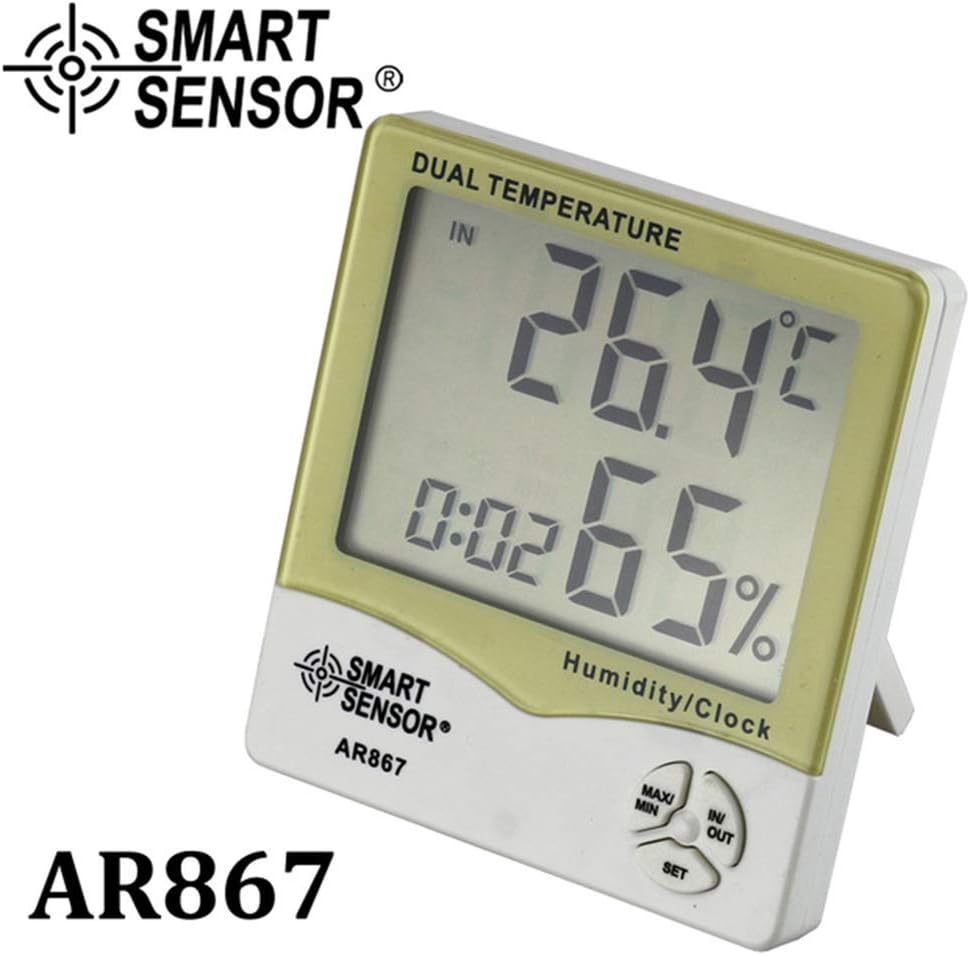
This image shows the Smart Sensor AR867 displaying an indoor temperature of 26.4°C and indoor humidity of 65%.

This image shows the Smart Sensor AR867 displaying an outdoor temperature of 30.2°C and indoor humidity of 76%, with the external temperature probe visible.
6.3 Nastavenie času a dátumu
- Stlačte a podržte SET button for a few seconds until the year display starts flashing.
- Použite MAX/MIN nastavte rok. Stlačte tlačidlo SET to confirm and move to the next setting (month, day, hour, minute).
- Repeat step 2 for month, day, hour, and minute.
- After setting the minutes, press SET to exit the time/date setting mode.
6.4 Prepínanie jednotiek teploty (°C/°F)
V normálnom režime zobrazenia stlačte tlačidlo IN/OUT tlačidlo na prepínanie medzi jednotkami teploty Celzia (°C) a Fahrenheita (°F).
6.5 Switching 12/24 Hour Display
V normálnom režime zobrazenia stlačte tlačidlo SET button briefly to switch between 12-hour and 24-hour time formats.
6.6 Viewmeranie MAX/MIN hodnôt
- Stlačte tlačidlo MAX/MIN raz stlačte tlačidlo pre zobrazenie maximálnej zaznamenanej teploty a vlhkosti.
- Stlačte tlačidlo MAX/MIN znova stlačte tlačidlo pre zobrazenie minimálnej zaznamenanej teploty a vlhkosti.
- Stlačte tlačidlo MAX/MIN tretíkrát sa vrátite k aktuálnym údajom.
- Ak chcete vymazať záznamy MAX/MIN, stlačte a podržte tlačidlo MAX/MIN button for approximately 3 seconds while MAX/MIN values are displayed.
6.7 Using the Alarm Clock
- V normálnom režime zobrazenia stlačte tlačidlo SET button twice to enter alarm setting mode. The alarm hour will flash.
- Použite MAX/MIN tlačidlo na nastavenie hodiny budíka. Stlačte SET to confirm and move to alarm minutes.
- Použite MAX/MIN button to adjust the alarm minutes. Press SET potvrdiť.
- Ak chcete aktivovať/deaktivovať budík, stlačte tlačidlo IN/OUT button while in alarm setting mode. An alarm icon will appear/disappear on the display.
- Stlačte tlačidlo SET pre ukončenie režimu nastavenia budíka.
7. Údržba
- Zariadenie pravidelne čistite mäkkou, suchou handričkou. Nepoužívajte abrazívne čistiace prostriedky ani rozpúšťadlá.
- If the display becomes dim or the device functions erratically, replace the battery.
- Ak sa zariadenie dlhší čas nepoužíva, vyberte batériu, aby ste predišli jej vytečeniu.
8. Riešenie problémov
- Bez zobrazenia: Check battery installation and ensure polarity is correct. Replace with a new AAA battery if necessary.
- Nepresné údaje: Ensure the device is placed away from direct heat sources, cold drafts, or direct sunlight. For outdoor temperature, ensure the probe is correctly positioned and protected.
- Tlačidlá nereagujú: Remove and reinsert the battery to perform a soft reset. If the issue persists, replace the battery.
9. Špecifikácie
| Funkcia | Špecifikácia |
|---|---|
| Materiály | ABS |
| Farba | Žltá |
| Rozsah vnútorných teplôt | -10 °C ~ +50 °C (14 °F ~ 122 °F) |
| Rozsah vonkajšej teploty | -50 °C ~ +70 °C (-58 °F ~ +158 °F) |
| Presnosť teploty | ±2 °C |
| Rozlíšenie teploty | 0.1 °C (0.1 °F) |
| Rozsah merania vlhkosti | 20%RH - 99%RH |
| Presnosť merania vlhkosti | ± 5% RH |
| Rozlíšenie vlhkosti | 1 % RH |
| Freeze Point Alarm | -1 °C ~ 4 °C |
| Rozsah kalendára | 1999/1/1 - 2048/12/31 |
| Batéria | 1x AAA 1.5V (nie sú súčasťou balenia) |
| Rozmery produktu | 10.8 x 10 x 2.2 cm (4.25 x 3.93 x 0.86 palca) |
| Hmotnosť produktu | 126 g |

This image provides a visual representation of the Smart Sensor AR867's dimensions, showing its length, width, and thickness.
10. Záruka a podpora
This product comes with a standard manufacturer's warranty against defects in materials and workmanship. For specific warranty details, please refer to the documentation provided with your purchase or contact your retailer. For technical support or inquiries, please reach out to the customer service department of your place of purchase.