
Koniec produktuview
The XIAOMI Redmi 9I is a feature-rich smartphone designed for everyday use. This manual provides essential information for setting up, operating, maintaining, and troubleshooting your device.
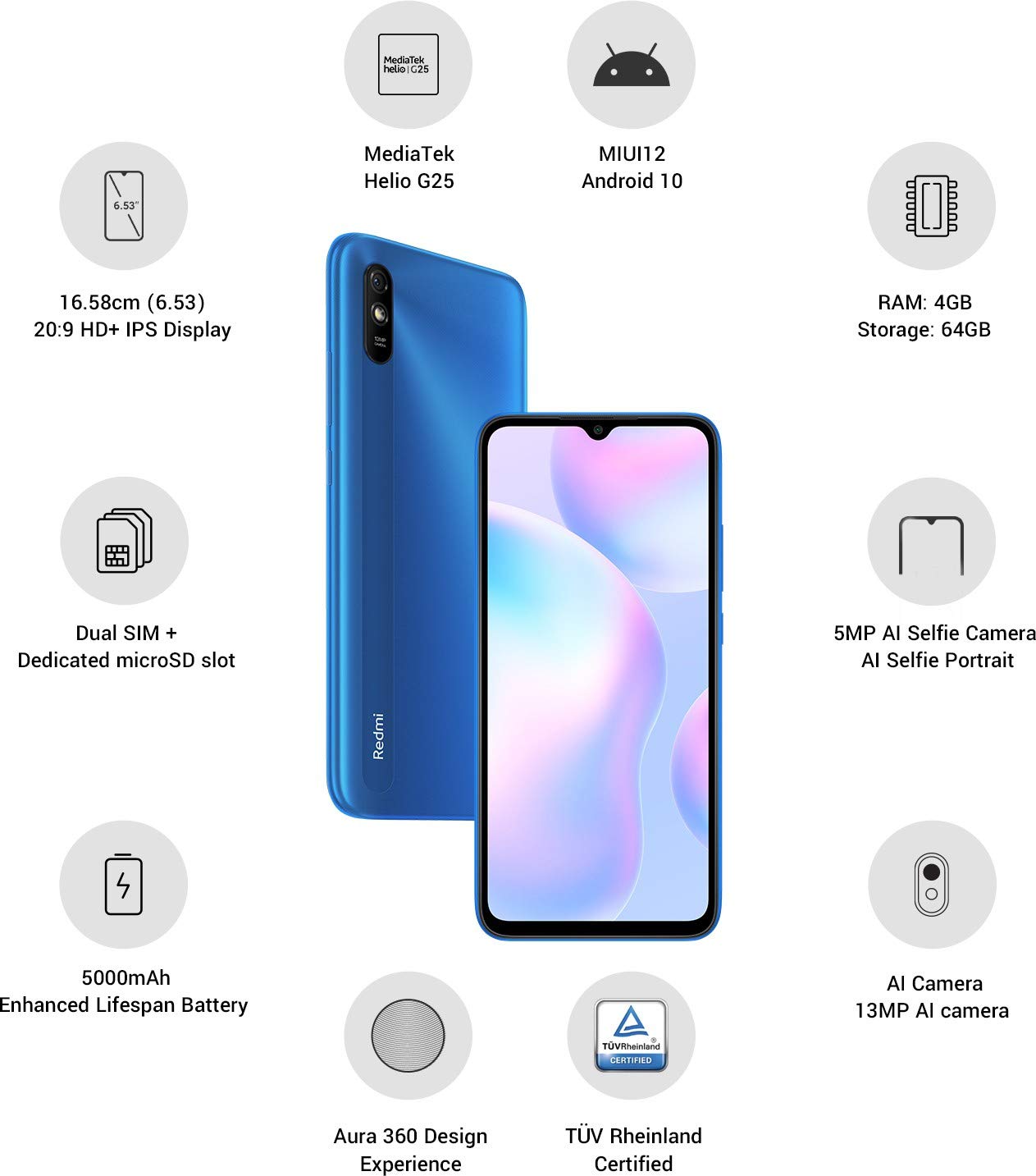
Obrázok: Cezview of the Xiaomi Redmi 9I highlighting key features such as the 6.53-inch HD+ IPS Display, MediaTek Helio G25 processor, MIUI12 Android 10, 4GB RAM, 64GB Storage, Dual SIM + dedicated microSD slot, 5000mAh battery, 5MP AI Selfie Camera, 13MP AI Camera, Aura 360 Design Experience, and TÜV Rheinland Certification.
Sprievodca nastavením
1. Rozbalenie a počiatočná kontrola
Opatrne vyberte všetky položky z obalu. Uistite sa, že sú prítomné nasledujúce komponenty:
- XIAOMI Redmi 9I Smartphone
- Napájací adaptér
- Kábel USB typu C
- Nástroj na vysunutie SIM karty
- Stručná úvodná príručka (ak je súčasťou balenia)
2. Vloženie SIM karty (karty) a MicroSD karty
Locate the SIM card tray on the side of your device. Use the provided SIM ejector tool to open the tray. Insert your Nano SIM card(s) and/or a microSD card into the designated slots. Ensure the cards are correctly oriented as shown in the diagram below. Gently push the tray back into the phone until it clicks into place.

Obrázok: Bočný view of the Xiaomi Redmi 9I, illustrating the location of the SIM card tray. The tray is designed to hold dual Nano SIM cards and a dedicated microSD card.
3. Nabíjanie zariadenia
Before first use, fully charge your Redmi 9I. Connect the USB Type-C cable to the phone's charging port (located at the bottom) and the other end to the power adapter. Plug the adapter into a wall outlet. The charging indicator will appear on the screen.

Obrázok: Spodná časť view of the Xiaomi Redmi 9I, showing the USB Type-C charging port and speaker grille.
4. Zapnutie a počiatočná konfigurácia
Press and hold the Power button (located on the right side of the device) until the XIAOMI logo appears. Follow the on-screen instructions to complete the initial setup, including language selection, Wi-Fi connection, Google account setup, and security settings.

Obrázok: Bočný view of the Xiaomi Redmi 9I, clearly showing the power button and volume rocker on the right edge of the device.
Návod na obsluhu
Základná navigácia
- Dotknite sa: Tap icons to open apps, select items, or confirm actions.
- Potiahnutie prstom: Slide your finger across the screen to scroll, switch between home screens, or navigate within apps.
- Štipka: Na priblíženie alebo oddialenie fotografií použite dva prsty a web stránky.
- Dlhé stlačenie: Press and hold an item for additional options or to move icons.
Uskutočňovanie hovorov a odosielanie správ
Tap the Phone icon to access the dialer. Enter a number or select a contact. Tap the Messages icon to compose and send text messages.
Pripojenie k sieťam
- Wi-Fi: Prejsť na Nastavenia > Wi-Fi, zapnite Wi-Fi a vyberte požadovanú sieť. Ak sa zobrazí výzva, zadajte heslo.
- Bluetooth: Prejsť na Nastavenia > Bluetooth, turn Bluetooth on, and pair with compatible devices.
- Mobilné dáta (4G): Uistite sa, že vaša SIM karta je aktívna a máte povolené mobilné dáta. Nastavenia > SIM karty a mobilné siete.
Používanie fotoaparátu
Tap the Camera icon to open the camera application. The Redmi 9I features a 13MP rear camera and a 5MP front camera. Switch between modes (Photo, Video, Portrait, etc.) by swiping across the screen. Tap the shutter button to capture photos or start/stop video recording.

Obrázok: Zadná strana view of the Xiaomi Redmi 9I, showcasing the 13MP AI camera module and the Redmi branding.
Údržba
Čistenie zariadenia
Na čistenie obrazovky a tela telefónu používajte mäkkú handričku, ktorá nepúšťa vlákna. Nepoužívajte agresívne chemikálie ani abrazívne materiály, ktoré môžu poškodiť displej alebo povrchovú úpravu. V prípade odolných škvŕn jemne očistiteamphandričku vodou alebo čistiacim prostriedkom na obrazovky určeným pre elektroniku.
Aktualizácie softvéru
Pravidelne kontrolujte a inštalujte aktualizácie softvéru, aby ste zabezpečili optimálny výkon, zabezpečenie a prístup k novým funkciám. Prejdite na Nastavenia > Informácie o telefóne > Verzia MIUI skontrolovať aktualizácie.
Starostlivosť o batérie
The Redmi 9I is equipped with a 5000 mAh Lithium-Polymer battery. To prolong battery life:
- Vyhnite sa extrémnym teplotám.
- Pred častým nabíjaním nenechajte batériu úplne vybiť.
- Použite originálnu nabíjačku a kábel.
- Optimalizujte využitie batérie v Nastavenia > Batéria a výkon.
Správa úložiska
Vaše zariadenie je vybavené 64 GB internou pamäťou. Ak chcete efektívne spravovať úložisko:
- Pravidelne odstraňujte nepotrebné files, fotografie a videá.
- Odinštalujte nepoužívané aplikácie.
- Využívajte služby cloudového úložiska.
- Presunúť veľké filena vloženú kartu microSD.
Riešenie problémov
This section addresses common issues you might encounter with your Redmi 9I.
Zariadenie sa nezapína
- Ensure the battery is charged. Connect the phone to its charger for at least 30 minutes.
- Stlačte a podržte tlačidlo napájania 10-15 sekúnd, aby ste vynútili reštart.
Slabé sieťové pripojenie
- Skontrolujte, či je vaša SIM karta správne vložená.
- Toggle Airplane Mode on and off (swipe down from the top for Quick Settings).
- Reštartujte svoje zariadenie.
- Verify your mobile data plan is active and you are in an area with network coverage.
Aplikácie padajú alebo zamŕzajú
- Zatvorte a znova otvorte problematickú aplikáciu.
- Vymažte vyrovnávaciu pamäť a údaje aplikácie (Nastavenia > Aplikácie > Spravovať aplikácie > [Názov aplikácie] > Vymazať údaje).
- Uistite sa, že aplikácia je aktualizovaná na najnovšiu verziu.
- Reštartujte telefón.
Obrazovka nereaguje
- Vynútite reštart zariadenia podržaním tlačidla napájania.
- If the issue persists, consider a factory reset (Upozornenie: Týmto sa vymažú všetky údaje v telefóne. Najprv si zálohujte dôležité údaje. Prejsť na Nastavenia > Informácie o telefóne > Obnovenie továrenských nastavení).
Špecifikácie
| Funkcia | Detail |
|---|---|
| Značka | XIAOMI |
| Model | Redmi 9I |
| Operačný systém | Android 9.0 (MIUI12) |
| RAM | 4 GB |
| Interné úložisko | 64 GB |
| Procesor | Snapdragon (2 GHz CPU Speed) |
| Typ zobrazenia | LCD |
| Veľkosť obrazovky | 6.53 palca |
| Zadná kamera | 13 MP |
| Predná kamera | 5 MP |
| Kapacita batérie | 5000 milamp Hours (Lithium-Polymer) |
| Slot na SIM kartu | Dual SIM (Nano) |
| Konektivita | 4G, Wi-Fi, Bluetooth, USB Type C |
| GPS | GLONASS |
| Materiál | Plastové |
| Úroveň odolnosti voči vode | Odolný voči vode |
Informácie o záruke
The XIAOMI Redmi 9I comes with a 1-ročná záruka výrobcu from the date of purchase. This warranty covers manufacturing defects under normal use. For detailed terms and conditions, please refer to the warranty card included in your product packaging or visit the official XIAOMI support webstránky.
Zákaznícka podpora
If you encounter issues not covered in this manual or require further assistance, please contact XIAOMI customer support. You can typically find contact information (phone numbers, email, chat support) on the official XIAOMI webalebo prostredníctvom sekcie podpory v nastaveniach vášho zariadenia.
Before contacting support, please have your device's model number (Redmi 9I) and serial number ready. The serial number can usually be found in Nastavenia > Informácie o telefóne > Stav.