
1. Úvod
Ďakujem za nákupasing the JVC XS-N2239TC Wireless Stereo Speaker System. This manual provides essential information for the safe and efficient use of your new speaker system. Please read these instructions thoroughly before operating the device and retain them for future reference.
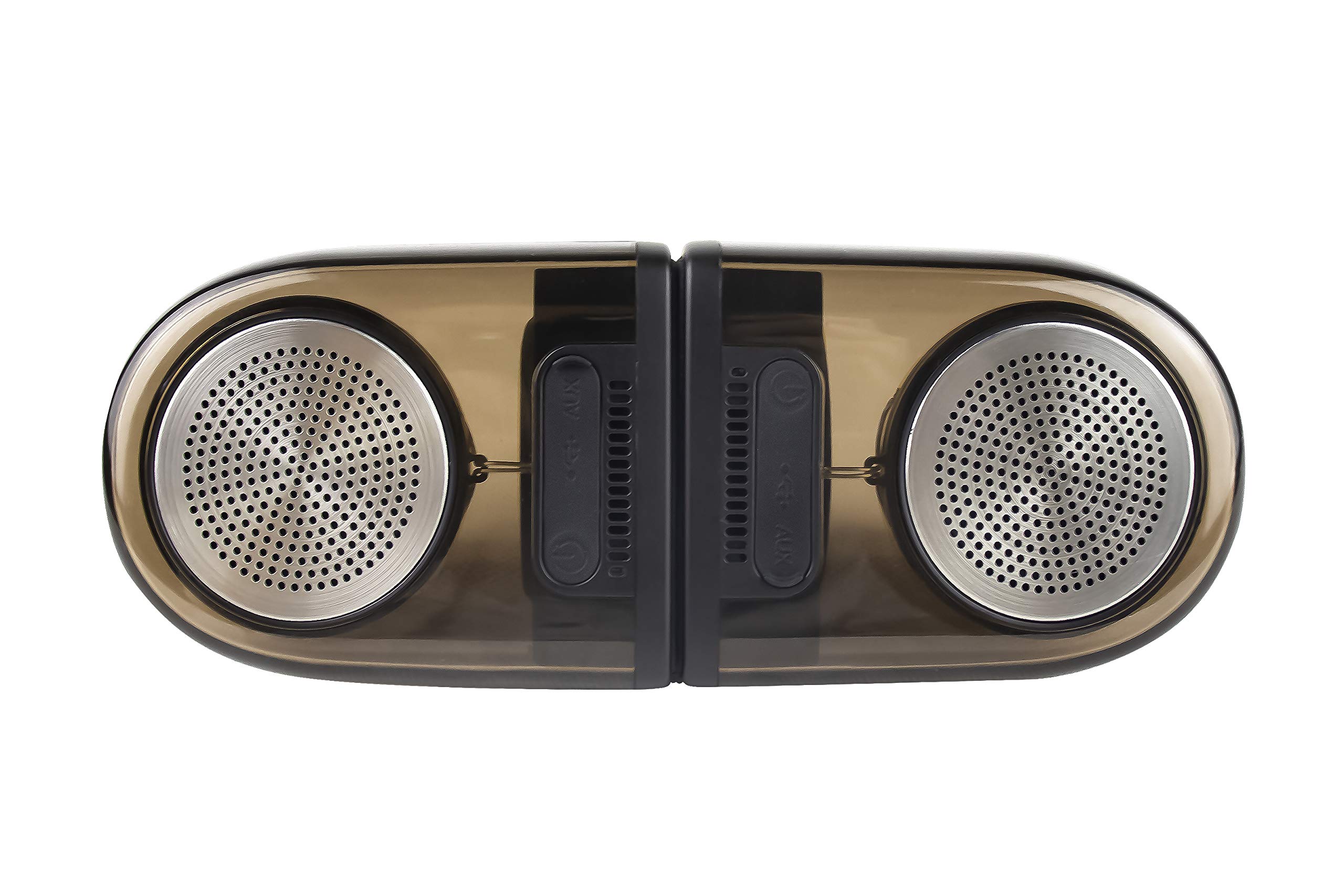
Image of the JVC XS-N2239TC speaker system, showcasinjeho dizajn a komponenty.
2. Obsah balenia
Skontrolujte, či sú vo vašom balení všetky nasledujúce položky:
- 1 x JVC XS-N2239TC Speaker Unit
- Kábel 1 x AUX
- 1 x Používateľská príručka (tento dokument)
- 1 x nabíjací kábel
- 1 x Záručný list
3. Nastavenie
3.1 Umiestnenie
The JVC XS-N2239TC speakers are designed for versatile placement, suitable as Bookshelf or Floor Standing units. Ensure the speakers are placed on a stable, flat surface or floor, away from direct sunlight, heat sources, and moisture. For optimal stereo sound, position the two speakers appropriately within your listening area.
3.2 Pripojenie napájania
- Connect the charging cable to the speaker's power input port.
- Zapojte druhý koniec nabíjacieho kábla do vhodnej elektrickej zásuvky.
- Ensure the speaker is fully charged before initial use for optimal battery life.
4. Návod na obsluhu
4.1 Zapnutie/vypnutie
Locate the power button on the speaker unit. Press and hold the button for a few seconds to power the speaker on or off. An indicator light will typically confirm the power status.
4.2 Pripojenie
4.2.1 Bezdrôtové pripojenie
The speaker supports wireless streaming. To connect wirelessly:
- Ensure the speaker is powered on and in pairing mode (refer to the speaker's indicator lights for status).
- On your device (e.g., smartphone, tablet, television), enable wireless functionality.
- Hľadať available devices and select "JVC XS-N2239TC" from the list.
- Once connected, you can stream audio wirelessly to the speaker system.
4.2.2 USB pripojenie
The speaker features a plug-and-play USB card reader. Insert a USB storage device containing audio files into the designated USB port on the speaker. The speaker will automatically detect and begin playing compatible audio files.
4.2.3 Pripojenie AUX
Use the provided AUX cable to connect the speaker to devices with a 3.5mm audio output jack, such as televisions or other audio sources. Plug one end of the AUX cable into the speaker's AUX input and the other end into your audio source's output.
4.3 Ovládacie prvky
4.3.1 Multifunctional Panel Keys
The speaker unit is equipped with multifunctional panel keys. These keys allow you to:
- Adjust volume (increase/decrease).
- Prehrať/Pozastaviť prehrávanie zvuku.
- Navigate tracks (forward/backward) when playing from USB or wireless sources.
4.3.2 Diaľkové ovládanie
The included remote control provides convenient access to various functions from a distance. Use the remote to:
- Zapnutie/vypnutie reproduktora.
- Upravte hlasitosť.
- Ovládanie prehrávania (prehrávanie, pozastavenie, preskakovanie skladieb).
- Switch input modes (e.g., Wireless, USB, AUX).
5. Údržba
5.1 Čistenie
To clean the speaker, use a soft, dry cloth. Do not use abrasive cleaners, waxes, or solvents as they may damage the finish. Ensure the speaker is powered off and unplugged before cleaning.
5.2 Odolnosť voči vode
The JVC XS-N2239TC speaker is designed with water resistance. While it can withstand splashes, it is not intended for submersion. Avoid exposing the speaker to excessive moisture or direct water jets to prevent damage.
6. Riešenie problémov
If you encounter issues with your speaker system, please refer to the following common solutions:
- Bez napájania: Ensure the charging cable is securely connected to both the speaker and a working power outlet. Check if the power button has been pressed correctly.
- Žiadny zvuk: Verify the volume level on both the speaker and your connected device. Ensure the correct input mode (Wireless, USB, AUX) is selected. Check all cable connections.
- Problémy s bezdrôtovým pripojením: Make sure the speaker is within range of your device. Try unpairing and re-pairing the speaker with your device. Ensure no other devices are interfering with the wireless signal.
- Problémy s prehrávaním z USB: Confirm the USB device is formatted correctly and contains compatible audio fileSkúste iné zariadenie USB.
- Nefunguje diaľkové ovládanie: Check the remote control's batteries and replace them if necessary. Ensure there are no obstructions between the remote and the speaker's sensor.
Ak problém pretrváva, kontaktujte zákaznícku podporu.
7. Špecifikácie
| Funkcia | Detail |
|---|---|
| Značka | JVC |
| Názov modelu | JVC XS-N2239TC |
| Technológia pripojenia | USB, bezdrôtové |
| Typ bezdrôtovej technológie | Bezdrôtové |
| Protokol pripojenia | USB |
| Režim zvukového výstupu | Stereo |
| Typ reproduktora | Knižnica |
| Typ montáže | Stojace na podlahu |
| Vlastnosti produktu | Diaľkové ovládanie |
| Metóda kontroly | Diaľkové ovládanie |
| Kompatibilné zariadenia | Televízia |
| Počet zvukových kanálov | 2.1 |
| Veľkosť reproduktora | 7.5 centimetra |
| Subwoofer Speaker Diameter | 5 palca |
| Tweeter Driver Diameter | 1 palca |
| Typ zvukového ovládača | Dynamický ovládač |
| Farba | Čierna |
| Je Vodotesný | PRAVDA |
| Úroveň odolnosti voči vode | Vodotesný |
| Špecifické použitie produktu | Systémy domácej zábavy |
| Priemerná životnosť batérie | 6 hodín |
| Hmotnosť položky | 0.56 kg |
8. Záruka a podpora
8.1 Informácie o záruke
Tento produkt je dodávaný s a 1 ročná záruka poskytnuté výrobcom od dátumu nákupu. Uschovajte si doklad o kúpe a záručný list pre prípad uplatnenia záruky.
8.2 Zákaznícka podpora
For any complaints, technical assistance, or support regarding your JVC XS-N2239TC speaker system, please contact JVC customer care:
- Číslo starostlivosti o zákazníkov: +91-9910332380
Pred kontaktovaním podpory si, prosím, pripravte číslo modelu produktu a podrobnosti o kúpe.