
1. Úvod
This manual provides comprehensive instructions for the One For All URC4912 Sony TV Replacement Remote Control. Designed to function identically to your original Sony TV remote, the URC4912 offers immediate compatibility with all Sony TV models (LCD, LED, Plasma) without requiring any setup. It also includes a learning feature for personalized customization of functions.
2. Nastavenie
2.1 Inštalácia batérií
The URC4912 remote control requires two AA batteries (not included). Follow these steps to install them:
- Nájdite kryt priestoru pre batérie na zadnej strane diaľkového ovládača.
- Posuňte kryt smerom nadol alebo stlačte západku, aby ste ho otvorili.
- Vložte dve batérie typu AA a uistite sa, že kladný (+) a záporný (-) pól správne zarovnané s označeniami vo vnútri priehradky na batérie.
- Nasaďte kryt priehradky na batérie tak, že ho zasuniete späť na miesto, kým bezpečne nezacvakne.
Poznámka: Vždy používajte nové batérie a staré batérie zlikvidujte zodpovedne.
2.2 Initial Setup (No Configuration Required)
The One For All URC4912 remote control is pre-programmed for all Sony televisions. No setup or programming is required. Simply insert the batteries, and the remote is ready for immediate use with your Sony TV.
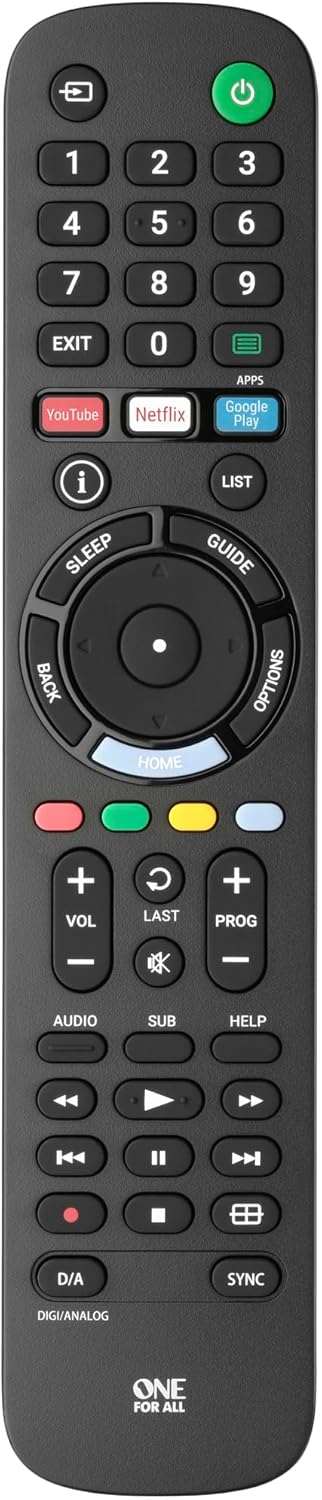
Obrázok 1: Predná strana view of the One For All URC4912 remote control. This image displays the remote's layout, including number buttons, navigation pad, volume and channel controls, and dedicated app buttons for services like YouTube and Netflix.
3. Ovládanie diaľkového ovládača
3.1 Základné funkcie
The URC4912 remote provides all standard functions found on an original Sony TV remote:
- Tlačidlo napájania: Zapína alebo vypína televízor.
- Číselné tlačidlá (0-9): Pre priamy výber kanála.
- Zvýšenie/zníženie hlasitosti (+/-): Upravuje hlasitosť TV.
- Channel Up/Down (PROG +/-): Mení televízne kanály.
- Tlačidlo Stlmiť: Stíší zvuk televízora.
- Navigačný panel (hore, dole, doľava, doprava, OK): Pre navigáciu v menu a výber.
- Tlačidlo Späť: Návrat na predchádzajúcu obrazovku alebo ponuku.
- Domovské tlačidlo: Prístup k hlavnej domovskej obrazovke televízora alebo rozhraniu Smart TV.
3.2 Specific Sony Functions
This remote supports common Sony-specific functions, including:
- Divadlo: Activates or deactivates Theatre mode.
- i-Manual: Accesses the TV's electronic instruction manual.
- Možnosti: Displays context-sensitive options for the current screen.
3.3 Learning Feature
The URC4912 remote includes a learning feature, allowing you to copy functions directly from your original remote control. This is useful for any specific functions not pre-programmed or for personalizing button assignments.
- Place the URC4912 remote and your original remote on a flat surface, facing each other, with their IR emitters approximately 1-2 inches apart.
- Na URC4912 stlačte a podržte tlačidlo NASTAVENIE button (if available, or refer to the full manual for specific button combination to enter learning mode) until the LED indicator blinks twice and then stays lit.
- Press the button on the URC4912 that you wish to program. The LED will blink rapidly.
- On your original remote, press and hold the corresponding function button until the URC4912's LED blinks twice to confirm successful learning.
- Kroky 3 a 4 zopakujte pre všetky ostatné tlačidlá, ktoré chcete naprogramovať.
- Ak chcete ukončiť režim učenia, stlačte tlačidlo NASTAVENIE tlačidlo znova. LED dióda zhasne.
Note: If the LED shows a long blink, the learning was unsuccessful. Try again, ensuring both remotes are stable and the original remote's batteries are fresh.

Obrázok 2: Uhlové view of the One For All URC4912 remote control, highlighting its ergonomic design and button placement for easy access to various functions.
4. Údržba
Aby ste zaistili dlhú životnosť a optimálny výkon vášho diaľkového ovládača:
- Čistenie: Wipe the remote with a soft, dry cloth. Do not use abrasive cleaners or liquids.
- Výmena batérie: Replace batteries when the remote's response becomes sluggish or the LED indicator (if present) signals low power. Always replace both batteries simultaneously.
- Ukladací priestor: Diaľkový ovládač skladujte na suchom mieste, mimo dosahu priameho slnečného žiarenia a extrémnych teplôt.
5. Riešenie problémov
| Problém | Riešenie |
|---|---|
| Diaľkové ovládanie nereaguje. |
|
| Niektoré tlačidlá nefungujú. |
|
| Learning feature fails. |
|
6. Špecifikácie
| Značka | Jeden za všetkých |
| Model | URC4912 |
| Kompatibilné zariadenia | Television (All Sony TV types: LCD, LED, Plasma) |
| Špeciálne funkcie | Infrared, Learning Function |
| Počet položiek | 1 |
| Typ batérie | 2 x AA batérie (nie sú súčasťou balenia) |
| Rozmery produktu | 19.5 x 4.4 x 2.5 cm |
| Hmotnosť položky | 100 g |
7. Informácie o záruke
For detailed warranty information regarding your One For All URC4912 remote control, please refer to the official One For All webalebo záručný list, ktorý bol súčasťou vášho nákupu. Záručné podmienky sa môžu líšiť v závislosti od regiónu.
8. Podpora
Should you require further assistance, technical support, or have questions not covered in this manual, please visit the official One For All support website or contact their customer service. You can often find FAQs, additional guides, and contact information on their brand page: