
1. Úvod
The Carrera RC Mario Kart Yoshi Quad (Model 370200997X) is a remote-controlled vehicle designed for users aged 6 and up. This manual provides essential information for the safe and optimal use of your RC Yoshi Quad, ensuring an enjoyable experience. Please read all instructions carefully before operating the product.
2. Čo je v krabici
Opatrne rozbaľte všetky komponenty a uistite sa, že sú v balení nasledujúce položky:
- Carrera RC Yoshi Quad Vehicle
- Diaľkové ovládanie
- 3.2V 700 mAh LiFePo4 Battery (for vehicle)
- USB nabíjací kábel
- Návod na použitie

Image: The Carrera RC Mario Kart Yoshi Quad shown in its original retail packaging, indicating included components.
3. Nastavenie
3.1. Nabíjanie batérie vozidla
Before first use, fully charge the vehicle's 3.2V 700 mAh LiFePo4 battery. The charging process typically takes approximately 50 minutes.
- Connect the USB charging cable to the vehicle's charging port.
- Zapojte druhý koniec USB kábla do kompatibilného USB zdroja napájania (napr. počítač, USB adaptér do zásuvky, powerbanka).
- The charging indicator light on the vehicle or cable will show the charging status (refer to specific indicator behavior in the quick start guide if available).
- Po dokončení nabíjania odpojte kábel.

Image: The Yoshi Quad vehicle, ready for battery charging via its USB cable.
3.2. Inštalácia batérie diaľkového ovládača
The remote control requires batteries for operation. Please ensure you use the correct type and polarity.
- Nájdite priehradku na batérie na zadnej strane diaľkového ovládača.
- Otvorte kryt priehradky na batérie.
- Insert the required batteries (e.g., AA or AAA, typically 2x) according to the polarity markings (+/-).
- Bezpečne zatvorte kryt priestoru pre batérie.
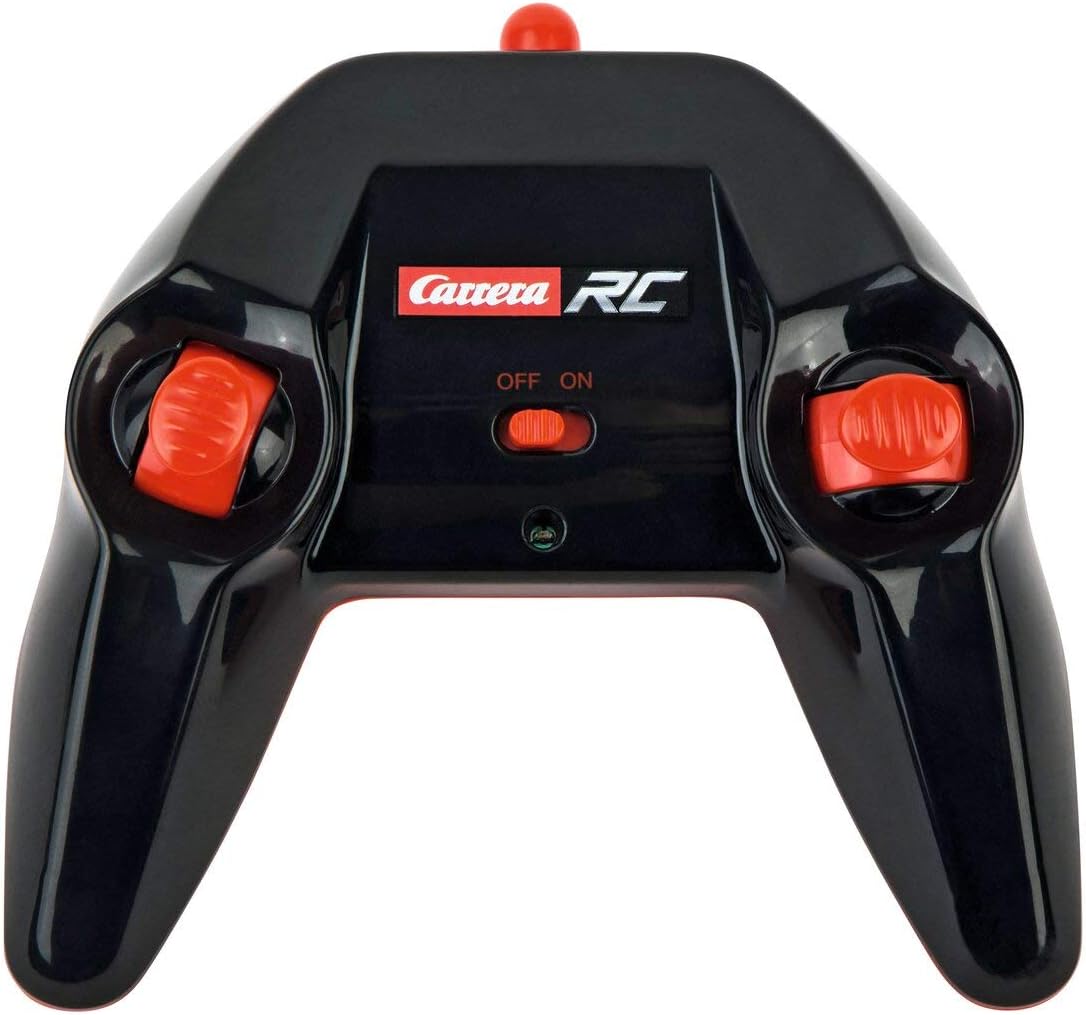
Image: The Carrera RC remote control, showing its design and controls.
3.3. Spárovanie vozidla a diaľkového ovládača
To establish a connection between the vehicle and the remote control, follow these steps:
- Ensure both the vehicle and the remote control have fresh or fully charged batteries.
- Zapnite vozidlo pomocou jeho vypínača.
- Zapnite diaľkový ovládač pomocou jeho vypínača.
- The vehicle and remote control should automatically pair. A successful connection is usually indicated by a solid light on both devices (refer to your quick start guide for specific light indicators).
Video: This video demonstrates the unboxing, battery installation, and initial pairing process for the Carrera RC Mario Kart Yoshi Quad.
4. Návod na obsluhu
Once paired, you can begin operating your Carrera RC Yoshi Quad.
- Dopredu/dozadu: Use the throttle trigger or joystick on the remote control to move the vehicle forward or backward.
- Riadenie: Use the steering wheel or directional controls on the remote control to turn the vehicle left or right.
- Rýchlosť: The Yoshi Quad can reach speeds of up to 9 km/h. Adjust your control input for desired speed.
- Rozsah: Operate the vehicle within the specified range of the remote control to maintain connection and avoid loss of control.
Bezpečnostné opatrenia:
- Always operate in open areas, away from people, pets, and obstacles.
- Nepoužívajte v blízkosti vody alebo vo vlhkom prostredí.
- Avoid operating on public roads or near traffic.
- Supervise younger children during operation.
5. Údržba
5.1. Upratovanie
To maintain the appearance and functionality of your RC Yoshi Quad:
- Wipe the vehicle and remote control with a soft, dry cloth after each use.
- Do not use harsh chemicals or solvents, as these can damage the plastic.
- Avoid getting water into electronic components.
5.2. Starostlivosť o batériu a jej skladovanie
- Ak diaľkový ovládač dlhší čas nepoužívate, vždy z neho vyberte batérie.
- Store the vehicle's LiFePo4 battery in a cool, dry place, away from direct sunlight and extreme temperatures.
- Batériu neprebíjajte ani úplne nevybíjajte.
6. Riešenie problémov
If you encounter issues with your RC Yoshi Quad, refer to the following common problems and solutions:
| Problém | Možná príčina | Riešenie |
|---|---|---|
| Vozidlo sa nepohne. | Low or uncharged vehicle battery. Batérie diaľkového ovládača sú vybité alebo nesprávne vložené. Vozidlo a diaľkové ovládanie nie sú spárované. | Nabite batériu vozidla. Replace/install remote control batteries correctly. Re-pair vehicle and remote control. |
| Poor control range or intermittent connection. | Interference from other RC devices or electronics. Prevádzka mimo efektívneho dosahu. Slabé batérie. | Move to a different location. Operate closer to the vehicle. Nabite/vymeňte batérie. |
| Vozidlo sa pohybuje pomaly alebo nepravidelne. | Slabá batéria vozidla. Prekážka v kolesách/nápravách. | Nabite batériu vozidla. Skontrolujte a odstráňte všetky prekážky. |
7. Špecifikácie
| Značka | Carrera |
| Názov modelu | 370200997X |
| Charakter | Joši |
| Typ vozidla | Quad |
| Materiál | Plastové |
| Farba | Multicolor (predominantly Green) |
| Vekový rozsah (popis) | 6+ rokov |
| Maximálna rýchlosť | 9 kilometrov za hodinu |
| Zdroj napájania | Napájanie z batérie |
| Vehicle Battery Type | 1 Lithium-ion (3.2V 700 mAh LiFePo4) - included |
| Doba nabíjania | Pribl. 50 minút |
| Prevádzkový čas | Až 30 minút |
| Typ diaľkového ovládača | Radio Control (2.4 GHz) |
| Rozmery (položka) | 36.5 x 20.5 x 23 cm |
| Hmotnosť (položka) | 1.06 kg |
| Špeciálna funkcia | Blikajúce svetlo |
| Krajina pôvodu | Čína |
8. Záruka a podpora
8.1. Záruka výrobcu
This Carrera RC product is covered by a 2-ročná záruka výrobcuPre prípadné reklamácie si uschovajte doklad o kúpe. Záruka sa vzťahuje na chyby materiálu a spracovania pri bežnom používaní.
8.2. Zákaznícka podpora
For technical assistance, spare parts, or warranty inquiries, please contact Carrera customer support. Refer to the contact information provided on the product packaging or the official Carrera webstránky.