
1. Dôležité bezpečnostné informácie
Please read this manual carefully before operating the appliance and keep it for future reference. Failure to follow these instructions may result in electric shock, fire, or injury.
- Uistite sa, že napájací zdroj zodpovedá objtage uvedené na typovom štítku.
- Neprevádzkujte jednotku s poškodeným káblom alebo zástrčkou.
- Udržujte prístroj mimo zdrojov tepla a priameho slnečného žiarenia.
- Neblokujte vstupy alebo výstupy vzduchu.
- This appliance contains R290 refrigerant. Handle with care and ensure proper ventilation during installation and maintenance.
- Pred čistením alebo servisom vždy jednotku odpojte.
- Na čistenie nepoužívajte chemické rozpúšťadlá.
- Tento spotrebič nie je určený na to, aby ho používali osoby (vrátane detí) so zníženými fyzickými, zmyslovými alebo duševnými schopnosťami alebo s nedostatkom skúseností a znalostí, pokiaľ nie sú pod dozorom alebo nie sú poučené o používaní spotrebiča osobou zodpovednou za ich bezpečnosť.
2. Obsah balenia
Pri vybalení skontrolujte, či sú všetky položky prítomné a nepoškodené.
- 1 x Klarstein Kraftwerk Smart Portable Air Conditioner
- 1 x Diaľkové ovládanie
- 1 x Window Sealing Kit (for tilt windows)
- 1 x Exhaust Hose with Connectors
- 1 x Water Drainage Hose
- 1 x Používateľská príručka (angličtina)

Image: Contents of the delivery, including the air conditioner unit, remote control, window sealing kit, exhaust hose, and drainage hose.
3. Nastavenie a inštalácia
3.1 Umiestnenie jednotky
Place the air conditioner on a flat, stable surface. Ensure there is at least 30 cm (12 inches) of space around the unit for proper airflow. The integrated castors allow for easy movement between rooms.

Image: The portable air conditioner with integrated wheels for easy transport.
3.2 Inštalácia výfukovej hadice
- Pripojte výfukovú hadicu k výstupu vzduchu na zadnej strane jednotky.
- Predĺžte hadicu k najbližšiemu oknu alebo otvoru.
- Use the provided window sealing kit to secure the exhaust hose in the window opening, preventing hot air from re-entering the room.

Image: Quick installation with the window kit, showing the exhaust hose and window seal.
3.3 Drainage Hose (Dehumidifier Mode)
For continuous dehumidification, connect the drainage hose to the designated outlet and route it to a suitable drain or container. In cooling mode, water typically evaporates, but manual drainage may be required if the internal tank fills.
4. Návod na obsluhu
4.1 Ovládací panel a diaľkové ovládanie
The unit can be controlled via the touch control panel on top of the unit or the included remote control. The remote control requires 2x AAA batteries (not included).
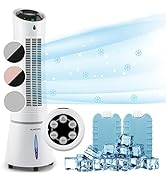
Image: Digital display and remote control for the air conditioner.
4.2 Prevádzkové režimy
- Režim chladenia: Reduces room temperature. Set desired temperature and fan speed.
- Režim odvlhčovača: Odstraňuje prebytočnú vlhkosť zo vzduchu.
- Režim ventilátora: Cirkuluje vzduch bez chladenia. Vyberte požadovanú rýchlosť ventilátora.
- Režim spánku: Operates quietly with reduced fan speed and gradually increases temperature for comfortable sleep.
4.3 Smart Control (App & Alexa)
The Klarstein Kraftwerk Smart can be controlled via the Klarstein app on your smartphone and is compatible with Amazon Alexa and Google Home. Follow the app's instructions for pairing the device.

Image: Simple and practical use with the Klarstein app, compatible with Amazon Alexa and Google Home.
4.4 Funkcia časovača
Use the timer function to set the unit to turn on or off automatically after a specified period.
5. Údržba
Pravidelná údržba zaisťuje optimálny výkon a predlžuje životnosť vašej klimatizácie. Pred akoukoľvek údržbou vždy odpojte jednotku zo siete.
5.1 Čistenie vzduchového filtra
The air filter should be cleaned every two weeks or more frequently depending on usage. A dirty filter reduces efficiency.
- Vypnite a odpojte jednotku.
- Nájdite a vyberte vzduchový filter zo zadnej alebo bočnej strany jednotky.
- Clean the filter with a vacuum cleaner or wash it with warm water and mild detergent.
- Pred opätovným vložením nechajte filter úplne vyschnúť.
5.2 Čistenie exteriéru jednotky
Vonkajšiu časť jednotky utrite mäkkou, damp handričkou. Nepoužívajte agresívne chemikálie, abrazívne prostriedky ani rozpúšťadlá.
5.3 Sezónne skladovanie
Ak zariadenie skladujete dlhší čas:
- Vypustite všetku nahromadenú vodu z jednotky.
- Vyčistite vzduchový filter.
- Zakryte jednotku, aby ste ju chránili pred prachom.
- Skladujte na suchom a chladnom mieste.
6. Riešenie problémov
Pred kontaktovaním zákazníckej podpory si pozrite nasledujúcu tabuľku, kde nájdete bežné problémy a riešenia.
| Problém | Možná príčina | Riešenie |
|---|---|---|
| Jednotka sa nezapne. | No power, power cord unplugged, fuse blown. | Skontrolujte pripojenie k elektrickej sieti, zásuvku a istič. |
| Nedostatočné chladenie. | Dirty air filter, blocked air intake/outlet, room too large, windows/doors open, exhaust hose not properly installed. | Clean filter, clear obstructions, ensure proper room size for unit capacity, close windows/doors, check exhaust hose installation. |
| Jednotka je hlučná. | Jednotka nie je na rovnom povrchu, vnútorné komponenty vibrujú. | Ensure unit is on a level surface. Some operational noise is normal for portable AC units. |
| Únik vody. | Drainage plug not properly sealed, drainage hose blocked or improperly connected. | Check drainage plug and hose connections. Clear any blockages in the drainage hose. |
| Problémy s pripojením k Wi-Fi. | Incorrect Wi-Fi settings, 5GHz network used, temporary glitch. | Ensure you are connecting to a 2.4GHz Wi-Fi network. Try unplugging the unit for 10 seconds, then reconnecting. Refer to the app's pairing instructions. |
7. Špecifikácie
| Funkcia | Detail |
|---|---|
| Značka | KLARSTEIN |
| Názov modelu | Kraftwerk Smart |
| Chladiaca kapacita | 10,000 2.9 BTU (XNUMX kW) |
| Odvlhčovacia kapacita | 23 litre |
| Objem prúdenia vzduchu | 440 m³/h |
| Odporúčaná veľkosť izby | 29-49 m² |
| Úroveň hluku | 50 dB (Min) / 65 dB (Max) |
| Trieda energetickej účinnosti | A |
| Chladivo | R-290 |
| Spotreba energie | 1150 wattov |
| Voltage | 220 voltov |
| Rozmery (D x Š x V) | 38P x 35.5d x 82.2v cm |
| Hmotnosť | 26 kg |
| Metóda kontroly | Diaľkové ovládanie, ovládanie aplikácií |
| Typ filtra | Drevené uhlie |

Image: Energy efficiency label for the product.
Image: Technical drawing with product dimensions.
8. Záruka a zákaznícka podpora
8.1 Informácie o záruke
This product comes with a limited warranty. Please refer to the warranty card included in your package or contact customer support for detailed terms and conditions. The warranty covers manufacturing defects under normal use.
8.2 Zákaznícka podpora
For technical assistance, spare parts, or any questions regarding your Klarstein Kraftwerk Smart air conditioner, please contact Klarstein customer support. Contact details can typically be found on the official Klarstein webna stránke alebo v dokumentácii k nákupu.
Before contacting support, please have your model number (Kraftwerk Smart) and purchase date available.