
1. Produkt skončilview
Discover the ForceClima 12300 Connected Heating portable air conditioner, designed to adapt to your needs at any time with its portable design and five operating modes. It ventilates, cools, heats, and dehumidifies any room in your home, or allows for peaceful rest with its night mode. Featuring Wi-Fi control, a remote control, a touch panel, and an LED screen, it ensures you can enjoy the optimal environment with maximum comfort.

Obrázok 1.1: Predná strana view of the Cecotec ForceClima 12300 portable air conditioner.

Image 1.2: Another perspective of the Cecotec ForceClima 12300 portable air conditioner.
2. Bezpečnostné upozornenia
Please read all safety warnings and instructions carefully before using the appliance to prevent personal injury or damage to the product. Keep this manual for future reference.
- Rozbalenie: Remove the product from its box and remove all packaging materials. Ensure all components are present and undamaged.
- umiestnenie: Place the unit on a stable, flat surface. Ensure adequate clearance around the unit for proper airflow.
- Napájanie: Spotrebič pripájajte iba do uzemnenej elektrickej zásuvky so správnym napätím.tage, ako je uvedené na štítku produktu.
- Deti a domáce zvieratá: Počas prevádzky držte deti a domáce zvieratá mimo dosahu spotrebiča.
- Údržba: Nepokúšajte sa spotrebič opravovať ani upravovať sami. V prípade potreby kontaktujte kvalifikovaný servisný personál.
- voda: Do not immerse the appliance in water or other liquids. Avoid spilling liquids on the unit.
- Vetranie: Ensure the exhaust hose is properly installed and vented outdoors to prevent heat buildup.
3. Vlastnosti produktu
- High Cooling/Heating Capacity: Portable air conditioner with a powerful 12000 BTU capacity, suitable for quickly and efficiently reaching desired temperatures in areas up to approximately 25 m². Features a heat pump for effective heating during winter.
- Wi-Fi pripojenie: Configure the appliance remotely via Wi-Fi connection, allowing full control from your smartphone from anywhere.
- Viacero rýchlostí: Three fan speeds (Low, Medium, High) to adapt operation according to immediate needs.
- Diaľkové ovládanie: Includes a remote control for convenient operation from any location without needing to approach the unit.
- Intuitive Display and Control: LED screen displays all possible configurations and highlights current settings for easy control. The top touch control panel provides practical and simple operation.
- Päť prevádzkových režimov: Offers Fan mode, Cooling mode, Heating mode, Dehumidification mode, and Night mode.
- Vysoká odvlhčovacia kapacita: Dehumidification mode can capture up to 26 liters per day, contributing to a healthier environment in your home.

12000 BTU Capacity

Kúrenie a chladenie

Ovládanie Wi-Fi

Diaľkové a dotykové ovládanie

LED displej

5 Prevádzkové režimy

3 rýchlosti ventilátora

odvlhčovanie
4. Nastavenie a inštalácia
Proper setup is crucial for the optimal performance of your portable air conditioner. Follow these steps for installation:
- Rozbaliť: Carefully remove the air conditioner and all accessories from the packaging. Ensure you have the unit, exhaust hose, window kit, and remote control.
- Umiestnenie: Place the unit on a firm, level surface near a window and a grounded electrical outlet. Ensure there is at least 20 cm (8 inches) of space around the unit for proper air circulation.
- Montážna súprava na okná:
- Zostavte sadu tesniacich dosiek okna podľa typu okna (posuvné alebo výklopné).
- Secure the window kit in the open window, ensuring a tight seal to prevent air leakage.
- Pripojenie výfukovej hadice:
- Pripojte jeden koniec výfukovej hadice k výstupu vzduchu na zadnej strane jednotky.
- Connect the other end of the exhaust hose to the adapter in the window kit. Extend the hose as little as possible and avoid sharp bends to maximize efficiency.
- Drainage (Dehumidification/Cooling): For continuous drainage during dehumidification or cooling in high humidity, connect a drain hose (not included) to the continuous drain port and lead it to a floor drain or suitable container. Otherwise, the internal water tank will collect condensate and require manual emptying.
- Napájanie: Zapojte napájací kábel do uzemnenej elektrickej zásuvky s napätím 230 voltov.

Image 4.1: Proper placement of the unit with the exhaust hose connected to a window.
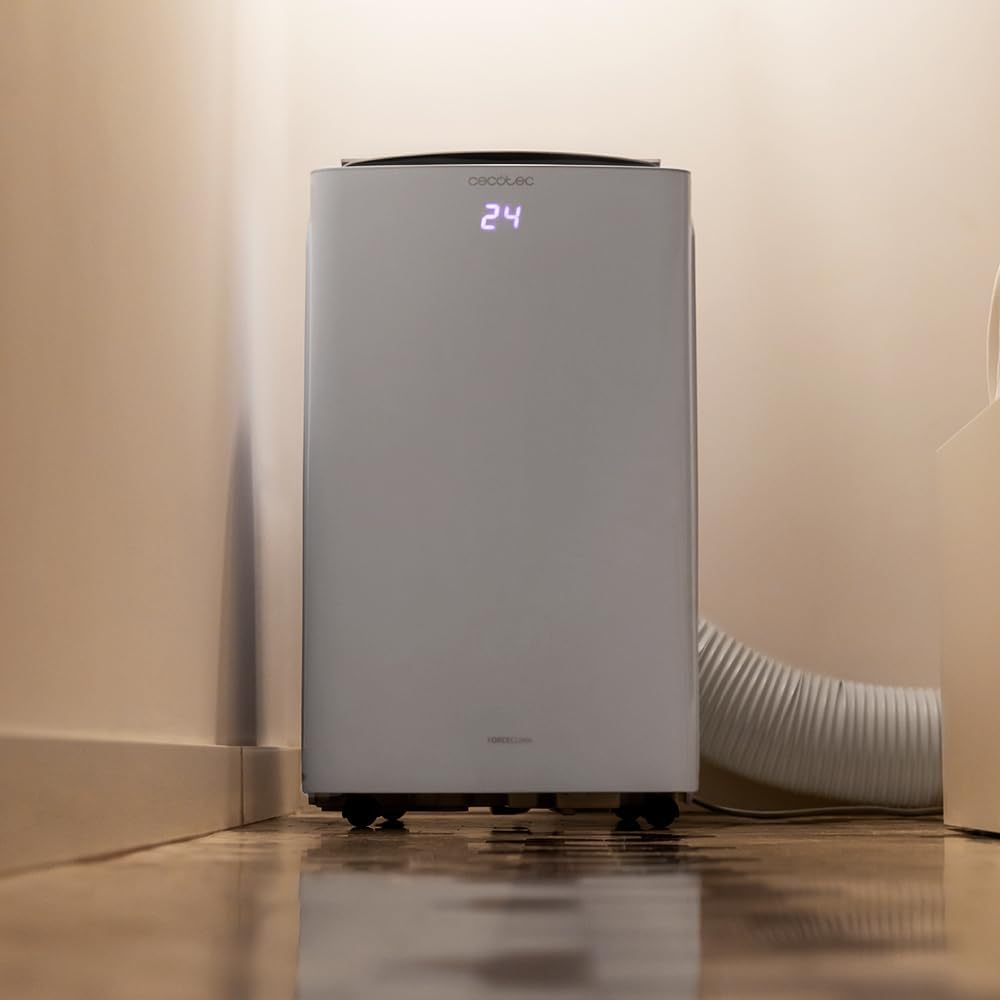
Image 4.2: Close-up of the exhaust hose connection at the base of the unit.
5. Návod na obsluhu
Your ForceClima 12300 offers various ways to control its functions:
5.1. Obsluha ovládacieho panela
The touch control panel on top of the unit allows direct access to all functions.

Image 5.1: User interacting with the top control panel of the air conditioner.
- Tlačidlo napájania: Stlačením zapnete alebo vypnete jednotku.
- Tlačidlo režimu: Cycle through the 5 operating modes: Cooling, Heating, Fan, Dehumidification, and Night.
- Tlačidlo rýchlosti ventilátora: Select desired fan speed: Low, Medium, or High.
- Nastavenie teploty: Pomocou šípok hore/dole nastavte požadovanú teplotu.
- Tlačidlo časovača: Nastavte časovač pre automatické ZAP./VYP.
5.2. Prevádzka diaľkového ovládania
Priložené diaľkové ovládanie umožňuje pohodlné ovládanie na diaľku.

Image 5.2: Remote control for the Cecotec ForceClima 12300.
- Všetky funkcie dostupné na ovládacom paneli sú prístupné pomocou diaľkového ovládača.
- Ensure the remote control is pointed towards the receiver on the unit.
- Install batteries (not included) as per the markings inside the battery compartment.
5.3. Wi-Fi and App Control
Control your air conditioner from anywhere using the dedicated smartphone application.

Image 5.3: Smartphone displaying the Cecotec control application.
- Stiahnite si oficiálnu aplikáciu Cecotec z obchodu s aplikáciami pre váš smartfón.
- Follow the in-app instructions to pair your ForceClima 12300 unit with your Wi-Fi network.
- Once connected, you can remotely adjust modes, temperature, fan speed, and set schedules.

Image 5.4: The air conditioner seamlessly integrated into a home environment.
6. Údržba
Pravidelná údržba zabezpečí dlhú životnosť a efektívnu prevádzku vašej klimatizácie.
- Čistenie vzduchového filtra:
- Pred čistením jednotku vypnite a odpojte zo siete.
- Remove the air filter (location typically on the back or side, refer to diagrams in the full manual if available).
- Clean the filter with a vacuum cleaner or wash it gently with lukewarm water and mild detergent. Rinse thoroughly and allow it to air dry completely before reinserting.
- Clean the air filter every two weeks or more frequently if the unit is used often or in dusty environments.
- Vypúšťanie vody:
- When the internal water tank is full, the unit will stop operating and an indicator light will illuminate.
- Pod odtokový otvor v spodnej zadnej časti jednotky umiestnite plytkú panvicu alebo misku.
- Remove the drain plug to allow water to flow out. Replace the plug once the tank is empty.
- Čistenie exteriéru jednotky: Vonkajšok utrite mäkkou, damp handričkou. Nepoužívajte agresívne chemikálie, abrazívne prostriedky ani rozpúšťadlá.
- Ukladací priestor: If storing the unit for an extended period, ensure the water tank is completely drained and the unit is clean and dry. Store it in a cool, dry place, preferably in its original packaging.
7. Riešenie problémov
Pred kontaktovaním zákazníckej podpory si prečítajte nasledujúce bežné problémy a ich riešenia:
| Problém | Možná príčina | Riešenie |
|---|---|---|
| Jednotka sa nezapne. | Žiadne napájanie, napájací kábel odpojený, istič vypol. | Skontrolujte pripojenie napájania, resetujte istič. |
| Jednotka beží, ale nechladí/nekúri. | Air filter dirty, exhaust hose blocked/disconnected, room too large, doors/windows open. | Clean air filter, check hose connection, close doors/windows, ensure unit is sized for the room. |
| Únik vody. | Drain plug loose, continuous drain hose blocked or improperly connected, water tank full. | Ensure drain plug is secure, check drain hose, empty water tank. |
| Jednotka je hlučná. | Jednotka nie je na rovnom povrchu, ventilátor je zablokovaný. | Place on a level surface, check for obstructions in fan area. |
| Nefunguje diaľkové ovládanie. | Vybité alebo nesprávne vložené batérie, prekážka medzi diaľkovým ovládačom a zariadením. | Replace batteries, ensure clear line of sight to unit's receiver. |
8. Špecifikácie
Detailed technical specifications for the Cecotec ForceClima 12300 Connected Heating Portable Air Conditioner:
| Špecifikácia | Hodnota |
|---|---|
| Značka | Cecotec |
| Číslo modelu | 05959 |
| Rozmery produktu (D x Š x V) | 47.5 x 40.5 x 88 cm |
| Hmotnosť | 27 kg |
| Hodnotenie energetickej účinnosti | A |
| Ročná spotreba energie | 1.1 kilowatthodín |
| Chladiaca kapacita | 12000 BTU |
| Sila | 1350 wattov |
| Voltage | 230 voltov |
| Úroveň hluku | 65 dB |
| Odvlhčovacia kapacita | Až 26 litrov/deň |
| Oblasť pokrytia | Pribl. 25 m² |
| Typ inštalácie | okno |
| Typ | Prenosný |
| Špeciálne funkcie | Dehumidifier, Heating, Wi-Fi Control, Remote Control, LED Display |
| Farba | Biela |
| Materiál | Plastové |
| Zahrnuté komponenty | 1 x Air conditioner; 1 x Window kit; 1 x Remote control; 1 x User manual |

Image 8.1: EU Energy Label for the ForceClima 12300, showing A-rated energy efficiency.
9. Záruka a podpora
For warranty information, technical support, or spare parts availability, please refer to the warranty card included with your product or contact Cecotec customer service directly. Information regarding spare parts availability was not provided at the time of this manual's creation.
You can typically find contact details for Cecotec customer support on their official webna mieste alebo v balení produktu.