
1. Úvod
Thank you for choosing the AIYIMA A05 TPA3221 Power Amplifier. This compact 2.0 channel stereo amplifier is designed to deliver high-fidelity audio to passive speakers, featuring both Bluetooth and RCA input options. This manual provides detailed instructions for setup, operation, and maintenance to ensure optimal performance and longevity of your device.
2. Bezpečnostné pokyny
- Napájanie: Use only the specified power adapter (DC 12-32V) to prevent damage. Ensure the power outlet voltage je kompatibilný.
- Vetranie: Umiestnite amplifier in a well-ventilated area. Do not block ventilation openings. Avoid placing it on soft surfaces that may obstruct airflow.
- vlhkosť: Keep the device away from water, humidity, and liquids. Do not operate with wet hands.
- Teplo: Vyhýbajte sa priamemu slnečnému žiareniu, zdrojom tepla alebo extrémnym teplotám.
- Čistenie: Pred čistením odpojte napájanie. Použite mäkkú, suchú handričku. Nepoužívajte tekuté ani aerosólové čistiace prostriedky.
- servis: Nepokúšajte sa jednotku opravovať ani rozoberať sami. Všetky servisné práce zverte kvalifikovanému personálu.
- deti: Uchovávajte mimo dosahu detí.
3. Obsah balenia
Skontrolujte, prosím, balenie, či neobsahuje nasledujúce položky:
- AIYIMA A05 Bluetooth 5.0 Ampzvlhčovač x 1
- Anténa Bluetooth x 1
- Návod na použitie x 1
- Záručný list x 1
- DC 32V napájací adaptér x 1

Obrázok 3.1: Contents of the AIYIMA A05 ampzáchranný balík vrátane amplifier unit, Bluetooth antenna, user manual, warranty card, and power adapter.
4. Produkt skončilview
4.1 Ovládacie prvky na prednom paneli
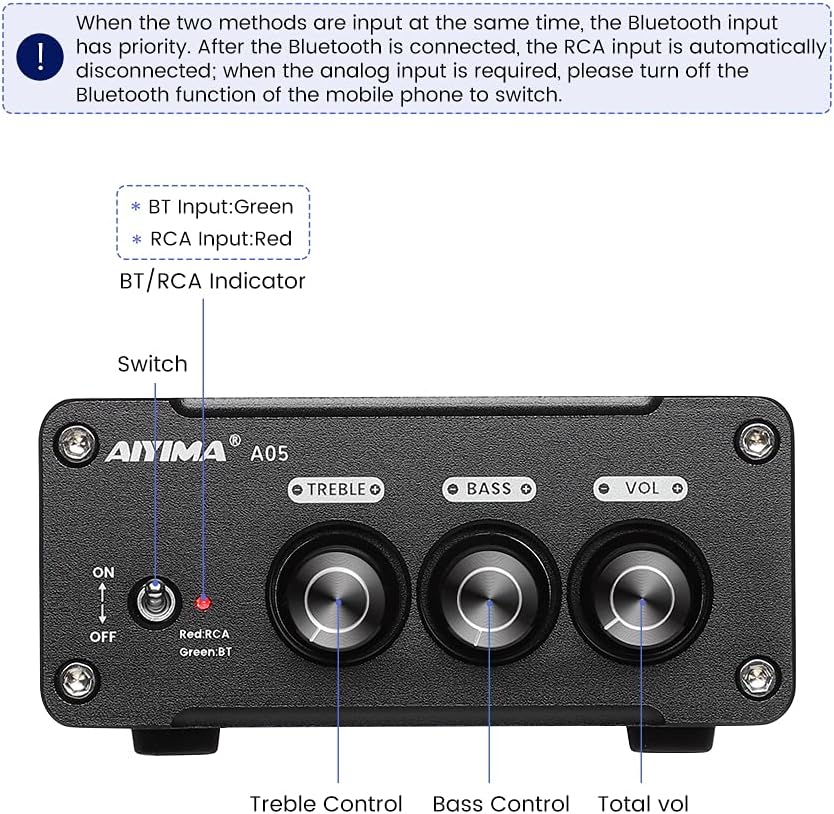
Obrázok 4.1: Front panel of the AIYIMA A05 amplifier, showing the power switch, input indicator, treble, bass, and volume controls.
- Vypínač (ON/OFF): Prepína ampvýkon zvlhčovača.
- BT/RCA Indicator: Displays the active input source. Green indicates Bluetooth (BT) input, Red indicates RCA input.
- Ovládanie výšok: Upravuje vysokofrekvenčný zvukový výstup.
- Ovládanie basov: Upravuje nízkofrekvenčný zvukový výstup.
- Ovládanie hlasitosti: Upravuje celkovú úroveň zvukového výstupu.

Obrázok 4.2: Detailný záber view of the power switch and the BT/RCA input indicator on the front panel.

Obrázok 4.3: Detailný záber view of the Treble, Bass, and Volume control knobs.
4.2 Pripojenia zadného panela

Obrázok 4.4: Rear panel of the AIYIMA A05 amplifier, showing the Bluetooth antenna port, RCA audio input, speaker outputs, and DC power input.
- ANT (Bluetooth Antenna Port): Connect the included Bluetooth antenna here for wireless audio reception.
- AUDIO IN (RCA Input): Connect audio sources (e.g., CD player, TV, DAC) using RCA cables.
- SPEAKER (Audio Output): Connect passive speakers using speaker wires. Ensure correct polarity (+ to + and - to -).
- DC 24-32V (Power Input): Pripojte dodaný adaptér jednosmerného prúdu.
5. Pokyny na nastavenie
Postupujte podľa týchto krokov a nastavte si AIYIMA A05 ampživšie:
- Connect Bluetooth Antenna: Screw the included Bluetooth antenna into the ANT port on the rear panel.
- Pripojenie reproduktorov: Connect your passive speakers to the SPEAKER output terminals on the rear panel. Ensure the positive (+) terminal of the amplifier connects to the positive (+) terminal of the speaker, and the negative (-) terminal connects to the negative (-).
- Connect Audio Source (RCA): If using a wired audio source, connect it to the AUDIO IN (RCA) ports on the rear panel using appropriate RCA cables.
- Pripojenie napájania: Connect the DC power adapter to the DC 24-32V input port on the rear panel, then plug the adapter into a wall outlet.
- Zapnutie: Flip the power switch on the front panel to the "ON" position. The input indicator will light up.

Obrázok 5.1: Zadný panel amplifier with Bluetooth antenna, RCA cables, speaker wires, and power adapter connected.
6. Návod na obsluhu
6.1 Zapnutie/vypnutie
Na zapnutie amplifier, flip the front panel switch to the "ON" position. To power off, flip the switch to the "OFF" position.
6.2 Pripojenie Bluetooth
- Zabezpečte amplifier is powered on and the BT/RCA indicator is green, indicating Bluetooth mode. If it's red, ensure no RCA cable is connected or disconnect it.
- Na svojom mobilnom zariadení (telefón, tablet atď.) povoľte Bluetooth a vyhľadajte dostupné zariadenia.
- Zo zoznamu zariadení, ktoré chcete spárovať, vyberte „AIYIMA A05“.
- Once paired, the indicator light will remain green, and you can play audio from your device through the ampdoživotné.
6.3 RCA Input Usage
- Connect your audio source to the RCA input ports on the rear panel.
- Zabezpečte amplifier is powered on. The BT/RCA indicator should be red, indicating RCA input mode.
- If the indicator is green (Bluetooth mode), ensure Bluetooth is disconnected on any paired device, or turn off Bluetooth on your mobile device to switch to RCA input.
6.4 Nastavenie zvuku
- Objem: Rotate the "VOL" knob clockwise to increase volume and counter-clockwise to decrease.
- Výšky: Rotate the "TREBLE" knob to adjust high-frequency sounds to your preference.
- Basy: Rotate the "BASS" knob to adjust low-frequency sounds to your preference.
7. Údržba
- Čistenie: Disconnect the power adapter before cleaning. Use a soft, dry, lint-free cloth to wipe the surface of the amplifier. Do not use harsh chemicals or abrasive materials.
- Ukladací priestor: If not in use for an extended period, store the ampUchovávajte na chladnom a suchom mieste, mimo dosahu priameho slnečného žiarenia a extrémnych teplôt.
- Spojenia: Pravidelne kontrolujte všetky káblové pripojenia, aby ste sa uistili, že sú bezpečné a bez korózie.
8. Riešenie problémov
Ak sa vyskytnú problémy s vaším AIYIMA A05 amplifier, pozrite si nasledujúce bežné problémy a riešenia:
| Problém | Možná príčina | Riešenie |
|---|---|---|
| Žiadny zvukový výstup |
|
|
| Distorted or buzzing sound |
|
|
| Bluetooth sa nepripája |
|
|
| Loud noise/ticking on startup |
|
|
If the problem persists after trying these solutions, please contact AIYIMA customer support for further assistance.
9. Špecifikácie

Obrázok 9.1: Rozmery AIYIMA A05 amplifier: 107mm (4.2in) width, 87mm (3.4in) depth, 36mm (1.4in) height.
| Funkcia | Špecifikácia |
|---|---|
| Model | A05 |
| Výstupný výkon | 105 Watts (at 4 Ω) |
| Počet kanálov | 2.0 (stereo) |
| Verzia Bluetooth | QCC3034 APTX Bluetooth 5.0 |
| Čipová súprava | TPA3221 |
| Minimálna zásoba objtage | 12 volty (DC) |
| Maximálny objem dodávkytage | 32 volty (DC) |
| Hmotnosť položky | 500 gramov |
| Rozmery (približne) | 107 mm (Š) x 87 mm (D) x 36 mm (H) |
10. Záruka a podpora
AIYIMA A05 amplifier comes with a warranty. Please refer to the included Warranty Card for specific terms and conditions. For technical support, troubleshooting assistance, or warranty claims, please contact AIYIMA customer service through the retailer where the product was purchased or visit the official AIYIMA webstránky.
Online zdroje: For additional information and support, you may visit the AIYIMA store page: AIYIMA Official Store