
Úvod
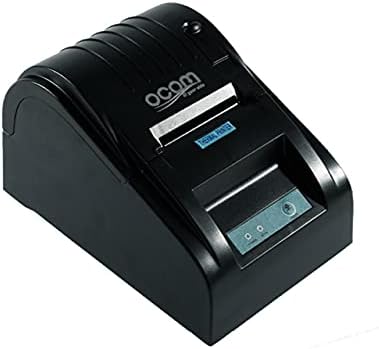
This image shows the OCOM OCPP-585A-U-B Thermal Receipt Printer from a slightly elevated front-right angle. The printer is black with a sleek, compact design. The paper output slot is visible at the top, and the control panel with 'POWER' and 'MODE' indicators is located on the front.
This manual provides detailed instructions for the OCOM OCPP-585A-U-B Thermal Receipt Printer. Please read this manual carefully before using the printer to ensure proper operation and longevity.
Sprievodca nastavením
1. Rozbalenie
Carefully remove the printer and all accessories from the packaging. Verify that all components are present: printer unit, power adapter, USB cable, and a roll of thermal paper.
2. Vkladanie termopapiera
- Open the paper cover by pushing the cover open button (usually located on the side or front).
- Insert the thermal paper roll into the paper compartment, ensuring the printing side of the paper faces the print head. The paper should feed smoothly from the bottom of the roll.
- Pull out a small length of paper beyond the paper exit slot.
- Kryt papiera pevne zatvorte, kým nezacvakne na miesto.
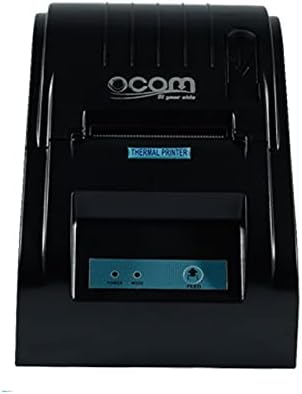
This image displays the OCOM OCPP-585A-U-B Thermal Receipt Printer from a direct top-down perspective. The paper compartment is visible, showing a thermal paper roll correctly inserted. The 'THERMAL PRINTER' label and the control panel with 'POWER' and 'MODE' indicators are clearly visible.
3. Pripojenie tlačiarne
- Connect the power adapter to the printer's power input port and then plug it into a power outlet.
- Connect the USB cable to the printer's USB port and the other end to your computer or POS system.
- Stlačením tlačidla napájania zapnite tlačiareň. Kontrolka napájania by sa mala rozsvietiť.
Návod na obsluhu
Základná tlač
Once connected and powered on, the printer is ready to receive print commands from your connected device. Ensure the correct printer driver is installed on your computer/POS system.
- Otvorte dokument alebo aplikáciu, z ktorej chcete tlačiť.
- Vyberte možnosť „Tlačiť“ z ponuky file menu.
- Choose 'OCOM OCPP-585A-U-B' as your printer.
- Adjust print settings if necessary (e.g., paper size, print quality).
- Kliknite na tlačidlo „Tlačiť“.
Self-Test Print
To perform a self-test print, ensure the printer is off. Hold down the 'FEED' button (if available, or a combination of buttons as per specific model) while turning on the printer. Release the button once printing begins. This will print a configuration page, confirming basic printer functionality.
Údržba
Čistenie tlačovej hlavy
Regular cleaning of the print head ensures optimal print quality and extends printer life.
- Vypnite tlačiareň a odpojte napájací kábel.
- Otvorte papierový kryt.
- Použite vatový tampón jemneampened with isopropyl alcohol to gently wipe the thermal print head (the dark strip inside the printer).
- Pred zatvorením krytu a zapnutím tlačiarne nechajte tlačovú hlavu úplne vyschnúť.
Cleaning the Paper Path
Odstráňte všetok papierový prach alebo nečistoty z dráhy papiera pomocou mäkkej kefy alebo stlačeného vzduchu.
Riešenie problémov
| Problém | Možná príčina | Riešenie |
|---|---|---|
| Tlačiareň sa nezapína | Power cable loose; Power outlet faulty | Skontrolujte pripojenia napájania; skúste inú zásuvku |
| Žiadny tlačový výstup | Paper loaded incorrectly; Out of paper; Driver not installed/selected | Reload paper correctly; Replace paper roll; Install/select correct printer driver |
| Faint or blank print | Thermal paper loaded upside down; Print head dirty; Paper quality issue | Flip paper roll; Clean print head; Try new thermal paper |
| Tlačiareň je offline | USB cable disconnected; Printer driver issue | Reconnect USB cable; Reinstall printer driver |
Špecifikácie
| Funkcia | Detail |
|---|---|
| Prvý dostupný dátum | 2021. júna 20 |
| Výrobca | OCOM |
| ASIN | B097LSGP62 |
| Číslo modelu položky | OCPP-585-U-B |
| Názov značky | OCOM |
| Technológia pripojenia | USB |
| Technológia tlačiarne | Termálne |
| Farba | Čierna |
| Názov modelu | OCPP 585 U B |
| Tlačové médiá | Štítky |
| Typ skenera | Potvrdenie |
Záruka a podpora
This OCOM printer typically comes with a standard manufacturer's warranty. Please refer to the warranty card included with your product for specific terms and conditions, or visit the official OCOM webpodrobné záručné informácie.
For technical support, driver downloads, or further assistance, please visit the OCOM official support website or contact their customer service. Keep your model number (OCPP-585A-U-B) and purchase details ready when seeking support.