
Jeden za všetkých URC 3661
One For All URC 3661 Universal Remote Control
Používateľská príručka
Koniec produktuview
The One For All URC 3661 is a universal remote control designed to consolidate multiple remote controls into a single, easy-to-use device. It is compatible with a wide range of electronic devices, including televisions, set-top boxes, audio systems, DVD players, and Blu-ray players. This remote features backlit keys for improved visibility in low-light conditions and includes a learning function to copy commands from original remotes.

Obrázok 1: Uhlové view of the URC 3661 Universal Remote Control.
Nastavenie
1. Inštalácia batérie
The URC 3661 remote control requires two (2) AA batteries for operation. Follow these steps to install them:
- Nájdite priehradku na batérie na zadnej strane diaľkového ovládača.
- Posuňte kryt batérie smerom nadol a zdvihnite ho.
- Vložte dve batérie typu AA a uistite sa, že kladný (+) a záporný (-) pól sú zarovnané s označeniami vo vnútri priehradky na batérie.
- Nasaďte kryt batérie späť jeho zasunutím späť na miesto, kým bezpečne nezacvakne.
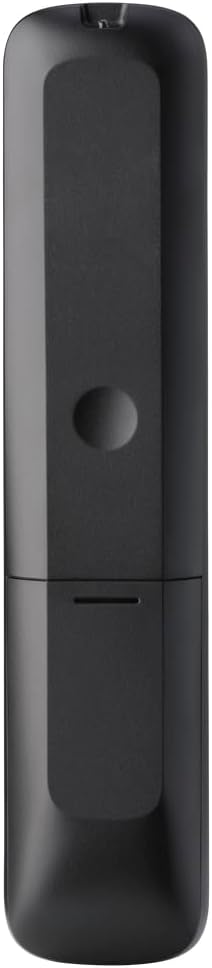
Obrázok 2: Späť view of the remote, highlighting the battery compartment.
2. Programovanie diaľkového ovládača
The URC 3661 can be programmed using direct code entry, auto code search, or the learning function. It is recommended to try direct code entry first.
Priame zadanie kódu:
- Zapnite zariadenie, ktoré chcete ovládať (napr. televízor, DVD prehrávač).
- Stlačte a podržte NASTAVENIE button until the LED light under the device key (e.g., TV, DVD) blinks twice and stays lit.
- Press the device key you want to program (e.g., TV). LED dióda zostane svietiť.
- Enter the 4-digit or 5-digit setup code for your brand and device. Refer to the code list provided with your remote or visit the One For All website for the most up-to-date codes.
- After entering the code, the LED will blink twice and turn off if the code is valid. If it blinks once and stays lit, the code is invalid; re-enter the code.
- Otestujte diaľkový ovládač stlačením tlačidla POWER button. If the device turns off, try other functions like volume or channel. If it works, programming is complete. If not, try the next code for your brand or use the Auto Code Search.
Vyhľadávanie automatického kódu:
- Zapnite zariadenie, ktoré chcete ovládať.
- Stlačte a podržte NASTAVENIE kým LED dióda dvakrát neblikne a nezostane svietiť.
- Press the device key you want to program.
- Nasmerujte diaľkový ovládač na zariadenie a stlačte tlačidlo POWER opakovane stláčajte tlačidlo (približne každé 3 sekundy), kým sa zariadenie nevypne.
- Hneď ako sa zariadenie vypne, stlačte tlačidlo NASTAVENIE button to save the code. The LED will blink twice and turn off.
- Test the remote. If it doesn't work correctly, repeat the process.
Funkcia učenia:
The learning function allows the URC 3661 to copy functions directly from your original remote control, which is useful for commands not available via direct code entry or auto search.
- Umiestnite URC 3661 a pôvodný diaľkový ovládač na rovný povrch, oproti sebe, vo vzdialenosti približne 1 až 2 cm od seba.
- Stlačte a podržte NASTAVENIE kým LED dióda dvakrát neblikne a nezostane svietiť.
- Press the button on the URC 3661 that you want to teach a function to (e.g., a specific input button). The LED will blink rapidly.
- Press and hold the corresponding button on your original remote control until the LED on the URC 3661 blinks twice, indicating successful learning.
- Opakujte pre všetky požadované tlačidlá.
- Ak chcete ukončiť režim učenia, stlačte tlačidlo NASTAVENIE button. The LED will blink twice and turn off.
Obsluha diaľkového ovládača
The URC 3661 is designed for intuitive operation. Familiarize yourself with the button layout and their primary functions.

Obrázok 3: Predná strana view of the URC 3661 with button layout.
Kľúčové funkcie:
- Device Keys (TV, STB, AUDIO, BLURAY, DVD, STREAM): Select the device you wish to control. The LED under the selected device key will illuminate.
- POWER: Zapne alebo vypne vybrané zariadenie.
- VOL +/-: Upravuje hlasitosť.
- CH +/-: Zmení kanály.
- Navigation Pad (UP, DOWN, LEFT, RIGHT, OK): Používa sa na navigáciu v menu a výber.
- PONUKA: Otvorí hlavnú ponuku zariadenia.
- SPRIEVODCA: Zobrazuje elektronického programového sprievodcu (ak ho zariadenie podporuje).
- INFO: Zobrazuje informácie o aktuálnom programe alebo vstupe.
- DOMOV: Returns to the device's home screen.
- VÝCHOD: Exits menus or applications.
- Playback Controls (PLAY, PAUSE, STOP, REWIND, FAST FORWARD, SKIP): Ovládajte prehrávanie médií.
- Číselné klávesy (0-9): Pre priame zadanie kanála alebo číselný vstup.
- App Shortcut Keys (Netflix, Prime Video, YouTube): Priamy prístup k populárnym streamovacím službám.
- Podsvietenie: The keys are backlit for easy use in dark environments. The backlight activates automatically when a button is pressed.
Údržba
Čistenie diaľkového ovládača:
To maintain the remote's appearance and functionality, clean it regularly:
- Na utretie povrchu diaľkového ovládača použite mäkkú, suchú handričku.
- Na odolnú špinu mierneamphandričku opláchnite vodou alebo jemným, neabrazívnym čistiacim prostriedkom. Zabráňte nadmernej vlhkosti.
- Do not use harsh chemicals, solvents, or abrasive cleaning agents, as these can damage the remote's finish or internal components.
Výmena batérie:
Replace batteries when the remote's performance degrades or the LED indicator blinks unusually. Refer to the "Battery Installation" section under Setup for detailed instructions.
Riešenie problémov
If you encounter issues with your URC 3661 remote control, try the following troubleshooting steps:
| Problém | Možná príčina | Riešenie |
|---|---|---|
| Remote does not operate the device. | Incorrect device selected. Batérie sú slabé alebo nesprávne vložené. Naprogramovaný nesprávny kód. | Ensure the correct device key (TV, DVD, etc.) is pressed. Skontrolujte orientáciu batérie a v prípade potreby ju vymeňte. Re-program the remote using a different code or the Auto Code Search/Learning function. |
| Niektoré tlačidlá nefungujú. | Incomplete programming. Device does not support the function. | Use the Learning function to copy specific commands from your original remote. Verify if the original remote has that function. |
| LED blinks once and stays lit during code entry. | Invalid code entered. | Ensure you are entering the correct 4 or 5-digit code. Try another code from the list or use Auto Code Search. |
| Remote LED does not light up. | Vybité batérie. | Vymeňte batérie za nové batérie typu AA. |
For further assistance, visit the official One For All support webstránku alebo si pozrite komplexnú online príručku.
Špecifikácie
| Funkcia | Detail |
|---|---|
| Číslo modelu | 3661 URC |
| Značka | Jeden za všetkých |
| Rozmery produktu | 0.39 x 0.39 x 0.39 palca |
| Hmotnosť položky | 6.7 uncí |
| Vyžadujú sa batérie | 2 AA batérie |
| Maximálny počet podporovaných zariadení | Až 6 zariadenia |
| Kompatibilné zariadenia | Television, Set-top Box, Audio, Blu-ray, DVD, Streaming devices |
| Špeciálna funkcia | Universal, Learning Function, Backlit Keys |

Figure 4: Product packaging indicating compatibility with up to 6 devices.
Záruka a podpora
Warranty information for the One For All URC 3661 Universal Remote Control is typically provided with your purchase documentation. Please refer to the warranty card or leaflet included in the product packaging for details regarding coverage, terms, and conditions.
For technical support, frequently asked questions, or to find the latest programming codes, please visit the official One For All website. Contact information for customer service may also be found on the manufacturer's webna stránke alebo v dokumentácii k produktu.
Jeden za všetkých oficiálne Webmiesto: www.oneforall.com
Ask a question about this manual
Ask about setup, troubleshooting, compatibility, parts, safety, or missing instructions. Manuals+ will review the question and use this page’s manual context to help answer it.