
1. Úvod
Thank you for choosing the HISTTON Fanless Mini PC J4125. This compact and robust industrial-grade mini computer is designed for stable and efficient operation in various environments. Featuring a fanless design for silent performance and dust protection, it is equipped with an Intel Celeron J4125 processor, ample RAM, and versatile connectivity options. This manual provides essential information for setting up, operating, maintaining, and troubleshooting your device.

Image 1.1: The HISTTON Fanless Mini PC J4125, a compact black device with a ribbed top for heat dissipation, featuring various ports on its front and back panels.
2. Obsah balenia
Zaškrtnite políčko pri nasledujúcich položkách:
- 1 x HISTTON Mini PC (J4125)
- 1 x napájací adaptér
- 1 x Návod na použitie
- 1 x HDMI kábel
- 1 x držiak VESA
- 1 x sada skrutiek
- Kábel 1 x SATA
3. Produkt skončilview
3.1 Kľúčové vlastnosti
- procesor: Intel Celeron J4125 (4 Cores 4 Threads, 2.00GHz Base, 2.70GHz Turbo)
- grafika: Grafická karta Intel UHD 600
- Operačný systém: Pre-installed Windows 11 Pro (64-bit, activated)
- pamäť: DDR4 RAM (Single SODIMM slot, up to 32GB supported)
- Ukladací priestor: 1x mSATA SSD slot, 1x SATA 3.0 for 2.5-inch HDD/SSD
- Pripojenie: Dual Gigabit RJ45 LAN, Dual-band Wi-Fi (2.4G+5.0G), Bluetooth 4.0
- Video výstup: 1x HDMI, 1x VGA (Dual display support)
- Porty: 2x USB 3.0, 2x USB 2.0, 2x RS232 COM, 1x 3.5mm Mic/SPK out
- Špeciálne vlastnosti: Fanless design, RTC wake up, Wake on LAN, Auto Power on (BIOS setting), Network boot
3.2 Predný a zadný panel
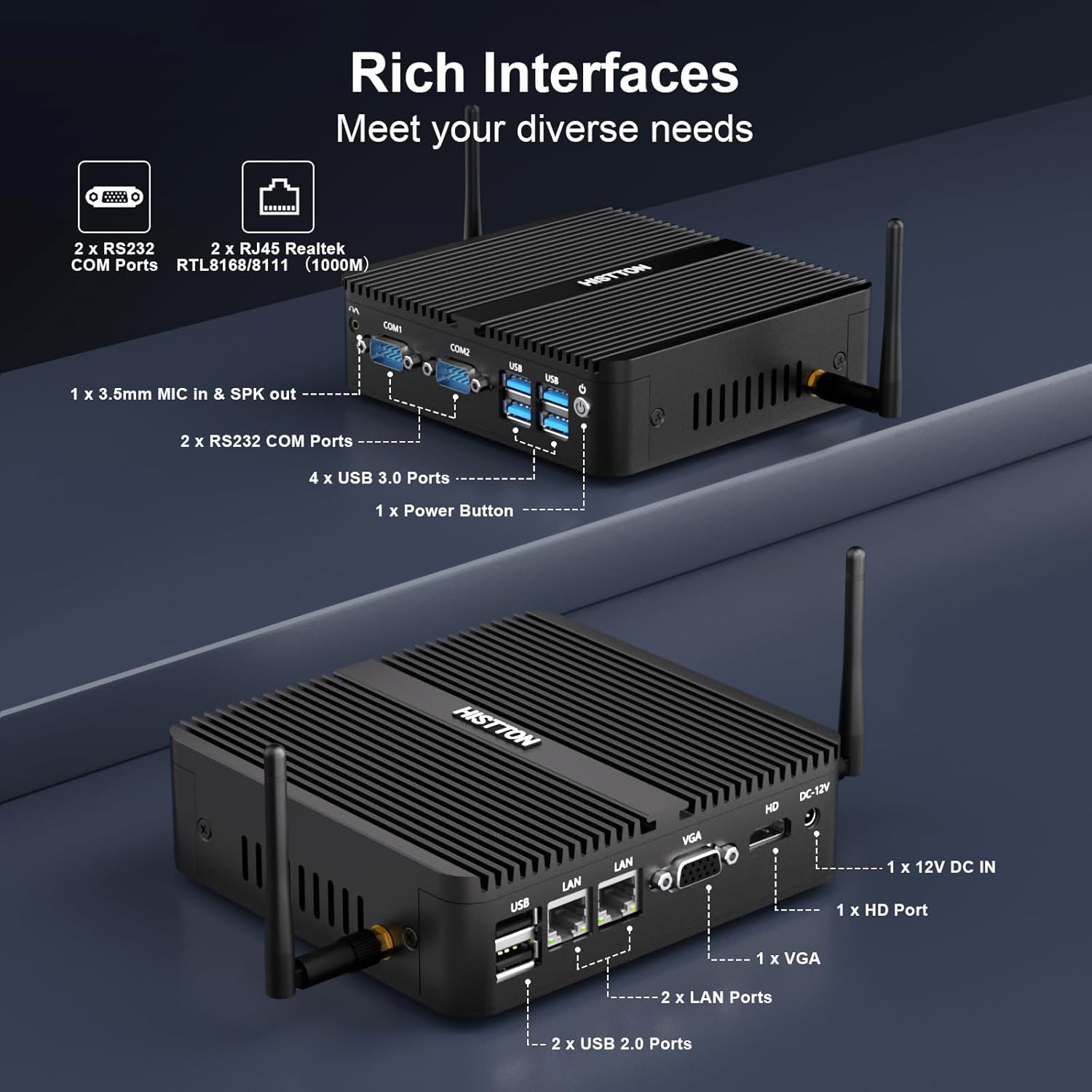
Obrázok 3.1: Detailný view of the HISTTON Mini PC's front and rear panels, highlighting the various input/output ports including USB, COM, LAN, HDMI, and VGA.
- Predný panel: Power button, 2x USB 3.0 ports, 2x USB 2.0 ports, 2x RS232 COM ports (COM1, COM2), 3.5mm audio jack (Mic/SPK out).
- Zadný panel: DC-12V power input, 1x HDMI port, 1x VGA port, 2x Gigabit RJ45 LAN ports, Wi-Fi antenna connectors.
3.3 Internal Components and Expandability
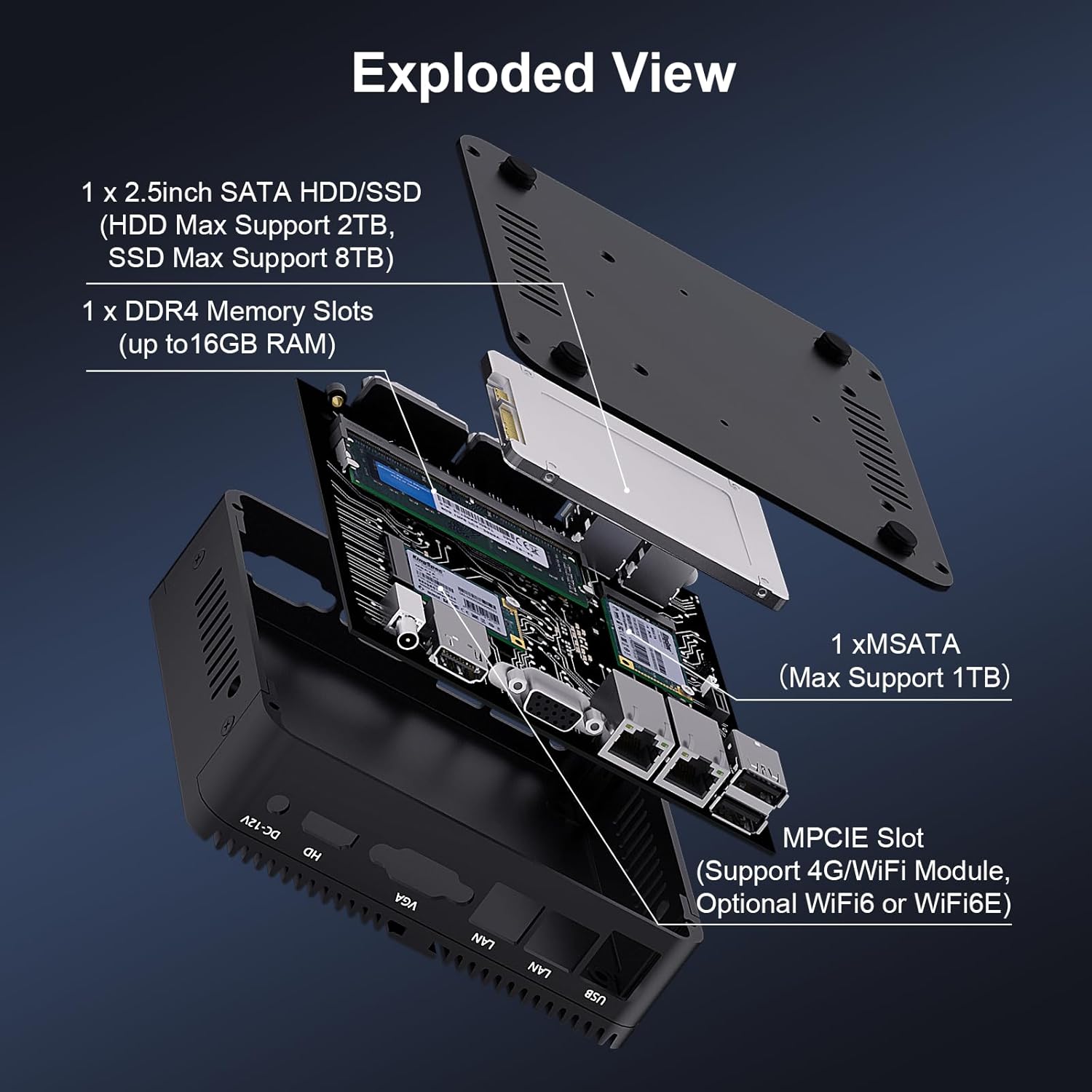
Obrázok 3.2: Rozložený view of the HISTTON Mini PC, showing the internal layout including the mSATA SSD slot, DDR4 memory slot, and space for a 2.5-inch SATA drive.
- RAM: Single SODIMM slot for DDR4 memory, supporting up to 32GB.
- SSD: 1x mSATA slot (Max Support 1TB).
- HDD/SSD: 1x SATA 3.0 port for a 2.5-inch HDD (Max Support 2TB) or SSD (Max Support 8TB).
- Bezdrôtové: MPCIE slot for 4G/WiFi module (Optional WiFi6 or WiFi6E).
4. Pokyny na nastavenie
4.1 Pripojenie periférnych zariadení
- Pripojte monitor(y) k portom HDMI a/alebo VGA na zadnom paneli.
- Connect your keyboard and mouse to the USB ports on the front panel.
- Attach the Wi-Fi antennas to the connectors on the rear panel.
- For wired network access, connect an Ethernet cable to one of the RJ45 LAN ports.
- Connect the power adapter to the DC-12V input port on the rear panel, then plug it into a power outlet.
4.2 Zapnutie
Press the power button on the front panel to turn on the Mini PC. The power indicator light will illuminate.
4.3 Inštalácia držiaka VESA (voliteľné)
The Mini PC supports VESA mounting, allowing you to attach it to the back of a compatible monitor or to a wall mount. Use the provided VESA mount and screws to secure the Mini PC. Ensure the monitor's VESA holes are compatible with the mount.
Video 4.1: An official product video demonstrating the physical features of the HISTTON Fanless Mini PC and its VESA mounting process.
5. Návod na obsluhu
5.1 Počiatočné nastavenie systému Windows
Upon first boot, follow the on-screen instructions to complete the Windows 11 Pro setup, including language, region, network connection, and user account creation.
5.2 Nastavenie duálneho zobrazenia
The Mini PC supports dual display output via its HDMI and VGA ports. Connect two monitors and configure display settings within Windows (Right-click on desktop > Display settings) to extend or duplicate your desktop.

Image 5.1: The HISTTON Mini PC connected to two monitors, demonstrating its dual display capability via HDMI and VGA ports.
5.3 Nastavenia systému BIOS
To access the BIOS, press the DEL key repeatedly during startup. The BIOS allows configuration of advanced features such as:
- RTC Wake Up: Schedule the PC to power on at a specific time.
- Wake on LAN: Power on the PC remotely via a network signal.
- Automatické zapnutie: Automatically power on the PC when power is restored after an outage.
- Zavedenie zo siete: Boot the PC from a network server.
6. Údržba
6.1 Čistenie
Regularly clean the exterior of the Mini PC with a soft, dry cloth. Avoid using liquid cleaners or abrasive materials. As it is fanless, internal dust accumulation is minimized, but ensure the ribbed chassis remains clear of obstructions for optimal heat dissipation.
6.2 Aktualizácie softvéru
Pre zaistenie optimálneho výkonu a zabezpečenia udržiavajte operačný systém Windows a ovládače aktualizované. K službe Windows Update sa dostanete cez Nastavenia > Windows Update.
7. Riešenie problémov
| Problém | Možná príčina | Riešenie |
|---|---|---|
| Mini PC sa nezapne. | Žiadne napájanie, chybný napájací adaptér, uvoľnené pripojenie. | Check power cable connection. Ensure power adapter is working. Try a different power outlet. |
| Žiadne zobrazenie na monitore. | Loose video cable, incorrect input source on monitor, monitor off. | Ensure video cables (HDMI/VGA) are securely connected. Select correct input source on monitor. Turn on monitor. |
| Žiadne sieťové pripojenie. | Loose Ethernet cable, Wi-Fi disabled, driver issue. | Check Ethernet cable connection. Ensure Wi-Fi is enabled and connected to a network. Reinstall network drivers if necessary. |
| Pomalý výkon. | Príliš veľa spustených aplikácií, málo miesta v úložisku, zastarané ovládače. | Zatvorte nepotrebné aplikácie. Uvoľnite miesto na disku. Aktualizujte ovládače a systém Windows. |
8. Špecifikácie
| Funkcia | Detail |
|---|---|
| Značka | HISTTON |
| Číslo modelu | J4125 |
| Operačný systém | Windows 11 Pro |
| Model CPU | Celeron J4125 |
| Rýchlosť CPU | 2 GHz (až 2.7 GHz Turbo) |
| Grafický koprocesor | Grafická karta Intel UHD 600 |
| Nainštalovaná pamäť RAM | 16 GB DDR4 (max 32 GB) |
| Kapacita pamäte | 512 GB SSD |
| Popis pevného disku | HDD, SSD (1x mSATA, 1x 2.5-inch SATA) |
| Rozhranie výstupu videa | HDMI, VGA |
| Technológia pripojenia | Ethernet, HDMI, LAN, Wi-Fi, Bluetooth |
| Bezdrôtová technológia | Bluetooth 4.0, Dual-band Wi-Fi (2.4G+5.0G) |
| Rozmery položky | 5.31 x 5 x 1.54 palca (13.5 x 12.6 x 4.0 cm) |
| Hmotnosť položky | 0.6 kg |
| Celkový počet portov USB | 4 (2x USB 3.0, 2x USB 2.0) |
| COM porty | 2x RS232 |
| LAN porty | 2x Gigabit RJ45 |
9. Záruka a podpora
HISTTON provides customer support for your Mini PC. If you encounter any issues or have questions, please refer to the following contact methods:
- Podpora Amazonu: Prihláste sa do svojho účtu Amazon, prejdite na „Vaše objednávky“ a vyberte možnosť „Položiť otázku o produkte“, ak potrebujete pomoc.
- Popredajná podpora: For direct technical assistance, you may send an email to the HISTTON After-Sales Team at minipc_service@yeah.net.
Uschovajte si doklad o kúpe pre uplatnenie záruky.