
1. Úvod
This manual provides detailed instructions for the safe installation, operation, and maintenance of your Lucci Air Peregrine 56-inch White Ceiling Fan with Remote, Model 21328001. The Peregrine fan features a modern design with three blades, energy-efficient direct current (DC) technology, six speeds, and high airflow. It is rated for both indoor and outdoor use in covered areas. The fan includes a 6-inch warm white GX53 light kit with 3-step dimming functionality and comes with a remote control and wall mount bracket.

Obrázok 1.1: Predná strana view of the Lucci Air Peregrine 56-inch White Ceiling Fan.
2. Bezpečnostné informácie
Please read all instructions carefully before beginning installation and retain this manual for future reference. Improper installation or use can lead to electric shock, fire, or personal injury.
- Elektrická bezpečnosť: Ensure the power supply is disconnected at the circuit breaker before installation or maintenance. All electrical wiring must be performed by a qualified electrician and comply with local codes and regulations.
- Montáž: The ceiling fan must be mounted to a structurally sound ceiling joist or outlet box capable of supporting the fan's weight (15.92 lbs).
- Svetlá výška čepele: Maintain a minimum clearance of 7 feet from the floor to the fan blades and 18 inches from the fan blades to any walls or obstructions.
- Svetelná súprava: Use only the specified GX53 12W 3000K bulb. Do not exceed the maximum wattage.
- Vonkajšie použitie: This fan is rated for indoor and outdoor use in covered areas. Do not expose to direct water spray.
- Diaľkové ovládanie: Diaľkový ovládač chráňte pred vodou a extrémnymi teplotami. V prípade potreby vymeňte batérie.
3. Obsah balenia
Pred pokračovaním v inštalácii skontrolujte, či sú všetky komponenty prítomné a nepoškodené. Ak niektoré diely chýbajú alebo sú poškodené, kontaktujte zákaznícku podporu.
- Ceiling Fan Motor Housing with Downrod
- Čepele ventilátora (3)
- Diaľkové ovládanie
- Wall Mount Bracket for Remote
- GX53 12W 3000K Light Kit (pre-installed or separate)
- Optional Metal Cap (for non-light use)
- Montážny hardvér
- Návod na použitie

Obrázok 3.1: Koniecview of the remote control and its features, including 6 fan speeds, reverse switch, light on/off/dimming, fan on/off, and wall mount holster. A CP2032 battery is included.
4. Nastavenie a inštalácia
Professional installation is recommended for this ceiling fan. Ensure all power is disconnected at the main circuit breaker before beginning installation.
- Príprava miesta montáže: Securely attach the mounting bracket to a suitable ceiling joist or fan-rated outlet box. Ensure the structure can support the fan's weight.
- Zostavenie spodnej tyče a motora: Attach the downrod to the fan motor housing. Carefully feed the electrical wires through the downrod.
- Zostava zavesného ventilátora: Lift the fan assembly and hang it from the mounting bracket.
- Elektrické pripojenia: Connect the fan's electrical wires to the household wiring according to the wiring diagram provided in the separate installation guide (not included in this manual). Ensure all connections are secure.
- Pripevnite čepele: Securely attach the three fan blades to the motor housing using the provided screws.
- Inštalácia svetelnej súpravy (voliteľné): If using the light, install the GX53 12W 3000K bulb into the light kit socket. Attach the light kit to the bottom of the fan motor housing. If not using the light, install the optional metal cap.
- Bezpečná strieška: Slide the canopy up to the ceiling and secure it to the mounting bracket, covering all wiring.
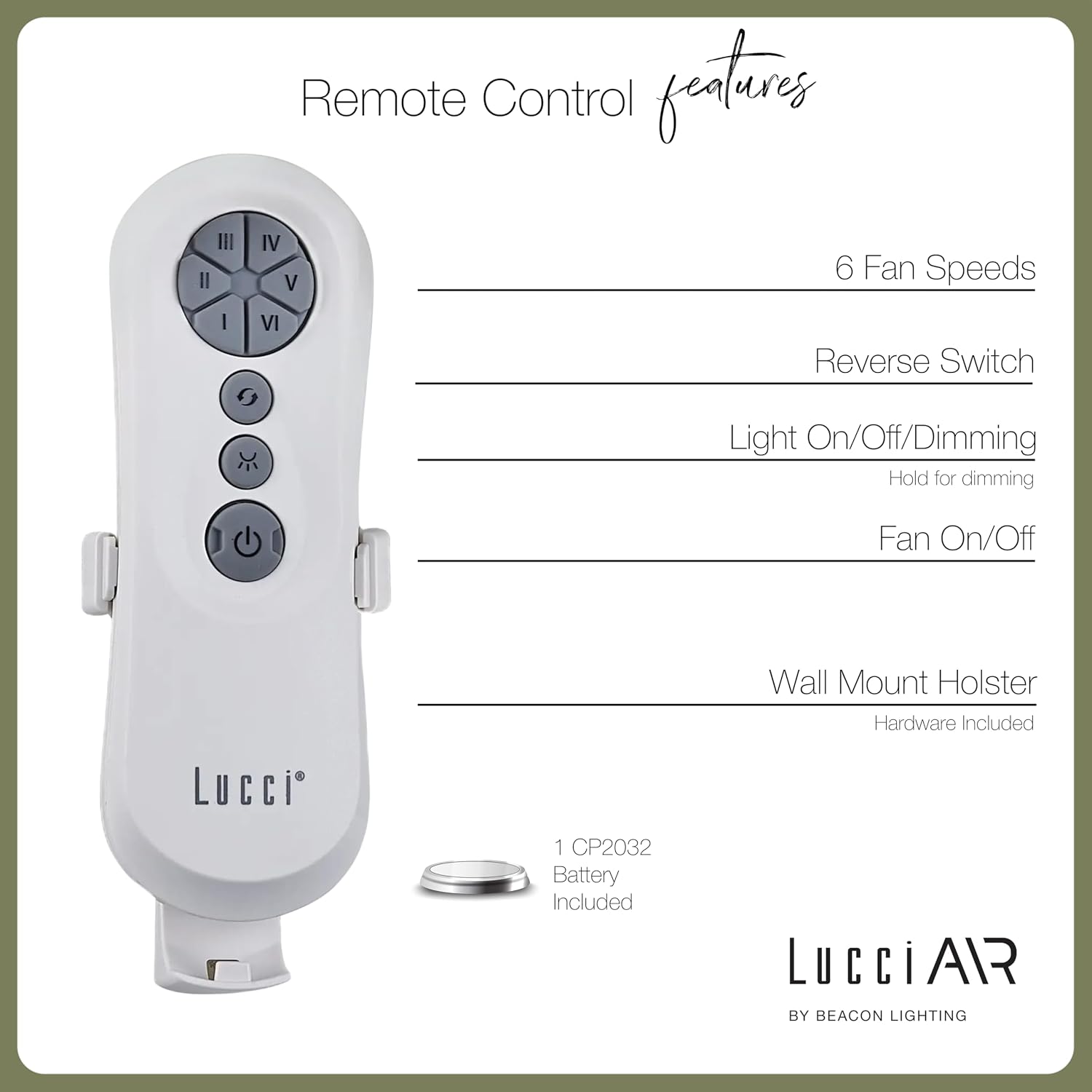
Image 4.1: Dimensional diagram of the Lucci Air Peregrine 56-inch Ceiling Fan, showing overall height, width, and blade length measurements.

Obrázok 4.2: Spodná časť view of the Lucci Air Peregrine fan, highlighting the integrated light kit.
5. Prevádzka
The Lucci Air Peregrine fan is operated using the included remote control. Ensure the remote has a working CP2032 battery installed.
5.1 Funkcie diaľkového ovládača
- Zapnutie/vypnutie ventilátora: Press the power button (ⓘ) to turn the fan on or off.
- Rýchlosť ventilátora: Use buttons I, II, III, IV, V, VI to select one of the six available fan speeds. I is the lowest speed, VI is the highest.
- Reverzný prepínač: Press the reverse button (↻) to change the direction of the fan blades. This function is typically used to switch between summer (downward airflow) and winter (upward airflow) modes. Note: Some models may have a manual switch on the motor housing for this function.
- Zapnutie/vypnutie/stmievanie svetla: Press the light button (☀) to turn the light on or off. Hold the light button to dim or brighten the light through its 3-step dimming range.
5.2 Zimný/letný režim
The fan features a manual switch on the motor housing to change between winter and summer modes. For summer operation, the blades should rotate counter-clockwise to push air downwards, creating a cooling breeze. For winter operation, the blades should rotate clockwise to draw cool air up, circulating warm air trapped near the ceiling. Adjust the switch accordingly.
6. Údržba
Pravidelná údržba zaisťuje optimálny výkon a predlžuje životnosť vášho stropného ventilátora.
- Čistenie: Pravidelne čistite lopatky ventilátora a kryt motora mäkkou handričkou.amp handričkou. Nepoužívajte abrazívne čistiace prostriedky ani rozpúšťadlá, pretože môžu poškodiť povrchovú úpravu.
- Tesnosť čepele: Check all blade screws annually to ensure they are tight. Loose blades can cause wobbling and noise.
- Výmena žiarovky: Disconnect power before replacing the GX53 light bulb. Allow the bulb to cool completely before handling.
- Diaľková batéria: Replace the CP2032 battery in the remote control when its range decreases or it stops responding.
7. Riešenie problémov
Bežné problémy a ich riešenia nájdete v nasledujúcej tabuľke.
| Problém | Možná príčina | Riešenie |
|---|---|---|
| Ventilátor sa nespustí | Žiadne napájanie ventilátora Uvoľnené káblové spojenia Vybitá batéria diaľkového ovládača | Skontrolujte istič Skontrolujte, či sú všetky káblové pripojenia bezpečné (vypnite napájanie). Vymeňte batériu diaľkového ovládača |
| Ventilátor sa kolíše | Uvoľnené skrutky čepele Nevyvážené čepele Uvoľnená montážna konzola | Utiahnite všetky skrutky čepele Ensure blades are installed correctly and balanced Verify mounting bracket is securely fastened |
| Svetlo nefunguje | Žiarovka chybná Loose wire connection to light kit | Vymeňte žiarovku Check light kit wiring (power off) |
| Diaľkové ovládanie nefunguje | Vybitá batéria Diaľkové ovládanie nie je spárované (ak je to relevantné) | Vymeňte batériu Refer to separate remote pairing instructions (if provided with fan) |
8. Špecifikácie
Key technical details for the Lucci Air Peregrine 56-inch White Ceiling Fan (Model 21328001).
| Funkcia | Detail |
|---|---|
| Názov modelu | Peregrine |
| Číslo modelu | 21328001 |
| Značka | Lucci Air |
| Farba | Biela |
| Dizajn ventilátora | Stropný ventilátor |
| Zdroj napájania | DC (jednosmerný prúd) |
| Rozmery produktu | 56"H x 56"Š x 15"V |
| Počet čepelí | 3 |
| Dĺžka čepele | 31.1 palca |
| Kapacita prietoku vzduchu | 6363 kubických stôp za minútu (CFM) |
| Počet rýchlostí | 6 |
| Spotreba energie (priemerná) | 38 W |
| Voltage | 120 V str., 60 Hz |
| Súčasťou balenia je svetelná sada | 1x GX53 12W 3000K bulb, 1100 Lumens, 3-step dimmable |
| Metóda kontroly | Diaľkové ovládanie |
| Vnútorné / vonkajšie použitie | Indoor, Outdoor (covered areas) |
| Hmotnosť položky | 15.92 libry |
| UPC | 811769032344 |
9. Záruka a podpora
The Lucci Air Peregrine 56-inch White Ceiling Fan comes with a obmedzená doživotná záruka. For warranty claims, technical support, or replacement parts, please contact Lucci Air customer service. Keep your proof of purchase for warranty validation.
Pre ďalšiu pomoc navštívte stránku Lucci Air Store on Amazon alebo kontaktujte svojho predajcu.