
1. Úvod
Thank you for choosing the Pantum BP5100DN Monochrome Laser Printer. This manual provides essential information for the safe and efficient use of your printer. Please read it thoroughly before operating the device and keep it for future reference.
The Pantum BP5100DN is designed for high-speed, high-quality monochrome printing, featuring automatic two-sided printing and versatile connectivity options including USB and Ethernet.
2. Bezpečnostné informácie
- Tlačiareň vždy umiestnite na stabilný a rovný povrch.
- Ensure proper ventilation around the printer to prevent overheating.
- Nevystavujte tlačiareň vode ani nadmernej vlhkosti.
- Use only the specified power supply and connect to a grounded outlet.
- Počas prevádzky držte ruky a voľné oblečenie v bezpečnej vzdialenosti od pohyblivých častí.
- Avoid touching the fuser unit, as it can be very hot.
- Do not attempt to service the printer yourself. Refer to qualified service personnel.
3. Čo je v krabici
Overte si, či sú vo vašom balení všetky nižšie uvedené položky:
- Pantum BP5100DN Monochrome Laser Printer
- Napájací kábel
- Kábel rozhrania USB
- Sprievodca rýchlym nastavením
- Starter cartridge (3000 pages)
- Starter drum (30000 pages)

Figure 3.1: Package Contents. This image displays the Pantum BP5100DN printer along with its accessories: power cord, USB interface cable, quick setup guide, starter toner cartridge, and starter drum unit.
4. Produkt skončilview
4.1. Komponenty tlačiarne
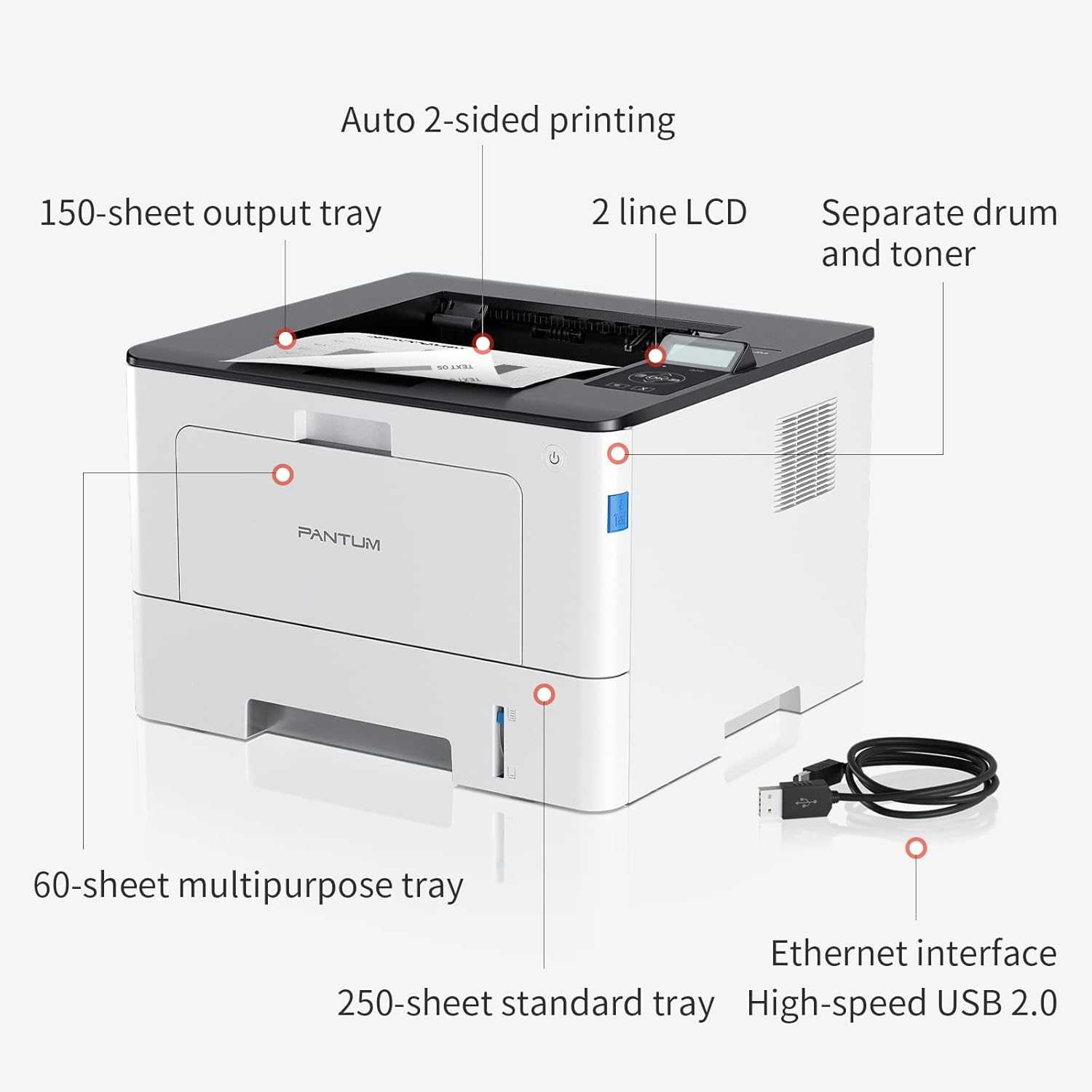
Figure 4.1: Printer Components. Key features include a 150-sheet output tray, a 2-line LCD display, separate drum and toner units, a 60-sheet multipurpose tray, a 250-sheet standard tray, an Ethernet interface, and a High-speed USB 2.0 port.
4.2. Rozmery

Figure 4.2: Printer Dimensions. The printer measures approximately 14.33 inches (W) x 10.12 inches (H) x 13.54 inches (D).
4.3. Ovládací panel

Figure 4.3: Control Panel. The control panel includes a 2-line LCD display for status messages and menu navigation, along with buttons for OK, arrow controls, and cancel functions.
5. Nastavenie
5.1. Vybalenie a umiestnenie
- Opatrne vyberte tlačiareň z obalu.
- Odstráňte z tlačiarne všetky ochranné pásky a baliaci materiál.
- Place the printer on a firm, level surface with adequate space for ventilation.
5.2. Toner and Drum Installation
- Otvorte predný kryt tlačiarne.
- Unpack the drum unit and toner cartridge.
- Insert the toner cartridge into the drum unit until it clicks into place.
- Insert the combined drum and toner unit into the printer.
- Zatvorte predný kryt.
5.3. Vkladanie papiera
- Pull out the standard paper tray or open the multipurpose tray.
- Upravte vodiace lišty papiera podľa veľkosti vášho papiera.
- Load paper into the tray, ensuring it is flat and not exceeding the maximum capacity (250 sheets for standard tray, 60 sheets for multipurpose tray).
- Zatvorte zásobník papiera.
5.4. Napájanie a pripojenie
- Pripojte napájací kábel k tlačiarni a potom k uzemnenej elektrickej zásuvke.
- For USB connection: Connect the provided USB 2.0 cable from the printer to your computer.
- For Ethernet connection: Connect an Ethernet cable from the printer to your network router or switch.
- Stlačením tlačidla napájania zapnite tlačiareň.
6. Návod na obsluhu
6.1. Inštalácia ovládača
For optimal performance, install the printer drivers from the official Pantum website or the provided installation media. The printer supports easy one-step installation for quick setup.
6.2. Tlač dokumentu
- Otvorte dokument, ktorý chcete vytlačiť, v počítači alebo mobilnom zariadení.
- Vyberte možnosť tlače z aplikácie.
- Choose the Pantum BP5100DN from the list of available printers.
- Podľa potreby upravte nastavenia tlače (napr. počet kópií, veľkosť papiera, obojstrannú tlač).
- Kliknite na tlačidlo „Tlačiť“.
The printer offers fast printing speeds of up to 40 pages per minute (A4) / 42 pages per minute (Letter) in black and white. It also supports automatic two-sided printing to save paper.
6.3. Mobilná tlač
The Pantum BP5100DN supports direct printing of office documents from mobile devices. Ensure your mobile device and printer are connected to the same network or via USB OTG (if supported by your device and printer).
7. Údržba
7.1. Replacing Toner Cartridge and Drum Unit
When the toner is low or the drum unit reaches its end of life, the printer's display will show a message. Refer to the instructions provided with the replacement consumables for proper installation. The starter toner cartridge yields approximately 3000 pages, and the starter drum unit yields approximately 30000 pages.
7.2. Čistenie tlačiarne
- Pred čistením tlačiareň vypnite a odpojte napájací kábel.
- Vonkajší povrch tlačiarne utrite mäkkou handričkou, ktorá nepúšťa vlákna.
- Use a dry cloth to clean the paper path and rollers if paper jams occur frequently.
- Nepoužívajte abrazívne čistiace prostriedky ani rozpúšťadlá.
8. Riešenie problémov
Ak sa vyskytnú problémy s tlačiarňou, pozrite si nasledujúce bežné riešenia:
- Tlačiareň nereaguje: Skontrolujte pripojenia napájania, pripojenia kábla USB/ethernet a uistite sa, že je tlačiareň zapnutá. Reštartujte tlačiareň aj počítač.
- Zaseknutý papier: Open all covers and carefully remove any jammed paper. Ensure paper is loaded correctly and not creased or damaged.
- Nízka kvalita tlače: Check toner levels. If print quality is faded, especially with cut and paste text, ensure you are using the correct print settings and consider replacing the toner cartridge or drum unit if they are near end-of-life.
- Problémy s pripojením: For Ethernet, verify network cable connection and IP address settings. For USB, try a different USB port or cable.
- Chybové hlásenia: Consult the printer's display for specific error codes and refer to the quick setup guide or online support for detailed solutions.
For persistent issues, please contact customer service for support.
9. Špecifikácie
| Funkcia | Špecifikácia |
|---|---|
| Názov modelu | BP5100DN |
| Technológia tlače | Laser |
| Výstup na tlačiareň | Monochromatický |
| Maximálna rýchlosť tlače (monochromatická) | 40 ppm (A4) / 42 ppm (Letter) |
| Maximálne rozlíšenie tlače | 1200 x 1200 dpi |
| Obojstranná tlač | Áno (automaticky) |
| Technológia pripojenia | Ethernet, USB 2.0 |
| Maximálna vstupná kapacita hárka | 250 sheets (Standard Tray), 60 sheets (Multipurpose Tray) |
| Tlačové médiá | Papier (obyčajný) |
| Veľkosť listu | A4, Letter, etc. |
| Kompatibilné zariadenia | Smartfóny, počítače |
| Wattage | 650 wattov |
| Hmotnosť položky | 9.07 kg (približne 9 kg 70 g) |
| Výrobca | Pantum |
10. Záruka a podpora
The Pantum BP5100DN Monochrome Laser Printer comes with a 1-year warranty from the date of purchase. For warranty claims, technical support, or any inquiries, please refer to the contact information provided in your quick setup guide or visit the official Pantum webstránky.
For a better experience, please kindly refer to the user manual or contact customer service for support.