
1. Úvod
This manual provides detailed instructions for the installation, operation, and maintenance of your VANTRUE VP01 5-Level Adjustable ACC Hardwire Kit. Please read this manual thoroughly before installation and use to ensure proper functionality and safety. This hardwire kit is designed to provide continuous power to your compatible dash cam for parking mode functionality and includes features to protect your vehicle's battery.
2. Produkt skončilview
The VANTRUE VP01 Hardwire Kit is an essential accessory for enabling advanced parking surveillance features on your compatible dash cam. It connects directly to your vehicle's fuse box, providing a stable power supply and intelligent battery protection. Key features include:
- Nízky objemtage ochrana: Automaticky vypne napájanie palubnej kamery, keď sa vybije batéria vozidlatage drops below a user-defined threshold, preventing battery drain.
- Custom Timer Setting: Allows continuous recording or power supply for a set duration after the vehicle is parked.
- ACC Linkage Function: Automatically switches the dash cam to parking mode when the ignition is turned off.
- Wide Voltage kompatibilita: Podporuje elektrické systémy vozidiel 12V-24V.
- Výstup USB Type-C: Compatible with various Type-C dash cams and other devices.
Zahrnuté komponenty:
- Vantrue Hardwire Kit (VP01)
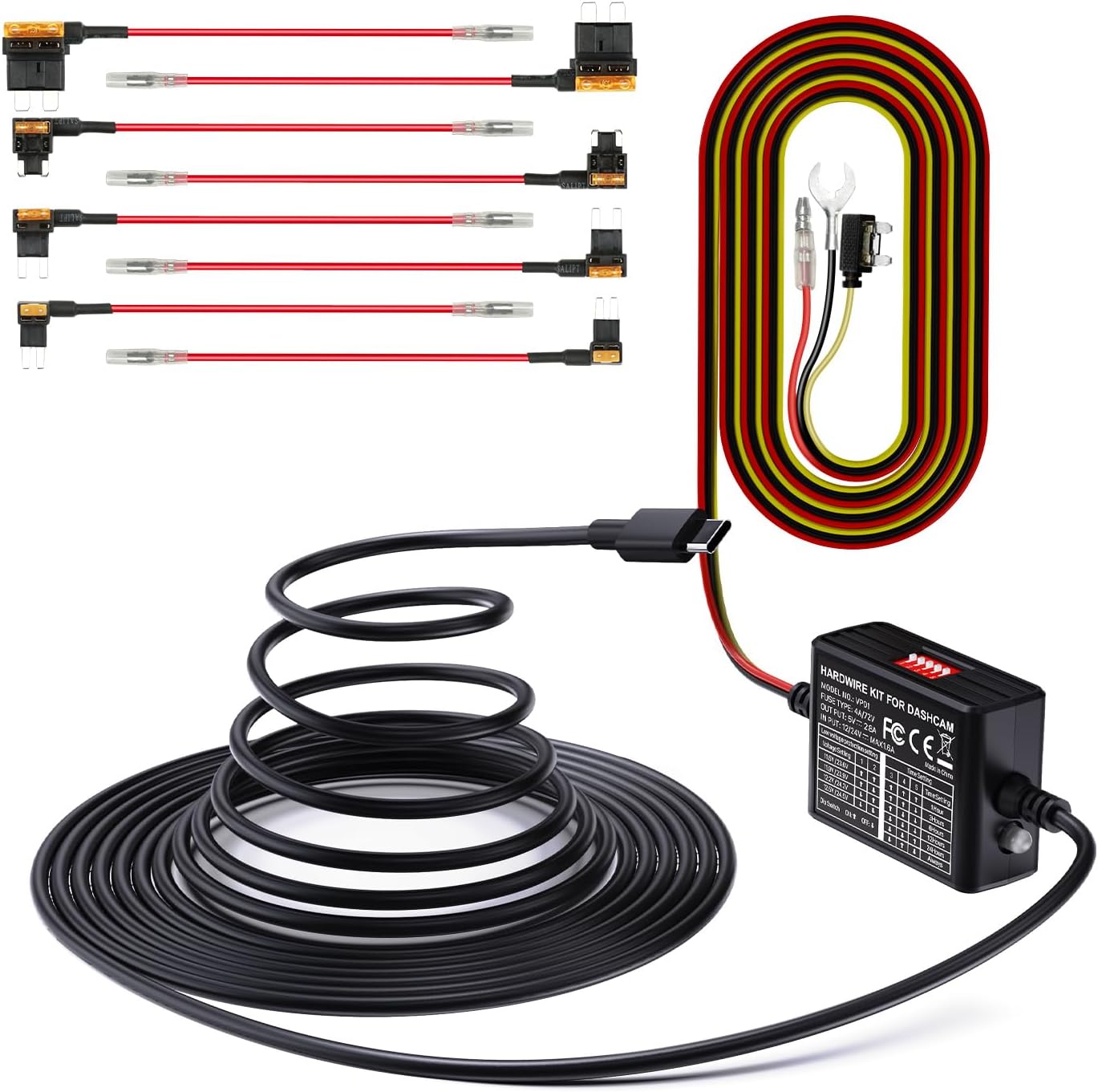
Image 2.1: The VANTRUE VP01 Hardwire Kit, showing its compact design and USB-C connector.
3. Kompatibilita
The VANTRUE VP01 Hardwire Kit is designed for broad compatibility with vehicles operating on 12V to 24V electrical systems. It features a USB Type-C output, making it suitable for a wide range of dash cams and other devices that use a Type-C USB connection.
Compatible VANTRUE Dash Cam Models:
- N4 ProS
- E1 Pro
- N5
- N5S
- N4
- N4S
- E2
- S1 Pro(Max)
- N2X
- E360
Note: This kit is specifically designed for the listed Vantrue dash cam models and may not be compatible with other Vantrue dash cams or third-party devices.

Image 3.1: Visual representation of the hardwire kit's compatibility with several VANTRUE dash cam models.
4. Inštalačná príručka
Proper installation is crucial for the optimal performance of your hardwire kit. If you are unsure about any steps, it is recommended to seek professional assistance.
4.1 Zapojenie káblov
The hardwire kit requires connection to three points in your vehicle's fuse box:
- Žltý drôt: Connect to a constant power source (B+) that provides power even when the ignition is off. This is typically a fuse that is always live.
- Červený drôt: Connect to an ACC (Accessory) power source that provides power only when the ignition is on. This allows the dash cam to detect when the vehicle is running or parked.
- Čierny drôt: Connect to any metal part of the vehicle chassis for a ground connection.

Image 4.1: Diagram illustrating the connection points for the yellow (ACC), red (continuous power), and black (ground) wires.
4.2 Fuse Box Connection
Use the included fuse taps to connect the yellow and red wires to appropriate fuses in your vehicle's fuse box. Ensure the fuse tap is inserted in the correct orientation to maintain circuit protection.

Image 4.2: Step-by-step visual guide for connecting the hardwire kit to the vehicle's fuse box, showing continuous power, ACC power, and ground connections.
5. Návod na obsluhu
Once installed, the hardwire kit operates automatically with your dash cam. It manages power delivery based on your vehicle's ignition status and the settings configured on the kit.
5.1 Parking Mode Activation
With the ACC linkage function, your dash cam will automatically transition into parking mode when the vehicle's ignition is turned off. This ensures continuous surveillance even when your car is parked.

Image 5.1: Graphic illustrating the 24-hour parking mode, providing continuous surveillance for your vehicle.
6. Konfigurácia nastavení
The hardwire kit features dip switches for configuring low voltage protection and timer settings. These switches allow you to customize the kit's behavior to suit your needs and vehicle's battery health.

Image 6.1: Close-up of the hardwire kit's dip switches for adjusting low voltage protection and parking mode timer settings.
6.1 Nízky objemtage Protection Settings
This feature prevents your vehicle's battery from draining completely by cutting power to the dash cam when the voltage drops below a selected level. Use the dip switches to set your desired voltage prah:
| Voltage Nastavenie | DIP spínač 1 | DIP spínač 2 |
|---|---|---|
| 11.6V / 23.6V | ON (Up) | ON (Up) |
| 11.9V / 23.9V | OFF (Down) | ON (Up) |
| 12.2V / 24.2V | ON (Up) | OFF (Down) |
| 12.5V / 24.5V | OFF (Down) | OFF (Down) |
Note: The higher voltage values (23.6V, 23.9V, 24.2V, 24.5V) apply to 24V vehicle systems.

Image 6.2: Visual explanation of the low voltage protection system, showing the battery icon and automatic power cut-off.
6.2 Nastavenia časovača
Configure how long the dash cam remains powered in parking mode after the ignition is off. Use the dip switches to select your desired duration:
| Nastavenie času | DIP spínač 3 | DIP spínač 4 | DIP spínač 5 |
|---|---|---|---|
| 1 hodina | ON (Up) | ON (Up) | ON (Up) |
| 3 hodín | OFF (Down) | ON (Up) | ON (Up) |
| 6 hodín | ON (Up) | OFF (Down) | ON (Up) |
| 12 hodín | OFF (Down) | OFF (Down) | ON (Up) |
| 24 hodín | ON (Up) | ON (Up) | OFF (Down) |
| Vždy | OFF (Down) | OFF (Down) | OFF (Down) |
7. Údržba
To ensure the longevity and reliable performance of your hardwire kit and dash cam, consider the following maintenance tips:
- Pravidelne kontrolujte pripojenia: Periodically inspect all wiring connections to ensure they are secure and free from damage.
- Správa karty SD: For dash cams, regularly format the SD card to prevent data corruption and ensure continuous recording. Replace the SD card if it shows signs of wear or error.
- Vyčistite zariadenie: Keep the hardwire kit and dash cam free from dust and debris. Use a soft, dry cloth for cleaning.
8. Riešenie problémov
Ak sa vyskytnú problémy so súpravou pevných káblov, pozrite si nasledujúce bežné problémy a riešenia:
- Dash Cam Not Powering On in Parking Mode:
- Check the yellow wire connection to ensure it is connected to a constant power fuse.
- Overte nízky objemtage protection settings. If the vehicle battery voltage is below the set threshold, the kit will cut power.
- Ensure the timer setting is not expired or set to 'Off'.
- Dash Cam Not Switching to Parking Mode:
- Check the red wire connection to ensure it is connected to an ACC power fuse that activates with the ignition.
- Confirm the ACC linkage function is enabled on your dash cam (refer to your dash cam's manual).
- Vehicle Battery Drains Quickly:
- Upravte nízku hlasitosťtage protection setting to a higher voltage (e.g., 12.5V for 12V systems) to cut power sooner.
- Reduce the parking mode timer duration.
- Ensure the fuse adapter is correctly oriented in the fuse box. Incorrect orientation can bypass the protection circuit.
- No Power to Dash Cam:
- Check all three wire connections (yellow, red, black) for secure contact.
- Inspect the fuses in the fuse box that the hardwire kit is connected to. Replace any blown fuses.
- Ensure the USB Type-C connection to the dash cam is firm.
9. Špecifikácie
| Funkcia | Špecifikácia |
|---|---|
| Model | VP01 |
| Vstupné objtage | 12V - 24V |
| Výstupný objemtage | 5V |
| Výstupný prúd | 2A |
| Dĺžka kábla | 14.8 stopy |
| Typ konektora | USB typu C |
| Nízky objemtage Ochrana | Adjustable (11.6V/11.9V/12.2V/12.5V for 12V; 23.6V/23.9V/24.2V/24.5V for 24V) |
| Nastavenia časovača | Adjustable (1, 3, 6, 12, 24 hours, or Always) |
| Rozmery položky (D x Š x V) | 4.33 x 3.03 x 2.4 palca |
10. Záruka a podpora
10.1 Informácie o záruke
The VANTRUE VP01 Hardwire Kit comes with a Záruka 12 mesiacov from the date of purchase. This warranty covers manufacturing defects and ensures the product meets its specified performance. Please retain your proof of purchase for warranty claims.
10.2 Zákaznícka podpora
For any questions, technical assistance, or warranty inquiries, please contact VANTRUE customer support. Refer to the official VANTRUE webNajaktuálnejšie kontaktné informácie nájdete na webovej stránke alebo na obale produktu.