
Úvod
Thank you for choosing the Dpofirs Portable MP3 Player. This device is designed to provide high-quality, lossless audio playback in a compact and durable form factor. This manual will guide you through the setup, operation, and maintenance of your new MP3 player.
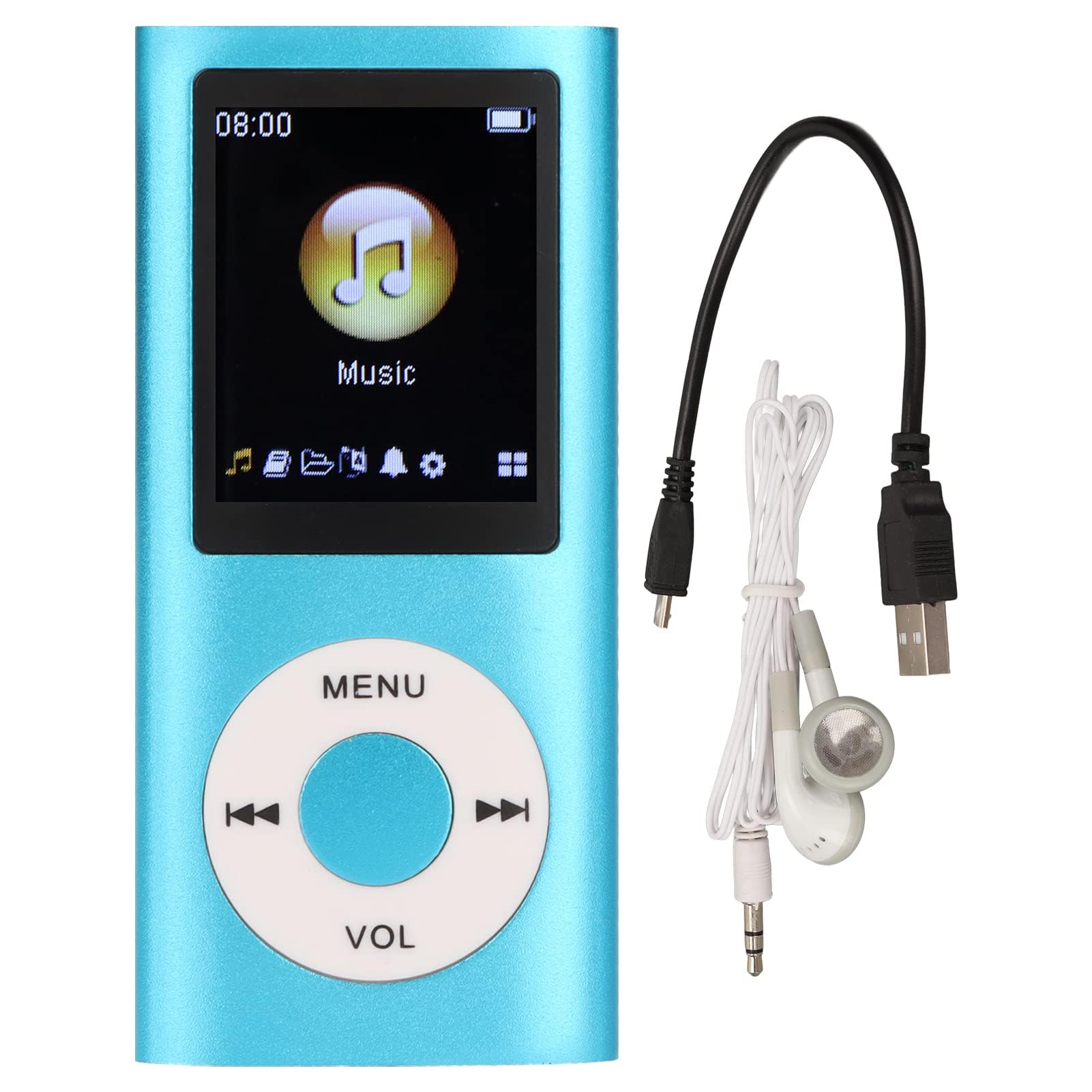
Image: The Dpofirs Portable MP3 Player, featuring a blue aluminum alloy casing and a circular control pad. A person is visible in the background, enjoying music with headphones.
Obsah balenia
Skontrolujte, prosím, balenie, či neobsahuje nasledujúce položky:
- 1 x Dpofirs MP3 Player
- 1 x nabíjací kábel
- 1 x Slúchadlá
Kľúčové vlastnosti
- Bezstratová kvalita zvuku: Supports MP3, WMA, FLAC, APE, AAC, OGG, and ACELP audio formats.
- Rozšíriteľná pamäť: Supports up to 64GB memory card (not included). MYMAHDI memory cards are recommended.
- Užívateľsky prívetivé rozhranie: Easy navigation for selecting songs, creating playlists, and managing playback.
- Dlhá výdrž batérie: Až 8 hodín nepretržitého prehrávania na plné nabitie.
- Odolný dizajn: Constructed from premium aluminum alloy for enhanced durability.
- Režimy prehrávania: Supports sequential and random playback, and sleep shutdown function.
Nastavenie
1. Nabíjanie zariadenia
Pred prvým použitím úplne nabite svoj MP3 prehrávač.
- Connect the provided charging cable to the MP3 player's charging port.
- Druhý koniec kábla pripojte k napájaciemu adaptéru USB (nie je súčasťou balenia) alebo k portu USB počítača.
- The device will indicate charging status. A full charge typically takes approximately 2 hours.
Dôležité: Ensure the charging cable is functioning correctly. If the device does not charge, try a different USB port or adapter.
2. Vloženie pamäťovej karty
The MP3 player requires a memory card for storing music.
- Nájdite slot pre pamäťovú kartu na boku MP3 prehrávača.
- Gently insert a microSD card (up to 64GB, not included) into the slot until it clicks into place.
- Ak chcete kartu vybrať, mierne ju zatlačte, kým nevyskočí.
Poznámka: A memory card is not included with the player. MYMAHDI brand memory cards are recommended for optimal performance.
3. Pripojenie slúchadiel
Connect the provided earphones or your preferred 3.5mm audio headphones to the headphone jack on the MP3 player.
Návod na obsluhu
1. Zapnutie/vypnutie
- To power on, press and hold the power button (usually the Play/Pause button or a dedicated power button) until the screen lights up.
- Ak chcete zariadenie vypnúť, znova stlačte a podržte tlačidlo napájania, kým sa obrazovka nevypne.
2. Základná navigácia
The MP3 player features a circular control pad with several buttons:
- PONUKA: Prístup do hlavnej ponuky alebo návrat na predchádzajúcu obrazovku.
- VOL (+/-): Upravte úroveň hlasitosti.
- Prehrať/pozastaviť: Spustenie alebo pozastavenie prehrávania.
- Nasledujúci/Predchádzajúci: Skip to the next track or go back to the previous track. Long press to fast forward/rewind.
3. Prenos hudby Files
Ak chcete preniesť hudbu do prehrávača MP3:
- Connect the MP3 player to your computer using the charging cable.
- Prehrávač by sa mal v počítači zobraziť ako vymeniteľná disková jednotka.
- Presuňte svoju hudbu myšou files (MP3, WMA, FLAC, APE, AAC, OGG, ACELP) into the player's memory card folder.
- Pred odpojením kábla bezpečne vysuňte zariadenie z počítača.
4. Prehrávanie hudby
- V hlavnej ponuke prejdite do sekcie „Hudba“ alebo „Zvuk“.
- Browse your music by artist, album, genre, or all songs.
- Vyberte skladbu pre spustenie prehrávania.
- Use the Play/Pause, Next/Previous, and VOL buttons to control playback.
5. Playback Options
- Zoznamy skladieb: Create and manage custom playlists directly on the device.
- Náhodné prehrávanie/Opakovanie: Toggle between sequential playback, shuffle, and repeat modes.
- Vypnutie počas spánku: Nastavte časovač, aby sa zariadenie automaticky vyplo.
Údržba
- Zariadenie uchovávajte v suchu. Vlhkosť môže poškodiť vnútorné obvody.
- Vyhnite sa extrémnym teplotám.
- Zariadenie čistite mäkkou, suchou handričkou. Nepoužívajte agresívne chemikálie ani čistiace prostriedky.
- Protect the screen from scratches.
- Keď zariadenie nepoužívate, uložte ho na bezpečné miesto.
Riešenie problémov
Zariadenie sa nezapne:
- Ensure the battery is charged. Connect the player to a power source and allow it to charge for at least 30 minutes.
- Try pressing and holding the power button for an extended period (5-10 seconds).
Cannot hear any sound:
- Check if the earphones are properly connected to the headphone jack.
- Zvýšte hlasitosť pomocou tlačidla VOL+.
- Test with a different pair of earphones to rule out faulty headphones.
- Zabezpečte zvuk filenie sú poškodené a sú v podporovanom formáte.
Hudba files are not recognized:
- Ensure the memory card is properly inserted and recognized by the device.
- Overte si, že hudba files are in one of the supported formats (MP3, WMA, FLAC, APE, AAC, OGG, ACELP).
- Try reformatting the memory card (this will erase all data) and re-transferring the music.
- Ensure the memory card is not full.
Zariadenie zamrzne alebo prestane reagovať:
- Stlačte a podržte tlačidlo napájania približne 10-15 sekúnd, aby ste vynútili reštart.
- If available, use a small pin to press the reset button (if present on the device).
Špecifikácie
| Značka | Dpofirs |
| Číslo modelu | Dpofirs5yhtvp70d23123-13 |
| Materiál | Zliatina hliníka |
| Batéria | Vstavaná lítiová batéria 200mAh |
| Doba nabíjania | Pribl. 2 hodín |
| Čas prehrávania | Až 8 hodín (pri plnom nabití) |
| Podpora pamäťových kariet | Up to 64GB (microSD, not included) |
| Podporované audio formáty | MP3, WMA, FLAC, APE, AAC, OGG, ACELP |
| Technológia pripojenia | Pomocný, Bluetooth, Wi-Fi (Note: Bluetooth/Wi-Fi functionality not detailed in product description, focusing on core MP3 player features) |
| Farba | Modrá |
| Krajina pôvodu | Čína |
Záruka a podpora
Specific warranty information for this product is not provided in the available documentation. Please refer to the retailer's return policy or contact the seller directly for details regarding warranty coverage.
For technical support or further assistance, please contact Dpofirs customer service through the platform where you purchased the product.