
1. Úvod
The Maxcom MM724 is a simple mobile phone designed for ease of use, featuring straightforward software and practical functions. It is particularly suitable for users who prefer a device without complicated menus. Key features include an emergency SOS button, a built-in flashlight, and Bluetooth connectivity for hearing aid compatibility.
2. Obsah balenia
Zaškrtnite políčko pri nasledujúcich položkách:
- 1 Maxcom MM724 Mobile Phone
- 1 Desktop Charger
- 1 Matching Cords (for charger)
- 1 Používateľská príručka (tento dokument)
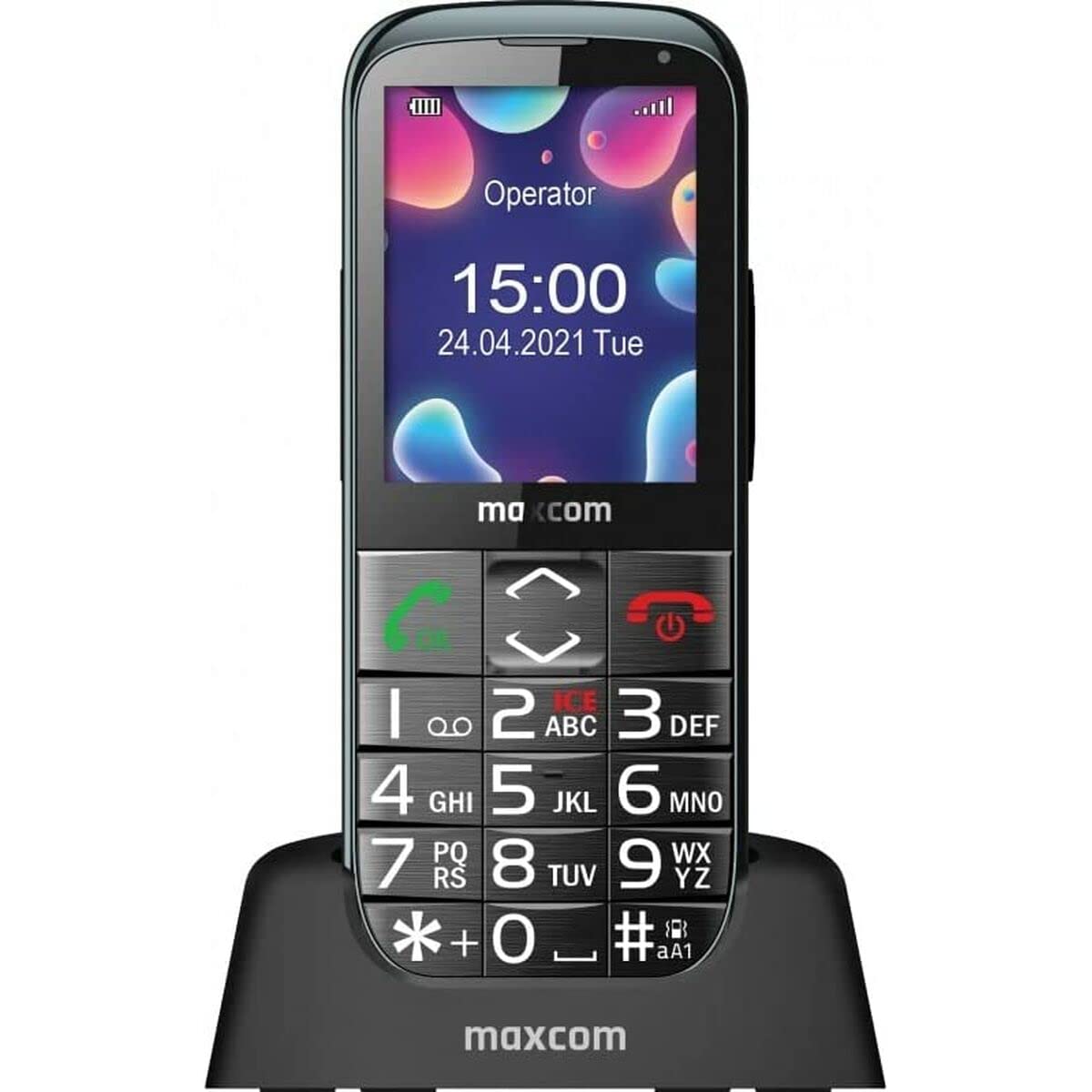
Image: The Maxcom MM724 simple mobile phone, typically black, with a clear display and large buttons.
3. Nastavenie
3.1. Vloženie SIM karty a batérie
- Opatrne odstráňte zadný kryt telefónu.
- Vložte SIM kartu (karty) do určeného slotu (slotov) zlatými kontaktmi smerom nadol.
- Vložte batériu a uistite sa, že kontakty sú správne zarovnané.
- Nasaďte zadný kryt späť, kým bezpečne nezacvakne na miesto.
3.2. Nabíjanie zariadenia
The Maxcom MM724 uses a convenient desktop charger. To charge your phone:
- Connect the charger cord to a power outlet.
- Place the phone upright into the desktop charging cradle.
- Ensure the charging indicator on the phone or cradle illuminates, indicating that charging has begun.
- For optimal battery life, keep the phone in the cradle when not in use to ensure it is always charged.
4. Návod na obsluhu
4.1. Zapnutie/vypnutie
- Zapnutie: Stlačte a podržte tlačidlo napájania/ukončenia hovoru (zvyčajne červené), kým sa obrazovka nerozsvieti.
- Vypnutie: Press and hold the Power/End Call button until the power-off options appear, then confirm.
4.2. Uskutočňovanie a prijímanie hovorov
- Ak chcete uskutočniť hovor: Dial the number using the keypad and press the Call button (usually green).
- Prijatie hovoru: Press the Call button when the phone rings. The phone is designed to ring very loudly to ensure calls are not missed.
- Ak chcete ukončiť hovor: Stlačte tlačidlo napájania/ukončenia hovoru.
4.3. Odosielanie a prijímanie správ
Navigate to the 'Messages' menu to compose new SMS messages or read incoming ones. Use the keypad to type your message.
4.4. Používanie tlačidla SOS
The SOS button is located on the back of the phone and is designed for emergencies.
- Nastavenie: Access the phone's settings to pre-define a list of emergency contacts.
- Aktivácia: In an emergency, press and hold the SOS button. The phone will automatically call the pre-defined contacts in sequence until one answers.
4.5. Aktivácia baterky
The phone features a dedicated button for the flashlight, making it easy to activate when needed. Refer to your phone's specific button layout for its location.
4.6. Bluetooth and Hearing Aid Compatibility
The Maxcom MM724 supports Bluetooth connectivity, allowing it to pair with compatible devices, including certain hearing aids. This enables hands-free calling.
- Párovanie: Go to the Bluetooth settings on your phone and enable Bluetooth. Put your hearing aid into pairing mode (consult your hearing aid's manual). Select your hearing aid from the list of available devices on the phone to pair.
- Poznámka: Compatibility with hearing aids depends on the hearing aid's features. Consult your audiologist for specific compatibility information. The phone also features a ring line and additional gain for improved audio performance with or without hearing aids.
5. Údržba
- Čistenie: Na čistenie obrazovky a tela telefónu používajte mäkkú, suchú handričku. Nepoužívajte tekuté čistiace prostriedky ani abrazívne materiály.
- Starostlivosť o batérie: Keep the battery charged regularly. Avoid extreme temperatures, which can affect battery performance and lifespan.
- Ukladací priestor: Ak telefón dlhší čas nepoužívate, skladujte ho na chladnom a suchom mieste.
6. Riešenie problémov
- Telefón sa nezapne: Uistite sa, že batéria je správne vložená a nabitá. Pripojte telefón k nabíjačke a skúste to znova.
- Žiadny sieťový signál: Skontrolujte, či je SIM karta správne vložená. Presuňte sa do oblasti s lepším pokrytím siete. Ak problém pretrváva, kontaktujte svojho poskytovateľa služieb.
- Nemožno uskutočňovať/prijímať hovory: Verify that you have sufficient credit or an active plan. Check network signal strength.
- Problémy s párovaním Bluetooth: Ensure both devices are in pairing mode and within range. Try restarting both the phone and the Bluetooth device.
7. Špecifikácie
| Značka | Maxcom |
| Názov modelu | MM724 |
| Operačný systém | Android |
| Veľkosť obrazovky | 3 palca |
| Technológia pripojenia | Bluetooth |
| Bunková technológia | 4G |
| Bezdrôtová sieťová technológia | GSM |
| Farba | Čierna |
| Hmotnosť položky | 85 gramov |
| Bezdrôtový nosič | Odomknuté |
8. Záruka a podpora
Warranty information for the Maxcom MM724 mobile phone is typically provided with your purchase documentation or can be found on the official Maxcom website. For technical support or service inquiries, please refer to the contact information provided by your retailer or the manufacturer.