
Úvod
Thank you for choosing the Baseus Adaman Digital Display Power Bank (Model: PPAD070001). This portable power bank is designed to provide reliable and efficient charging for your electronic devices. Please read this manual carefully before use to ensure proper operation and to maximize the lifespan of your device.
Bezpečnostné informácie
- Nevystavujte powerbanku extrémnym teplotám, priamemu slnečnému žiareniu ani ohňu.
- Zabráňte pádu, rozoberaniu alebo úprave zariadenia.
- Uchovávajte mimo dosahu vody a iných tekutín.
- Používajte iba certifikované nabíjacie káble a adaptéry.
- Uchovávajte mimo dosahu detí.
- Ak powerbanka napučie, vytečie alebo vydáva nezvyčajný zápach, okamžite ju prestaňte používať.
Obsah balenia
- Baseus Adaman Digital Display Power Bank (PPAD070001)
- USB nabíjací kábel
- Používateľská príručka
Koniec produktuview
The Baseus Adaman Power Bank (Model PPAD070001) is a portable charging solution featuring a digital display for battery status and multiple ports for wide compatibility. Its slim design makes it convenient for travel.

Obrázok: Hore view of the Baseus Adaman Power Bank showing its various input and output ports. From left to right: Type-C (Input/Output), IP/IN (Input), Micro/IN (Input), USB2 (Output), USB1 (Output).

Obrázok: Bočný profíkfile of the Baseus Adaman Power Bank, highlighting its slim and portable design.
- Port typu C: Supports both input and output (PD 3.0).
- USB1/USB2 Ports: Output ports for charging devices (QC 3.0).
- Micro-USB port: Vstupný port na nabíjanie powerbanky.
- IP/IN Port: Input port for charging the power bank (e.g., for Apple Lightning cables).
- Digitálny displej: Zobrazuje percentá batérie v reálnom časetage.
Nastavenie
Before first use, fully charge the power bank. This ensures optimal battery performance.
Nabíjanie power banky
- Connect the provided USB charging cable to one of the input ports on the power bank (Type-C, Micro-USB, or IP/IN).
- Druhý koniec kábla pripojte k USB nabíjačke do steny (nie je súčasťou balenia).
- Digitálny displej zobrazí stav nabíjania a percentá batérietage.
- Once the display shows 100%, the power bank is fully charged. Disconnect it from the charger.
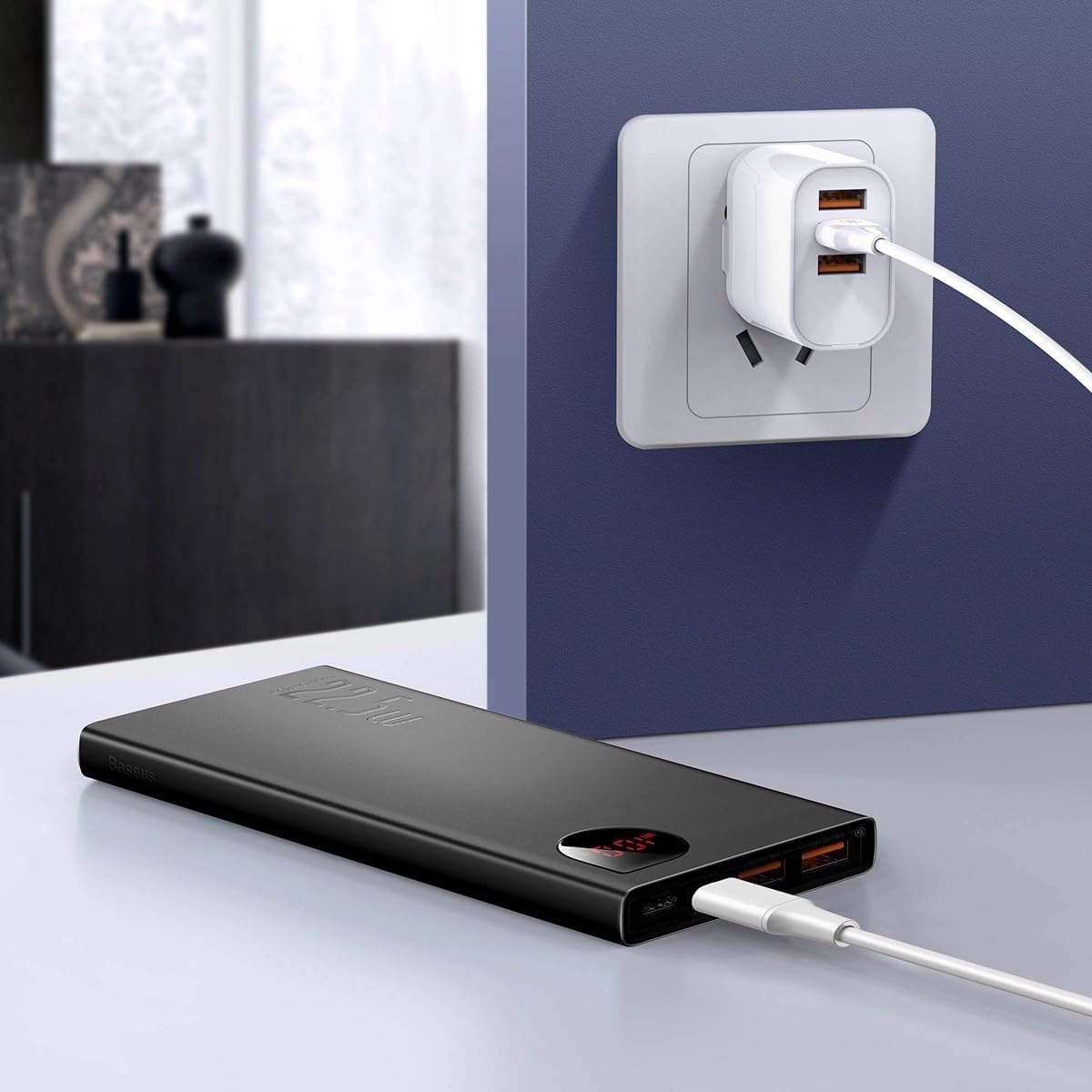
Obrázok: The Baseus Adaman Power Bank connected to a wall charger via a USB cable, illustrating the process of recharging the power bank itself.
Návod na obsluhu
Nabíjanie vašich zariadení
- Connect your device's charging cable to one of the output ports on the power bank (Type-C, USB1, or USB2).
- Druhý koniec kábla zapojte do zariadenia.
- Powerbanka automaticky začne nabíjať vaše zariadenie. Digitálny displej zobrazí zostávajúce percento batérie.tage.
- Ak chcete zastaviť nabíjanie, jednoducho odpojte zariadenie od powerbanky.

Obrázok: A smartphone being charged by the Baseus Adaman Power Bank, demonstrating the device's charging capability for mobile phones.
Kontrola úrovne batérie
The digital display on the power bank will show the current battery percentage when it is in use or when a device is connected. If the power bank is idle, you may need to briefly press the power button (if available, not explicitly mentioned but common) to activate the display.
Údržba
- Powerbanku čistite mäkkou, suchou handričkou. Nepoužívajte agresívne chemikálie ani abrazívne materiály.
- Ak powerbanku nepoužívate, skladujte ju na chladnom a suchom mieste.
- For optimal battery health, fully charge and discharge the power bank at least once every three months if it's not used regularly.
Riešenie problémov
| Problém | Možná príčina | Riešenie |
|---|---|---|
| Powerbanka nenabíja zariadenia. | Low battery, faulty cable, incompatible device. | Charge the power bank. Try a different cable. Ensure your device is compatible. |
| Powerbanka sa nenabíja. | Faulty charging cable/adapter, damaged port. | Try a different charging cable and wall adapter. Check ports for damage. |
| Digitálny displej nefunguje. | Power bank is off, low battery, malfunction. | Ensure power bank is on or connected to a device. Charge the power bank. If issue persists, contact support. |
Špecifikácie
| Funkcia | Detail |
|---|---|
| Číslo modelu | PPAD070001 |
| Značka | Baseus |
| Kapacita batérie | 10000 XNUMX mAh |
| Špeciálne funkcie | Digitálny displej |
| Typy konektorov | Input: USB Type-C, Micro-USB, IP/IN; Output: USB Type-C, USB-A (x2) |
| Voltage | 5 voltov |
| Aktuálne | 5 Amps |
| Výstupný výkon | Up to 22.5W (PD 3.0, QC 3.0) |
| Zloženie článkov batérie | Lítiový polymér |
| Počet výstupných portov | 3 (1x Type-C, 2x USB-A) |
| Number of Input Ports | 3 (1x Type-C, 1x Micro-USB, 1x IP/IN) |
| Kompatibilné zariadenia | All Smartphones and other USB-powered devices |
| Prenosný | áno |
Záruka a podpora
Tento produkt je dodávaný s Žiadna záruka as per the provided specifications. For any technical support or inquiries, please refer to the official Baseus webalebo kontaktujte svojho predajcu.
Pre viac informácií navštívte: www.baseus.com