
Úvod
This manual provides essential information for setting up, operating, and maintaining your Beelink SER3 Mini PC. Please read it thoroughly before use to ensure proper functionality and safety.
The Beelink SER3 Mini PC is a compact and powerful computer featuring an AMD Ryzen 3 3200U processor, 16GB DDR4 RAM, and a 500GB NVMe SSD, designed for various computing tasks from office work to media streaming.
Obsah balenia
Ensure all items listed below are present in your package.
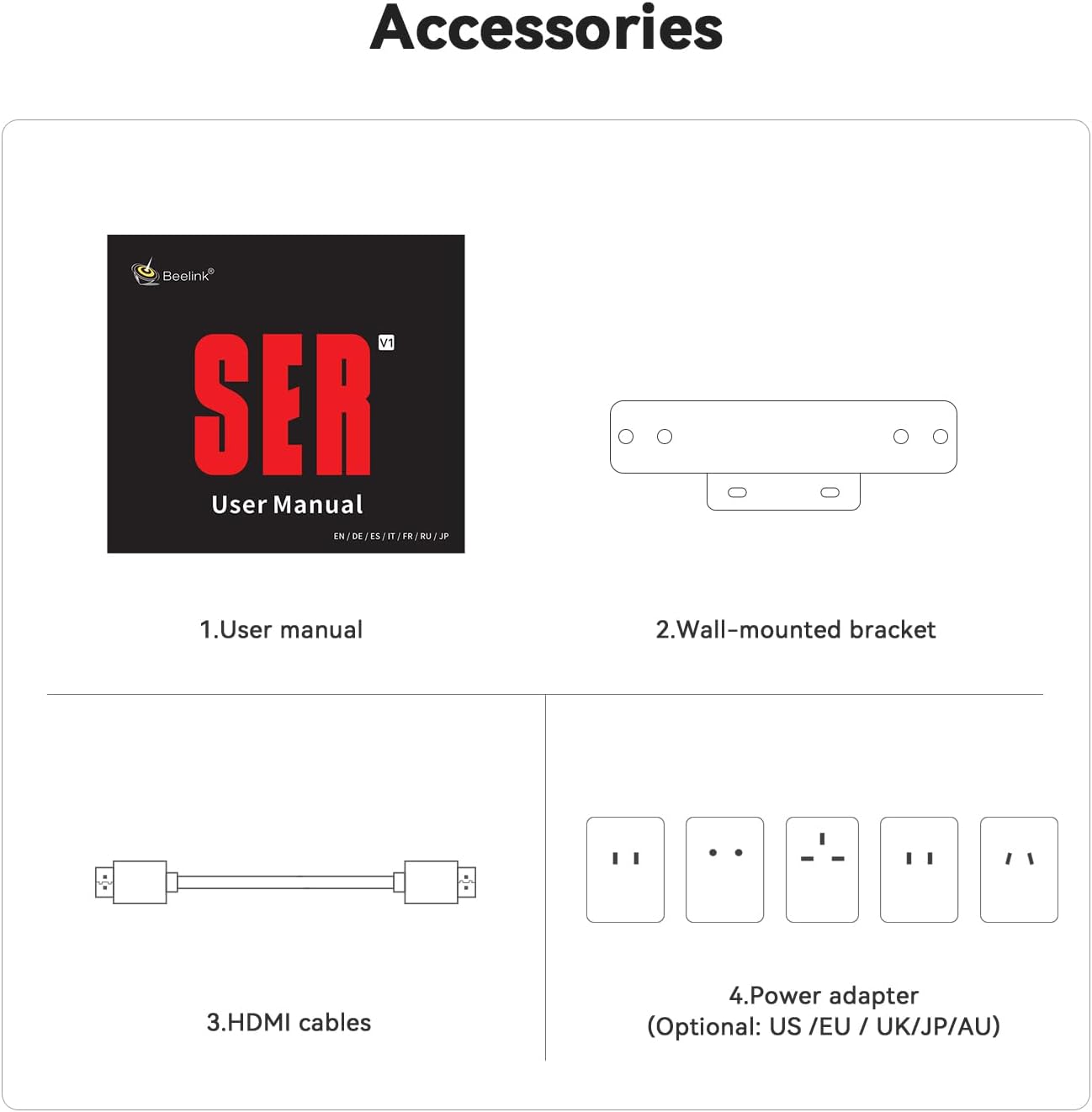
Image: Contents of the Beelink SER3 Mini PC package, showing the user manual, a wall-mounted bracket, two HDMI cables, and a power adapter with various regional plugs.
- Beelink SER3 Mini PC Unit
- Používateľská príručka
- Nástenný držiak
- HDMI káble (x2)
- Power Adapter (with regional plugs)
Koniec produktuview
Rozloženie predného a zadného panela
The following diagrams illustrate the ports and buttons on your Beelink SER3 Mini PC.
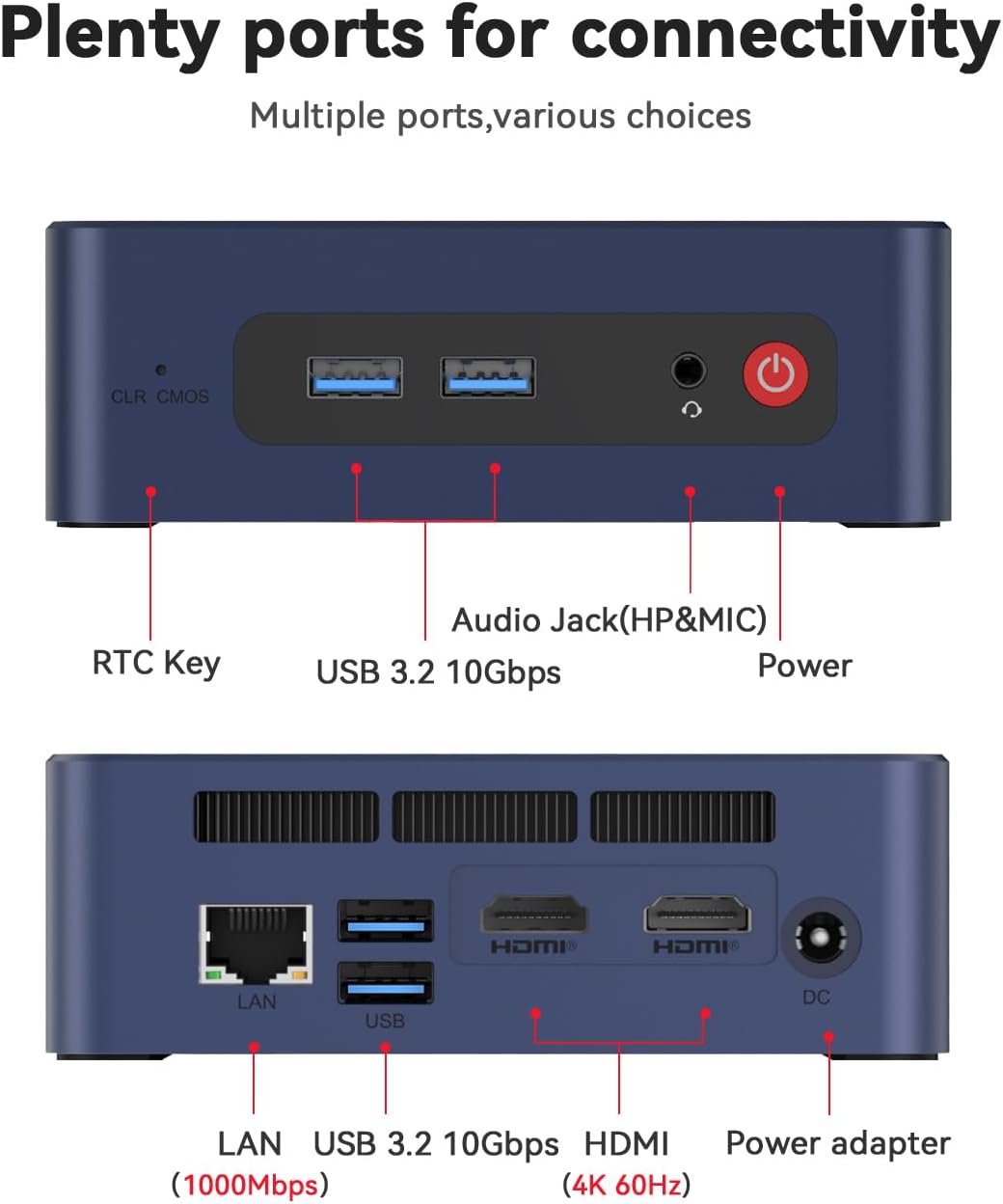
Image: Top panel of the Beelink SER3 Mini PC showing the CLR CMOS button, two USB 3.2 10Gbps ports, an Audio Jack (HP&MIC), and the Power button. The bottom panel shows the LAN port (1000Mbps), two USB 3.2 10Gbps ports, two HDMI (4K 60Hz) ports, and the DC power adapter input.
- Predný panel:
- CLR CMOS Key: Tlačidlo na vymazanie nastavení CMOS.
- USB 3.2 10Gbps Ports (x2): For high-speed data transfer and peripheral connections.
- Zvukový konektor (HP a mikrofón): Pre slúchadlá a mikrofón.
- Tlačidlo napájania: Na zapnutie/vypnutie zariadenia.
- Zadný panel:
- LAN Port (1000Mbps): Pre káblové sieťové pripojenie.
- USB 3.2 10Gbps Ports (x2): Ďalšie vysokorýchlostné USB porty.
- HDMI Ports (x2, 4K 60Hz): For connecting displays, supporting dual monitor setup.
- DC Jack: Vstupné napájanie pre adaptér.
Vnútorné komponenty
Explodoval view of the Beelink SER3 Mini PC's internal structure.
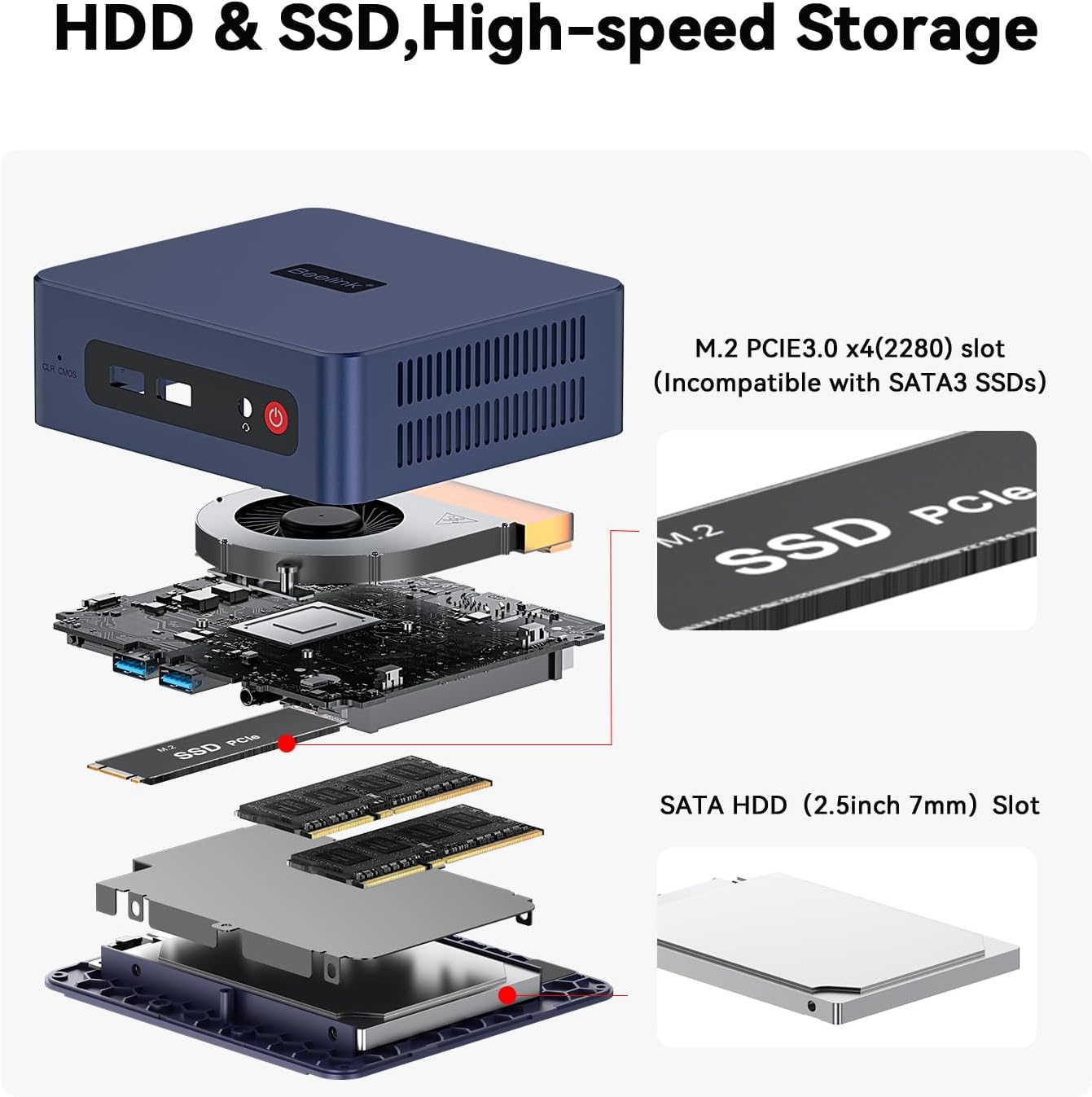
Image: An exploded diagram of the Beelink SER3 Mini PC, illustrating its components: plastic case, cooling fan, CPU, motherboard, M.2 2280 PCIe SSD, SO-DIMM DDR4 2400MT/s RAM, shielding can, and 2.5-inch HDD (7mm) bay, along with the plastic bottom panel.
- Plastové puzdro: External housing.
- Chladiaci ventilátor: Dissipates heat from internal components.
- CPU (AMD Ryzen 3 3200U): Centrálna procesorová jednotka.
- základná doska: Main circuit board connecting all components.
- M.2 2280 PCIe SSD: Primary storage drive.
- SO-DIMM DDR4 RAM: System memory (16GB installed, expandable).
- Shielding Can: Provides electromagnetic shielding.
- 2.5-inch HDD (7mm) Bay: Slot for additional SATA HDD/SSD storage.
- Plastic Bottom Panel: Base cover of the unit.
Nastavenie
Pri nastavovaní mini počítača Beelink SER3 postupujte podľa týchto krokov:
- Pripojiť k napájaniu: Plug the power adapter into the DC Jack on the rear panel of the Mini PC, then connect the adapter to a power outlet.
- Pripojiť k displeju: Use an HDMI cable to connect one or both HDMI ports on the Mini PC to your monitor(s) or TV.
- Pripojte periférne zariadenia: Connect your keyboard, mouse, and other USB devices to the available USB 3.2 ports.
- Sieťové pripojenie (voliteľné): For a wired internet connection, connect an Ethernet cable from your router to the LAN port on the rear panel. For wireless, ensure Wi-Fi is enabled in the operating system settings after initial setup.
- Zapnutie: Stlačením tlačidla napájania na prednom paneli zapnite Mini PC.
Návod na obsluhu
Základné prevádzkové pokyny pre váš Mini PC:
- Prvé spustenie: Upon first power-on, the system may guide you through the Windows 11 Pro setup process. Follow the on-screen instructions to configure your operating system.
- Zapnutie/vypnutie:
- Zapnutie: Stlačte tlačidlo napájania.
- Vypnutie: Kliknite na tlačidlo Štart v systéme Windows a potom vyberte položky Napájanie > Vypnúť.
- Ak chcete reštartovať: Kliknite na tlačidlo Štart v systéme Windows a potom vyberte položky Napájanie > Reštartovať.
- Na spanie: Kliknite na tlačidlo Štart v systéme Windows a potom vyberte položky Napájanie > Režim spánku.
- Pripojenie k sieti Wi-Fi: In Windows, click the Wi-Fi icon in the taskbar, select your network, enter the password, and click Connect.
- Nastavenie duálneho displeja: Connect two monitors to the HDMI ports. Windows should automatically detect both displays. You can configure display settings (extend, duplicate) via Display Settings in Windows.
- Rozšírenie úložiska: The Mini PC supports storage expansion. Refer to the "Maintenance" section for instructions on installing additional RAM or a 2.5-inch SATA HDD/SSD.
Údržba
Pravidelná údržba pomáha zabezpečiť dlhú životnosť a optimálny výkon vášho Mini PC.
Upratovanie
- Exteriér: Use a soft, dry cloth to clean the exterior of the Mini PC. Avoid liquid cleaners.
- Vetranie: Ensure the ventilation holes are clear of dust and obstructions to prevent overheating. Use compressed air to gently clear dust from vents if necessary.
Inovácie hardvéru
The Beelink SER3 Mini PC allows for RAM and storage upgrades.

Image: Diagram illustrating the storage expansion options for the Beelink SER3 Mini PC, including the M.2 PCIe 3.0 x4 (2280) slot for NVMe SSDs (up to 2TB) and the SATA HDD (2.5-inch 7mm) slot for additional storage (500GB~2TB).
- Aktualizácia pamäte RAM: The device supports up to 32GB DDR4 RAM (2*16G). To upgrade, carefully open the case, locate the SO-DIMM slots, and install compatible RAM modules.
- NVMe SSD Upgrade: The M.2 2280 PCIe 3.0 SSD can be upgraded up to 2TB.
- 2.5-inch SATA HDD/SSD Installation: An additional 2.5-inch SATA HDD/SSD (500GB~2TB) can be installed in the dedicated bay.
Poznámka: Always power off and disconnect the Mini PC from the power source before performing any hardware maintenance or upgrades. Consult a professional if you are unsure about any steps.
Riešenie problémov
Bežné problémy a riešenia
- Žiadne napájanie / Systém sa nezapne:
- Uistite sa, že napájací adaptér je bezpečne pripojený k Mini PC aj k funkčnej elektrickej zásuvke.
- Overte funkčnosť elektrickej zásuvky jej otestovaním s iným zariadením.
- Try pressing the Power button firmly.
- Žiadny displej / čierna obrazovka:
- Check that the HDMI cable(s) are securely connected to both the Mini PC and the monitor.
- Uistite sa, že monitor je zapnutý a nastavený na správny vstupný zdroj (HDMI 1, HDMI 2 atď.).
- Try connecting to a different monitor or using a different HDMI cable.
- Žiadne internetové pripojenie:
- Káblové: Check the Ethernet cable connection to both the Mini PC and your router. Verify router functionality.
- Bezdrôtové: Ensure Wi-Fi is enabled in Windows settings. Check if other devices can connect to your Wi-Fi network. Restart your router if necessary.
- System Slowdown / Performance Issues:
- Zatvorte nepotrebné aplikácie bežiace na pozadí.
- Skontrolujte dostupné aktualizácie systému Windows a nainštalujte ich.
- Zabezpečte dostatočné vetranie, aby ste zabránili prehriatiu.
- Consider upgrading RAM or storage if consistently experiencing performance issues with demanding tasks.
Špecifikácie
The following table details the technical specifications of the Beelink SER3 Mini PC.

Image: A detailed table outlining the product specifications of the Beelink SER3 Mini PC, including dimensions, CPU, graphics, system disk, internal slots, interfaces, wireless LAN, power details, operating/storage environment, and accessories.
| Funkcia | Detail |
|---|---|
| Značka | Beelink |
| Model | SER/3200U/16G/500G |
| Model CPU | AMD Ryzen 3 3200U (2C/4T, up to 3.5 GHz) |
| Grafika | AMD Radeon Vega 3 Graphics (3 core, 1200 MHz) |
| RAM | 16 GB DDR4 (rozšíriteľné na 32 GB) |
| Skladovanie | 500GB M.2 2280 PCIe 3.0 SSD (expandable to 2TB NVMe M.2 SSD, plus 2.5-inch SATA HDD/SSD slot) |
| Operačný systém | Windows 11 Pro |
| Bezdrôtové pripojenie | WiFi 5 (802.11ac), Bluetooth 5.0 |
| Ethernet | 1000M RJ45 Port |
| Video výstup | 2 x HDMI (4K 60Hz), supports dual display |
| USB porty | 4 x USB 3.2 Gen2 (10 Gb/s) |
| Zvuk | 1 x Audio Jack (HP&MIC) |
| Rozmery | Approximately 4.96 x 4.45 x 1.65 inches (124 x 113 x 42mm) |
| Príkon | 19V-3.42A (Input: 100-240V AC, 50/60Hz) |
| Prevádzkové prostredie | -10°C~45°C, 30%~90% vlhkosť |
| Skladovacie prostredie | -20°C~60°C, 10%~90% vlhkosť |
Záruka a podpora
The Beelink SER3 Mini PC comes with a 1-ročná záruka od dátumu nákupu, ktorá pokrýva výrobné chyby.
Beelink provides lifetime technical support, 30 days free return, and 7 days / 24 hours service. For technical assistance, warranty claims, or any questions regarding your product, please contact Beelink customer support through their official channels or the retailer where the product was purchased.
All Beelink products have obtained FCC, CE, and RoHS certifications, ensuring compliance with safety and environmental standards.