
1. Úvod
The Dynatron A42 1U Active Air Cooler is designed for high-performance AMD Ryzen Socket AM4 and AM5 processors. This compact, side-blower PWM fan provides efficient heat dissipation for CPUs up to 95 Watts in 1U server environments. The Dynatron A42 ensures optimal system performance by maintaining appropriate operating temperatures.
Kľúčové vlastnosti:
- Recommended for AMD Ryzen Processors, Socket AM4 and AM5.
- Supports CPU power up to 95 Watts heat dissipation.
- Features an 80x80x13mm PWM Fan and Copper Fin construction.
- Active Air Cooler suitable for 1U Server and Up.
- Overall dimensions: 110.0mm (L) x 85.0mm (W) x 27.3mm (H).
2. Obsah balenia
Pred pokračovaním v inštalácii skontrolujte, či sú v balení všetky komponenty:
- Zostava chladiča
- PWM Fan (integrated)
- Napájací kábel
- Mounting Connectors/Screws
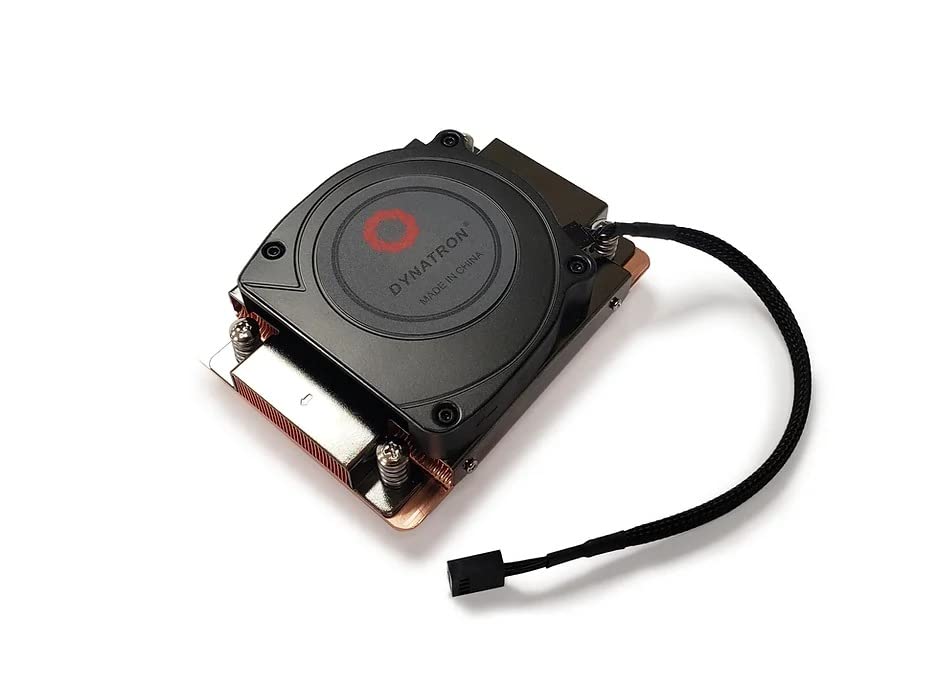
Obrázok 2.1: Hore view of the Dynatron A42 CPU Cooler, showing the integrated fan and Dynatron branding.
3. Nastavenie a inštalácia
Follow these steps carefully to install the Dynatron A42 CPU Cooler on your AMD AM4 or AM5 motherboard.
- Pripravte si základnú dosku: Ensure your motherboard is compatible with AMD AM4 or AM5 sockets. Remove any existing CPU cooler and clean the CPU surface thoroughly with isopropyl alcohol to remove old thermal paste.
- Naneste termálnu pastu: Apply a small, pea-sized amount of high-quality thermal paste to the center of the CPU's integrated heat spreader (IHS). Avoid applying excessive amounts, as this can lead to reduced cooling performance or unintended residue.
- Umiestnenie chladiča: Carefully align the Dynatron A42 cooler with the mounting holes on the motherboard around the CPU socket. The cooler's base should make even contact with the CPU's IHS.
- Zabezpečenie chladiča: Use the provided mounting screws to secure the cooler to the motherboard. Tighten the screws in a diagonal pattern (e.g., top-left, bottom-right, top-right, bottom-left) gradually until the cooler is firmly seated. Do not overtighten.
- Pripojenie kábla ventilátora: Locate the 4-pin PWM fan header on your motherboard (typically labeled "CPU_FAN"). Connect the cooler's 4-pin fan cable to this header. Ensure the connector is fully seated.
- Záverečná kontrola: Double-check all connections and ensure the cooler is securely mounted and does not wobble.

Obrázok 3.1: Spodná časť view of the Dynatron A42 CPU Cooler, showing the copper base and pre-applied thermal paste (if applicable) or area for application.

Image 3.2: Dynatron A42 CPU Cooler with indicated dimensions for reference during installation.
4. Prevádzkové pokyny
Once installed, the Dynatron A42 operates automatically, controlled by your motherboard's PWM fan settings. For optimal performance and longevity:
- Nastavenia BIOSu/UEFI: Access your system's BIOS/UEFI to ensure the CPU fan control is set to PWM mode for dynamic fan speed adjustment based on CPU temperature.
- Monitorovanie teploty: Regularly monitor your CPU temperatures using system monitoring software to ensure they remain within safe operating limits, especially under heavy load.
- Prúdenie vzduchu: Ensure adequate airflow within your server chassis. Proper case ventilation is crucial for the cooler's effectiveness.
5. Údržba
Pravidelná údržba pomáha zabezpečiť dlhú životnosť a optimálny výkon chladiča procesora.
- Odstraňovanie prachu: Periodically (every 3-6 months, depending on environment) use compressed air to clean dust from the fan blades and heatsink fins. Ensure the fan is not spinning during cleaning to prevent damage.
- Teplovodná pasta: If CPU temperatures rise significantly over time, consider reapplying thermal paste. This typically involves removing the cooler, cleaning both the CPU and cooler base, and applying fresh thermal paste.
- Kontrola ventilátora: Check the fan for any signs of wear, unusual noise, or obstructions. Replace the fan if it becomes excessively noisy or stops functioning correctly.
6. Riešenie problémov
If you encounter issues with your Dynatron A42 CPU Cooler, refer to the following common problems and solutions:
- Vysoké teploty CPU:
- Uistite sa, že chladič je bezpečne namontovaný a má úplný kontakt s procesorom.
- Verify that thermal paste was applied correctly and not excessively.
- Skontrolujte, či sa na chladiči a ventilátore nenahromadil prach.
- Confirm proper case airflow and ventilation.
- Ensure the fan is spinning and connected to the correct motherboard header.
- Ventilátor sa netočí alebo nevydáva hluk:
- Check the 4-pin fan cable connection to the motherboard.
- Inspect for any obstructions preventing the fan blades from rotating.
- Skontrolujte nastavenia ventilátorov v systéme BIOS/UEFI.
- If the fan is making grinding or clicking noises, it may be faulty and require replacement.
- Problémy s inštaláciou:
- Refer to the installation steps in Section 3.
- Ensure you are using the correct mounting hardware for your socket type (AM4/AM5).
7. Špecifikácie
| Funkcia | Špecifikácia |
|---|---|
| Rozmery produktu | 3.35"D x 1.07"Š x 4.33"V (110.0 x 85.0 x 27.3 mm) |
| Značka | Dynatron |
| Typ napájacieho konektora | 4-Pin PWM |
| Voltage | 12 voltov |
| Wattage (TDP Support) | 95 wattov |
| Spôsob chladenia | Vzduch |
| Kompatibilné zariadenia | Desktop (AMD AM4, AM5 Sockets) |
| Úroveň hluku | 62 decibelov (max.) |
| Materiál | Medená plutva |
| Maximálna rýchlosť otáčania | 2500 otáčok za minútu |
| Kapacita prietoku vzduchu | 26.25 kubických stôp za minútu |
| Hmotnosť položky | 1 libra |
| Číslo modelu | A42 (840556075493) |
8. Informácie o záruke
Dynatron products are manufactured to high-quality standards. Specific warranty terms and conditions may vary by region and retailer. Please refer to the warranty documentation included with your purchase or visit the official Dynatron webPodrobné informácie o záruke a postupoch registrácie nájdete na webovej stránke. Uschovajte si doklad o kúpe pre prípad reklamácie.
9. Podpora
For technical assistance, product inquiries, or further support, please visit the official Dynatron website or contact their customer service department. Online resources, FAQs, and driver downloads may also be available on the manufacturer's webstránky.
Oficiálne Webmiesto: www.dynatron.com (Prosím, skontrolujte si najaktuálnejšie kontaktné informácie a zdroje podpory.)